2011 GMC ACADIA light
[x] Cancel search: lightPage 264 of 478

Black plate (6,1)GMC Acadia/Acadia Denali Owner Manual - 2011
8-6 Climate Controls
Temperature Control
The driver and passenger side
temperature buttons are used
to adjust the temperature of the
air coming through the system.
The temperature can be adjusted
even if the system is turned
off since outside air still enters
the vehicle, unless the
recirculation mode is selected.
See“Recirculation” later in this
section.
Driver Side Temperature
Control: Press the + or −buttons
to increase or decrease the driver
side temperature. The driver side
temperature display will show the
temperature setting.
Passenger Side Temperature
Control: Press the + or −buttons
to increase or decrease the
passenger side temperature.
The passenger side display will
show the temperature setting. PASS (Passenger):
Press to
set the passenger temperature
to match the driver temperature
setting. The PASS indicator will
turn off. When the passenger
temperature setting is different
than the driver setting, the PASS
indicator comes on.
Manual Operation
The air delivery mode or fan speed
can be manually adjusted.
D/C(Fan Control): Press to
increase or decrease the fan speed.
Pressing
DorCwhile in automatic
control places the fan speed under
manual control.
The air delivery mode remains in
automatic control. The fan setting
still displays, but the word AUTO
no longer displays, and the AUTO
button indicator light turns off.
H/G(Air Delivery Mode
Control): Press to change the
direction of the airflow in the vehicle.
Repeatedly press
HorGuntil
the desired mode appears on the
display. Pressing a mode button
while the system is off changes the
air delivery mode without turning
the system on. Press a mode button
while in automatic control to place
the system into manual control.
The air delivery mode setting still
displays, but the word AUTO no
longer displays, and the AUTO
button indicator light turns off.
H(Vent): Air is directed to the
instrument panel outlets.
)(Bi-Level): Air is divided
between the instrument panel and
floor outlets. Some air is directed
towards the windshield and side
window outlets. Cooler air is
directed to the upper outlets and
warmer air to the floor outlets.
Page 265 of 478

Black plate (7,1)GMC Acadia/Acadia Denali Owner Manual - 2011
Climate Controls 8-7
6(Floor):Air is directed to the
floor outlets, with some of the air
directed to the windshield, side
window, and second row floor
outlets. In this mode, the system
uses outside air.
-(Defog): This mode clears the
windows of fog or moisture. Air is
directed to the windshield, floor
outlets, and side window vents.
When this mode is selected, the
system turns off recirculation and
runs the air conditioning compressor
unless the outside temperature is
less than 4°C (40°F). Do not drive
the vehicle until all the windows are
clear.
0(Defrost): Press to turn the
defrost on or off. This mode quickly
clears the windshield of fog or frost.
Air is directed to the windshield,
side window, and floor vents.
In this mode, outside air is pulled inside the vehicle. The air
conditioning system runs
automatically in this setting,
unless the outside temperature
is less than 4°C (40°F).
Do not drive the vehicle until all the
windows are clear.
While in defrost mode, if the
PASS button is pressed, the
PASS button indicator flashes three
times to show that the passenger
climate control system cannot
be activated. If the passenger
temperature buttons are adjusted
while in defrost mode, the driver
temperature indicator will change.
The passenger temperature will
not be displayed.
When returning to bi-level, vent,
or floor mode, the previous
temperature settings displays in
place of any change made while
in defrost mode.
Air Conditioning
#(Air Conditioning):
Press to
turn the air conditioning (A/C) on
and off. An indicator light comes
on when A/C is on.
The A/C does not work when the
outside temperature is below 4°C
(40°F). If
#is pressed the indicator
flashes three times and turns off
to show that the A/C mode is not
available. If the A/C is on and the
outside temperature drops below a
temperature which is too cool for air
conditioning to be effective, the A/C
indicator turns off to show that the
A/C mode has been canceled.
On hot days, open the windows
briefly to let hot inside air escape.
This helps reduce the time it takes
for the interior of the vehicle to
cool down.
Page 266 of 478

Black plate (8,1)GMC Acadia/Acadia Denali Owner Manual - 2011
8-8 Climate Controls
The air conditioning system
removes moisture from the air, so
water might drip under the vehicle
while idling or after turning off the
engine. This is normal.
@(Recirculation):Press to turn
the recirculation mode on or off.
An indicator light comes on when
recirculation is on. When the engine
is turned off, the recirculation mode
automatically turns off and must
be re‐selected when the engine is
turned on again.
This mode recirculates and helps
to quickly cool the air inside the
vehicle. It can be used to prevent
outside air and odors from entering
the vehicle. The recirculation mode cannot be
used with floor, defog, or defrosting
modes. If recirculation is selected in
these modes, the indicator flashes
three times and turns off. The air
conditioning compressor also comes
on when this mode is activated.
While in recirculation mode the
windows can fog when the weather
is cold and damp. To clear the fog,
select either the defog or defrost
mode and increase the fan speed.
REAR:
Press to turn the rear
heating and air conditioning on
or off. See Rear Climate Control
System (Rear Climate Control Only)
on page 8‑10 orRear Climate
Control System (Rear Climate with
Rear Seat Audio) on page 8‑11.
Rear Window Defogger
The rear window defogger uses a
warming grid to remove fog from the
rear window.
<(Rear Window Defogger):
Press to turn the rear window
defogger on or off. The rear
window defogger stays on for
about 10 minutes, before turning
off. The defogger also turns off
when the engine is turned off.
Do not drive the vehicle until
all the windows are clear.
For vehicles with heated outside
rearview mirrors, fog or frost is
cleared from the surface of the
mirror when the rear window
defog button is pressed.
Notice: Do not use a razor blade
or sharp object to clear the inside
rear window. Do not adhere
anything to the defogger grid
lines in the rear glass. These
actions may damage the rear
defogger. Repairs would not be
covered by your warranty.
Page 275 of 478

Black plate (3,1)GMC Acadia/Acadia Denali Owner Manual - 2011
Driving and Operating 9-3
Medical research shows that
alcohol in a person's system
can make crash injuries worse,
especially injuries to the brain,
spinal cord, or heart. This means
that when anyone who has been
drinking—driver or passenger —is
in a crash, that person's chance of
being killed or permanently disabled
is higher than if the person had not
been drinking.
Control of a Vehicle
The following three systems
help to control the vehicle while
driving —brakes, steering, and
accelerator. At times, as when
driving on snow or ice, it is easy to
ask more of those control systems
than the tires and road can provide.
Meaning, you can lose control of the
vehicle. See StabiliTrak
®System on
page 9‑31.
Adding non‐dealer accessories
can affect vehicle performance.
See Accessories and Modifications
on page 10‑3.
Braking
See Brake System Warning Light on
page 5‑20.
Braking action involves
perception time and reaction
time. Deciding to push the brake
pedal is perception time. Actually
doing it is reaction time.
Average reaction time is about
three‐fourths of a second.
But that is only an average.
It might be less with one driver
and as long as two or three seconds
or more with another. Age, physical
condition, alertness, coordination,
and eyesight all play a part. So do
alcohol, drugs, and frustration.
But even in three‐fourths of a
second, a vehicle moving at
100 km/h (60 mph) travels 20 m
(66 ft). That could be a lot of
distance in an emergency, so
keeping enough space between
the vehicle and others is important. And, of course, actual stopping
distances vary greatly with the
surface of the road, whether it is
pavement or gravel; the condition
of the road, whether it is wet, dry,
or icy; tire tread; the condition of the
brakes; the weight of the vehicle;
and the amount of brake force
applied.
Avoid needless heavy
braking. Some people drive in
spurts
—heavy acceleration
followed by heavy braking —rather
than keeping pace with traffic.
This is a mistake. The brakes
might not have time to cool between
hard stops. The brakes will wear
out much faster with a lot of heavy
braking. Keeping pace with the
traffic and allowing realistic following
distances eliminates a lot of
unnecessary braking. That means
better braking and longer brake life.
Page 277 of 478
Black plate (5,1)GMC Acadia/Acadia Denali Owner Manual - 2011
Driving and Operating 9-5
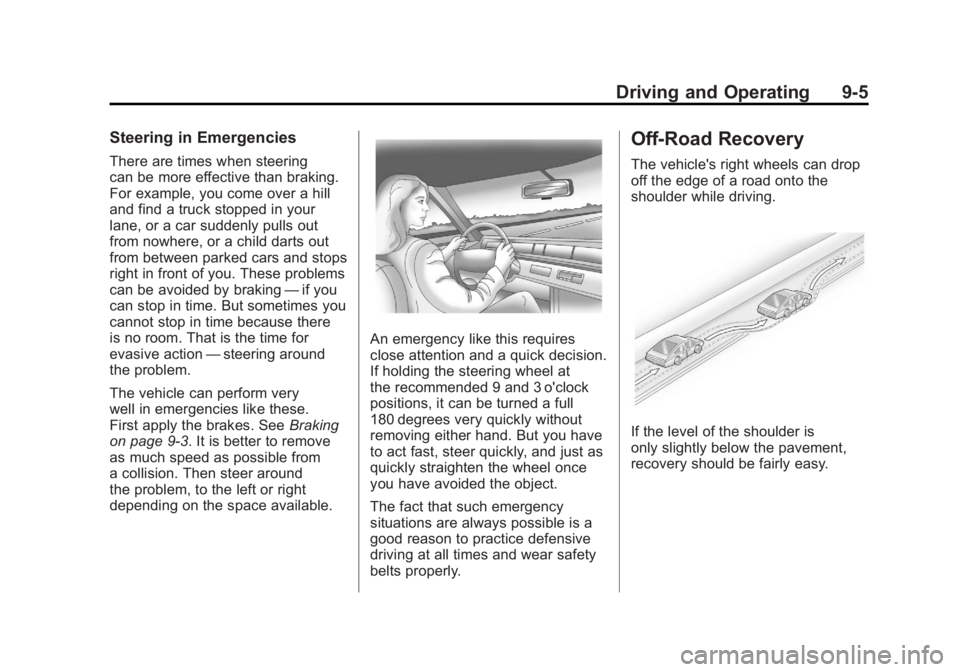
Steering in Emergencies
There are times when steering
can be more effective than braking.
For example, you come over a hill
and find a truck stopped in your
lane, or a car suddenly pulls out
from nowhere, or a child darts out
from between parked cars and stops
right in front of you. These problems
can be avoided by braking—if you
can stop in time. But sometimes you
cannot stop in time because there
is no room. That is the time for
evasive action —steering around
the problem.
The vehicle can perform very
well in emergencies like these.
First apply the brakes. See Braking
on page 9‑3. It is better to remove
as much speed as possible from
a collision. Then steer around
the problem, to the left or right
depending on the space available.
An emergency like this requires
close attention and a quick decision.
If holding the steering wheel at
the recommended 9 and 3 o'clock
positions, it can be turned a full
180 degrees very quickly without
removing either hand. But you have
to act fast, steer quickly, and just as
quickly straighten the wheel once
you have avoided the object.
The fact that such emergency
situations are always possible is a
good reason to practice defensive
driving at all times and wear safety
belts properly.
Off-Road Recovery
The vehicle's right wheels can drop
off the edge of a road onto the
shoulder while driving.
If the level of the shoulder is
only slightly below the pavement,
recovery should be fairly easy.
Page 279 of 478

Black plate (7,1)GMC Acadia/Acadia Denali Owner Manual - 2011
Driving and Operating 9-7
Driving on Wet Roads
Rain and wet roads can reduce
vehicle traction and affect your
ability to stop and accelerate.
Always drive slower in these types
of driving conditions and avoid
driving through large puddles and
deep‐standing or flowing water.
{WARNING
Wet brakes can cause crashes.
They might not work as well in
a quick stop and could cause
pulling to one side. You could
lose control of the vehicle.
After driving through a large
puddle of water or a car/vehicle
wash, lightly apply the brake
pedal until the brakes work
normally.(Continued)
WARNING (Continued)
Flowing or rushing water creates
strong forces. Driving through
flowing water could cause the
vehicle to be carried away. If this
happens, you and other vehicle
occupants could drown. Do not
ignore police warnings and be
very cautious about trying to
drive through flowing water.
Hydroplaning
Hydroplaning is dangerous. Water
can build up under the vehicle's
tires so they actually ride on the
water. This can happen if the road
is wet enough and you are going
fast enough. When the vehicle is
hydroplaning, it has little or no
contact with the road. There is no hard and fast rule about
hydroplaning. The best advice is to
slow down when the road is wet.
Other Rainy Weather Tips
Besides slowing down, other wet
weather driving tips include:
.Allow extra following distance.
.Pass with caution.
.Keep windshield wiping
equipment in good shape.
.Keep the windshield washer fluid
reservoir filled.
.Have good tires with proper
tread depth. See
Tires on
page 10‑38.
.Turn off cruise control.
Page 283 of 478

Black plate (11,1)GMC Acadia/Acadia Denali Owner Manual - 2011
Driving and Operating 9-11
To save fuel, run the engine for only
short periods as needed to warm
the vehicle and then shut the engine
off and close the window most of
the way to save heat. Repeat this
until help arrives but only when you
feel really uncomfortable from the
cold. Moving about to keep warm
also helps.
If it takes some time for help to
arrive, now and then when you run
the engine, push the accelerator
pedal slightly so the engine
runs faster than the idle speed.
This keeps the battery charged to
restart the vehicle and to signal for
help with the headlamps. Do this
as little as possible to save fuel.If the Vehicle is Stuck
Slowly and cautiously spin the
wheels to free the vehicle when
stuck in sand, mud, ice, or snow.
If the vehicle has a traction system,
it can often help to free a stuck
vehicle. Refer to the vehicle's
traction system in the Index. If stuck
too severely for the traction system
to free the vehicle, turn the traction
system off and use the rocking
method.{WARNING
If the vehicle's tires spin at high
speed, they can explode, and
you or others could be injured.
The vehicle can overheat,
causing an engine compartment
fire or other damage. Spin the
wheels as little as possible and
avoid going above 55 km/h
(35 mph).
For information about using tire
chains on the vehicle, see Tire
Chains on page 10‑60.
Page 284 of 478

Black plate (12,1)GMC Acadia/Acadia Denali Owner Manual - 2011
9-12 Driving and Operating
Rocking the Vehicle to Get
it Out
Turn the steering wheel left and
right to clear the area around the
front wheels. Turn off any traction
or stability system. Shift back and
forth between R (Reverse) and a
forward gear, spinning the wheels
as little as possible. To prevent
transmission wear, wait until the
wheels stop spinning before shifting
gears. Release the accelerator
pedal while shifting, and press
lightly on the accelerator pedal
when the transmission is in gear.
Slowly spinning the wheels in the
forward and reverse directions
causes a rocking motion that
could free the vehicle. If that
does not get the vehicle out after
a few tries, it might need to be
towed out. If the vehicle does
need to be towed out, seeTowing
the Vehicle on page 10‑87.
Vehicle Load Limits
It is very important to know
how much weight your vehicle
can carry. This weight is called
the vehicle capacity weight
and includes the weight of
all occupants, cargo, and all
nonfactory-installed options.
Two labels on your vehicle
show how much weight it may
properly carry, the Tire and
Loading Information label and
the Certification/Tire label.{WARNING
Do not load the vehicle
any heavier than the
Gross Vehicle Weight
Rating (GVWR), or either the
maximum front or rear Gross
Axle Weight Rating (GAWR).
This can cause systems to
break and change the way the
vehicle handles. This could
cause loss of control and a
crash. Overloading can also
shorten the life of the vehicle.