2011 GMC ACADIA light
[x] Cancel search: lightPage 377 of 478

Black plate (49,1)GMC Acadia/Acadia Denali Owner Manual - 2011
Vehicle Care 10-49
The TPMS can warn about a
low tire pressure condition but
it does not replace normal tire
maintenance. SeeTire Inspection
on page 10‑51, Tire Rotation on
page 10‑52 andTires on
page 10‑38.
Notice: Tire sealant materials
are not all the same.
A non-approved tire sealant
could damage the TPMS sensors.
TPMS sensor damage caused by
using an incorrect tire sealant
is not covered by the vehicle
warranty. Always use only
the GM-approved tire sealant
available through your dealer
or included in the vehicle.
Factory-installed Tire Inflator Kits
use a GM approved liquid tire
sealant. Using non-approved tire
sealants could damage the TPMS
sensors. See Tire Sealant and
Compressor Kit on page 10‑63 for
information regarding the inflator
kit materials and instructions.TPMS Malfunction Light and
Message
The TPMS will not function properly
if one or more of the TPMS sensors
are missing or inoperable. When
the system detects a malfunction,
the low tire warning light flashes for
about one minute and then stays
on for the remainder of the ignition
cycle. A DIC warning message also
displays. The malfunction light and
DIC warning message come on at
each ignition cycle until the problem
is corrected. Some of the conditions
that can cause these to come
on are:
.One of the road tires has been
replaced with the spare tire.
The spare tire does not have a
TPMS sensor. The malfunction
light and DIC message should
go off after the road tire is
replaced and the sensor
matching process is performed
successfully. See "TPMS Sensor
Matching Process" later in this
section.
.The TPMS sensor matching
process was not done or
not completed successfully
after rotating the tires.
The malfunction light and the
DIC message should go off
after successfully completing
the sensor matching process.
See "TPMS Sensor Matching
Process" later in this section
.One or more TPMS sensors
are missing or damaged.
The malfunction light and
the DIC message should go
off when the TPMS sensors
are installed and the sensor
matching process is performed
successfully. See your dealer
for service.
Page 378 of 478

Black plate (50,1)GMC Acadia/Acadia Denali Owner Manual - 2011
10-50 Vehicle Care
.Replacement tires or wheels do
not match the original equipment
tires or wheels. Tires and wheels
other than those recommended
could prevent the TPMS from
functioning properly. SeeBuying
New Tires on page 10‑54.
.Operating electronic devices or
being near facilities using radio
wave frequencies similar to the
TPMS could cause the TPMS
sensors to malfunction.
If the TPMS is not functioning
properly, it cannot detect or signal a
low tire condition. See your dealer
for service if the TPMS malfunction
light and DIC message comes on
and stays on.
TPMS Sensor Matching
Process
Each TPMS sensor has a unique
identification code. The identification
code needs to be matched to a new
tire/wheel position after rotating the
tires or replacing one or more of the
TPMS sensors. The TPMS sensor
matching process should also be
performed after replacing a spare
tire with a road tire containing the
TPMS sensor. The malfunction
light and the DIC message should
go off at the next ignition cycle.
The sensors are matched to the
tire/wheel positions, using a TPMS
relearn tool, in the following order:
driver side front tire, passenger side
front tire, passenger side rear tire,
and driver side rear. See your
dealer for service or to purchase
a relearn tool. There are two minutes to match
the first tire/wheel position, and
five minutes overall to match all
four tire/wheel positions. If it takes
longer, the matching process stops
and must be restarted.
The TPMS sensor matching
process is:
1. Set the parking brake.
2. Turn the ignition to ON/RUN with
the engine off.
3. Press the Remote Keyless Entry (RKE) transmitter's LOCK
and UNLOCK buttons at the
same time for approximately
five seconds. The horn sounds
twice to signal the receiver
is in relearn mode and TIRE
LEARNING ACTIVE message
displays on the DIC screen.
Page 381 of 478
Black plate (53,1)GMC Acadia/Acadia Denali Owner Manual - 2011
Vehicle Care 10-53
Lightly coat the center of the
wheel hub with wheel bearing
grease after a wheel change or
tire rotation to prevent corrosion
or rust build-up. Do not get
grease on the flat wheel
mounting surface or on the
wheel nuts or bolts.
Make sure the spare tire, if
the vehicle has one, is stored
securely. Push, pull, and then
try to rotate or turn the tire.
If it moves, tighten the cable.
SeeTire Changing on
page 10‑71.When It Is Time for New
Tires
Factors such as maintenance,
temperatures, driving speeds,
vehicle loading, and road conditions
affect the wear rate of the tires.
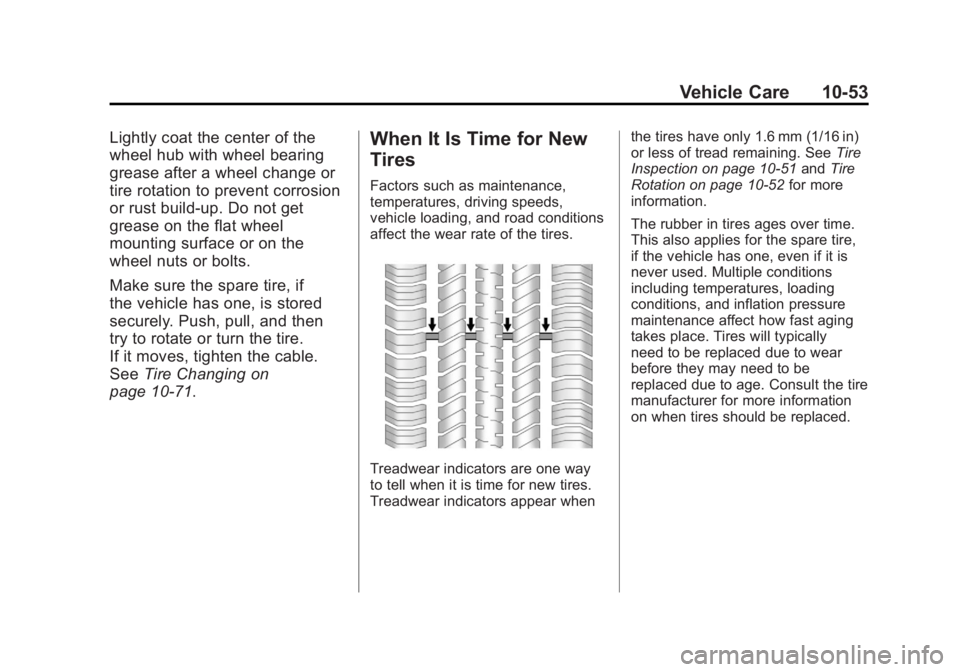
Treadwear indicators are one way
to tell when it is time for new tires.
Treadwear indicators appear when the tires have only 1.6 mm (1/16 in)
or less of tread remaining. See
Tire
Inspection on page 10‑51 andTire
Rotation on page 10‑52 for more
information.
The rubber in tires ages over time.
This also applies for the spare tire,
if the vehicle has one, even if it is
never used. Multiple conditions
including temperatures, loading
conditions, and inflation pressure
maintenance affect how fast aging
takes place. Tires will typically
need to be replaced due to wear
before they may need to be
replaced due to age. Consult the tire
manufacturer for more information
on when tires should be replaced.
Page 382 of 478
Black plate (54,1)GMC Acadia/Acadia Denali Owner Manual - 2011
10-54 Vehicle Care
Vehicle Storage
Tires age when stored normally
mounted on a parked vehicle.
Park a vehicle that will be stored
for at least a month in a cool, dry,
clean area away from direct sunlight
to slow aging. This area should be
free of grease, gasoline, or other
substances that can deteriorate
rubber.
Parking for an extended period
can cause flat spots on the tires
that may result in vibrations while
driving. When storing a vehicle for
at least a month, remove the tires
or raise the vehicle to reduce the
weight from the tires.
Buying New Tires
GM has developed and matched
specific tires for the vehicle.
The original equipment tires
installed on the vehicle,
when it was new, were
designed to meet General
Motors Tire Performance
Criteria Specification (TPC
Spec) system rating. If you
need replacement tires, GM
strongly recommends that you
get tires with the same TPC
Spec rating. This way, the
vehicle will continue to have
tires that are designed to give
the same performance and
vehicle safety, during normal
use, as the original tires.GM's exclusive TPC Spec
system considers over a
dozen critical specifications that
impact the overall performance
of the vehicle, including brake
system performance, ride and
handling, traction control,
and tire pressure monitoring
performance. GM's TPC Spec
number is molded onto the tire's
sidewall near the tire size. If the
tires have an all‐season tread
design, the TPC Spec number
will be followed by an MS
for mud and snow. See
Tire
Sidewall Labeling on page 10‑39
for additional information.
Page 385 of 478

Black plate (57,1)GMC Acadia/Acadia Denali Owner Manual - 2011
Vehicle Care 10-57
Uniform Tire Quality
Grading
Quality grades can be found
where applicable on the tire
sidewall between tread shoulder
and maximum section width.
For example:
Treadwear 200 Traction AA
Temperature A
The following information relates
to the system developed by the
United States National Highway
Traffic Safety Administration
(NHTSA), which grades tires
by treadwear, traction, and
temperature performance.
This applies only to vehicles
sold in the United States.
The grades are molded on the
sidewalls of most passenger
car tires. The Uniform TireQuality Grading (UTQG)
system does not apply to deep
tread, winter-type snow tires,
space-saver, or temporary use
spare tires, tires with nominal
rim diameters of 10 to 12 inches
(25 to 30 cm), or to some
limited-production tires.
While the tires available on
General Motors passenger
cars and light trucks may vary
with respect to these grades,
they must also conform to
federal safety requirements and
additional General Motors Tire
Performance Criteria (TPC)
standards.
All Passenger Car Tires Must
Conform to Federal Safety
Requirements In Addition
To These Grades.
Treadwear
The treadwear grade is a
comparative rating based
on the wear rate of the tire
when tested under controlled
conditions on a specified
government test course.
For example, a tire graded
150 would wear one and a
half (1½) times as well on
the government course as a
tire graded 100. The relative
performance of tires depends
upon the actual conditions of
their use, however, and may
depart significantly from the
norm due to variations in
driving habits, service practices
and differences in road
characteristics and climate.
Page 393 of 478
Black plate (65,1)GMC Acadia/Acadia Denali Owner Manual - 2011
Vehicle Care 10-65
When using the tire sealant
and compressor kit during cold
temperatures, warm the kit in a
heated environment for five minutes.
This will help to inflate the tire
faster.
If a tire goes flat, avoid further tire
and wheel damage by driving slowly
to a level place. Turn on the hazard
warning flashers. SeeHazard
Warning Flashers on page 6‑3.
See If a Tire Goes Flat on
page 10‑61 for other important
safety warnings.
Do not remove any objects that
have penetrated the tire.
1. Remove the tire sealant and compressor kit from its storage
location. See Storing the Tire
Sealant and Compressor Kit on
page 10‑70.
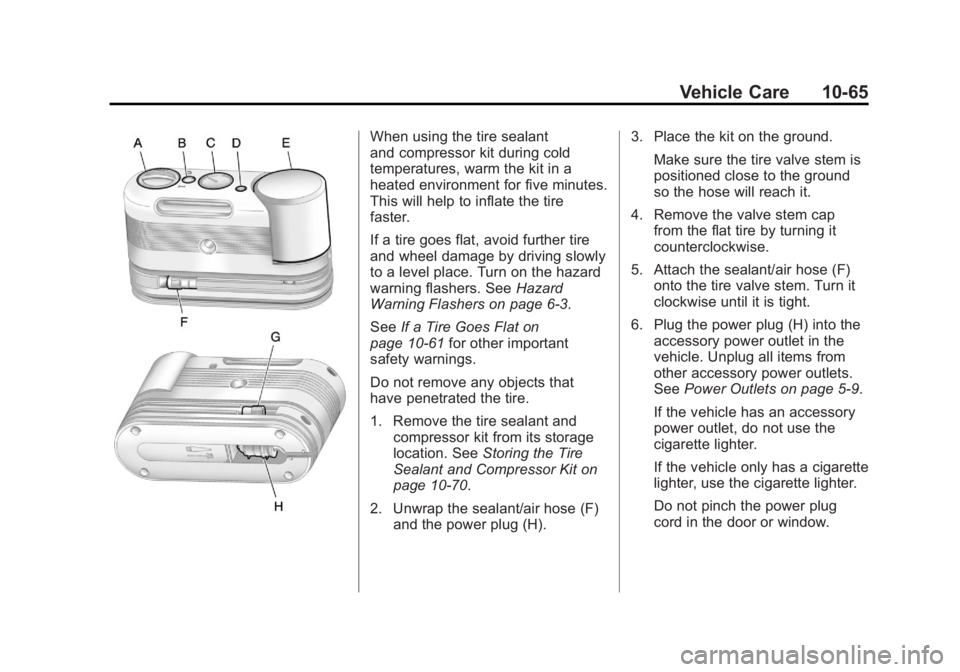
2. Unwrap the sealant/air hose (F) and the power plug (H). 3. Place the kit on the ground.
Make sure the tire valve stem is
positioned close to the ground
so the hose will reach it.
4. Remove the valve stem cap from the flat tire by turning it
counterclockwise.
5. Attach the sealant/air hose (F) onto the tire valve stem. Turn it
clockwise until it is tight.
6. Plug the power plug (H) into the accessory power outlet in the
vehicle. Unplug all items from
other accessory power outlets.
See Power Outlets on page 5‑9.
If the vehicle has an accessory
power outlet, do not use the
cigarette lighter.
If the vehicle only has a cigarette
lighter, use the cigarette lighter.
Do not pinch the power plug
cord in the door or window.
Page 397 of 478

Black plate (69,1)GMC Acadia/Acadia Denali Owner Manual - 2011
Vehicle Care 10-69
6. Plug the power plug (H) into theaccessory power outlet in the
vehicle. Unplug all items from
other accessory power outlets.
See Power Outlets on page 5‑9.
If the vehicle has an accessory
power outlet, do not use the
cigarette lighter.
If the vehicle only has a cigarette
lighter, use the cigarette lighter.
Do not pinch the power plug
cord in the door or window.
7. Start the vehicle. The vehicle must be running while using the
air compressor.
8. Turn the selector switch (A) clockwise to the Air Only
position.
9. Press the on/off (B) button to turn the compressor on.
The compressor will inflate the
tire with air only. 10. Inflate the tire to the
recommended inflation
pressure using the pressure
gauge (C). The recommended
inflation pressure can be
found on the Tire and Loading
Information label. See Tire
Pressure on page 10‑45.
The pressure gauge (C) may
read higher than the actual tire
pressure while the compressor
is on. Turn the compressor off
to get an accurate reading.
The compressor may be turned
on/off until the correct pressure
is reached.
If you inflate the tire higher
than the recommended
pressure you can adjust
the excess pressure by
pressing the pressure deflation
button (D), if equipped, until
the proper pressure reading is
reached. This option is only
functional when using the air
only hose (G). 11. Press the on/off button (B)
to turn the tire sealant and
compressor kit off.
Be careful while handling the
tire sealant and compressor
kit as it could be warm after
usage.
12. Unplug the power plug (H) from the accessory power outlet in
the vehicle.
13. Disconnect the air only hose (G) from the tire
valve stem by turning it
counterclockwise, and replace
the tire valve stem cap.
14. Replace the air only hose (G) and the power plug (H) and
cord back in their original
locations.
Page 412 of 478

Black plate (84,1)GMC Acadia/Acadia Denali Owner Manual - 2011
10-84 Vehicle Care
Notice:If the radio or other
accessories are left on during
the jump starting procedure, they
could be damaged. The repairs
would not be covered by the
warranty. Always turn off the
radio and other accessories
when jump starting the vehicle.
3. Turn off the ignition on both
vehicles. Unplug unnecessary
accessories plugged into the
cigarette lighter or the accessory
power outlets. Turn off the radio
and all lamps that are not
needed. This will avoid sparks
and help save both batteries.
And it could save the radio!
4. Open the hoods and locate the positive (+) and negative (−)
terminal locations on the
other vehicle. Your vehicle
has a remote positive (+) and
a remote negative (−) jump
starting terminal. See Engine
Compartment Overview on
page 10‑6 for more information
on the terminal locations.{WARNING
Using a match near a battery
can cause battery gas to explode.
People have been hurt doing this,
and some have been blinded.
Use a flashlight if you need
more light.
Be sure the batteries have
enough water. You do not need
to add water to the ACDelco
®
battery (or batteries) installed in
your new vehicle. But if a battery
has filler caps, be sure the right
amount of fluid is there. If it is low,
add water to take care of that
first. If you do not, explosive
gas could be present.
Battery fluid contains acid that
can burn you. Do not get it on
you. If you accidentally get it in
your eyes or on your skin, flush
the place with water and get
medical help immediately.
{WARNING
Fans or other moving engine
parts can injure you badly. Keep
your hands away from moving
parts once the engine is running.
5. Check that the jumper cables do not have loose or missing
insulation. If they do, you could
get a shock. The vehicles could
be damaged too.
Before you connect the cables,
here are some basic things you
should know. Positive (+) will go
to positive (+) or to a remote
positive (+) terminal if the vehicle
has one. Negative (−) will go to a
heavy, unpainted metal engine
part or to a remote negative (−)
terminal if the vehicle has one.