Page 1 of 441
Introduction 4
Instrument Cluster 14
Warning lights and chimes 14
Gauges 21
Message center 22
Entertainment Systems 60
AM/FM stereo 60
AM/FM stereo with CD 62
Auxiliary input jack 69
USB port 71
Satellite radio information 74
Navigation system 77
SYNC�77
Climate Controls 78
Manual heating and air conditioning 78
Dual electronic automatic temperature control 81
Rear window defroster 84
Lights 86
Headlamps 86
Turn signal control 90
Bulb replacement 91
Driver Controls 97
Windshield wiper/washer control 97
Steering wheel adjustment 98
Power windows 102
Mirrors 104
Speed control 109
Upfitter controls 112
Locks and Security 126
Keys 126
Locks 134
Anti-theft system 146
Table of Contents
1
2011 F-250/350/450/550(f23)
Owners Guide, 1st Printing
USA(fus)
Page 12 of 441
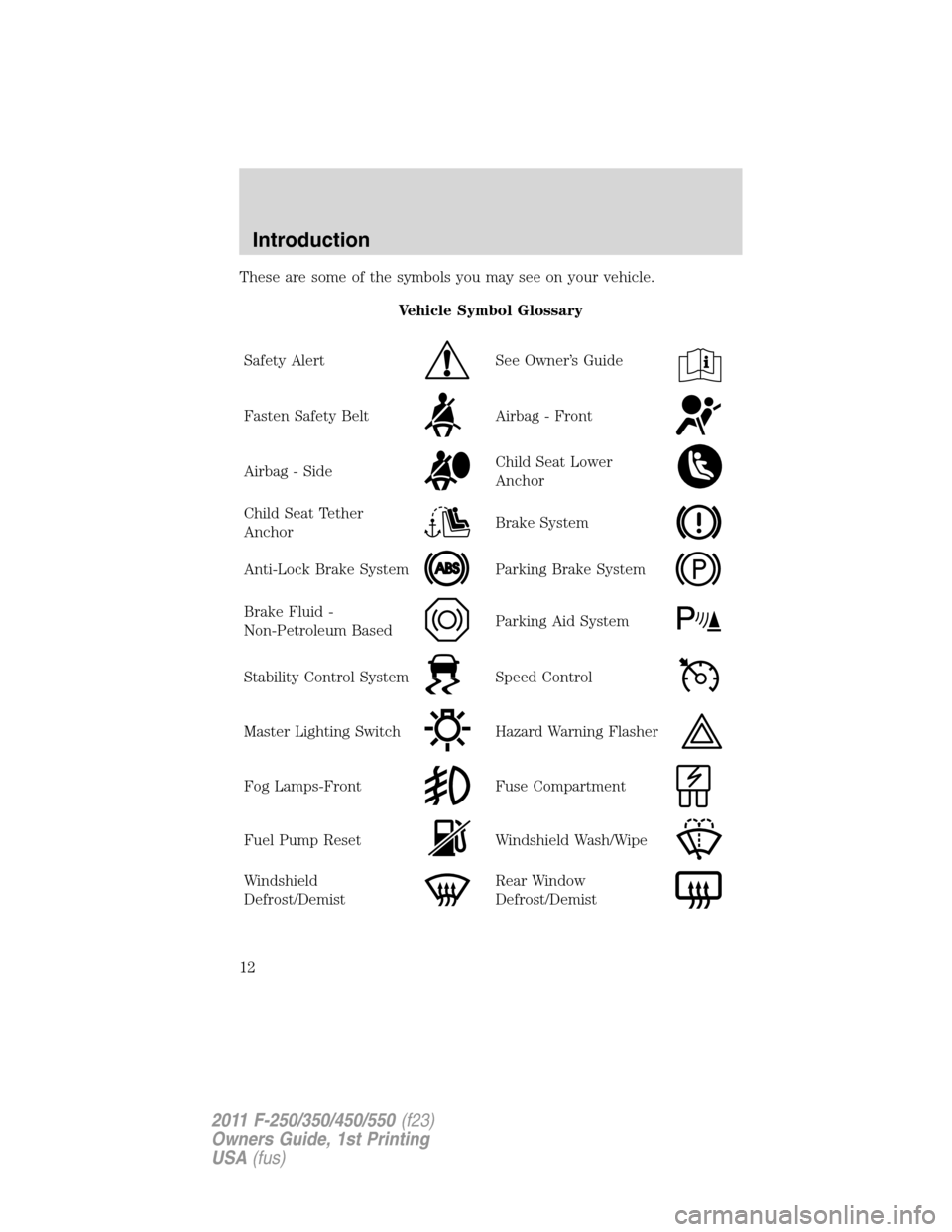
These are some of the symbols you may see on your vehicle.
Vehicle Symbol Glossary
Safety Alert
See Owner’s Guide
Fasten Safety BeltAirbag - Front
Airbag - SideChild Seat Lower
Anchor
Child Seat Tether
AnchorBrake System
Anti-Lock Brake SystemParking Brake System
Brake Fluid -
Non-Petroleum BasedParking Aid System
Stability Control SystemSpeed Control
Master Lighting SwitchHazard Warning Flasher
Fog Lamps-FrontFuse Compartment
Fuel Pump ResetWindshield Wash/Wipe
Windshield
Defrost/DemistRear Window
Defrost/Demist
Introduction
12
2011 F-250/350/450/550(f23)
Owners Guide, 1st Printing
USA(fus)
Page 13 of 441
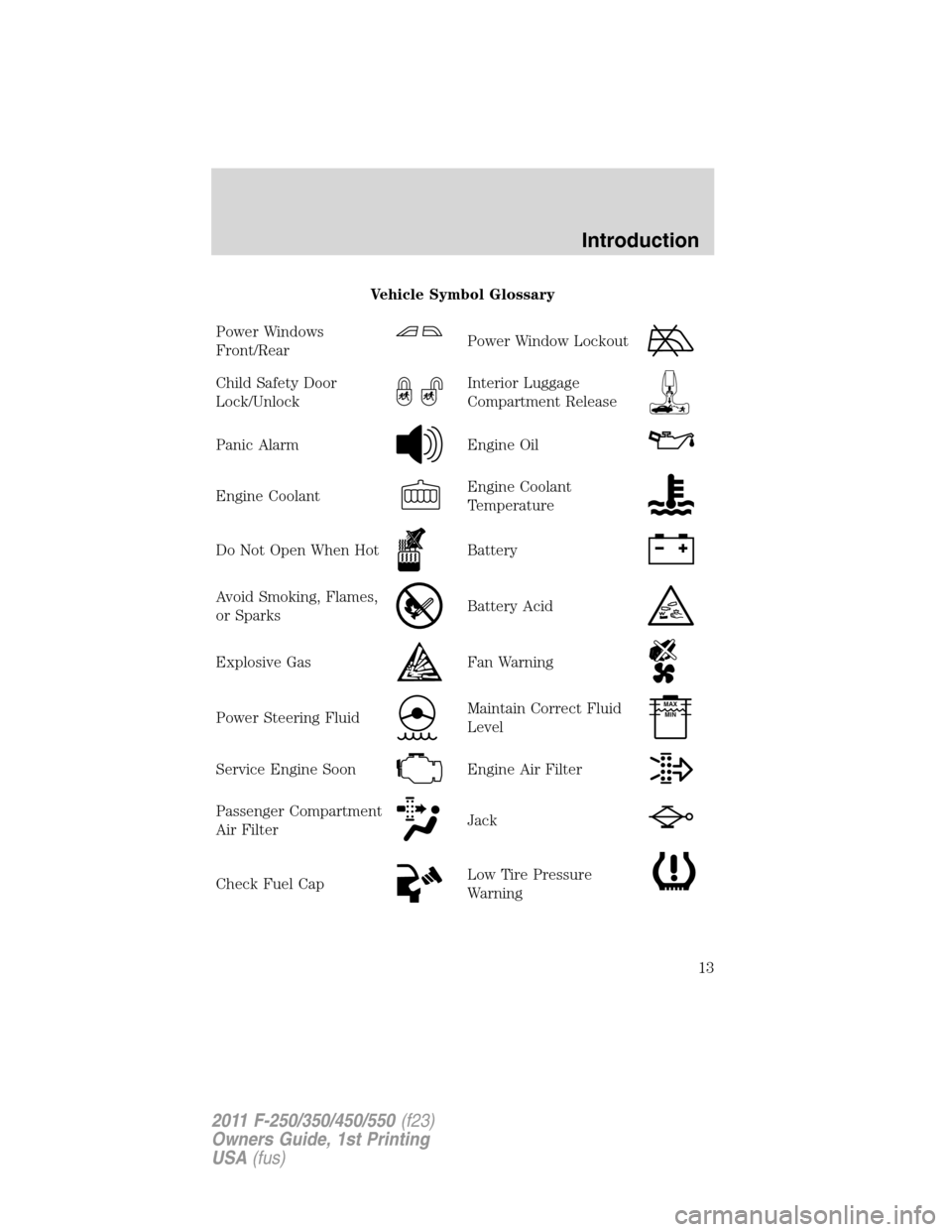
Vehicle Symbol Glossary
Power Windows
Front/Rear
Power Window Lockout
Child Safety Door
Lock/UnlockInterior Luggage
Compartment Release
Panic AlarmEngine Oil
Engine CoolantEngine Coolant
Temperature
Do Not Open When HotBattery
Avoid Smoking, Flames,
or SparksBattery Acid
Explosive GasFan Warning
Power Steering FluidMaintain Correct Fluid
LevelMAX
MIN
Service Engine SoonEngine Air Filter
Passenger Compartment
Air FilterJack
Check Fuel CapLow Tire Pressure
Warning
Introduction
13
2011 F-250/350/450/550(f23)
Owners Guide, 1st Printing
USA(fus)
Page 17 of 441
WARNING:Driving a vehicle with the brake system warning
light on is dangerous. A significant decrease in braking
performance may occur. It will take you longer to stop the vehicle.
Have the vehicle checked by your authorized dealer. Driving extended
distances with the parking brake engaged can cause brake failure and
the risk of personal injury.
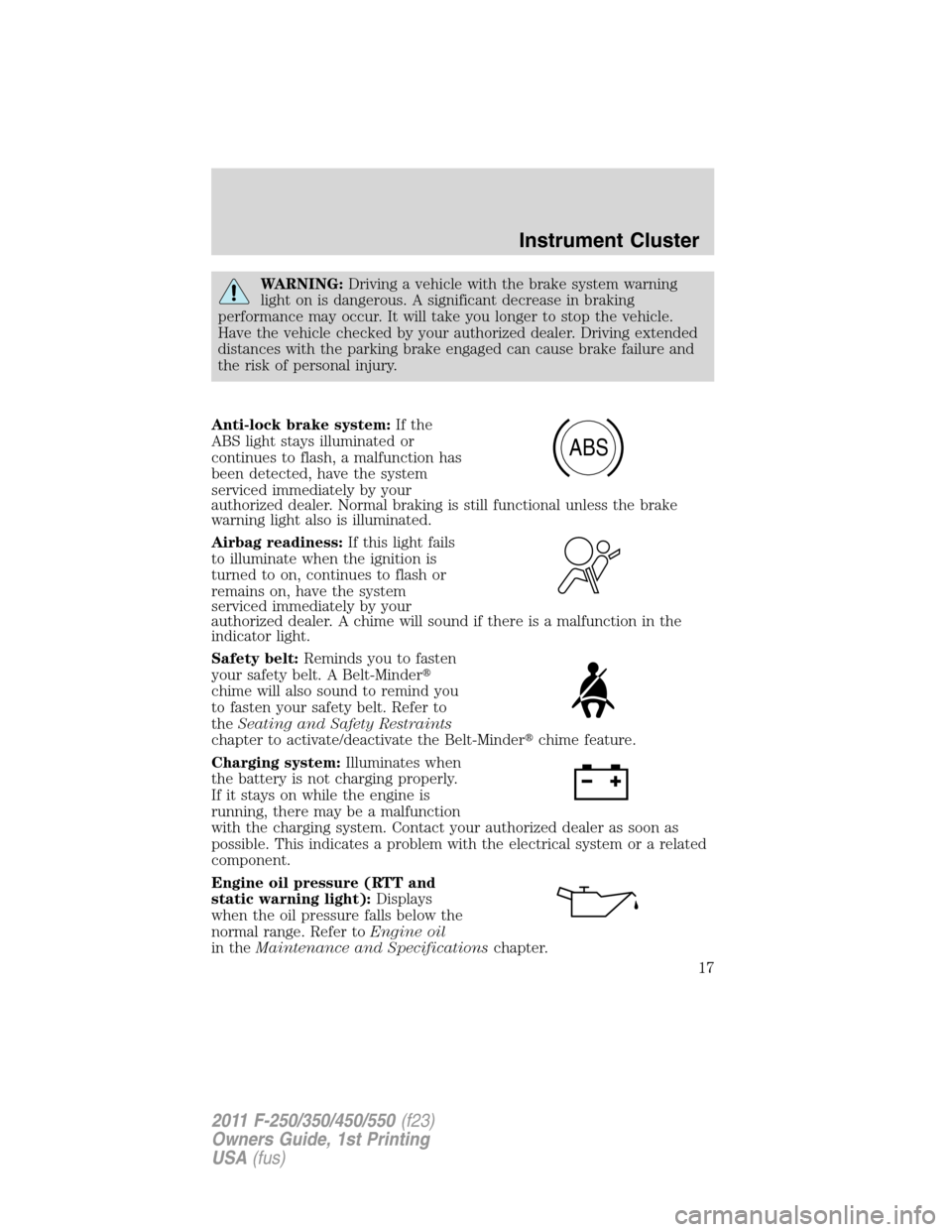
Anti-lock brake system:If the
ABS light stays illuminated or
continues to flash, a malfunction has
been detected, have the system
serviced immediately by your
authorized dealer. Normal braking is still functional unless the brake
warning light also is illuminated.
Airbag readiness:If this light fails
to illuminate when the ignition is
turned to on, continues to flash or
remains on, have the system
serviced immediately by your
authorized dealer. A chime will sound if there is a malfunction in the
indicator light.
Safety belt:Reminds you to fasten
your safety belt. A Belt-Minder�
chime will also sound to remind you
to fasten your safety belt. Refer to
theSeating and Safety Restraints
chapter to activate/deactivate the Belt-Minder�chime feature.
Charging system:Illuminates when
the battery is not charging properly.
If it stays on while the engine is
running, there may be a malfunction
with the charging system. Contact your authorized dealer as soon as
possible. This indicates a problem with the electrical system or a related
component.
Engine oil pressure (RTT and
static warning light):Displays
when the oil pressure falls below the
normal range. Refer toEngine oil
in theMaintenance and Specificationschapter.
ABS
Instrument Cluster
17
2011 F-250/350/450/550(f23)
Owners Guide, 1st Printing
USA(fus)
Page 19 of 441
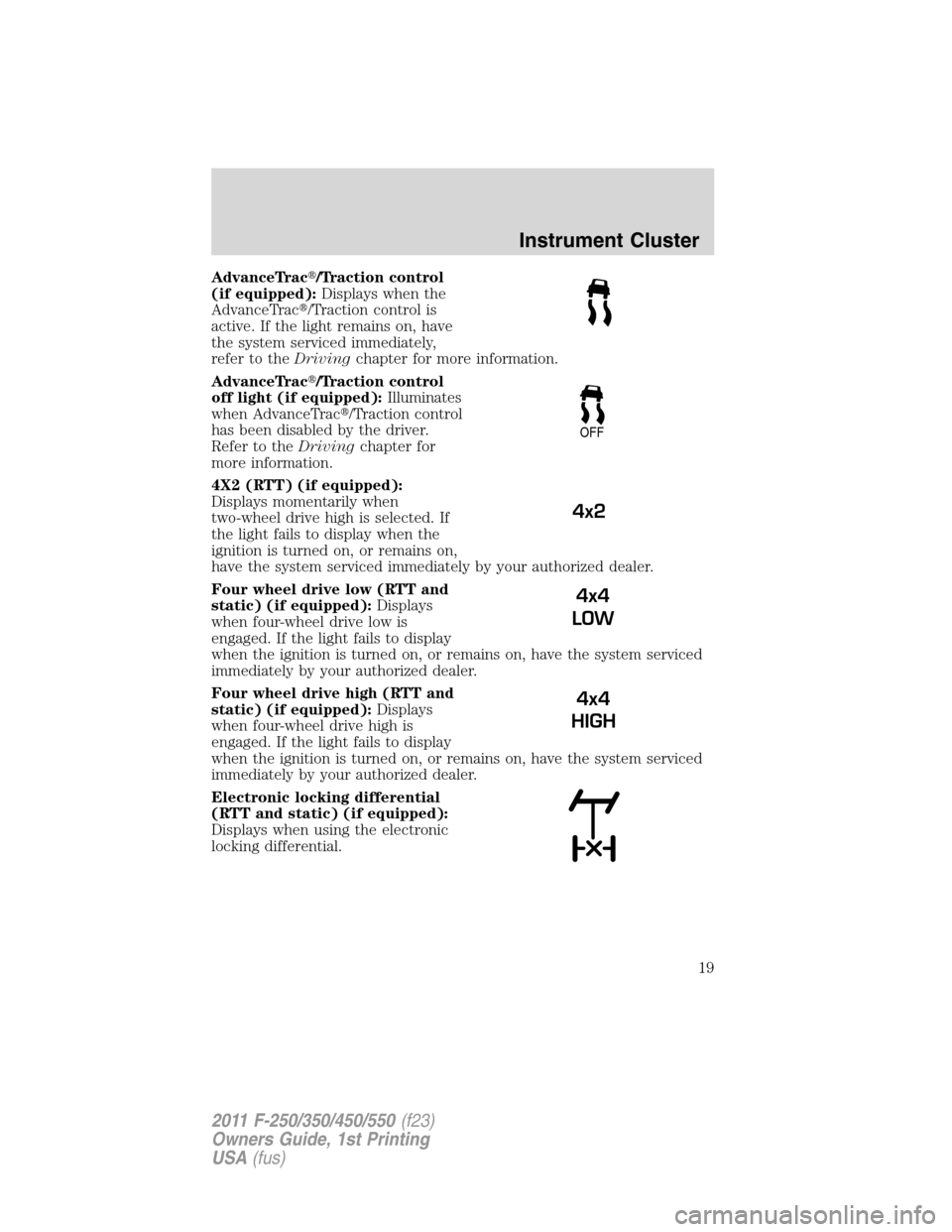
AdvanceTrac�/Traction control
(if equipped):Displays when the
AdvanceTrac�/Traction control is
active. If the light remains on, have
the system serviced immediately,
refer to theDrivingchapter for more information.
AdvanceTrac�/Traction control
off light (if equipped):Illuminates
when AdvanceTrac�/Traction control
has been disabled by the driver.
Refer to theDrivingchapter for
more information.
4X2 (RTT) (if equipped):
Displays momentarily when
two-wheel drive high is selected. If
the light fails to display when the
ignition is turned on, or remains on,
have the system serviced immediately by your authorized dealer.
Four wheel drive low (RTT and
static) (if equipped):Displays
when four-wheel drive low is
engaged. If the light fails to display
when the ignition is turned on, or remains on, have the system serviced
immediately by your authorized dealer.
Four wheel drive high (RTT and
static) (if equipped):Displays
when four-wheel drive high is
engaged. If the light fails to display
when the ignition is turned on, or remains on, have the system serviced
immediately by your authorized dealer.
Electronic locking differential
(RTT and static) (if equipped):
Displays when using the electronic
locking differential.
OFF
4x2
4x4
LOW
4x4
HIGH
Instrument Cluster
19
2011 F-250/350/450/550(f23)
Owners Guide, 1st Printing
USA(fus)
Page 22 of 441
Altering the severity of the driving conditions is recommended to lower
the transmission temperature into the normal range.
Red areaThe transmission fluid is overheating. Stop the vehicle to allow
the temperature to return to normal range.
If the gauge is operating in the yellow or red area, stop the vehicle and
verify the airflow is not restricted such as snow or debris blocking airflow
through the grill. If the gauge continues to show high temperatures, see
your authorized dealer.
4.Fuel gauge:Indicates approximately how much fuel is left in the fuel
tank (when the ignition is in the on position). The fuel gauge may vary
slightly when the vehicle is in motion or on a grade. The fuel icon and
arrow indicates which side of the vehicle the fuel filler door is located.
Refer toFilling the tankin theMaintenance and Specifications
chapter for more information.
5.Speedometer:Indicates the current vehicle speed.
6.Tachometer:Indicates the engine speed in revolutions per minute.
Driving with your tachometer pointer continuously at the top of the scale
may damage the engine.
Odometer and trip odometer:The odometer is displayed on the lower
line in the message center and registers the total accumulated distance
the vehicle has traveled. For trip odometer, refer toStandard message
centerorOptional message centerin this chapter.
STANDARD MESSAGE CENTER
Your vehicle’s message center is capable of monitoring many vehicle
systems and will alert you to potential vehicle problems and various
conditions with an informational message followed by a long indicator
chime.
The message center display is located in the instrument cluster and the
controls are located on the steering wheel.
Instrument Cluster
22
2011 F-250/350/450/550(f23)
Owners Guide, 1st Printing
USA(fus)
Page 23 of 441
Selectable features
Info (information menu)
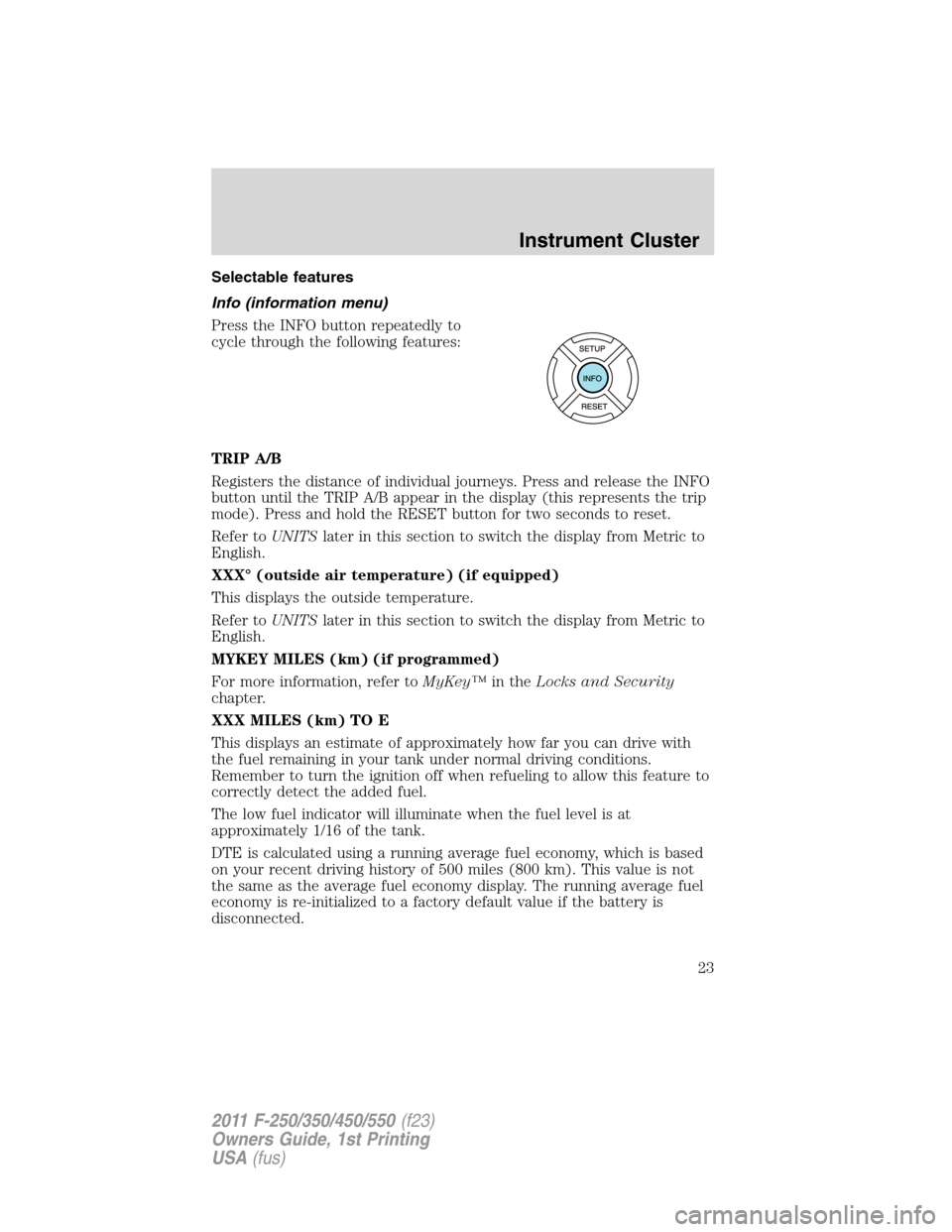
Press the INFO button repeatedly to
cycle through the following features:
TRIP A/B
Registers the distance of individual journeys. Press and release the INFO
button until the TRIP A/B appear in the display (this represents the trip
mode). Press and hold the RESET button for two seconds to reset.
Refer toUNITSlater in this section to switch the display from Metric to
English.
XXX° (outside air temperature) (if equipped)
This displays the outside temperature.
Refer toUNITSlater in this section to switch the display from Metric to
English.
MYKEY MILES (km) (if programmed)
For more information, refer toMyKey™in theLocks and Security
chapter.
XXX MILES (km) TO E
This displays an estimate of approximately how far you can drive with
the fuel remaining in your tank under normal driving conditions.
Remember to turn the ignition off when refueling to allow this feature to
correctly detect the added fuel.
The low fuel indicator will illuminate when the fuel level is at
approximately 1/16 of the tank.
DTE is calculated using a running average fuel economy, which is based
on your recent driving history of 500 miles (800 km). This value is not
the same as the average fuel economy display. The running average fuel
economy is re-initialized to a factory default value if the battery is
disconnected.
Instrument Cluster
23
2011 F-250/350/450/550(f23)
Owners Guide, 1st Printing
USA(fus)
Page 26 of 441
To reset the oil monitoring system to 100% after each oil change,
perform the following:
1. Press and release the SETUP button to display “OIL LIFE XXX%
HOLD RESET = NEW”.
2. Press and hold the RESET button for two seconds and release to reset
the oil life to 100%.
Note:To change oil life 100% value to another value, proceed to Step 3.
3. Once “OIL LIFE SET TO XXX%” is displayed, release and press the
RESET button to change the oil life start value. Each release and press
will reduce the value by 10%.
UNITS
Displays the current units English or Metric.
Press the RESET button to change from English to Metric.
AUTOLAMP (SEC)
This feature keeps your headlights on for up to three minutes after the
ignition is switched off.
Press the RESET control to select the new autolamp delay values of 0,
10, 20, 30, 60, 90, 120 or 180 seconds.
AUTOLOCK
This feature automatically locks all vehicle doors when the vehicle is
shifted into any gear, putting the vehicle in motion.
Press the RESET control to turn autolock on or off.
AUTOUNLOCK
This feature automatically unlocks all vehicle doors when the driver’s
door is opened within 10 minutes of the ignition being turned off.
Press RESET to turn it off or on.
RESET FOR ZONE SETTING
This feature changes the compass zone setting.
Most geographic areas (zones) have a magnetic north compass point that
varies slightly from the northerly direction on maps. This variation is four
degrees between adjacent zones and will become noticeable as the
vehicle crosses multiple zones. A correct zone setting will eliminate this
error.
Refer toCompass zone/calibration adjustment.
Instrument Cluster
26
2011 F-250/350/450/550(f23)
Owners Guide, 1st Printing
USA(fus)