Page 367 of 2057
2. Pull out the passenger side air vent.
Item 2
Dipped beam switch
1. Unclip the dipped beam switch through the driver side air vent cut-out. G295560en
2008.50 Kuga 8/2011 417-01-33
Exterior Lighting
417-01-33
REMOVAL AND INSTALLATIONTO MODEL INDEX
BACK TO CHAPTER INDEX
FORD KUGA 2011.0MY WORKSHOP REPAIR MANUALE4473712 E44376
Page 368 of 2057
Stoplamp Switch
Removal
1. CAUTION: Make sure that the brake
pedal remains in the rest position. Installation
1.
CAUTION: Make sure that the brake
pedal remains in the rest position.
To install, reverse the removal procedure. G1076278en
2008.50 Kuga 8/2011 417-01-34
Exterior Lighting
417-01-34
REMOVAL AND INSTALLATIONTO MODEL INDEX
BACK TO CHAPTER INDEX
FORD KUGA 2011.0MY WORKSHOP REPAIR MANUALE123773
Page 369 of 2057
Trailer Module
Removal
1.
Refer to: Loadspace Trim Panel LH (501-05
Interior Trim and Ornamentation, Removal
and Installation).
2. Installation
1.
To install, reverse the removal procedure. G1158252en
2008.50 Kuga 8/2011 417-01-35
Exterior Lighting
417-01-35
REMOVAL AND INSTALLATIONTO MODEL INDEX
BACK TO CHAPTER INDEX
FORD KUGA 2011.0MY WORKSHOP REPAIR MANUALE122607
Page 370 of 2057
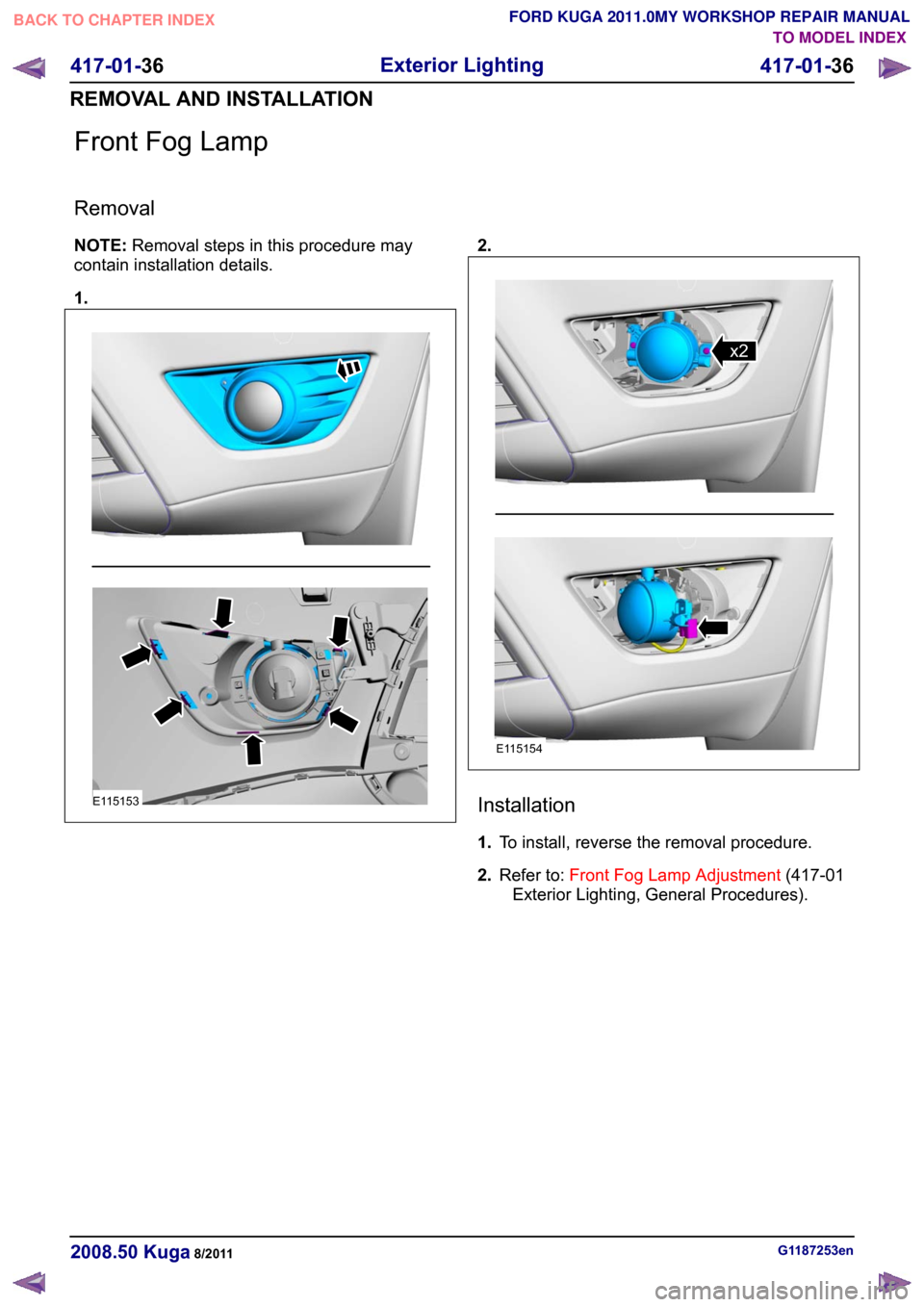
Front Fog Lamp
Removal
NOTE:
Removal steps in this procedure may
contain installation details.
1. 2.
Installation
1.
To install, reverse the removal procedure.
2. Refer to: Front Fog Lamp Adjustment (417-01
Exterior Lighting, General Procedures). G1187253en
2008.50 Kuga 8/2011 417-01-36
Exterior Lighting
417-01-36
REMOVAL AND INSTALLATIONTO MODEL INDEX
BACK TO CHAPTER INDEX
FORD KUGA 2011.0MY WORKSHOP REPAIR MANUALE115153 E115154x2
Page 371 of 2057
Headlamp Assembly
Removal
1.
2. Vehicles with headlamp washers
3.
G1255597en
2008.50 Kuga 8/2011 417-01-37
Exterior Lighting
417-01-37
REMOVAL AND INSTALLATIONTO MODEL INDEX
BACK TO CHAPTER INDEX
FORD KUGA 2011.0MY WORKSHOP REPAIR MANUALE1234761 E123478
Page 372 of 2057
Installation
1.
To install, reverse the removal procedure.
2. Refer to: Headlamp Adjustment (417-01 Exterior
Lighting, General Procedures). G1255597en
2008.50 Kuga 8/2011 417-01-38
Exterior Lighting
417-01-38
REMOVAL AND INSTALLATIONTO MODEL INDEX
BACK TO CHAPTER INDEX
FORD KUGA 2011.0MY WORKSHOP REPAIR MANUALE123477
Page 373 of 2057
SECTION 417-02 Interior Lighting
VEHICLE APPLICATION:
2008.50 Kuga
PAGE
CONTENTS
DIAGNOSIS AND TESTING
417-02-2
Interior Lighting ...................................................................................................................
417-02-2
Inspection and Verification .................................................................................................. 417-02-1
Interior Lighting
417-02-1
.TO MODEL INDEX
BACK TO CHAPTER INDEX
FORD KUGA 2011.0MY WORKSHOP REPAIR MANUAL
Page 374 of 2057
Interior Lighting
Refer to
Wiring Diagrams Section 417-02, for
schematic and connector information. General Equipment
The Ford approved diagnostic tool
Inspection and Verification
1. Verify the customer concern.
2. Visually inspect for obvious signs of electrical damage.
Visual Inspection Chart Electrical
– Fuse(s)
– Bulb(s)
– Switch(es)
– Wiring harness
– Electrical connector(s)
– Interior lamp(s)
– Battery saver relay
– Door
– Central junction box (CJB)
3. If an obvious cause for an observed or reported concern is found, correct the cause (if possible)
before proceeding to the next step.
4. If the cause is not visually evident, verify the symptom and refer to the diagnostic tab within
the Ford approved diagnostic tool. G1055016en
2008.50 Kuga 8/2011 417-02-2
Interior Lighting
417-02-2
DIAGNOSIS AND TESTINGTO MODEL INDEX
BACK TO CHAPTER INDEX
FORD KUGA 2011.0MY WORKSHOP REPAIR MANUAL