Page 16 of 357

AdvanceTrac�/Traction control
(if equipped):Displays when the
AdvanceTrac�/Traction control is
active. If the light remains on, have
the system serviced immediately,
refer to theDrivingchapter for more information.
Speed control (if equipped):
Illuminates when the speed control
system is in use.
Anti-theft system:Flashes when
the SecuriLock�Passive Anti-theft
System has been activated.
Turn signal:Illuminates when the
left or right turn signal or the
hazard lights are turned on. If the
indicators stay on or flash faster, check for a burned out bulb.
High beams:Illuminates when the
high beam headlamps are turned on.
Key-in-ignition warning chime:Sounds when the key is left in the
ignition in the off or accessory position and the driver’s door is opened.
Headlamps on warning chime:Sounds when the headlamps or parking
lamps are on, the ignition is off (the key is not in the ignition) and the
driver’s door is opened.
Instrument Cluster
16
2011 Fiesta(fie)
Owners Guide, 1st Printing
USA(fus)
Page 19 of 357

•Clock:Select Clock then move right to enter the menu. Scroll up or
down to select from to select from: The clock can also be set through
the audio system. SeeAudio systemsin theEntertainment Systems
chapter for more information.
•Set time:Move right to enter the menu and adjust the time.
•Set date:Move right to enter the menu and adjust the date.
•24 hour mode:Move right to enter the menu to choose 24-hour
mode.
•Display:Select Display then move right to enter the menu. Scroll up
or down to select from:
•Measure unit:Move right to enter the menu then move up or
down to select Fahrenheit or Celsius.
•Language:Move right to enter the menu then move up or down to
select the desired language.
•Messages:Select messages then move right to view stored messages.
Compass (if equipped):If your vehicle is equipped with SYNC�,the
compass heading is displayed to the left of the clock in the upper portion
of the multifunction display.
Information messages
: The message indicator will illuminate when there is a new message
stored in the multifunction display.
Message Warning Lamp at
Instrument ClusterSystem
ABS MALFUNCTION
SERVICE NOW
ABS
ESP OFF— ABS
ESP MALFUNCTION
NEXT SERVICE— ABS
BRAKE SYSTEM
MALFUNCTION
STOP SAFELY
Brakes
ALARM SYSTEM
MALFUNCTION
NEXT SERVICE—Anti-theft security
system
Instrument Cluster
19
2011 Fiesta(fie)
Owners Guide, 1st Printing
USA(fus)
Page 20 of 357
Message Warning Lamp at
Instrument ClusterSystem
INTERIOR SCAN
DEACTIVATED—Anti-theft security
system
IMMOBILIZER
MALFUNCTION
SERVICE NOW—Anti-theft security
system
ALARM TRIGGERED
CHECK VEHICLE—Anti-theft security
system
LEFT/RIGHT
INDICATOR
MALFUNCTION
CHANGE BULB— Lights
HILL START ASSIST
NOT AVAILABLE
Transmission
STEERING LOCK
ENGAGED TURN
STEERING WHEEL—Passive Entry/Passive
Start
STEERING
MALFUNCTION
SERVICE NOW—Passive Entry/Passive
Start
STEERING
MALFUNCTION
STOP SAFELY—Passive Entry/Passive
Start
POWER STEERING
MALFUNCTION
SERVICE NOW— Power Steering
KEY NOT
DETECTED—Passive entry/passive
start system
TURN IGNITION
OFF USE POWER
BUTTON—Passive entry/passive
start system
KEY OUTSIDE CAR
—Passive entry/passive
start system
Instrument Cluster
20
2011 Fiesta(fie)
Owners Guide, 1st Printing
USA(fus)
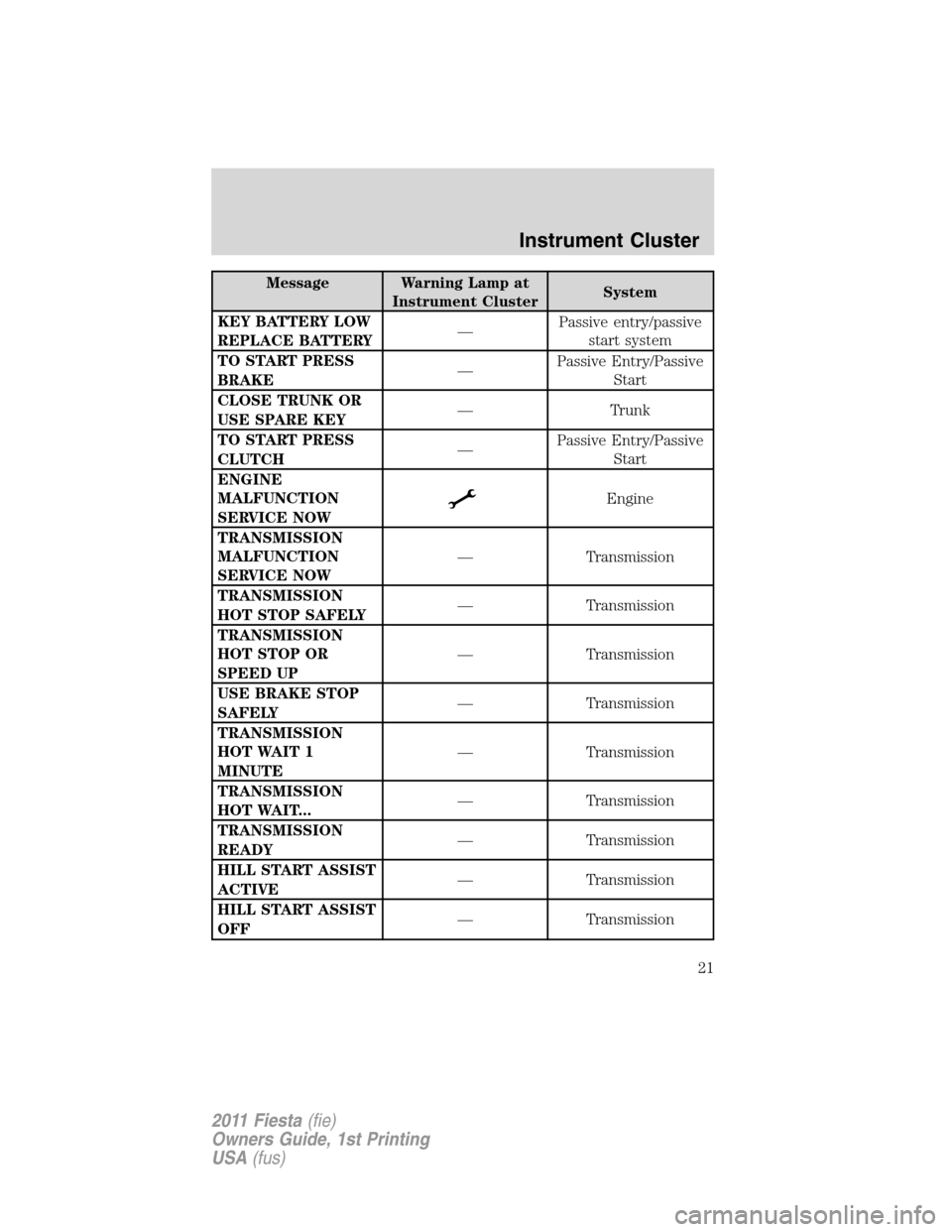
Page 21 of 357
Message Warning Lamp at
Instrument ClusterSystem
KEY BATTERY LOW
REPLACE BATTERY—Passive entry/passive
start system
TO START PRESS
BRAKE—Passive Entry/Passive
Start
CLOSE TRUNK OR
USE SPARE KEY— Trunk
TO START PRESS
CLUTCH—Passive Entry/Passive
Start
ENGINE
MALFUNCTION
SERVICE NOW
Engine
TRANSMISSION
MALFUNCTION
SERVICE NOW— Transmission
TRANSMISSION
HOT STOP SAFELY— Transmission
TRANSMISSION
HOT STOP OR
SPEED UP— Transmission
USE BRAKE STOP
SAFELY— Transmission
TRANSMISSION
HOT WAIT 1
MINUTE— Transmission
TRANSMISSION
HOT WAIT...— Transmission
TRANSMISSION
READY— Transmission
HILL START ASSIST
ACTIVE— Transmission
HILL START ASSIST
OFF— Transmission
Instrument Cluster
21
2011 Fiesta(fie)
Owners Guide, 1st Printing
USA(fus)
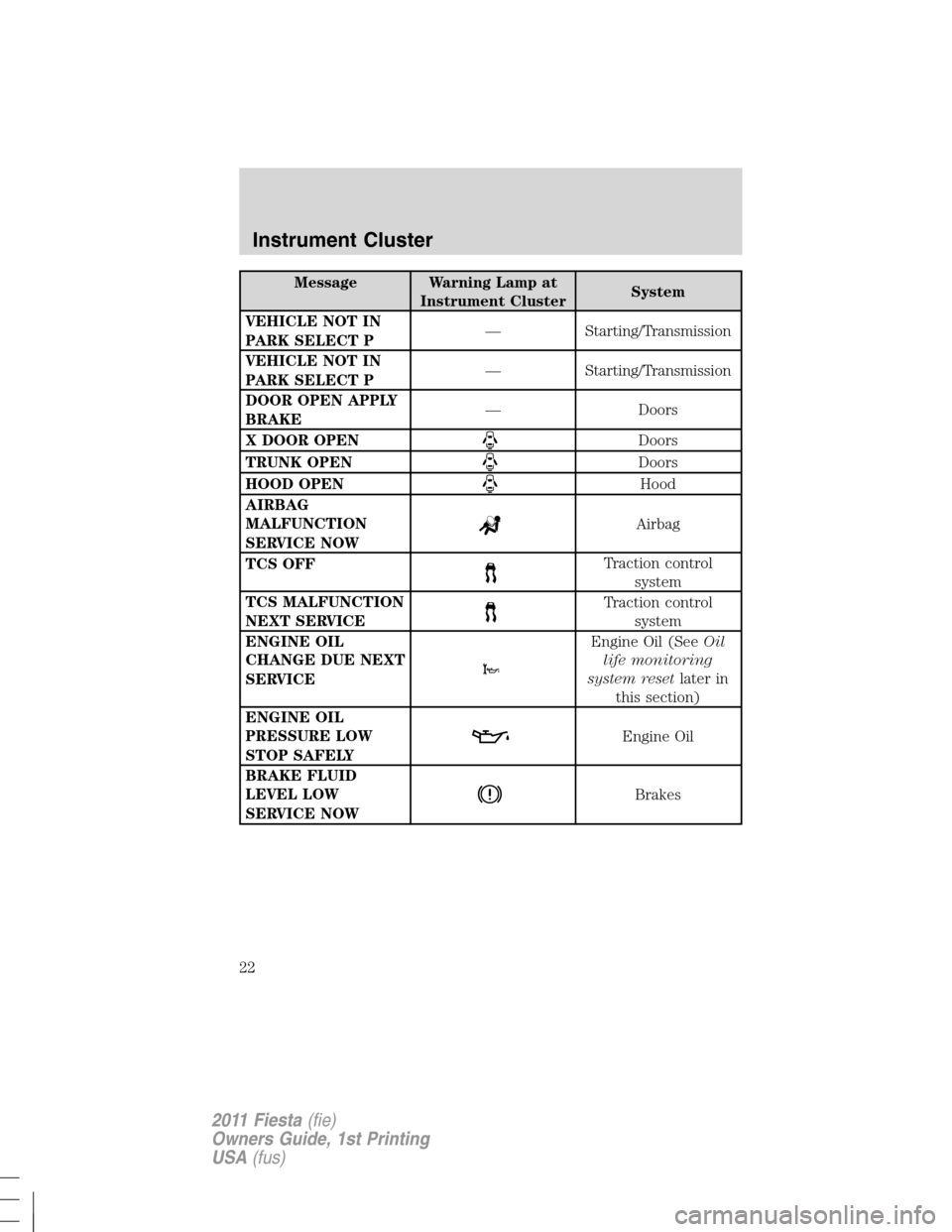
Page 22 of 357
Message Warning Lamp at
Instrument ClusterSystem
VEHICLE NOT IN
PARK SELECT P— Starting/Transmission
VEHICLE NOT IN
PARK SELECT P— Starting/Transmission
DOOR OPEN APPLY
BRAKE— Doors
X DOOR OPEN
Doors
TRUNK OPEN
Doors
HOOD OPEN
Hood
AIRBAG
MALFUNCTION
SERVICE NOW
Airbag
TCS OFF
Traction control
system
TCS MALFUNCTION
NEXT SERVICE
Traction control
system
ENGINE OIL
CHANGE DUE NEXT
SERVICE
Engine Oil (SeeOil
life monitoring
system resetlater in
this section)
ENGINE OIL
PRESSURE LOW
STOP SAFELY
Engine Oil
BRAKE FLUID
LEVEL LOW
SERVICE NOW
Brakes
Instrument Cluster
22
2011 Fiesta(fie)
Owners Guide, 1st Printing
USA(fus)
Page 23 of 357
Oil life monitoring system reset
To reset the oil service light and clear the oil change message after
servicing use the following procedure:
1. With the ignition in the off position, press the brake and accelerator
pedals.
2. Turn the key to the accessory position for keyed vehicles and for push
button start vehicles press the Start/Stop button once quickly. DO NOT
attempt to start the engine.
3. Press the accelerator and brake pedals fully for 20 seconds.
4.ENGINE OIL CHANGE DUE NEXT SERVICEand
will display.
5. Turn the vehicle off. The message and lights will be cleared.
Instrument Cluster
23
2011 Fiesta(fie)
Owners Guide, 1st Printing
USA(fus)
Page 35 of 357
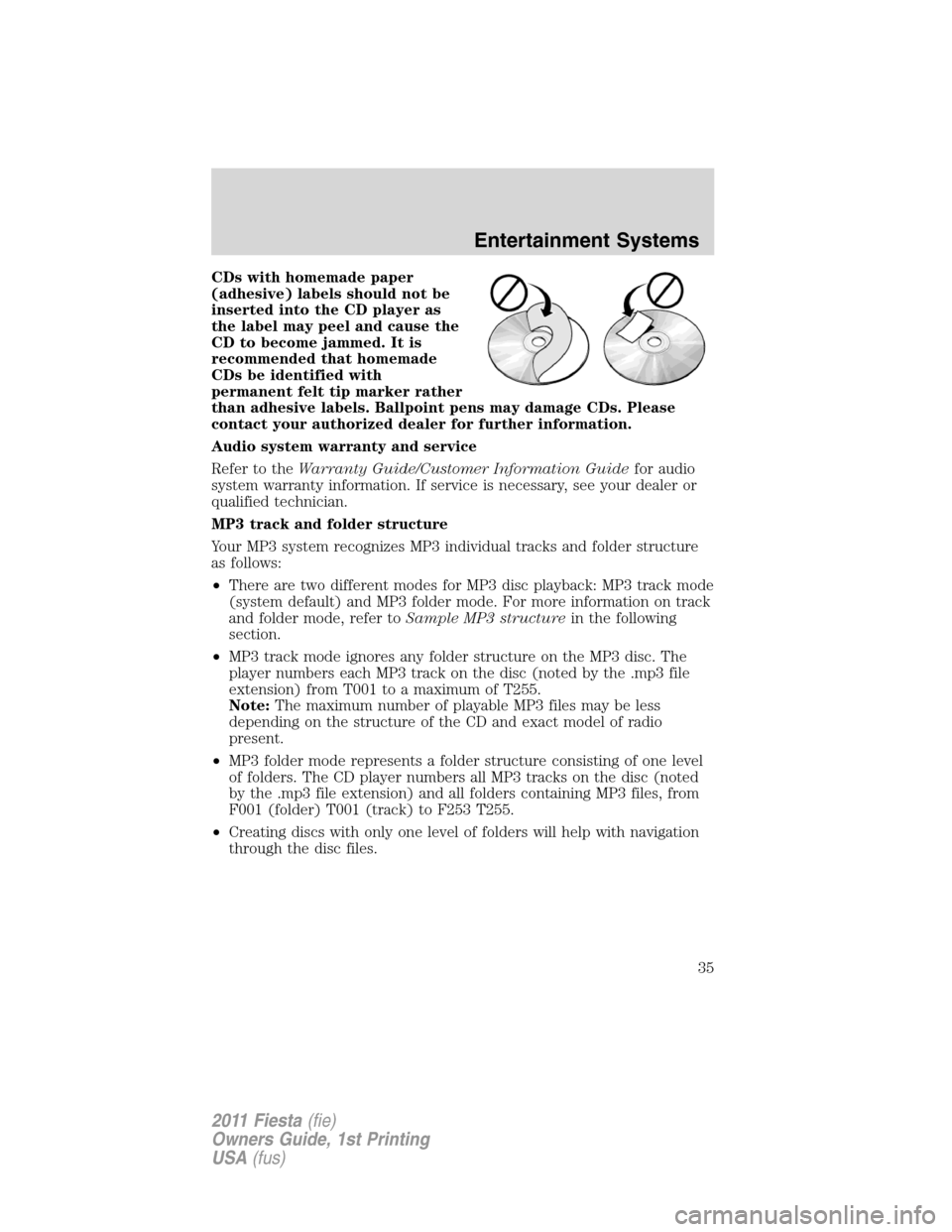
CDs with homemade paper
(adhesive) labels should not be
inserted into the CD player as
the label may peel and cause the
CD to become jammed. It is
recommended that homemade
CDs be identified with
permanent felt tip marker rather
than adhesive labels. Ballpoint pens may damage CDs. Please
contact your authorized dealer for further information.
Audio system warranty and service
Refer to theWarranty Guide/Customer Information Guidefor audio
system warranty information. If service is necessary, see your dealer or
qualified technician.
MP3 track and folder structure
Your MP3 system recognizes MP3 individual tracks and folder structure
as follows:
•There are two different modes for MP3 disc playback: MP3 track mode
(system default) and MP3 folder mode. For more information on track
and folder mode, refer toSample MP3 structurein the following
section.
•MP3 track mode ignores any folder structure on the MP3 disc. The
player numbers each MP3 track on the disc (noted by the .mp3 file
extension) from T001 to a maximum of T255.
Note:The maximum number of playable MP3 files may be less
depending on the structure of the CD and exact model of radio
present.
•MP3 folder mode represents a folder structure consisting of one level
of folders. The CD player numbers all MP3 tracks on the disc (noted
by the .mp3 file extension) and all folders containing MP3 files, from
F001 (folder) T001 (track) to F253 T255.
•Creating discs with only one level of folders will help with navigation
through the disc files.
Entertainment Systems
35
2011 Fiesta(fie)
Owners Guide, 1st Printing
USA(fus)
Page 37 of 357
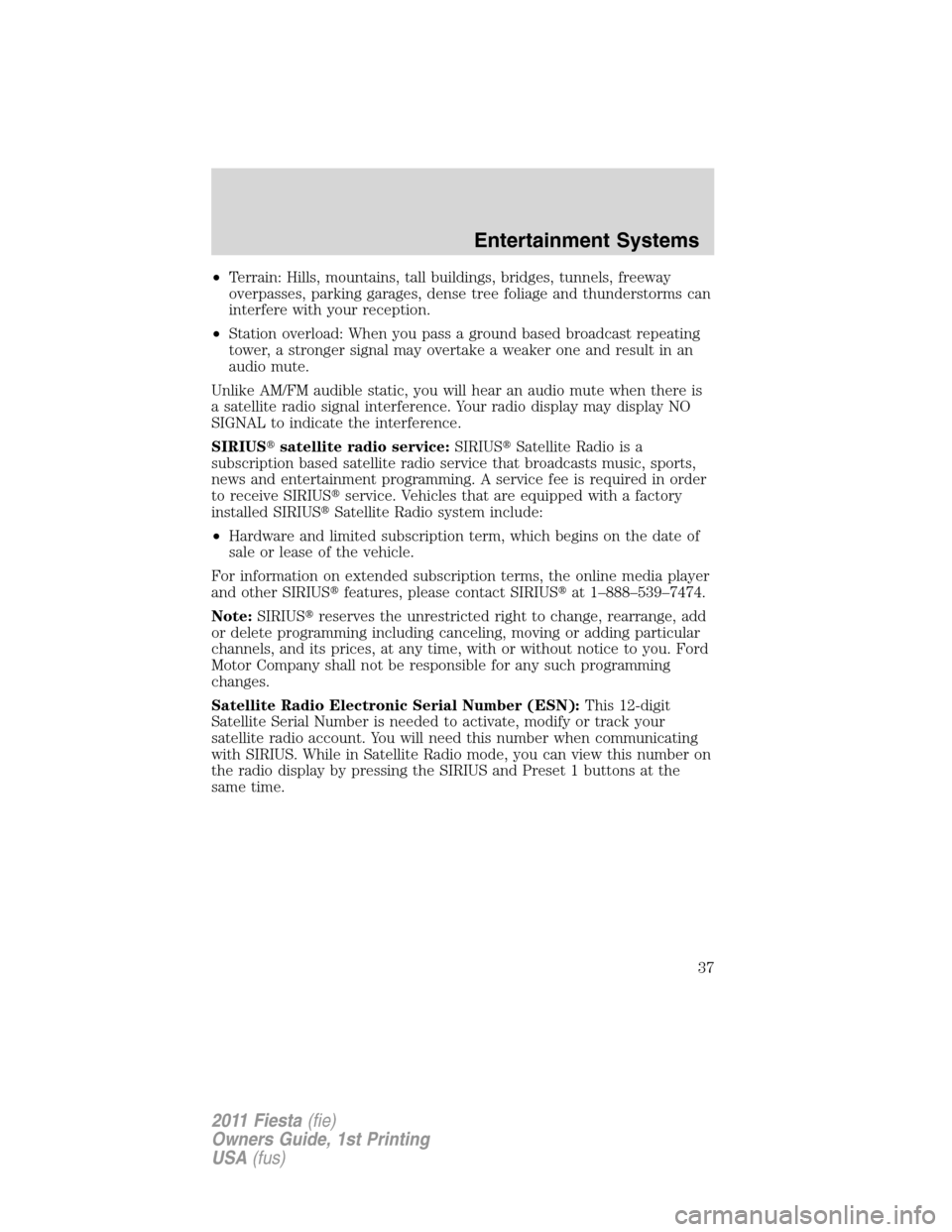
•Terrain: Hills, mountains, tall buildings, bridges, tunnels, freeway
overpasses, parking garages, dense tree foliage and thunderstorms can
interfere with your reception.
•Station overload: When you pass a ground based broadcast repeating
tower, a stronger signal may overtake a weaker one and result in an
audio mute.
Unlike AM/FM audible static, you will hear an audio mute when there is
a satellite radio signal interference. Your radio display may display NO
SIGNAL to indicate the interference.
SIRIUS�satellite radio service:SIRIUS�Satellite Radio is a
subscription based satellite radio service that broadcasts music, sports,
news and entertainment programming. A service fee is required in order
to receive SIRIUS�service. Vehicles that are equipped with a factory
installed SIRIUS�Satellite Radio system include:
•Hardware and limited subscription term, which begins on the date of
sale or lease of the vehicle.
For information on extended subscription terms, the online media player
and other SIRIUS�features, please contact SIRIUS�at 1–888–539–7474.
Note:SIRIUS�reserves the unrestricted right to change, rearrange, add
or delete programming including canceling, moving or adding particular
channels, and its prices, at any time, with or without notice to you. Ford
Motor Company shall not be responsible for any such programming
changes.
Satellite Radio Electronic Serial Number (ESN):This 12-digit
Satellite Serial Number is needed to activate, modify or track your
satellite radio account. You will need this number when communicating
with SIRIUS. While in Satellite Radio mode, you can view this number on
the radio display by pressing the SIRIUS and Preset 1 buttons at the
same time.
Entertainment Systems
37
2011 Fiesta(fie)
Owners Guide, 1st Printing
USA(fus)