Page 26 of 449
Scroll up/down to highlight one of the options, then press the right arrow
key or OK to enter into that menu option.
Information
4WD Gauge (if equipped)
MyKey™ Distance (if MyKey™ is programmed)
MyKey™ Information (number of MyKeys™ and admin keys programmed)
Coolant Temperature
In this mode, you can view vehicle information and configure different
vehicle settings. Press the right arrow key (when in the Settings menu)
to reach the different menus.
Settings
Driver Assist Traction Control
Blind Spot
Collision Warning Sensitivity
(if MyKey is
programmed)High, Normal or
Low
Chimes
Warning
Cross Traffic
Rear Park Aid
Trailer Sway
Display Language English, Español or Français
Units Distance Miles and
Gallons or Km
and Liters
Temperature Fahrenheit (°F)
or Celsius (°C)
Convenience Autolamp Delay Off or number of seconds
DTE Calculation Normal or Towing
Instrument Cluster
25
2011 Explorer(exp)
Owners Guide, 1st Printing
USA(fus)
Page 42 of 449
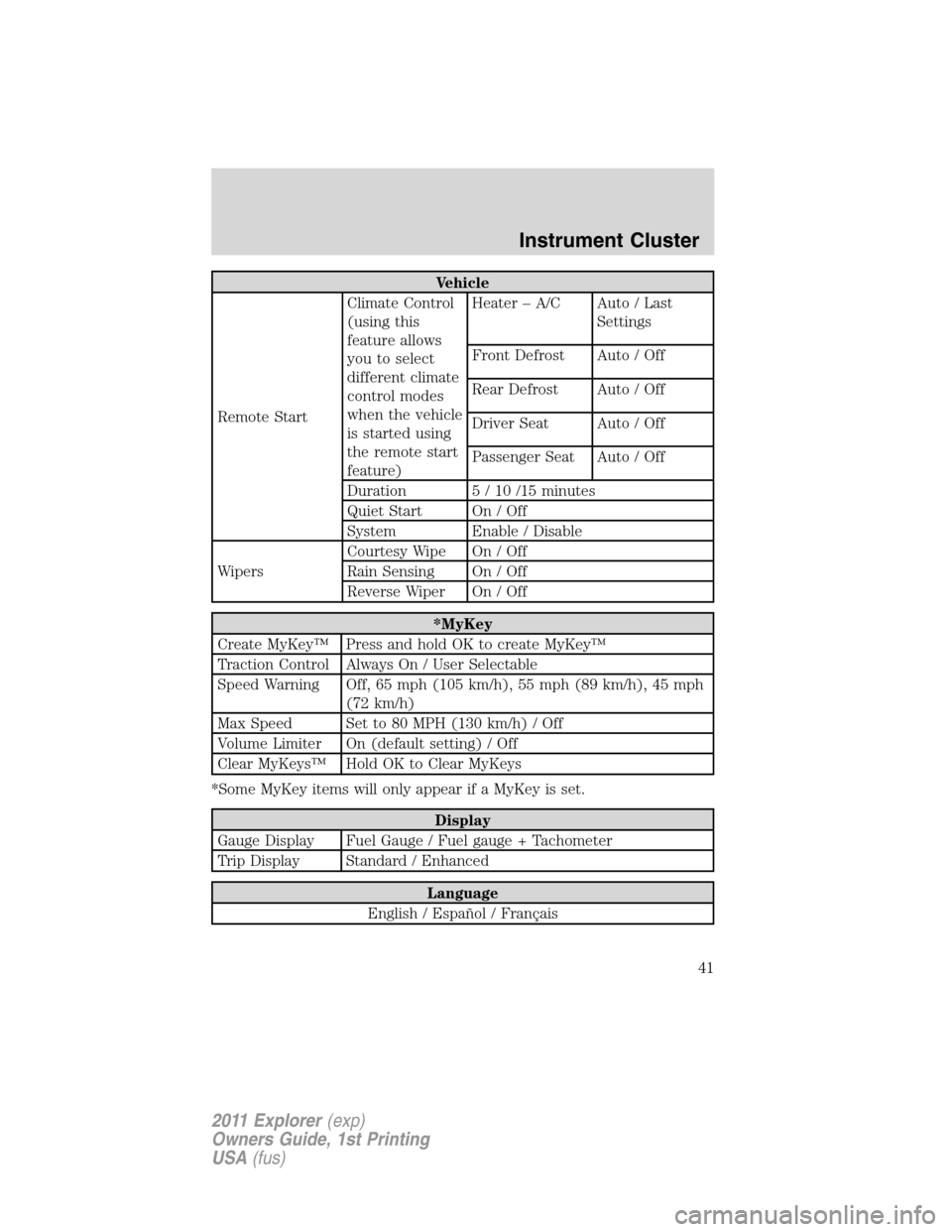
Vehicle
Remote StartClimate Control
(using this
feature allows
you to select
different climate
control modes
when the vehicle
is started using
the remote start
feature)Heater – A/C Auto / Last
Settings
Front Defrost Auto / Off
Rear Defrost Auto / Off
Driver Seat Auto / Off
Passenger Seat Auto / Off
Duration 5 / 10 /15 minutes
Quiet Start On / Off
System Enable / Disable
WipersCourtesy Wipe On / Off
Rain Sensing On / Off
Reverse Wiper On / Off
*MyKey
Create MyKey™ Press and hold OK to create MyKey™
Traction Control Always On / User Selectable
Speed Warning Off, 65 mph (105 km/h), 55 mph (89 km/h), 45 mph
(72 km/h)
Max Speed Set to 80 MPH (130 km/h) / Off
Volume Limiter On (default setting) / Off
Clear MyKeys™ Hold OK to Clear MyKeys
*Some MyKey items will only appear if a MyKey is set.
Display
Gauge Display Fuel Gauge / Fuel gauge + Tachometer
Trip Display Standard / Enhanced
Language
English / Español / Français
Instrument Cluster
41
2011 Explorer(exp)
Owners Guide, 1st Printing
USA(fus)
Page 53 of 449
2. You can press some of the hard buttons to access their respective
menus.
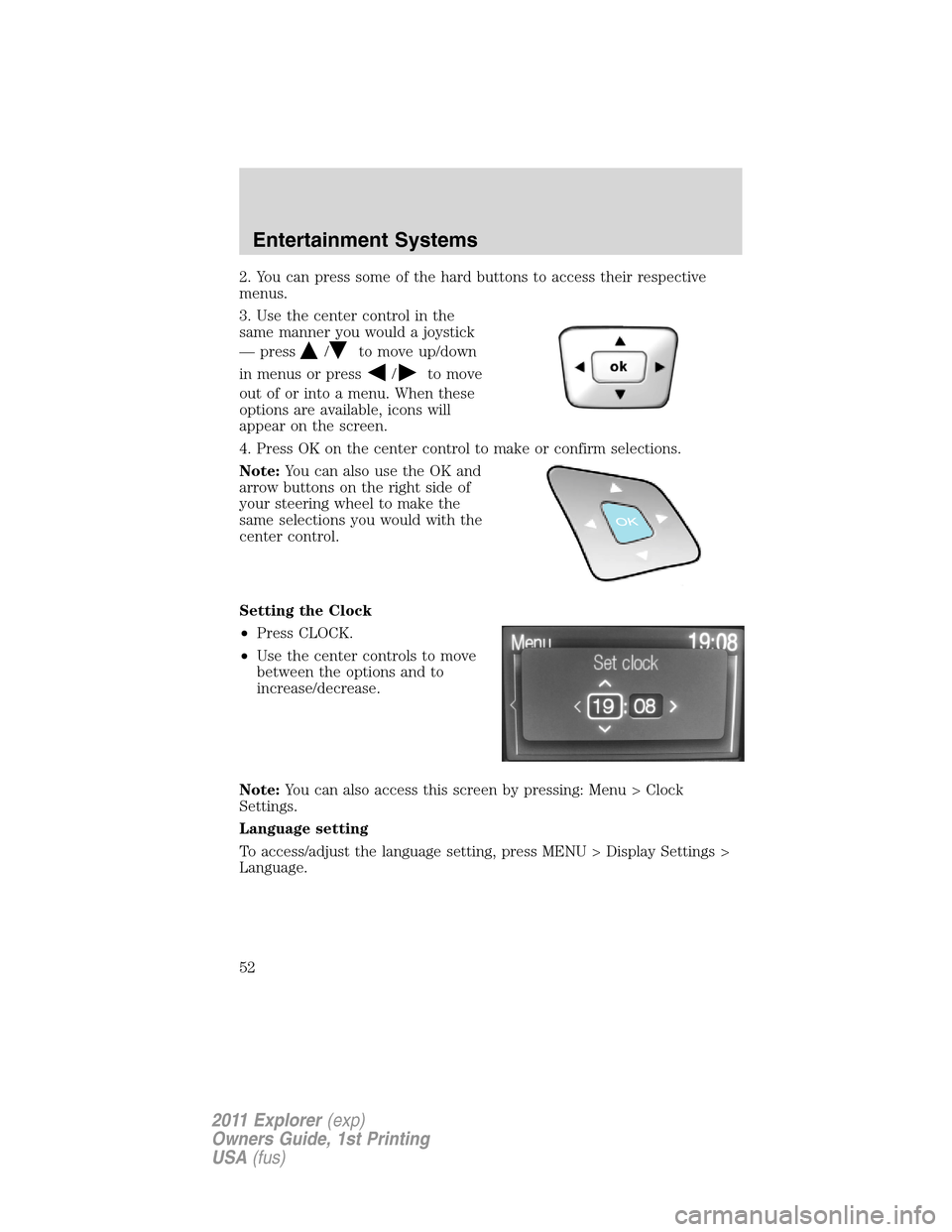
3. Use the center control in the
same manner you would a joystick
— press
/to move up/down
in menus or press
/to move
out of or into a menu. When these
options are available, icons will
appear on the screen.
4. Press OK on the center control to make or confirm selections.
Note:You can also use the OK and
arrow buttons on the right side of
your steering wheel to make the
same selections you would with the
center control.
Setting the Clock
•Press CLOCK.
•Use the center controls to move
between the options and to
increase/decrease.
Note:You can also access this screen by pressing: Menu > Clock
Settings.
Language setting
To access/adjust the language setting, press MENU > Display Settings >
Language.
Entertainment Systems
52
2011 Explorer(exp)
Owners Guide, 1st Printing
USA(fus)