2011 FORD EXPLORER horn
[x] Cancel search: hornPage 139 of 449

POWER DOOR LOCKS
•Press the
control to unlock all
doors.
•Press the
control to lock all
doors.
Smart unlocks for integrated keyhead transmitter (IKT)
This feature helps to prevent you from locking yourself out of the vehicle
if your key is still in the ignition.
When you open one of the front doors and you lock the vehicle with the
power door lock control (on the driver or passenger door trim panel), all
the doors will lock, then all doors will automatically unlock reminding
you that your key is still in the ignition.
The vehicle can still be locked with the key in the ignition by using the
keyless entry keypad with the driver door closed, or by pressing the
control on the transmitter even if the doors are not closed.
If both front doors are closed, the vehicle can be locked by any method,
regardless of whether the key is in the ignition or not.
Smart unlocks for intelligent access keys (IA key) (if equipped)
The smart unlock feature is intended to prevent you from unintentionally
locking your IA key inside your vehicle’s passenger compartment or rear
cargo area.
When you lock your vehicle using the driver or passenger power door
lock control (with the door open, vehicle in park and ignition off), after
you close the door the vehicle will search for an IA key in the passenger
compartment. If an IA key is found inside the vehicle, all of the doors
will immediately unlock and the horn will chirp, indicating that the IA
key is inside.
Locks and Security
138
2011 Explorer(exp)
Owners Guide, 1st Printing
USA(fus)
Page 141 of 449
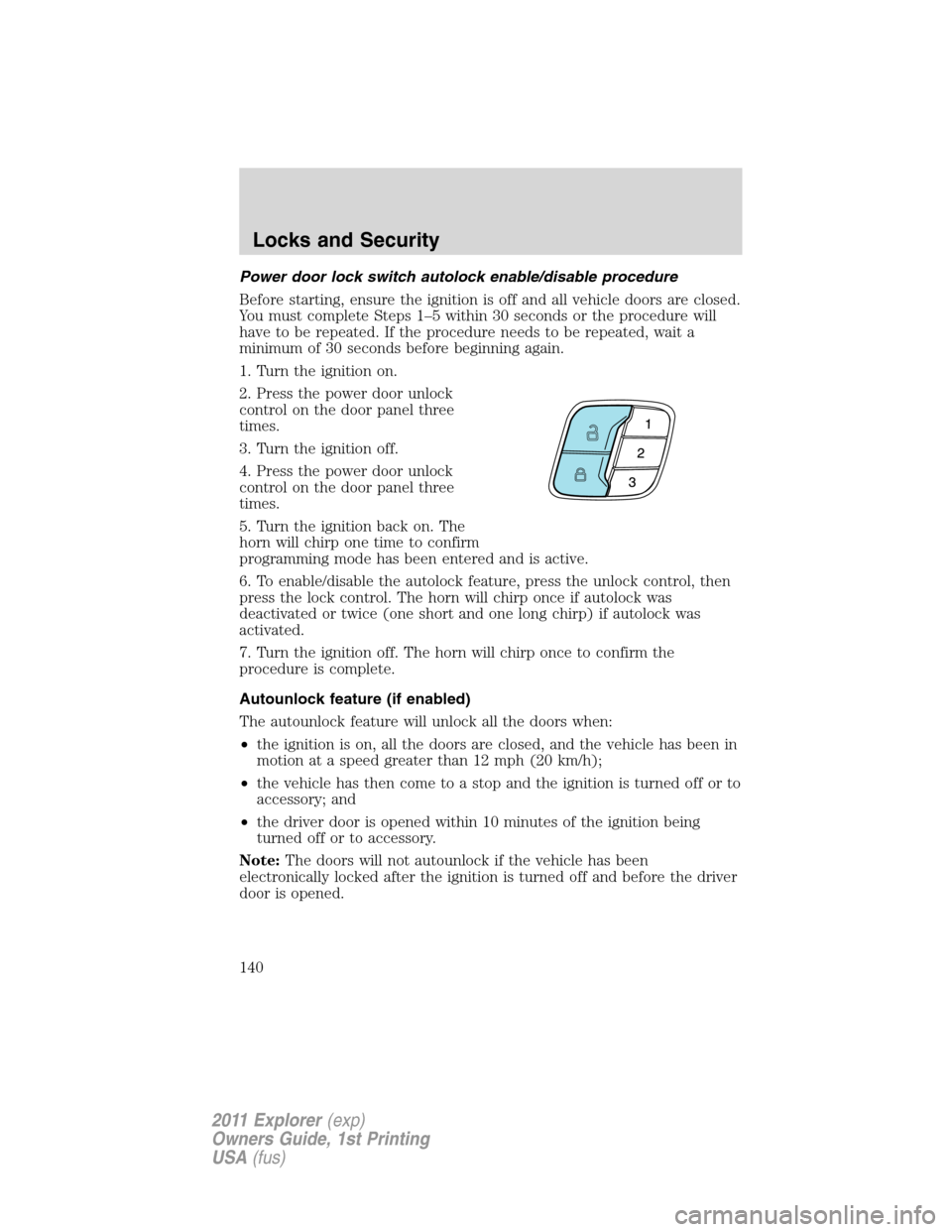
Power door lock switch autolock enable/disable procedure
Before starting, ensure the ignition is off and all vehicle doors are closed.
You must complete Steps 1–5 within 30 seconds or the procedure will
have to be repeated. If the procedure needs to be repeated, wait a
minimum of 30 seconds before beginning again.
1. Turn the ignition on.
2. Press the power door unlock
control on the door panel three
times.
3. Turn the ignition off.
4. Press the power door unlock
control on the door panel three
times.
5. Turn the ignition back on. The
horn will chirp one time to confirm
programming mode has been entered and is active.
6. To enable/disable the autolock feature, press the unlock control, then
press the lock control. The horn will chirp once if autolock was
deactivated or twice (one short and one long chirp) if autolock was
activated.
7. Turn the ignition off. The horn will chirp once to confirm the
procedure is complete.
Autounlock feature (if enabled)
The autounlock feature will unlock all the doors when:
•the ignition is on, all the doors are closed, and the vehicle has been in
motion at a speed greater than 12 mph (20 km/h);
•the vehicle has then come to a stop and the ignition is turned off or to
accessory; and
•the driver door is opened within 10 minutes of the ignition being
turned off or to accessory.
Note:The doors will not autounlock if the vehicle has been
electronically locked after the ignition is turned off and before the driver
door is opened.
Locks and Security
140
2011 Explorer(exp)
Owners Guide, 1st Printing
USA(fus)
Page 142 of 449
Deactivating/activating autounlock feature
Your vehicle comes with the autounlock feature activated; there are three
methods to enable/disable this feature:
•Through your authorized dealer,
•by using a power door unlock/lock sequence, or
•by using the instrument cluster message center. Refer toMessage
centerin theInstrument Clusterchapter.
Note:The autounlock feature can be activated/deactivated
independently of the autolock feature.
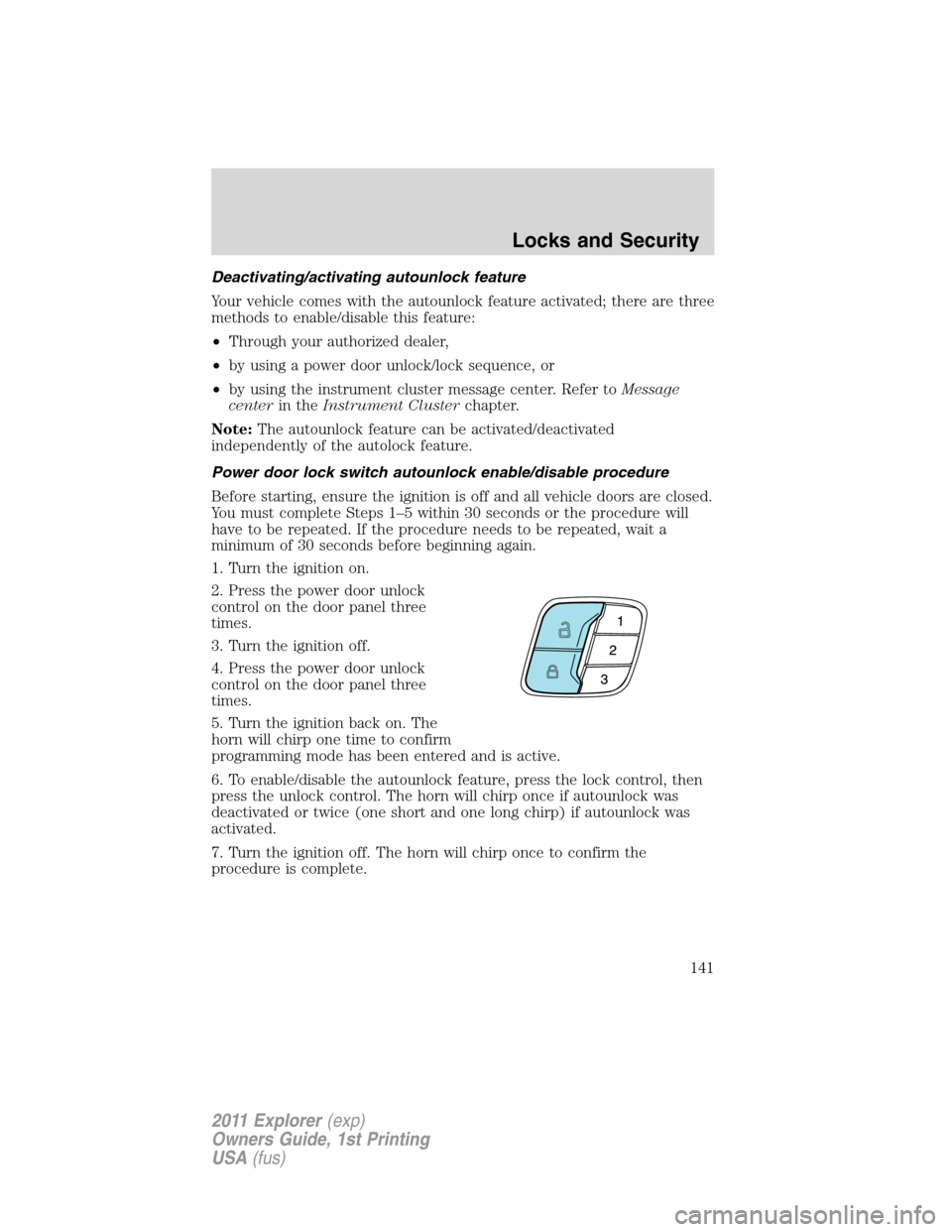
Power door lock switch autounlock enable/disable procedure
Before starting, ensure the ignition is off and all vehicle doors are closed.
You must complete Steps 1–5 within 30 seconds or the procedure will
have to be repeated. If the procedure needs to be repeated, wait a
minimum of 30 seconds before beginning again.
1. Turn the ignition on.
2. Press the power door unlock
control on the door panel three
times.
3. Turn the ignition off.
4. Press the power door unlock
control on the door panel three
times.
5. Turn the ignition back on. The
horn will chirp one time to confirm
programming mode has been entered and is active.
6. To enable/disable the autounlock feature, press the lock control, then
press the unlock control. The horn will chirp once if autounlock was
deactivated or twice (one short and one long chirp) if autounlock was
activated.
7. Turn the ignition off. The horn will chirp once to confirm the
procedure is complete.
Locks and Security
141
2011 Explorer(exp)
Owners Guide, 1st Printing
USA(fus)
Page 145 of 449

To lock the doors, press and hold for half a second the lock area (black
button) on either front door handle.
Activating intelligent access at the liftgate:If your IA key is within
3 feet (1 meter) of the liftgate, you can activate your intelligent access
system by pressing the exterior liftgate release button, hidden in the
handle below the license plate. The liftgate will release and open.
Push button start:The push button start system allows you to start
your vehicle without using a key. Refer toPush button start systemin
theDrivingchapter.
Unlocking the doors/two stage unlock
1. Pressand release to unlock the driver’s door.
Note:The interior lamps and turn signal lamps will illuminate.
2. Press
and release again within three seconds to unlock all the
doors. The turn signals will flash.
The remote entry system activates the illuminated entry feature; this
feature turns on the lamps for 25 seconds or until the ignition is turned
on.
The battery saver feature will turn off the lamps 10 minutes after the
ignition is turned off.
Two stage unlocking may be disabled or re-enabled by simultaneously
pressing the
andcontrols on the transmitter for four seconds
(disabling two stage unlock allows all vehicle doors to unlock
simultaneously). The turn signal lamps will illuminate twice to indicate
that two-stage unlock was enabled or disabled.
If equipped with IA key, when two stage unlocking is disabled, intelligent
access at the driver’s door results in an unlock of all doors (not just the
driver door).
Locking the doors
1. Pressand release to lock all the doors. The turn signal lamps will
illuminate.
2. Press
and release again within three seconds to confirm that all
the doors are closed.Note:The doors will lock again, the horn will chirp
and the turn lamps will illuminate if all the doors and liftgate are closed.
Note:If any door or the liftgate is not closed, or if the hood is not
closed on vehicles equipped with a perimeter alarm or remote start, the
horn will chirp twice and the lamps will not flash.
Locks and Security
144
2011 Explorer(exp)
Owners Guide, 1st Printing
USA(fus)
Page 146 of 449
Car finder
Press
twice within three seconds. The horn will chirp and the turn
lamps will flash. It is recommended that this method be used to locate
your vehicle, rather than using the panic alarm.
Sounding a panic alarm
Press
to activate the alarm. Press again or turn the ignition to on to
deactivate.
Note:The panic alarm will only operate when the ignition is off.
Opening the power liftgate (if equipped)
Presstwice within three seconds to fully unlatch and open the
liftgate.
WARNING:Make sure all persons are clear of the liftgate area
before using power liftgate control.
In order to fully lower and latch the liftgate, press the control twice.
If the liftgate stops mid-travel, it may have detected an obstacle. Check
to ensure the liftgate swing zone is free from obstruction and reset the
power assist by manually closing the liftgate. Normal operation can then
be resumed. Liftgate open/close can be reversed by pressing
twice
within three seconds.
WARNING:Make sure the liftgate is closed to prevent exhaust
fumes from being drawn into the vehicle. This will also prevent
passengers and cargo from falling out. If you must drive with the
liftgate open, keep the vents open so outside air comes into the
vehicle.
Memory feature (seat and mirrors) (if equipped)
The integrated keyhead transmitter (IKT) or intelligent access key (IA
key) allows you to recall the memory seat and power mirrors feature.
Press
to automatically move the seat and power mirrors to the
desired memory position. The mirrors will move to the programmed
position and the seat will move to the easy entry position. The seat will
move to the final position when the ignition is switched out of off (if
easy entry feature is enabled).
Locks and Security
145
2011 Explorer(exp)
Owners Guide, 1st Printing
USA(fus)
Page 151 of 449

To help make the vehicle as comfortable as possible, the engine idle can
be increased during a remote start. You can enable or disable engine idle
increase by selecting Remote Start Quiet in the message center. Refer to
Message centerin theInstrument Clusterchapter.
Many states and provinces have restrictions for the use of remote start.
Check your local and state or provincial laws for specific requirements
regarding remote start systems.
Note:Do not use remote start if your vehicle is low on fuel.
WARNING:To avoid exhaust fumes, do not use remote start if
your vehicle is parked indoors or areas that are not well
ventilated.
The remote start system will not work if:
•The ignition is on.
•The alarm system is triggered.
•The feature has been disabled.
•The hood is not closed.
•Two remote vehicle starts have already been attempted within the last
hour.
•The vehicle is not in P (Park).
•The vehicle battery voltage is too low.
Starting the engine with remote start
The remote start label on your transmitter details the engine starting
procedure. To start the engine using remote start:
Note:Each button press must be done within three seconds of each
other. If this sequence is not followed, the vehicle will not remote start
and the horn will not chirp.
1. Press
to lock all the doors.
2. Press
two times. The exterior
lamps will flash twice.
If for some reason, the system fails to start, the horn will chirp.
Locks and Security
150
2011 Explorer(exp)
Owners Guide, 1st Printing
USA(fus)
Page 159 of 449

8. Verify that the remote entry functions operate (press lock then
unlock, making sure you end in unlock) and that the vehicle starts with
new intelligent access key.
If the intelligent access key has been successfully programmed, it can be
used to activate the intelligent access with push button Start feature and
can be used to start your vehicle.
Note:To program MyKey™ features, refer toMyKey™in this chapter.
PERIMETER ALARM SYSTEM (IF EQUIPPED)
The perimeter alarm system will warn you in case of unauthorized entry
to your vehicle.
When the following types of unauthorized entry occur:
•any door, the hood or the liftgate/trunk is opened without using the
keypad, the remote entry transmitter or the intelligent access
transmitter (if equipped),
•or if the ignition is turned on with an invalid key,
the perimeter alarm will flash the turn signal lamps and sound the horn
up to a total of 10 times.
ARMING THE SYSTEM
The system is ready to arm whenever the ignition is off. To arm the
system, do one of the following:
•Press the
control on the remote entry transmitter.
Note:If you press the
control twice on the remote entry
transmitter within three seconds, the horn will chirponceto let you
know that all doors, the hood and the liftgate/trunk are closed. If any
of these are not closed, the horn will chirptwiceto warn you that
they are still open.
•Press the driver or passenger interior door lock control
while a
front door is open, then close the door.
•Lock the doors using the intelligent access (if equipped) method
(press the lock area in either front door handle).
•Press and hold the 7•8 and 9•0 controls together on the keyless
entry pad to lock the doors (driver’s door must be closed).
Locks and Security
158
2011 Explorer(exp)
Owners Guide, 1st Printing
USA(fus)
Page 160 of 449
After locking the doors using any of the methods above, the turn signal
lamps will flash once indicating that the perimeter alarm is in the
pre-armed mode and will become fully armed in 20 seconds.
When fully armed (after the 20 second pre-arm mode), any IA keys (if
equipped) found inside the vehicle are disabled/inoperable and will not
start the engine. Press
button to re-enable them.
Disarming the system
To disarm the system, do any of the following:
•Pressing the power door unlock control within the 20-second,
pre-armed mode will disarm the system.
•Unlock the doors by pressing unlock
on the remote entry
transmitter.
•Unlock the doors by using your keyless entry pad.
•Enter the vehicle using intelligent access (if equipped).
•Turn the ignition on with a valid key (if equipped with IKT only).
•Press the panic control
on the remote entry transmitter. The alarm
system will still be armed, but this shuts off the horn and turn lamps
when the alarm is sounding.
•Unlock the doors using a key. If you use this method the system will
not disarm, but you will have an opportunity to disarm the vehicle
once entered. See the Note following.
Note:If the driver’s door is unlocked with a key, a chime will sound
when you open the door and the message center will displayTO STOP
ALARM START VEHICLE. When this occurs, you will have 12 seconds
to disarm the alarm using any of the actions above, otherwise the alarm
will trigger.
Perimeter alarm issues
If there seems to be a potential perimeter alarm system problem with
your vehicle, ensureALLkeys/remote entry transmitters are brought to
your authorized dealer to aid in troubleshooting.
Locks and Security
159
2011 Explorer(exp)
Owners Guide, 1st Printing
USA(fus)