Page 2 of 449
Introduction 4
Instrument Cluster 14
Warning lights and chimes 14
Gauges 21
Message center 23
Entertainment Systems 51
MyFord™ system 51
Auxiliary input jack (Line in) 60
Climate Controls 63
Manual heating and air conditioning 63
Automatic temperature control 66
Touchscreen features 71
Auxiliary passenger climate control 74
Rear window defroster 75
Lights 77
Headlamps 77
Turn signal control 82
Bulb replacement 84
Driver Controls 92
Windshield wiper/washer control 92
Steering wheel adjustment 94
Power windows 98
Mirrors 100
Speed control 103
Adaptive cruise control 105
Moon roof 114
Locks and Security 130
Keys 130
Locks 138
Anti-theft system 154
Table of Contents
1
2011 Explorer(exp)
Owners Guide, 1st Printing
USA(fus)
Page 16 of 449

Many lights will illuminate when you start your vehicle to make sure the
indicators work. If any light remains on after starting the vehicle, refer to
the respective system warning light for additional information.
Note:Some warning lights are reconfigurable telltale (RTT) indicators.
These indicators display in the lower line of the message center near the
odometer reading. They function the same as a warning light but do not
display on startup.
Service engine soon:The service
engine soon indicator light
illuminates when the ignition is first
turned to the on position to check
the bulb and to indicate whether the vehicle is ready for
Inspection/Maintenance (I/M) testing. Normally, the service engine soon
light will stay on until the engine is cranked, then turn itself off if no
malfunctions are present. However, if after 15 seconds the service engine
soon light blinks eight times, it means that the vehicle is not ready for
I/M testing. See theReadiness for Inspection/Maintenance (I/M)
testingin theMaintenance and Specificationschapter.
Solid illumination after the engine is started indicates the on-board
diagnostics system (OBD-II) has detected a malfunction. Refer to
On-board diagnostics (OBD-II)in theMaintenance and Specifications
chapter. If the light is blinking, engine misfire is occurring which could
damage your catalytic converter. Drive in a moderate fashion (avoid
heavy acceleration and deceleration) and contact your authorized dealer
as soon as possible.
WARNING:Under engine misfire conditions, excessive exhaust
temperatures could damage the catalytic converter, the fuel
system, interior floor coverings or other vehicle components, possibly
causing a fire.
Powertrain malfunction/reduced
power (RTT):Illuminates when a
powertrain or an 4WD fault has
been detected. Contact your
authorized dealer as soon as possible.
Instrument Cluster
15
2011 Explorer(exp)
Owners Guide, 1st Printing
USA(fus)
Page 20 of 449

Low washer fluid (RTT):
Illuminates when the windshield
washer fluid is low.
Turn signal:Illuminates when the
left or right turn signal or the
hazard lights are turned on. If the
indicators flash faster, check for a burned out bulb.
High beams:Illuminates when the
high beam headlamps are turned on.
Fog lamps:Illuminates when the
fog lamps are turned on.
Grade assist (if equipped):
Illuminates when grade assist is
turned on.
Transmission Tow/Haul Feature
(RTT) (if equipped):Displays
when the Tow/Haul feature has been
activated. Refer to theDriving
chapter for transmission function and operation. If the light flashes
steadily, have the system serviced immediately, damage to the
transmission could occur.
Hill descent (if equipped):
Illuminates when hill descent is
turned on.
Terrain management (if
equipped):Illuminates when a
terrain management mode is
selected. SeeTerrain management
in theDrivingchapter for more
information.
Instrument Cluster
19
2011 Explorer(exp)
Owners Guide, 1st Printing
USA(fus)
Page 85 of 449

Third row cargo lamp
The dome lamp lights when:
•any door is opened.
•the instrument panel dimmer
button is pressed until the
courtesy lamp comes on.
•any of the remote entry controls
are pressed and the ignition is
off.
The courtesy lamp can also be
turned on and off manually by
pressing the control switch.
Battery saver
The battery saver will shut off the exterior lamps and interior lamps,
except the hazard warning lamps if activated, 10 minutes after the
ignition control has been turned off. The system will not turn off the
parking lamps if they are on.
BULB REPLACEMENT
Lamp assembly condensation
Exterior lamps are vented to accommodate normal changes in pressure.
Condensation can be a natural by-product of this design. When moist air
enters the lamp assembly through the vents, there is a possibility that
condensation can occur when the temperature is cold. When normal
condensation occurs, a thin film of mist can form on the interior of the
lens. The thin mist eventually clears and exits through the vents during
normal operation. Clearing time may take as long as 48 hours under dry
weather conditions.
Examples of acceptable condensation are:
•Presence of thin mist (no streaks, drip marks or droplets)
•Fine mist covers less than 50% of the lens
Examples of unacceptable moisture (usually caused by a lamp water
leak) are:
•Water puddle inside the lamp
•Large water droplets, drip marks or streaks present on the interior of
the lens
Take your vehicle to a dealer for service if any of the above conditions of
unacceptable moisture are present.
Lights
84
2011 Explorer(exp)
Owners Guide, 1st Printing
USA(fus)
Page 86 of 449
Using the right bulbs
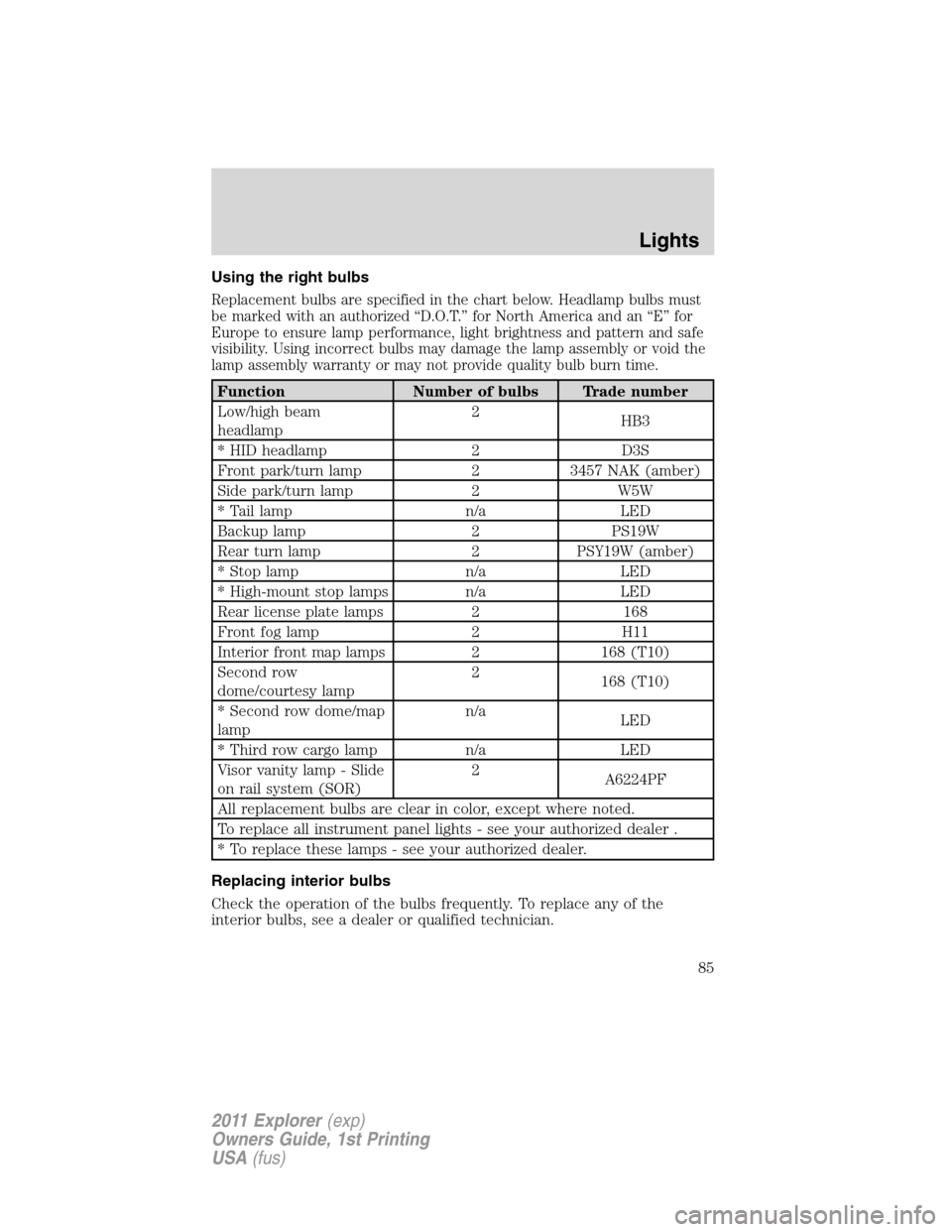
Replacement bulbs are specified in the chart below. Headlamp bulbs must
be marked with an authorized “D.O.T.” for North America and an “E” for
Europe to ensure lamp performance, light brightness and pattern and safe
visibility. Using incorrect bulbs may damage the lamp assembly or void the
lamp assembly warranty or may not provide quality bulb burn time.
Function Number of bulbs Trade number
Low/high beam
headlamp2
HB3
* HID headlamp 2 D3S
Front park/turn lamp 2 3457 NAK (amber)
Side park/turn lamp 2 W5W
* Tail lamp n/a LED
Backup lamp 2 PS19W
Rear turn lamp 2 PSY19W (amber)
* Stop lamp n/a LED
* High-mount stop lamps n/a LED
Rear license plate lamps 2 168
Front fog lamp 2 H11
Interior front map lamps 2 168 (T10)
Second row
dome/courtesy lamp2
168 (T10)
* Second row dome/map
lampn/a
LED
* Third row cargo lamp n/a LED
Visor vanity lamp - Slide
on rail system (SOR)2
A6224PF
All replacement bulbs are clear in color, except where noted.
To replace all instrument panel lights - see your authorized dealer .
* To replace these lamps - see your authorized dealer.
Replacing interior bulbs
Check the operation of the bulbs frequently. To replace any of the
interior bulbs, see a dealer or qualified technician.
Lights
85
2011 Explorer(exp)
Owners Guide, 1st Printing
USA(fus)
Page 87 of 449
Replacing exterior bulbs
Check the operation of all the bulbs frequently.
Replacing headlamp bulbs
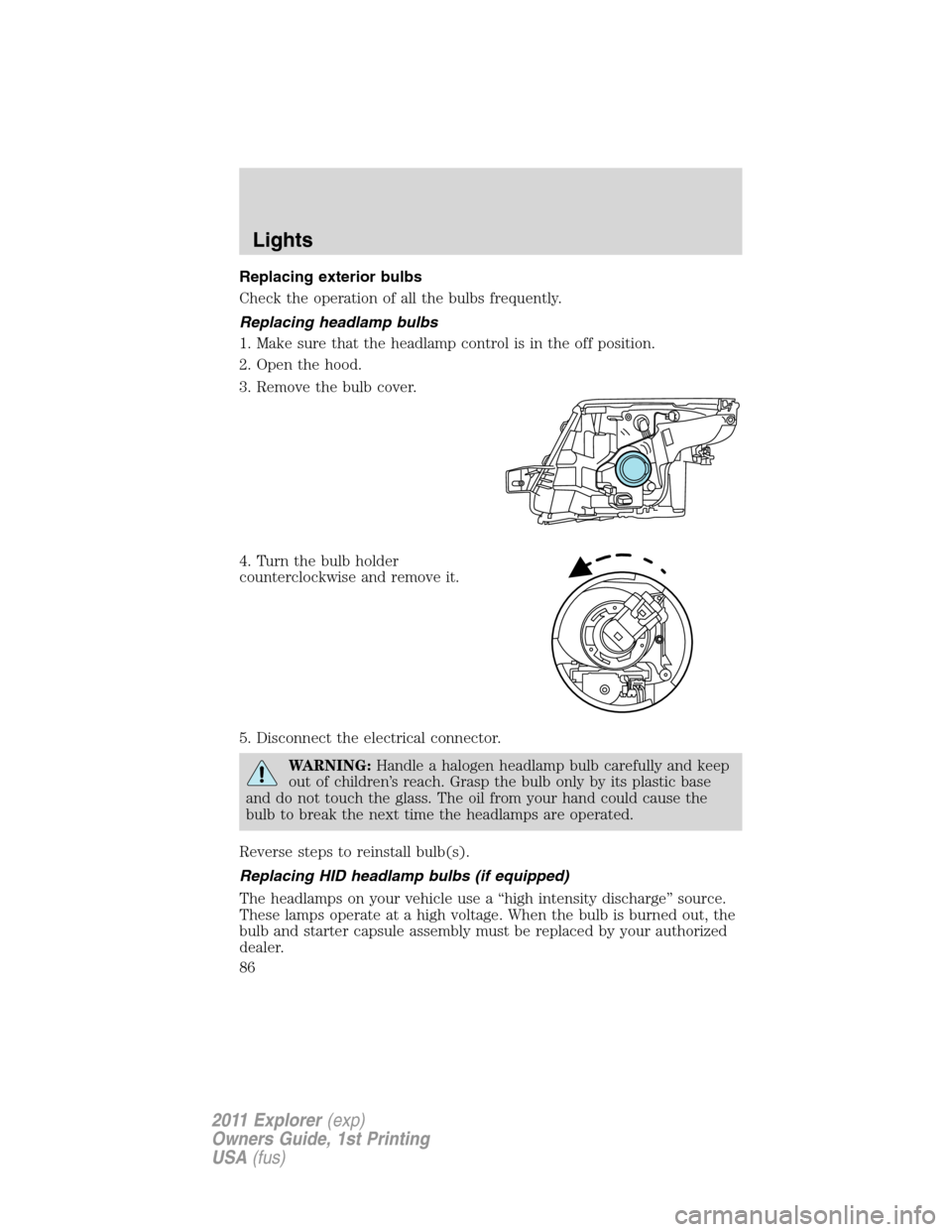
1. Make sure that the headlamp control is in the off position.
2. Open the hood.
3. Remove the bulb cover.
4. Turn the bulb holder
counterclockwise and remove it.
5. Disconnect the electrical connector.
WARNING:Handle a halogen headlamp bulb carefully and keep
out of children’s reach. Grasp the bulb only by its plastic base
and do not touch the glass. The oil from your hand could cause the
bulb to break the next time the headlamps are operated.
Reverse steps to reinstall bulb(s).
Replacing HID headlamp bulbs (if equipped)
The headlamps on your vehicle use a “high intensity discharge” source.
These lamps operate at a high voltage. When the bulb is burned out, the
bulb and starter capsule assembly must be replaced by your authorized
dealer.
Lights
86
2011 Explorer(exp)
Owners Guide, 1st Printing
USA(fus)
Page 88 of 449
Replacing front parking lamp/turn signal bulbs
1. Make sure that the headlamp
control is in the off position.
2. Open the hood.
3. Remove the hood overslam
bumper tower to service park/turn
bulb (if needed).
4. Rotate the bulb socket
counterclockwise and remove it
from the lamp assembly.
5. Pull the bulb straight out of the
socket.
Reverse steps to reinstall bulb(s).
Lights
87
2011 Explorer(exp)
Owners Guide, 1st Printing
USA(fus)
Page 89 of 449
Replacing sidemarker bulbs
1. Make sure that the headlamp
control is in the off position.
2. Open the hood.
3. Remove the hood overslam
bumper tower to service sidemarker
bulb (if needed).
4. Rotate the bulb socket
counterclockwise and remove it
from the lamp assembly.
Lights
88
2011 Explorer(exp)
Owners Guide, 1st Printing
USA(fus)