2011 FORD EXPLORER ECU
[x] Cancel search: ECUPage 225 of 449

WARNING:The standardized spacing for LATCH lower anchors
is 280 mm (11 inches) center to center. Do not use LATCH
lower anchors for the center seating position unless the child seat
manufacturer’s instructions permit and specify using anchors spaced at
least as far apart as those in this vehicle.
Each time you use the safety seat, check that the seat is properly
attached to the lower anchors and tether anchor, if applicable. Tug the
child seat from side to side and forward and back where it is secured to
the vehicle. The seat should move less than one inch when you do this
for a proper installation.
If the safety seat is not anchored properly, the risk of a child being
injured in a crash greatly increases.
Combining safety belt and LATCH lower anchors for attaching
child safety seats
When used in combination, either the safety belt or the LATCH lower
anchors may be attached first, provided a proper installation is achieved.
Attach the tether strap afterward, if included with the child seat. Refer
toRecommendations for attaching child safety restraints for children
in this chapter.
Attaching child safety seats with tether straps
Many forward-facing child safety seats include a tether strap which
extends from the back of the child safety seat and hooks to an anchoring
point called the top tether anchor. Tether straps are available as an
accessory for many older safety seats. Contact the manufacturer of your
child seat for information about ordering a tether strap, or to obtain a
longer tether strap if the tether strap on your safety seat does not reach
the appropriate top tether anchor in the vehicle.
The rear seats of your vehicle are equipped with built-in tether strap
anchors located behind the seats as described below.
Seating and Safety Restraints
224
2011 Explorer(exp)
Owners Guide, 1st Printing
USA(fus)
Page 228 of 449

Third row seating position
For the third row seating position,
route the child safety seat tether
strap over the seatback, under the
head restraint, and between the
head restraint posts.
Note: The cargo tie-downs at the
rear edge of the floor are not tether
anchors.
3. Clip the tether hook to the
anchor as shown–the tether hook
may be twisted 1/2 turn to improve
installation.
If the tether strap is clipped incorrectly, the child safety seat may not be
retained properly in the event of a collision.
4. Tighten the child safety seat tether strap according to the
manufacturer’s instructions.
If the safety seat is not anchored properly, the risk of a child being
injured in a collision greatly increases.
If your child restraint system is equipped with a tether strap, and the
child restraint manufacturer recommends its use, Ford also recommends
its use.
Child booster seats
The belt-positioning booster (booster seat) is used to improve the fit of
the vehicle safety belt. Children outgrow a typical child seat (e.g.,
convertible or toddler seat) when they weigh about 40 lb (18 kg) and are
around four (4) years of age. Consult your child safety seat owner guide
for the weight, height, and age limits specific to your child safety seat.
Keep your child in the child safety seat if it properly fits the child,
remains appropriate for their weight, height and age AND if properly
secured to the vehicle.
Seating and Safety Restraints
227
2011 Explorer(exp)
Owners Guide, 1st Printing
USA(fus)
Page 253 of 449
To restore the full functionality of the tire pressure monitoring system,
have the damaged road wheel/tire repaired and remounted on your
vehicle. For additional information, refer toChanging tires with a
TPMSin this section.
When you believe your system is not operating properly
The main function of the tire pressure monitoring system is to warn you
when your tires need air. It can also warn you in the event the system is
no longer capable of functioning as intended. Please refer to the
following chart for information concerning your tire pressure monitoring
system:
Low tire pressure
warning lightPossible
causeCustomer action required
Solid warning light Tire(s)
under-inflated1. Check your tire pressure to
ensure tires are properly inflated;
refer toInflating your tiresin this
chapter.
2. After inflating your tires to the
manufacturer’s recommended
inflation pressure as shown on the
Tire Label (located on the edge of
driver’s door or the B-Pillar), the
vehicle must be driven for at least
two minutes over 20 mph (32 km/h)
before the light will turn off.
Spare tire in
useYour temporary spare tire is in use.
Repair the damaged road wheel/tire
and reinstall it on the vehicle to
restore system functionality. For a
description on how the system
functions, refer toWhen your
temporary spare tire is installed
in this section.
TPMS
malfunctionIf your tires are properly inflated
and your spare tire is not in use and
the light remains on, contact your
authorized dealer as soon as
possible.
Tires, Wheels and Loading
252
2011 Explorer(exp)
Owners Guide, 1st Printing
USA(fus)
Page 254 of 449

Low tire pressure
warning lightPossible
causeCustomer action required
Flashing warning
lightSpare tire in
useYour temporary spare tire is in use.
Repair the damaged road wheel and
re-mount it on the vehicle to restore
system functionality. For a
description of how the system
functions under these conditions,
refer toWhen your temporary
spare tire is installedin this
section.
TPMS
malfunctionIf your tires are properly inflated
and your spare tire is not in use and
the TPMS warning light still flashes,
contact your authorized dealer as
soon as possible.
When inflating your tires
When putting air into your tires (such as at a gas station or in your
garage), the tire pressure monitoring system may not respond
immediately to the air added to your tires.
It may take up to two minutes of driving over 20 mph (32 km/h) for the
light to turn off after you have filled your tires to the recommended
inflation pressure.
How temperature affects your tire pressure
The tire pressure monitoring system (TPMS) monitors tire pressure in
each pneumatic tire. While driving in a normal manner, a typical
passenger tire inflation pressure may increase approximately 2 to 4 psi
(14 to 28 kPa) from a cold start situation. If the vehicle is stationary
overnight with the outside temperature significantly lower than the
daytime temperature, the tire pressure may decrease approximately 3 psi
(21 kPa) for a drop of 30°F (17°C) in ambient temperature. This lower
pressure value may be detected by the TPMS as being significantly lower
than the recommended inflation pressure and activate the TPMS warning
light for low tire pressure. If the low tire pressure warning light is on,
visually check each tire to verify that no tire is flat. (If one or more tires
are flat, repair as necessary.) Check air pressure in the road tires. If any
tire is under-inflated, carefully drive the vehicle to the nearest location
where air can be added to the tires. Inflate all the tires to the
recommended inflation pressure.
Tires, Wheels and Loading
253
2011 Explorer(exp)
Owners Guide, 1st Printing
USA(fus)
Page 277 of 449
the parking brake, and then inspect the accelerator pedal for any
interferences. If none are found and the condition persists, have your
vehicle towed to the nearest dealer.
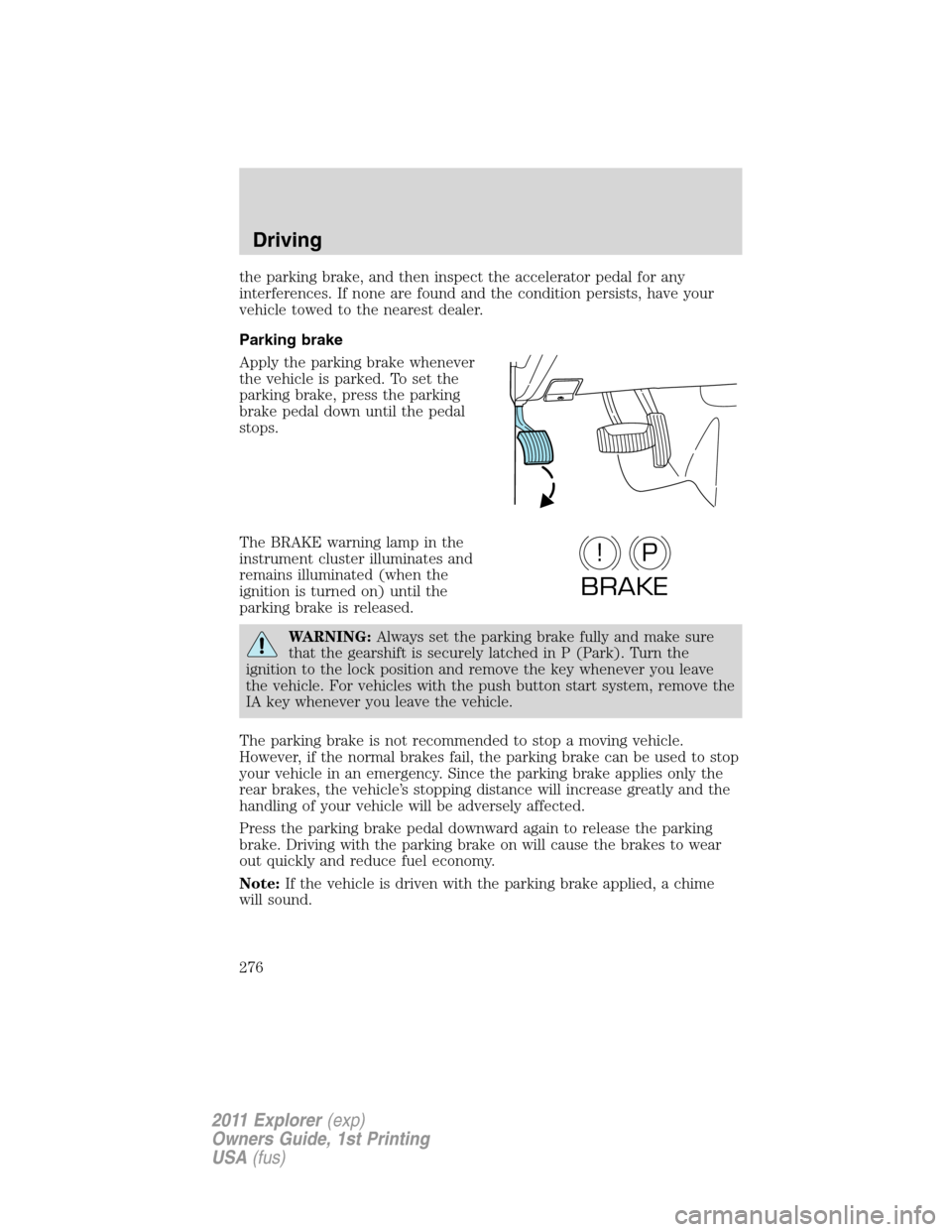
Parking brake
Apply the parking brake whenever
the vehicle is parked. To set the
parking brake, press the parking
brake pedal down until the pedal
stops.
The BRAKE warning lamp in the
instrument cluster illuminates and
remains illuminated (when the
ignition is turned on) until the
parking brake is released.
WARNING:Always set the parking brake fully and make sure
that the gearshift is securely latched in P (Park). Turn the
ignition to the lock position and remove the key whenever you leave
the vehicle. For vehicles with the push button start system, remove the
IA key whenever you leave the vehicle.
The parking brake is not recommended to stop a moving vehicle.
However, if the normal brakes fail, the parking brake can be used to stop
your vehicle in an emergency. Since the parking brake applies only the
rear brakes, the vehicle’s stopping distance will increase greatly and the
handling of your vehicle will be adversely affected.
Press the parking brake pedal downward again to release the parking
brake. Driving with the parking brake on will cause the brakes to wear
out quickly and reduce fuel economy.
Note:If the vehicle is driven with the parking brake applied, a chime
will sound.
P!
BRAKE
Driving
276
2011 Explorer(exp)
Owners Guide, 1st Printing
USA(fus)
Page 290 of 449

P (Park)
This position locks the transmission
and prevents the front wheels from
turning.
To put your vehicle in gear:
•Press the brake pedal
•Move the gearshift lever into the
desired gear
To put your vehicle in P (Park):
•Come to a complete stop
•Move the gearshift lever and securely latch it in P (Park)
WARNING:Always set the parking brake fully and make sure
the gearshift is latched in P (Park). Turn the ignition to the off
position and remove the key whenever you leave your vehicle.
R (Reverse)
With the gearshift lever in R (Reverse), the vehicle will move backward.
Always come to a complete stop before shifting into and out of R
(Reverse).
N (Neutral)
With the gearshift lever in N (Neutral), the vehicle can be started and is
free to roll. Hold the brake pedal down while in this position.
D (Drive) with Overdrive
The normal driving position for the best fuel economy. Transmission
operates in gears one through six.
The automatic transmission shift strategy has the ability to detect hilly
terrain or mountainous areas and will provide a limited amount of grade
assist features automatically. Refer to D (Drive) with Grade assist or
SelectShift for more information.
D (Drive) with Tow on
The tow feature improves transmission operation when towing a trailer
or a heavy load. All transmission gear ranges are available when using
tow.
Tow can be activated by pressing theTOWswitch located on the
instrument panel by the headlamp control. TheTOW/HAULmessage
will illuminate in the instrument cluster.
PRNDL
Driving
289
2011 Explorer(exp)
Owners Guide, 1st Printing
USA(fus)
Page 296 of 449
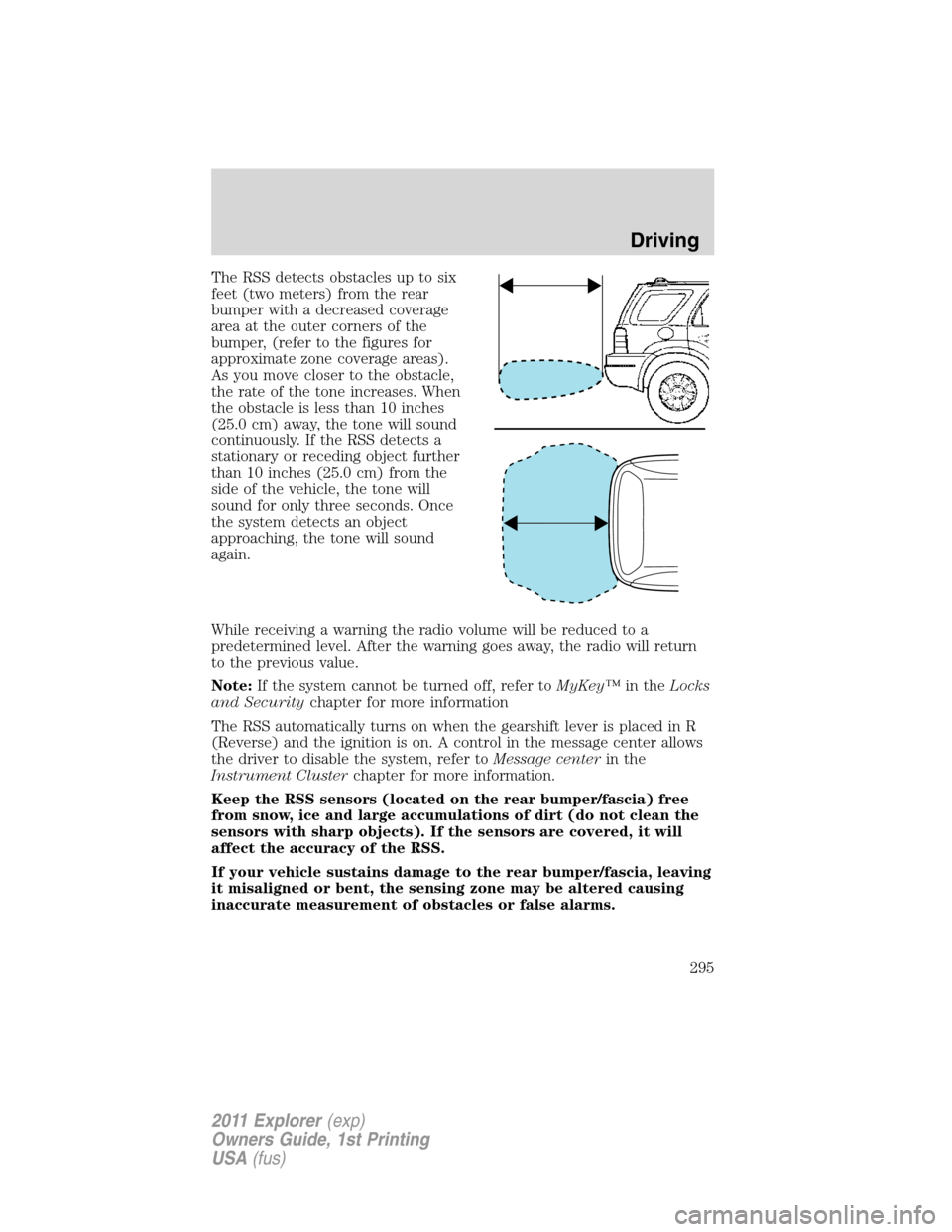
The RSS detects obstacles up to six
feet (two meters) from the rear
bumper with a decreased coverage
area at the outer corners of the
bumper, (refer to the figures for
approximate zone coverage areas).
As you move closer to the obstacle,
the rate of the tone increases. When
the obstacle is less than 10 inches
(25.0 cm) away, the tone will sound
continuously. If the RSS detects a
stationary or receding object further
than 10 inches (25.0 cm) from the
side of the vehicle, the tone will
sound for only three seconds. Once
the system detects an object
approaching, the tone will sound
again.
While receiving a warning the radio volume will be reduced to a
predetermined level. After the warning goes away, the radio will return
to the previous value.
Note:If the system cannot be turned off, refer toMyKey™in theLocks
and Securitychapter for more information
The RSS automatically turns on when the gearshift lever is placed in R
(Reverse) and the ignition is on. A control in the message center allows
the driver to disable the system, refer toMessage centerin the
Instrument Clusterchapter for more information.
Keep the RSS sensors (located on the rear bumper/fascia) free
from snow, ice and large accumulations of dirt (do not clean the
sensors with sharp objects). If the sensors are covered, it will
affect the accuracy of the RSS.
If your vehicle sustains damage to the rear bumper/fascia, leaving
it misaligned or bent, the sensing zone may be altered causing
inaccurate measurement of obstacles or false alarms.
Driving
295
2011 Explorer(exp)
Owners Guide, 1st Printing
USA(fus)
Page 304 of 449

Activating/deactivating collision warning system
To turn the warning system and/or chime on or off and set the warning
sensitivity <– –>, refer toMessage centerin theInstrument Cluster
chapter.
Note:If the system cannot be turned off in a MyKey™ equipped vehicle,
refer toMyKey™in theLocks and Securitychapter for more
information.
Note:If collision warnings are perceived as being too frequent or
disturbing then the warning sensitivity can be reduced, though the
manufacturer recommends using the highest sensitivity setting where
possible. Setting lower sensitivity would lead to fewer and later system
warnings. Refer to theMessage centerin theInstrument Cluster
chapter for instructions on reducing the sensitivity.
ACTIVE PARK ASSIST (APA) (IF EQUIPPED)
Active park assist (APA) will detect an available parallel parking space
and automatically steer the vehicle into the space (hands-free) while you
control the accelerator, gearshift and brakes. The system will visually
and/or audibly instruct the driver to park the vehicle.
WARNING:This system is designed to be a supplementary park
aid. It may not work in all conditions and is not intended to
replace the driver’s attention and judgment. The driver is responsible
for avoiding hazards and maintaining a safe distance and speed, even
when the APA is in use.
Conditions in which the system may not work:
•Something passes between the front bumper and the space such as a
pedestrian or cyclist
•The edge of the neighboring parked vehicle is high from the ground
such as a bus, tow truck or flatbed truck
Driving
303
2011 Explorer(exp)
Owners Guide, 1st Printing
USA(fus)