Page 39 of 449

Enhanced trip display
•Trip distance — shows the accumulated trip distance
•Average fuel economy — shows the average fuel economy for a given
trip.
•Estimated amount of fuel consumed — shows the amount of fuel used
for a given trip.
•Elapsed trip time — timer stops when the vehicle is turned off and
restarts when the vehicle is restarted.
Press OK to pause the Trip 1 or 2 screen. Press again to un-pause.
Press and hold OK to reset the currently displayed trip information.
Fuel Economy
Press the right arrow on the left steering wheel mounted button when
fuel economy is selected. The boxes in the upper right corner of the
screen indicate that there are multiple screens that you can navigate
through. Each press of the right arrow will navigate to the next screen
until the last screen is reached. The white highlighted box indicates
which of the screens you are currently viewing:
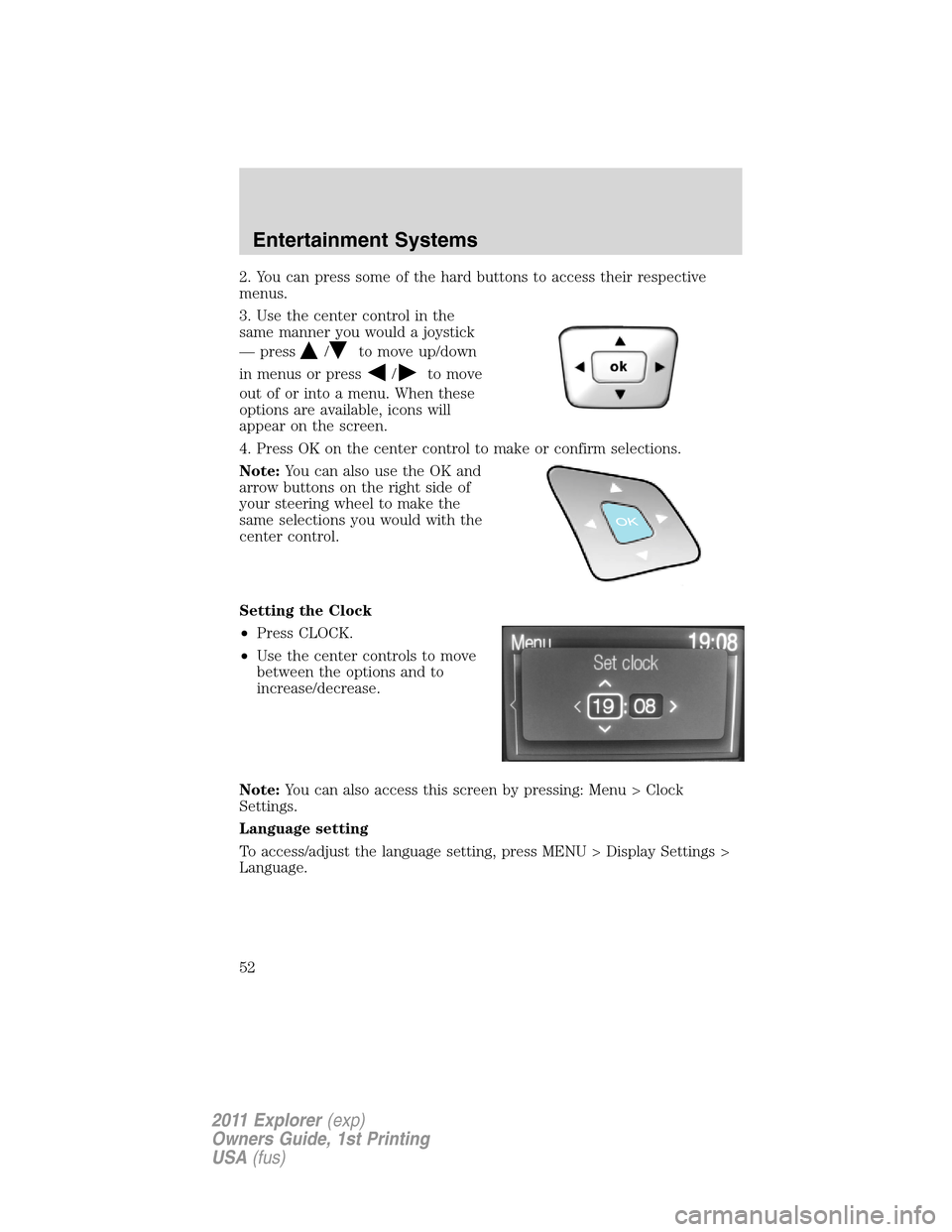
Instant fuel economy
Shown with vertical bar tachometer
enabled
•This display shows a visual graph
of your instantaneous fuel
economy. Press the right arrow to
reach the other fuel displays and
press the left arrow once to
return to the previous display.
F6
4 139.5 mi Trip 1
28.5
MPG300.5 GAL
00:58:44
RPM
1000+
2
0
01234.5mi
E
F6
4
RPM
1000+
2
0
01234.5mi Inst. Fuel Economy
E
Inst
Instrument Cluster
38
2011 Explorer(exp)
Owners Guide, 1st Printing
USA(fus)
Page 46 of 449
WASHER FLUID LEVEL LOW— Indicates the washer fluid reservoir
is less than one quarter full. Check the washer fluid level. Refer to
Windshield washer fluidin theMaintenance and Specifications
chapter.
LOW TIRE PRESSURE— Displayed when one or more tires on your
vehicle have low tire pressure. Refer toInflating your tiresin theTires,
Wheels and Loadingchapter.
TIRE PRESSURE MONITOR FAULT— Displayed when the tire
pressure monitoring system is malfunctioning. If the warning stays on or
continues to come on, have the system inspected by your authorized
dealer.
TIRE PRESSURE SENSOR FAULT— Displayed when a tire pressure
sensor is malfunctioning, or your spare tire is in use. For more
information on how the system operates under these conditions, refer to
Understanding your tire pressure monitoring system (TPMS)in the
Tires, Wheels and Loadingchapter. If the warning stays on or
continues to come on, contact your authorized dealer as soon as
possible.
POWER STEERING ASSIST FAULT— The power steering system
has disabled power steering assist due to a system error, service is
required.
SERVICE POWER STEERING— The power steering system has
detected a condition that requires service.
SERVICE POWER STEERING NOW— The power steering system
has detected a condition within the power steering system that requires
service immediately.
BUCKLE UP TO UNMUTE AUDIO— Displayed when a MyKey™ is in
use and Belt-Minder�is activated. Refer toMyKey™in theLocks and
Securitychapter for more information.
REMOVE OBJECTS NEAR PASS SEAT— Displayed when objects
are by the passenger seat. After the objects are moved away from the
seat, if the warning stays on or continues to come on contact your
authorized dealer as soon as possible.
CRUISE CONTROL AUTOMATIC BRAKING TURNED OFF (if
equipped)— Displayed when adaptive cruise control automatic braking
is turned off.
Instrument Cluster
45
2011 Explorer(exp)
Owners Guide, 1st Printing
USA(fus)
Page 53 of 449
2. You can press some of the hard buttons to access their respective
menus.
3. Use the center control in the
same manner you would a joystick
— press
/to move up/down
in menus or press
/to move
out of or into a menu. When these
options are available, icons will
appear on the screen.
4. Press OK on the center control to make or confirm selections.
Note:You can also use the OK and
arrow buttons on the right side of
your steering wheel to make the
same selections you would with the
center control.
Setting the Clock
•Press CLOCK.
•Use the center controls to move
between the options and to
increase/decrease.
Note:You can also access this screen by pressing: Menu > Clock
Settings.
Language setting
To access/adjust the language setting, press MENU > Display Settings >
Language.
Entertainment Systems
52
2011 Explorer(exp)
Owners Guide, 1st Printing
USA(fus)
Page 95 of 449

Reverse wiper feature:The rear wiper will be automatically activated in
an intermittent setting when shifting into R (Reverse) if the front wipers
are activated. This feature may be enabled/disabled through the message
center. Refer toMessage centerin theInstrument Clusterchapter.
TILT/TELESCOPE STEERING WHEEL
To adjust the steering wheel:
1. Pull the lever down to unlock the
steering column.
2. While the lever is in the down
position, move the steering wheel
up or down and in or out until you
find the desired position.
3. While holding the steering wheel in
place, pull the lever up to its original
position to lock the steering column.
WARNING:Never adjust the steering wheel when the vehicle is
moving.
ILLUMINATED VISOR MIRROR (IF EQUIPPED)
Lift the mirror cover to turn on the
visor mirror lamp.
Slide-on-rod feature
Rotate the visor towards the side
window and extend it rearward for
additional sunlight coverage.
Note:To stow the visor back into
the headliner, visor must be
retracted before moving it back
towards the windshield.
Driver Controls
94
2011 Explorer(exp)
Owners Guide, 1st Printing
USA(fus)
Page 104 of 449

POWER ADJUSTABLE FOOT PEDALS (IF EQUIPPED)
The accelerator and brake pedal
should only be adjusted when the
vehicle is stopped and the gearshift
lever is in the P (Park) position.
The control is located on the left
side of the steering column. Press
and hold the rear of the control to
move the pedals toward you. Press
and hold the front of the control to
move the pedals away from you.
WARNING:Never adjust the accelerator and brake pedal with
feet on the pedals while the vehicle is moving.
The accelerator and brake pedal positions are saved when doing a
memory set function and can be recalled along with the vehicle
personality features when a memory position is selected. Refer to
Memory featurein theSeating and Safety Restraintschapter.
SPEED CONTROL (IF EQUIPPED)
With speed control set, you can maintain a set speed without keeping
your foot on the accelerator pedal.
WARNING:Do not use the speed control in heavy traffic or on
roads that are winding, slippery or unpaved.
Using speed control
The speed controls are located on the steering wheel. The following
buttons work with speed control:
SET:Press to set a speed or to
increase or decrease the set speed.
RES (Resume):Press to resume
the set speed.
CNCL (Cancel):Press to cancel
the set speed.
ON/OFF:Press to turn speed
control on or off.
Driver Controls
103
2011 Explorer(exp)
Owners Guide, 1st Printing
USA(fus)
Page 106 of 449

Turning off speed control
To turn off the speed control, press OFF downward or turn off the ignition.
Note:When you turn off the speed control or the ignition, your speed
control set speed memory is erased.
ADAPTIVE CRUISE CONTROL (ACC) (IF EQUIPPED)
Adaptive cruise control (ACC) is much like speed control, only this
system is designed to automatically adjust your speed to maintain a
proper distance between you and the vehicle in front of you in the same
lane. The driver can select from one of four GAP settings, the controls
are located on the steering wheel.
At startup, the system sets the gap
to the last selected setting. Once
activated, the driver can deactivate
the system at any time by pressing
the brake pedal, pressing the
steering wheel ON/OFF control or pressing the RES/CNCL control. In
addition, the driver can temporarily increase the vehicle speed above the
current speed by manually pressing on the accelerator pedal.
WARNING:Always pay close attention to changing road
conditions, especially when using adaptive cruise control.
Adaptive cruise control cannot replace attentive driving. Failing to
follow any of the warnings below or failing to pay attention to the road
may result in a collision, serious injury or death.
WARNING:Adaptive cruise control is not a collision warning or
avoidance system. Additionally, adaptive cruise control will not
detect:
•Stationary or slow moving vehicles below 6 mph (10 km/h).
•Pedestrians or objects in the roadway.
•Oncoming vehicles in the same lane.
WARNING:Do not use the adaptive cruise control when
entering or leaving a highway, in heavy traffic or on roads that
are winding, slippery or unpaved.
WARNING:Do not use in poor visibility, specifically fog, rain,
spray or snow.
Driver Controls
105
2011 Explorer(exp)
Owners Guide, 1st Printing
USA(fus)
Page 107 of 449
Using adaptive cruise control
Note:It is the drivers responsibility to stay alert, drive safely and be in
control of the vehicle at all times.
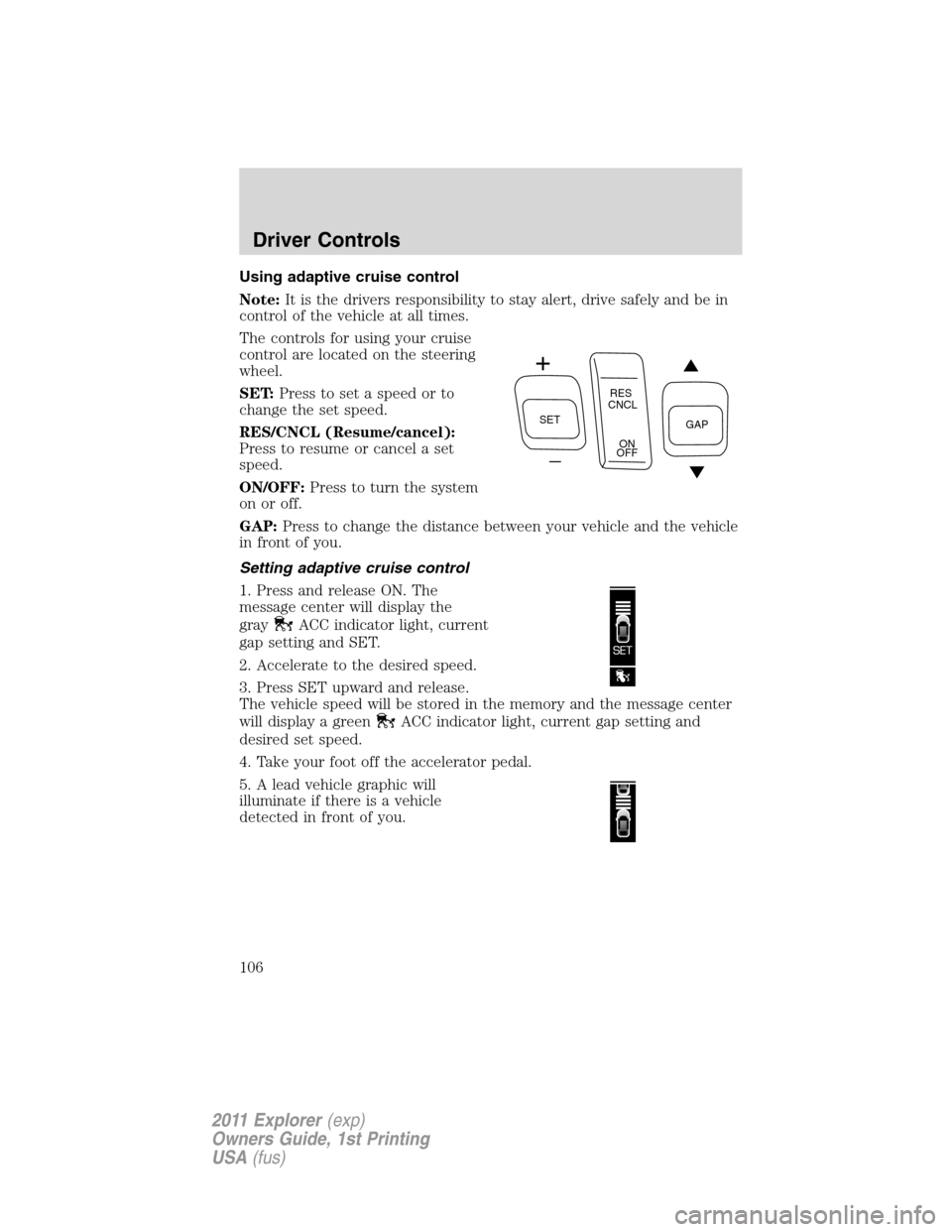
The controls for using your cruise
control are located on the steering
wheel.
SET:Press to set a speed or to
change the set speed.
RES/CNCL (Resume/cancel):
Press to resume or cancel a set
speed.
ON/OFF:Press to turn the system
on or off.
GAP:Press to change the distance between your vehicle and the vehicle
in front of you.
Setting adaptive cruise control
1. Press and release ON. The
message center will display the
gray
ACC indicator light, current
gap setting and SET.
2. Accelerate to the desired speed.
3. Press SET upward and release.
The vehicle speed will be stored in the memory and the message center
will display a green
ACC indicator light, current gap setting and
desired set speed.
4. Take your foot off the accelerator pedal.
5. A lead vehicle graphic will
illuminate if there is a vehicle
detected in front of you.
SETRES
CNCL
ON
OFFGAP
Driver Controls
106
2011 Explorer(exp)
Owners Guide, 1st Printing
USA(fus)
Page 114 of 449

STEERING WHEEL CONTROLS
Audio control features
SEEK:Press up or down to select
the next/previous radio station
preset, CD track or satellite radio (if
equipped) channel preset depending
on which media mode you are in.
MEDIA:Press repeatedly to scroll
through available audio modes.
MUTE:Press to silence the radio.
VOL (Volume):Press up or down
to increase or decrease the volume.
Navigation/SYNC�system hands-free control features (if equipped)
Pressto active the voice
recognition feature. Refer toVoice
recognition featurein theMyFord
Touch™ / MyLincoln Touch™
supplement.
Press
to access phone features.
Refer toPhone featuresin the
MyFord Touch™ / MyLincoln
Touch™supplement.
Cluster display control features
If equipped with the MyFord™
system, this control functions the
same as the center control on the
faceplate. Refer toMyFord system
in theEntertainment Systems
chapter.
If equipped with the MyFord™
Touch system, use this control to
adjust the right side of the cluster display. Navigate through the screen
and press OK to select. The following features are available:
•Entertainment
•Change audio source
•Limited play list
S
E
E
K
M
E
D
IA
M
U
T
E
VOL
S
E
E
KVOL
Driver Controls
113
2011 Explorer(exp)
Owners Guide, 1st Printing
USA(fus)