2011 FORD EXPLORER radio
[x] Cancel search: radioPage 143 of 449

CHILDPROOF DOOR LOCKS
•When these locks are set, the
rear doors cannot be opened from
the inside.
•The rear doors can be opened
from the outside when the
childproof door locks are set, but
the doors are unlocked.
The childproof locks are located on
the rear edge of each rear door and
must be set separately for each
door. Setting the lock for one door
will not automatically set the lock
for both doors.
•Insert the key and turn to the
lock position (key horizontal) to
engage the childproof locks.
•Insert the key and turn to the
unlock position (key vertical) to disengage the childproof locks.
REMOTE ENTRY SYSTEM
The integrated keyhead transmitters (IKTs) and intelligent access keys
(IA key) comply with part 15 of the FCC rules and with RSS-210 of
Industry Canada. Operation is subject to the following two conditions:
(1) This device may not cause harmful interference, and (2) This device
must accept any interference received, including interference that may
cause undesired operation.
Changes or modifications not expressly approved by the party
responsible for compliance could void the user’s authority to
operate the equipment.
The typical operating range for your transmitter is approximately 33 feet
(10 meters) unless equipped with remote start, which allows for greater
range performance. A decrease in operating range could be caused by:
•weather conditions,
•nearby radio towers,
•structures around the vehicle, or
•other vehicles parked next to your vehicle.
Locks and Security
142
2011 Explorer(exp)
Owners Guide, 1st Printing
USA(fus)
Page 144 of 449
The transmitter allows you to:
•remotely unlock the vehicle doors
.
•remotely lock all the vehicle doors
.
•remotely open the power liftgate (if equipped)
.
•remotely start/stop the vehicle (if equipped)
. Refer toRemote
startlater in this section.
•activate the personal alarm
.
•arm and disarm the perimeter anti-theft system.
•operate the illuminated entry feature.
Refer toIntelligent accessin this section for more features.
The remote entry lock/unlock feature operates in any ignition position
except while the vehicle is in the start position. The panic feature
operates with the ignition off.
If there are problems with the remote entry system, make sure to take
ALL integrated keyhead transmitters or intelligent access keys
with you to the authorized dealer in order to aid in troubleshooting the
problem.
Intelligent access (if equipped)
Your intelligent access system uses a radio frequency (RF) signal to
communicate with your vehicle and authorize your vehicle to unlock
when commanded (either by touching the inside of the driver or front
passenger exterior door handle, by activating the exterior power liftgate
button, or a button on the transmitter itself). If excessive RF
interference is present in the area, or if your transmitter battery is low, it
may be necessary to mechanically unlock your door. The mechanical key
blade in your IA key can be used to open the driver’s door in this
situation (refer toIntelligent access keyin this chapter for more
information on the location and use of the mechanical key blade).
Your vehicle will allow you to unlock and enter your vehicle without
actively using a key or transmitter. You can use the intelligent access
feature at the front doors or at the liftgate. You can activate the
intelligent access feature as long as you have one of your IA keys within
range of the front doors or the liftgate.
Activating intelligent access at the front doors:If your IA key is
within 3 feet (1 meter) of the front doors you can activate your
intelligent access system by pulling a front exterior door handle. The
door(s) will automatically unlock and the door can be opened.
Locks and Security
143
2011 Explorer(exp)
Owners Guide, 1st Printing
USA(fus)
Page 152 of 449
Note:If the vehicle has been remote started and is equipped with an
IKT, you must turn the ignition on before driving the vehicle. If equipped
with an IA transmitter, you must press the START/STOP button on the
instrument panel once while applying the brake pedal before driving the
vehicle.
The power windows will be inhibited during the remote start and the
radio will not turn on.
The parking lamps will remain on and the engine will run for 5, 10, or
15 minutes, depending on how you programmed the system. To select
the duration of the remote start system refer toMessage centerin the
Instrument Clusterchapter.
Extending the engine run time
To keep the engine running for another remote start duration, repeat
Steps 1 and 2 with the engine still running. If you programmed the
duration to last 10 minutes, the second 10 minutes will begin
immediately so that, for example, if the vehicle had been running from
the first remote start for five minutes, the engine will continue to run for
a total of 15 minutes. You can only extend the remote start once.
The ignition must be turned on and then back off or allow one hour to
pass before using remote start again if additional remote starts are
desired.
Turning the engine off after using remote start
•Press
one time. The parking lamps will turn off.
You may have to be closer to the vehicle than when starting due to
ground reflection and the added noise of the running engine.
You can disable or enable the remote start system through the message
center. Refer toMessage centerin theInstrument Clusterchapter.
Locks and Security
151
2011 Explorer(exp)
Owners Guide, 1st Printing
USA(fus)
Page 268 of 449

STARTING
Positions of the ignition (if equipped)
If your vehicle is equipped with a push button start system, refer to
Push button start systemin this section for ignition modes.
1. Off— locks the gearshift lever
and allows key removal. This
position also shuts the engine and
all electrical accessories off.
Note:In order to switch off the
engine while the vehicle is in
motion, shift to neutral and use the
brakes to bring the vehicle to a safe
stop. After the vehicle has stopped, turn the engine off and shift into
park. Then turn the key to the accessory or off position.
2. Accessory— allows the electrical accessories such as the radio to
operate while the engine is not running.
3. On— all electrical circuits operational. Warning lights illuminated. Key
position when driving.
4. Start— cranks the engine. Release the key as soon as the engine
starts.
Preparing to start your vehicle
Engine starting is controlled by the powertrain control system.
This system meets all Canadian interference-causing equipment standard
requirements regulating the impulse electrical field strength of radio
noise.
When starting a fuel-injected engine, don’t press the accelerator before
or during starting. Only use the accelerator when you have difficulty
starting the engine. For more information on starting the vehicle, refer to
Starting the enginein this chapter.
WARNING:Extended idling at high engine speeds can produce
very high temperatures in the engine and exhaust system,
creating the risk of fire or other damage.
WARNING:Do not park, idle, or drive your vehicle in dry grass
or other dry ground cover. The emission system heats up the
engine compartment and exhaust system, which can start a fire.
Driving
267
2011 Explorer(exp)
Owners Guide, 1st Printing
USA(fus)
Page 271 of 449

Note:Cranking may be stopped at any time by turning the key to the off
position.
3. After idling for a few seconds, release the parking brake, apply the
brake, shift into gear and drive.
Note:If the engine does not start on the first try, turn the vehicle to the
off position, wait 10 seconds and try Step 2 again. If the engine still fails
to start, press the accelerator to the floor and try Step 2 again, keeping
the accelerator on the floor until the engine begins to accelerate above
cranking speeds; this will allow the engine to crank with the fuel shut off
in case the engine is flooded with fuel.
Push button start system (if equipped)
If your vehicle is equipped with the
push button start system, you can
start your vehicle by pressing the
start button in combination with the
brake pedal rather than using a key.
The start button is located on the
instrument panel to the right of the
steering wheel.
In order to operate the push button
start system and start the vehicle,
your intelligent access key (IA key)
must be present inside the vehicle.
Ignition modes
1. Off — press and release the START/STOP button without applying the
brake pedal when your vehicle is in accessory or on modes or when the
engine is running.
Note:In order to switch off the engine while the vehicle is in motion,
shift to neutral and use the brakes to bring the vehicle to a safe stop.
After the vehicle has stopped, turn the engine off and shift into park.
Then, press and hold the START/STOP button for at least one second or
press the START/STOP button three times within two seconds.
2. Accessory — press and release the START/STOP button without
applying the brake pedal. This allows electrical accessories such as the
radio to operate while the engine is not running. ACCESSORY POWER
ACTIVE and PRESS BRAKE TO START will be displayed in the message
center. Refer toMessage centerin theInstrument Clusterchapter for
more information.
Driving
270
2011 Explorer(exp)
Owners Guide, 1st Printing
USA(fus)
Page 272 of 449

3. On — press and hold the START/STOP button for at least one second
without applying the brake pedal. This will power your vehicle’s electrical
system and the warning lights in the instrument cluster will illuminate,
but the engine will remain off.Note:You can start the engine from any
ignition mode.
4. Start — press the START/STOP button (for any length of time) while
applying the brake pedal.Note:The indicator light on the start button
will illuminate when the vehicle is in on mode and when the engine is
started.
There may be areas inside your vehicle where the IA key is not detected.
If the message NO KEY DETECTED appears on your message center
when you press the START/STOP button, it may be necessary to move
your IA key to another area within the vehicle. The IA key may not be
detected near the roof (between the driver or passenger sunvisor and
the roof, or in the overhead console area) or in the extreme corners of
the rear package tray, near your audio speakers. It is not recommended
that you stow the IA key in these locations. If you move the IA key to a
location where it has been detected before and you still see the NO KEY
DETECTED message, your IA key’s battery may be low or you may be in
an area with excessive radio frequency interference. If this occurs, you
can use the back-up method to start your vehicle (see below).
Back-up method of starting:Your IA key uses a radio frequency signal
to communicate with your vehicle and authorize your vehicle to start
when you press the START/STOP button and apply the brake pedal. If
excessive radio frequency interference is present in the area, or if the
battery in your IA key is low, it may be necessary to start your car by
inserting the IA key in the back-up slot, located at the front of the center
console storage compartment. Insert the IA key into the slot with
buttons facing out and with key ring up. After inserting the IA key into
the back-up slot, use the START/STOP button and brake pedal to start
your vehicle as usual. The vehicle should respond normally as long as the
IA key is in the back-up slot. Once the vehicle is started, the IA key can
be removed from the back-up slot, if desired.
Fast restart feature:The fast restart feature allows you to re-start
your vehicle within 20 seconds of switching the vehicle off, if a valid IA
key is not present when the vehicle is switched off. When you switch
your vehicle off without an IA key in the passenger compartment or
trunk, the message RESTART NOW OR KEY IS NEEDED will be
displayed in the message center. You can re-start the vehicle (by
applying the brake pedal and pressing the START/STOP button) for up
to 20 seconds, even though the IA key is not present. After 20 seconds
have expired, you can no longer start your vehicle without the IA key
present inside the vehicle.
Driving
271
2011 Explorer(exp)
Owners Guide, 1st Printing
USA(fus)
Page 296 of 449
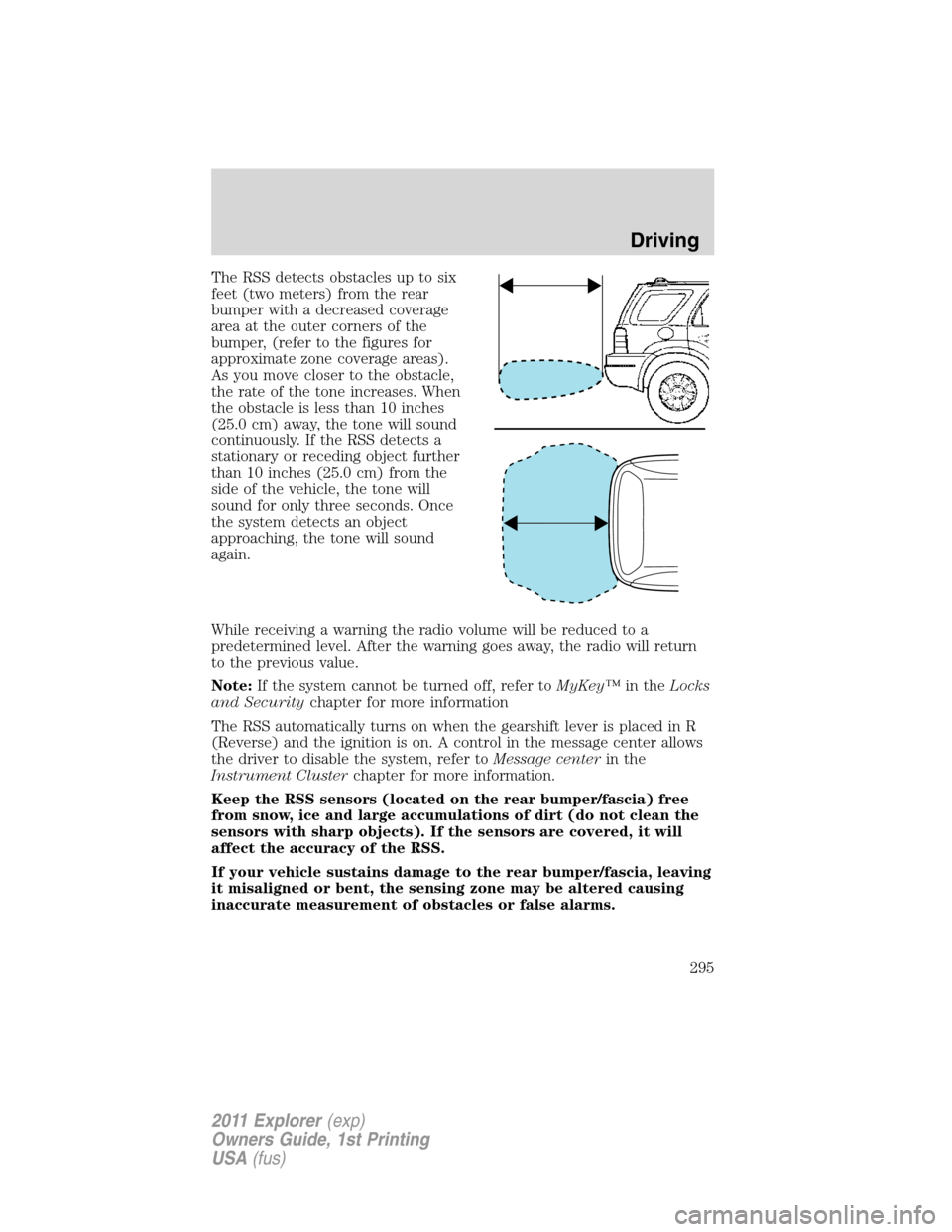
The RSS detects obstacles up to six
feet (two meters) from the rear
bumper with a decreased coverage
area at the outer corners of the
bumper, (refer to the figures for
approximate zone coverage areas).
As you move closer to the obstacle,
the rate of the tone increases. When
the obstacle is less than 10 inches
(25.0 cm) away, the tone will sound
continuously. If the RSS detects a
stationary or receding object further
than 10 inches (25.0 cm) from the
side of the vehicle, the tone will
sound for only three seconds. Once
the system detects an object
approaching, the tone will sound
again.
While receiving a warning the radio volume will be reduced to a
predetermined level. After the warning goes away, the radio will return
to the previous value.
Note:If the system cannot be turned off, refer toMyKey™in theLocks
and Securitychapter for more information
The RSS automatically turns on when the gearshift lever is placed in R
(Reverse) and the ignition is on. A control in the message center allows
the driver to disable the system, refer toMessage centerin the
Instrument Clusterchapter for more information.
Keep the RSS sensors (located on the rear bumper/fascia) free
from snow, ice and large accumulations of dirt (do not clean the
sensors with sharp objects). If the sensors are covered, it will
affect the accuracy of the RSS.
If your vehicle sustains damage to the rear bumper/fascia, leaving
it misaligned or bent, the sensing zone may be altered causing
inaccurate measurement of obstacles or false alarms.
Driving
295
2011 Explorer(exp)
Owners Guide, 1st Printing
USA(fus)
Page 299 of 449

When enabled, Level 1, Level 2, or Level 3 will only be active while the
vehicle is in R (Reverse). The feature disables outside of R (Reverse)
and must be re-enabled the next time the vehicle shifts into R (Reverse).
When manual zoom is enabled, only
the centerline will be shown.
Rear camera delay
After shifting out of R (Reverse) and into any gear other than P (Park),
the image will remain until the vehicle speed reaches five mph (8 km/h).
This will only occur if the rear camera delay feature is on, or until any
radio button is selected.
The default setting for the rear camera delay is ON. To turn this feature
on or off when the vehicle is not in R (Reverse), do the following:
1. Select Menu
2. Select Vehicle
3. Select Rear View Camera
The rear camera delay options are ON and OFF.
The camera lens for the reverse camera system is located on the liftgate.
Keep the lens clean so the video image remains clear and undistorted.
Clean the lens with a soft, lint-free cloth and non-abrasive cleaner.
When towing, the reverse camera system will only see what is being
towed behind the vehicle. This might not provide adequate coverage as it
usually provides in normal operation and some objects might not be
seen.
Active guidelines, fixed guidelines, visual park aid alert and manual zoom
features are only available when the vehicle is in R (Reverse).
If the vehicle is in R (Reverse) and the liftgate is ajar, no rear video
camera features will be displayed. A message will be displayed on the
touchscreen if the liftgate is ajar.
Zoom
{zoom
level}
Driving
298
2011 Explorer(exp)
Owners Guide, 1st Printing
USA(fus)