2011 FORD C MAX brake
[x] Cancel search: brakePage 154 of 296

Downloaded from www.Manualslib.com manuals search engine PRINCIPLE OF OPERATION
WARNINGS
The system does not relieve you of
your responsibility to drive with due
care and attention.
At all times you are responsible for
controlling the vehicle, supervising
the system and intervening if
required. You must observe that the selected
space remains clear of obstructions
at all times in the manoeuver.
Vehicles with overhanging loads,
street furniture and other items may
not be detected by the system. You
must make sure that the selected space
is suitable for parking. Do not use the system if a trailer is
attached to the vehicle.
Do not use the system if a bike rack
is attached to the back of the vehicle.
Do not use the system if an
overhanging item is attached to the
roof.
If the manoeuvre is interrupted
before completion, the system will
be disabled. The steering wheel
position will not indicate the true position
of the steering and you will have to take
control of the vehicle. Make sure that loose clothing, your
hands or your arms do not get caught
in the rotating steering wheel. The system will detect a suitable parallel
parking space and steer the vehicle into
the space. The system controls the
steering while the driver controls the
accelerator, transmission and brakes. The
manoeuvre can be stopped at any time by
holding the steering wheel or pressing the
active park assist switch. See At a Glance
(page 10).
The system will visually and audibly
instruct the driver throughout the
procedure to safely park the vehicle.
USING ACTIVE PARK ASSIST
CAUTIONS
The sensors may not detect objects
in heavy rain or other conditions that
cause disruptive reflections.
The sensors may not detect objects
with surfaces that absorb ultrasonic
waves.
The sensors may not detect the kerb.
Note:
If the traction control system is
disabled active park assist will not be
available. See General Information (page
83).
The system will not align the vehicle
correctly if:
• a spare tyre, or a tyre worn significantly
more than the other tyres is used
• the factory installed tyre size is not
used on the vehicle
• the tyres skid
• you allow the vehicle to roll
• the weather conditions are poor (heavy
rain, snow, fog, etc).
152
Active Park Assist
Page 155 of 296

Downloaded from www.Manualslib.com manuals search engine Move forwards at a maximum speed of 30
km/h (18 mph). Press the active park assist
switch. See At a Glance (page 10). Use
the direction indicator lever to select
searching either to the left-hand side or
right-hand side of the vehicle.
Note:
If no selection is made via the
direction indicator lever the system will
default to the passenger side of the vehicle. Note:
To disable the chimes: See
Personalised Settings (page 89).
The information and entertainment display
will inform you and a chime will be heard
when a suitable space is found. To park
the vehicle, follow the instructions on the
information and entertainment display. Note:
The arrow symbols or graphics in the
display indicate on which side of the vehicle
the system will park. The display will also
advise you when to select reverse gear.
Slow down and stop at approximately
position A, then follow the system
instructions. WARNING
If a speed of 10 km/h (6 mph) is
exceeded the system will be disabled
and you will need to take full control
of the vehicle. Move the vehicle backwards cautiously
using the accelerator and brake pedals to
control the vehicle. Parking aid warning
tones will sound. Stop the vehicle when
you hear a continuous tone.
153
Active Park AssistAE130107 E130108
Page 160 of 296

Downloaded from www.Manualslib.com manuals search engine PRINCIPLE OF OPERATION
WARNING
The system does not relieve you of
your responsibility to drive with due
care and attention.
Cruise control allows you to control your
speed using the switches on the steering
wheel. You can use cruise control when
you exceed approximately 30 km/h (20
mph).
USING CRUISE CONTROL
WARNING
Do not use cruise control in heavy
traffic, on twisty roads or when the
road surface is slippery.
Switching cruise control on
Note:
The system is ready for you to set a
speed. Setting a speed
Press the SET+ switch or the SET- switch
to store and maintain your current speed.
The cruise control indicator will illuminate.
See Warning Lamps and Indicators
(page 79).
Changing the set speed WARNING
When you are going downhill, your
speed may increase above the set
speed. The system will not apply the
brakes. Change down a gear and press the
SET- switch to assist the system in
maintaining the set speed. Note:
If you accelerate by pressing the
accelerator pedal, the set speed will not
change. When you release the accelerator
pedal, you will return to the speed that you
previously set. Accelerate
A
Decelerate
B
Cancelling the set speed
Press the brake pedal or pull the CAN
switch.
158
Cruise ControlE130072 E130073AB
Page 162 of 296
Downloaded from www.Manualslib.com manuals search engine PRINCIPLE OF OPERATION
WARNING
When you are going downhill, your
speed may increase above the set
speed. The system will not apply the
brakes but a warning will be given. The system allows you to set a speed, to
which the vehicle then becomes limited.
The set speed will become the effective
maximum speed of the vehicle, but with
the option to temporarily exceed this limit
if required.
USING THE SPEED LIMITER
Note:
The set speed limit can be
intentionally exceeded for a short period if
required, for example when overtaking.
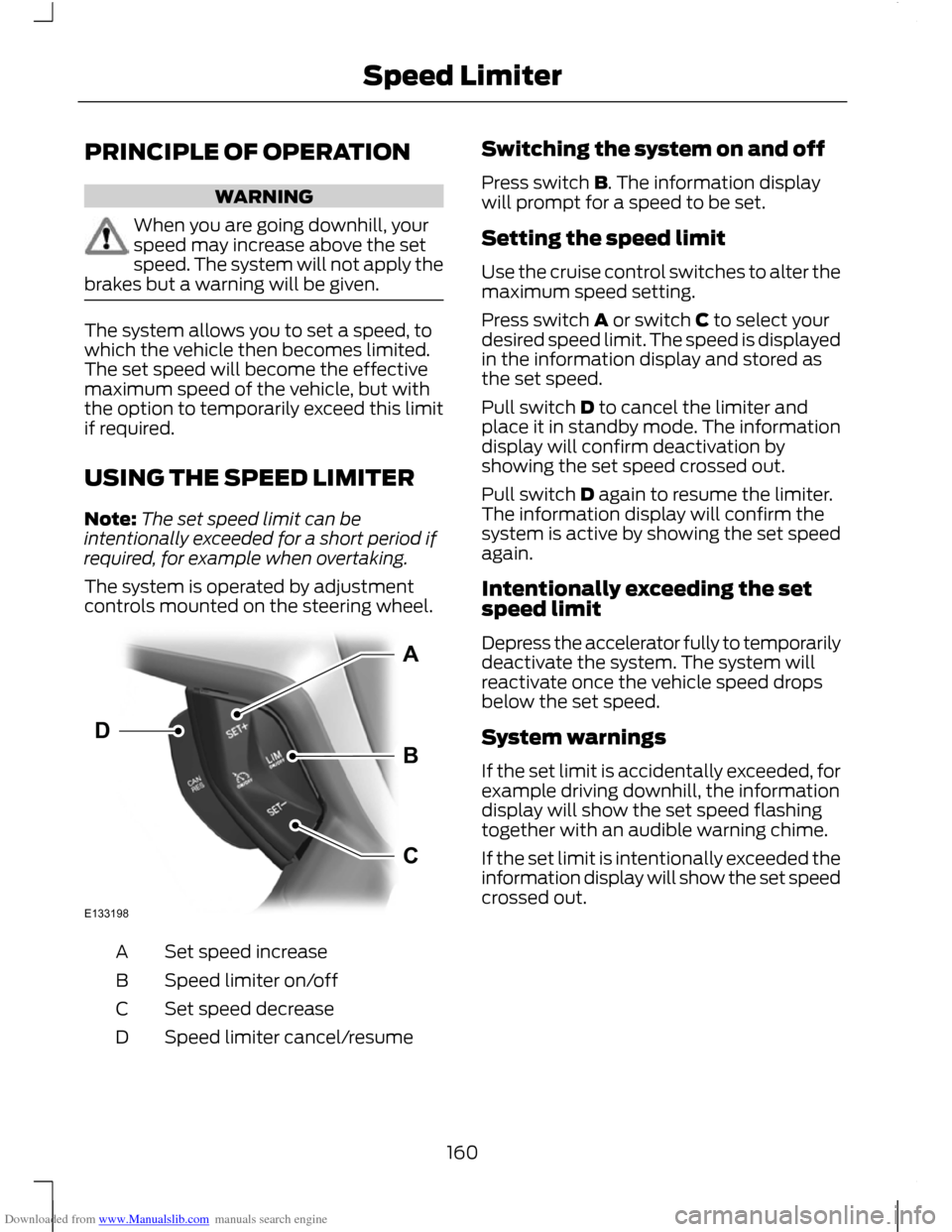
The system is operated by adjustment
controls mounted on the steering wheel. Set speed increase
A
Speed limiter on/off
B
Set speed decrease
C
Speed limiter cancel/resume
D Switching the system on and off
Press switch B. The information display
will prompt for a speed to be set.
Setting the speed limit
Use the cruise control switches to alter the
maximum speed setting.
Press switch A or switch C to select your
desired speed limit. The speed is displayed
in the information display and stored as
the set speed.
Pull switch D to cancel the limiter and
place it in standby mode. The information
display will confirm deactivation by
showing the set speed crossed out.
Pull switch D again to resume the limiter.
The information display will confirm the
system is active by showing the set speed
again.
Intentionally exceeding the set
speed limit
Depress the accelerator fully to temporarily
deactivate the system. The system will
reactivate once the vehicle speed drops
below the set speed.
System warnings
If the set limit is accidentally exceeded, for
example driving downhill, the information
display will show the set speed flashing
together with an audible warning chime.
If the set limit is intentionally exceeded the
information display will show the set speed
crossed out.
160
Speed LimiterE133198ABCD
Page 170 of 296

Downloaded from www.Manualslib.com manuals search engine TOWING A TRAILER
WARNINGS
Do not exceed 100 km/h (62 mph).
The rear tyre pressures must be
increased by 0.2 bar (3 psi) above
specification. See Technical
Specifications (page 209). Do not exceed the maximum gross
train weight stated on the vehicle
identification plate. See Vehicle
identification (page 214). CAUTION
Do not exceed the maximum
permissible nose weight, i.e. vertical
weight on the tow ball, of 75
kilogrammes (165 pounds). Note:
Not all vehicles are suitable or
approved to have tow bars fitted. Check
with your dealer first.
Place loads as low and central to the
axle(s) of the trailer as possible. If you are
towing with an unladen vehicle, the load
in the trailer should be placed toward the
nose, within the maximum nose load, as
this gives the best stability.
The stability of the vehicle to trailer
combination is very much dependant on
the quality of the trailer.
In high altitude regions above 1000 metres
(3281 feet), the stipulated maximum
permitted gross train weight must be
reduced by 10% for every additional 1000
metres (3281 feet).
Steep gradients WARNING
The overrun brake on a trailer is not
controlled by ABS. Change down a gear before you reach a
steep downhill gradient.
RETRACTABLE TOW BALL
CAUTION
Only move the tow ball arm with your
hand. Never use your foot or auxiliary
tools as damage to the mechanism
may result. You can turn the retractable tow ball arm
through 90 degrees using the handwheel
A.
A 13-pin trailer socket B is provided
underneath the rear bumper next to the
tow ball arm C.
168
TowingE130344A E75174BC
Page 174 of 296

Downloaded from www.Manualslib.com manuals search engine RUNNING-IN
Tyres
WARNING
New tyres need to be run-in for
approximately 500 kilometres (300
miles). During this time, you may
experience different driving characteristics. Brakes and clutch
WARNING
Avoid heavy use of the brakes and
clutch if possible for the first 150
kilometres (100 miles) in town and
for the first 1500 kilometres (1000 miles)
on motorways. Engine
CAUTION
Avoid driving too fast during the first
1500 kilometres (1000 miles). Vary
your speed frequently and change up
through the gears early. Do not labour the
engine. COLD WEATHER
PRECAUTIONS
The functional operation of some
components and systems can be affected
at temperatures below -30°C (-22°F).
DRIVING THROUGH WATER
Driving through water
CAUTIONS
Drive through water in an emergency
only, and not as part of normal driving.
Engine damage can occur if water
enters the air filter. In an emergency, the vehicle can be driven
through water to a maximum depth of 200
millimetres (8 inches) and at a maximum
speed of 10 km/h (6 mph). Extra caution
should be exercised when driving through
flowing water.
When driving in water, maintain a low
speed and do not stop the vehicle. After
driving through water, and as soon as it is
safe to do so:
•
Depress the brake pedal lightly and
check that full brake function is
achieved.
• Check that the horn works.
• Check that the vehicle's lights are fully
operational.
• Check the power assistance
of the steering system.
172
Driving Hints
Page 185 of 296

Downloaded from www.Manualslib.com manuals search engine TOWING POINTS
Towing eye location
The screw-in towing eye is located in the
spare wheel well.
The towing eye must always be carried in
the vehicle.
Installing the towing eye
CAUTION
The screw-in towing eye has a
left-hand thread. Turn it
anti-clockwise to install it. Make sure
that the towing eye is fully tightened. Note:
On vehicles with a tow bar, the
towing eye cannot be installed at the rear
of the vehicle. Use the tow bar to tow a
vehicle.
Front towing eye Rear towing eye
Insert a suitable object into the hole on the
underside of the cover and prise off the
cover.
Install the towing eye.
TOWING THE VEHICLE ON
FOUR WHEELS
All vehicles
WARNINGS
Switch the ignition on when your
vehicle is being towed. The steering
lock will engage and the direction
indicators and brake lamps will not work
if you do not. The brake and steering assistance
will not operate unless the engine is
running. Press the brake pedal harder
and allow for increased stopping distances
and heavier steering. 183
Vehicle recoveryE78367 E78368
Page 187 of 296

Downloaded from www.Manualslib.com manuals search engine GENERAL INFORMATION
Have your vehicle serviced regularly to help
maintain its roadworthiness and resale
value. There is a large network of Ford
Authorised Repairers that are there to help
you with their professional servicing
expertise. We believe that their specially
trained technicians are best qualified to
service your vehicle properly and expertly.
They are supported by a wide range of
highly specialised tools developed
specifically for servicing your vehicle.
In addition to regular servicing, we
recommend that you carry out the
following additional checks.
WARNINGS
Switch the ignition off before
touching or attempting adjustment
of any kind.
Do not touch the electronic ignition
system parts after you have switched
the ignition on or when the engine is
running. The system operates at high
voltage. Keep your hands and clothing clear
of the engine cooling fan. Under
certain conditions, the fan may
continue to run for several minutes after
you have switched the engine off. CAUTION
When carrying out maintenance
checks, make sure that filler caps are
fitted securely.
Daily checks
•
Exterior lamps.
• Interior lamps.
• Warning lamps and indicators. Check when refuelling
•
Engine oil level. See Engine Oil Check
(page 190).
• Brake fluid level. See Brake and
Clutch Fluid Check (page 191).
• Washer fluid level. See Washer Fluid
Check (page 192).
• Tyre pressures (when cold). See
Technical Specifications (page 209).
• Tyre condition. See Wheels and Tyres
(page 199).
Monthly checks
• Engine coolant level (engine cold). See
Engine Coolant Check (page 191).
• Pipes, hoses and reservoirs for leaks.
• Air conditioning operation.
• Parking brake operation.
• Horn operation.
• Tightness of wheel nuts. See
Technical Specifications (page 209).
OPENING AND CLOSING THE
BONNET
Opening the bonnet 185
MaintenanceE73698