Page 163 of 497
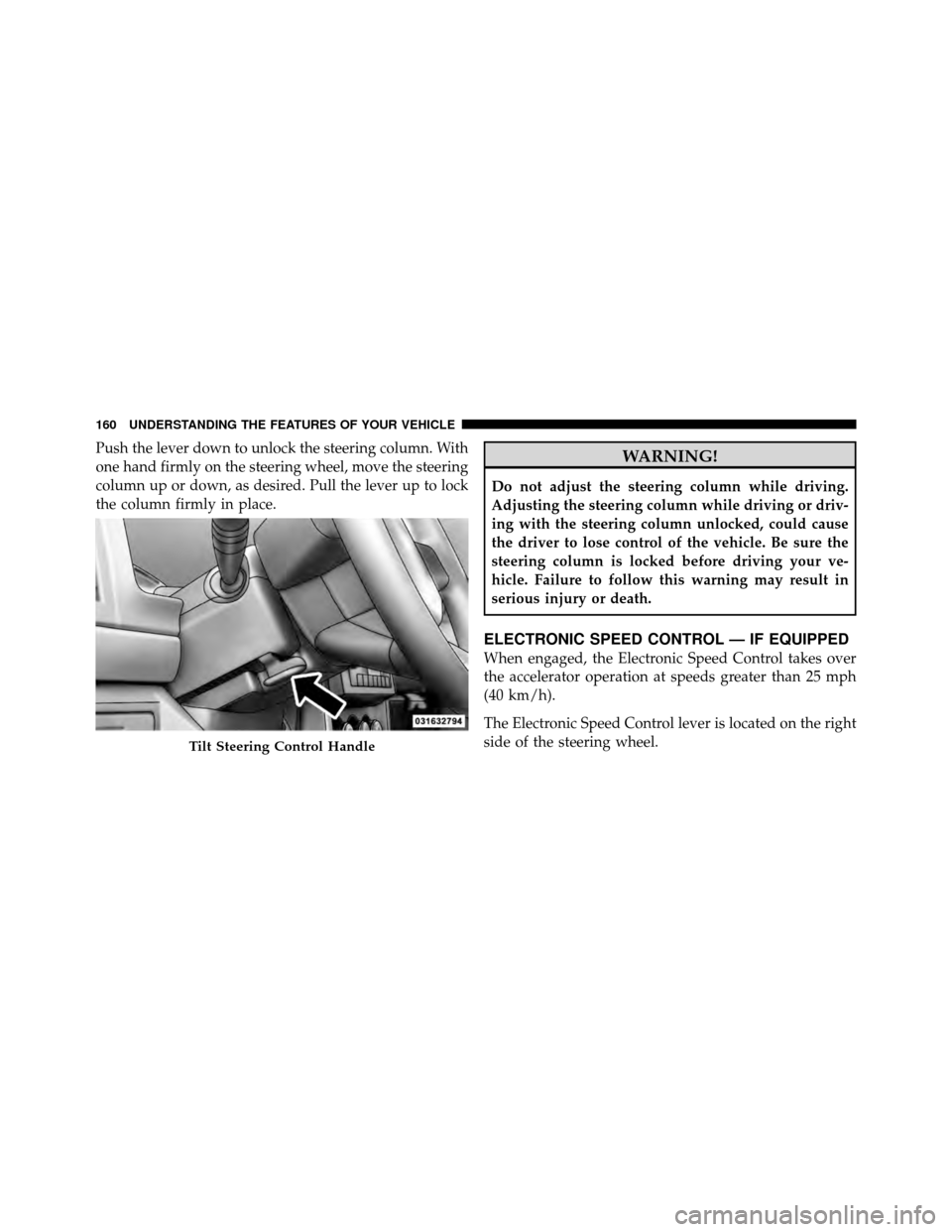
Push the lever down to unlock the steering column. With
one hand firmly on the steering wheel, move the steering
column up or down, as desired. Pull the lever up to lock
the column firmly in place.WARNING!
Do not adjust the steering column while driving.
Adjusting the steering column while driving or driv-
ing with the steering column unlocked, could cause
the driver to lose control of the vehicle. Be sure the
steering column is locked before driving your ve-
hicle. Failure to follow this warning may result in
serious injury or death.
ELECTRONIC SPEED CONTROL — IF EQUIPPED
When engaged, the Electronic Speed Control takes over
the accelerator operation at speeds greater than 25 mph
(40 km/h).
The Electronic Speed Control lever is located on the right
side of the steering wheel.
Tilt Steering Control Handle
160 UNDERSTANDING THE FEATURES OF YOUR VEHICLE
Page 198 of 497
�Media Center 130 With Satellite Radio
(Sales Code RES+RSC) ................... 255
▫ Operating Instructions — Radio Mode ..... 256
▫ Operation Instructions — CD Mode For CD
And MP3 Audio Play ................. 261
▫ Notes On Playing MP3 Files ............ 263
▫ List Button (CD Mode For MP3 Play) ...... 266
▫ Info Button (CD Mode For MP3 Play) ...... 266
▫ Uconnect™ Multimedia (Satellite Radio) —
If Equipped ........................ 267 �
Steering Wheel Audio Controls —
If Equipped .......................... 271
▫ Radio Operation ..................... 272
▫ CD Player ......................... 272
� CD/DVD Disc Maintenance .............. 273
� Radio Operation And Mobile Phones ....... 273
� Climate Controls ...................... 273
▫ Manual Heating And Air Conditioning ..... 274
▫ Automatic Temperature Control (ATC) —
If Equipped ........................ 278
▫ Operating Tips ...................... 283
4
UNDERSTANDING YOUR INSTRUMENT PANEL 195
Page 219 of 497
3. Release the CMTC reset button, then press and hold
again for approximately 10 seconds, until the direction is
displayed, with the CAL indicator on continuously in the
display.
4. To complete the compass calibration, drive the vehicle
in one or more complete 360–degree circles, under 5 mph
(8 km/h) in an area free from power lines and large
metallic objects, until the CAL indicator turns off. The
compass will now function normally.
ELECTRONIC VEHICLE INFORMATION CENTER
(EVIC) — IF EQUIPPED
The Electronic Vehicle Information Center (EVIC) fea-
tures a driver-interactive display that is located in the
instrument cluster.This system conveniently allows the driver to select a
variety of useful information by pressing the switches
mounted on the steering wheel. The EVIC consists of the
following:
•System Status
•Vehicle Information Warning Message Displays
Electronic Vehicle Information Center (EVIC)
216 UNDERSTANDING YOUR INSTRUMENT PANEL
Page 220 of 497

•Tire Pressure Monitor System (if equipped)
•Personal Settings (Customer-Programmable Features)
•Compass Display
•Outside Temperature Display
•Trip Computer Functions
•Uconnect™ gps system screens (if equipped)
•Audio Mode Display
The system allows the driver to select information by
pressing the following buttons mounted on the steering
wheel:
MENU Button Press and release the MENU button and the
mode displayed will change between Trip
Functions, Uconnect™ gps (if equipped), Sys-
tem Status, and Personal Settings. Press the FUNCTION SELECT button to accept
a selection. Also, the FUNCTION SELECT but-
ton changes the current CD track being played
(if equipped) when the EVIC is in the
Compass/Temp/Audio screen.
Press the SCROLL button to scroll through
Navigation (if equipped), System Status Mes-
sages, and Personal Settings (Customer-
Programmable Features).Press and release the COMPASS/TEMPERA-
TURE button to display one of eight compass
readings and the outside temperature.
Electronic Vehicle Information Center (EVIC)
Displays
When the appropriate conditions exist, the EVIC displays
the following messages:
•Turn signal on (with a continuous warning chime)
4
UNDERSTANDING YOUR INSTRUMENT PANEL 217
Page 274 of 497
Every time a preset button is used, a corresponding
button number will display.
Buttons1-6
These buttons tune the radio to the channels that you
commit to pushbutton memory (12 Satellite stations).
Operating Instructions - Uconnect™ Phone
(If Equipped)
Refer to “Uconnect™ Phone” in “Understanding The
Features If Your Vehicle”.
STEERING WHEEL AUDIO CONTROLS —
IF EQUIPPED
The remote sound system controls are located on the rear
surface of the steering wheel. Reach behind the wheel to
access the switches.The right-hand control is a rocker type switch with a
pushbutton in the center. Pressing the top of the switch
will increase the volume, and pressing the bottom of the
switch will decrease the volume.
Remote Sound System Controls
(Back View Of Steering Wheel)
4
UNDERSTANDING YOUR INSTRUMENT PANEL 271
Page 291 of 497
▫Shifting Procedure – Electronically Shifted
Transfer Case ....................... 306
� On-Road Driving Tips .................. 307
� Power Steering ....................... 307
▫ Power Steering Fluid Check ............. 308
� Parking Brake ........................ 309
� Anti-Lock Brake System ................. 311
� Electronic Brake Control System ........... 313
▫ Anti-Lock Brake System (ABS) ........... 314
▫ Traction Control System (TCS) ........... 314
▫ Brake Assist System (BAS) .............. 315
▫ Electronic Roll Mitigation (ERM) ......... 316
▫ Electronic Stability Control (ESC) ......... 316▫
ESC Activation/Malfunction Indicator Light
And ESC Off Indicator Light ............ 319
� Tire Safety Information ................. 320
▫ Tire Markings ....................... 320
▫ Tire Identification Number (TIN) ......... 323
▫ Tire Terminology And Definitions ......... 324
▫ Tire Loading And Tire Pressure .......... 325
� Tires — General Information ............. 329
▫ Tire Pressure ....................... 329
▫ Tire Inflation Pressures ................ 330
▫ Tire Pressures For High Speed Operation . . . 332
▫ Radial Ply Tires ..................... 332
▫ Spare Tire Matching Original Equipped Tire
And Wheel – If Equipped .............. 332
288 STARTING AND OPERATING
Page 310 of 497
ON-ROAD DRIVING TIPS
Utility vehicles have higher ground clearance and a
narrower track to make them capable of performing in a
wide variety of off-road applications. Specific design
characteristics give them a higher center of gravity than
ordinary cars.
An advantage of the higher ground clearance is a better
view of the road, allowing you to anticipate problems.
They are not designed for cornering at the same speeds as
conventional two-wheel drive vehicles any more than
low-slung sports cars are designed to perform satisfacto-
rily in off-road conditions. If at all possible, avoid sharp
turns or abrupt maneuvers. As with other vehicles of this
type, failure to operate this vehicle correctly may result in
loss of control or vehicle rollover.
POWER STEERING
The standard power steering system will give you good
vehicle response and increased ease of maneuverabilityin tight spaces. The system will provide mechanical
steering capability if power assist is lost.
If for some reason the power assist is interrupted, it will
still be possible to steer your vehicle. Under these condi-
tions, you will observe a substantial increase in steering
effort, especially at very low vehicle speeds and during
parking maneuvers.
NOTE:
•Increased noise levels at the end of the steering wheel
travel are considered normal and do not indicate that
there is a problem with the power steering system.
•Upon initial start-up in cold weather, the power steer-
ing pump may make noise for a short amount of time.
This is due to the cold, thick fluid in the steering
system. This noise should be considered normal, and it
does not in any way damage the steering system.
5
STARTING AND OPERATING 307
Page 311 of 497

WARNING!
Continued operation with reduced power steering
assist could pose a safety risk to yourself and others.
Service should be obtained as soon as possible.
CAUTION!
Prolonged operation of the steering system at the end
of the steering wheel travel will increase the steering
fluid temperature and it should be avoided when
possible. Damage to the power steering pump may
occur.
Power Steering Fluid Check
Checking the power steering fluid level at a defined
service interval is not required. The fluid should only be
checked if a leak is suspected, abnormal noises areapparent, and/or the system is not functioning as antici-
pated. Coordinate inspection efforts through an autho-
rized dealer.
CAUTION!
Do not use chemical flushes in your power steering
system as the chemicals can damage your power
steering components. Such damage is not covered by
the New Vehicle Limited Warranty.
WARNING!
Fluid level should be checked on a level surface and
with the engine off to prevent injury from moving
parts and to ensure accurate fluid level reading. Do
not overfill. Use only manufacturer’s recommended
power steering fluid.
308 STARTING AND OPERATING