Page 115 of 497

Call Termination
To end a call in progress, momentarily press the
button. Only the active call(s) will be terminated and if
there is a call on hold, it will become the new active call.
If the active call is terminated by the phone far end, a call
on hold may not become active automatically. This is cell
phone-dependent. To bring the call back from hold, press
and hold the
button until you hear a single beep.
Redial
•
Press thebutton to begin.
•After the “Ready” prompt and the following beep, say
“Redial”.
•The Uconnect™ Phone will call the last number that
was dialed from your mobile phone.
NOTE: This may not be the last number dialed from the
Uconnect™ Phone.
Call Continuation
Call continuation is the progression of a phone call on the
Uconnect™ Phone after the vehicle ignition key has been
switched to OFF. Call continuation functionality avail-
able on the vehicle can be any one of three types:
•After the ignition key is switched to OFF, a call can
continue on the Uconnect™ Phone either until the call
ends, or until the vehicle battery condition dictates
cessation of the call on the Uconnect™ Phone and
transfer of the call to the mobile phone.
•After the ignition key is switched to OFF, a call can
continue on the Uconnect™ Phone for a certain dura-
tion, after which the call is automatically transferred
from the Uconnect™ Phone to the mobile phone.
•An active call is automatically transferred to the
mobile phone after the ignition key is switched to OFF.
112 UNDERSTANDING THE FEATURES OF YOUR VEHICLE
Page 119 of 497

The Uconnect™ Phone will then send the corresponding
phone number associated with the phonebook entry, as
tones over the phone.
NOTE:
•You may not hear all of the tones due to mobile phone
network configurations. This is normal.
•Some paging and voice mail systems have system time
out settings that are too short and may not allow the
use of this feature.
Barge In — Overriding Prompts
The “Voice Command” button can be used when you
wish to skip part of a prompt and issue your voice
command immediately. For example, if a prompt is
asking “Would you like to pair a phone, clear a...,” you
could press the
button and say, “Pair a Phone” to
select that option without having to listen to the rest of
the voice prompt.
Turning Confirmation Prompts ON/OFF
Turning confirmation prompts off will stop the system
from confirming your choices (e.g., the Uconnect™
Phone will not repeat a phone number before you dial it).
•Press thebutton to begin.
•After the “Ready” prompt and the following beep, say
one of the following:
“Setup Confirmation Prompts On”
“Setup Confirmation Prompts Off”
Phone And Network Status Indicators
If available on the radio and/or on a premium display
such as the instrument panel cluster, and supported by
your mobile phone, the Uconnect™ Phone will provide
notification to inform you of your phone and network
status when you are attempting to make a phone call
using Uconnect™ Phone. The status is given for network
signal strength, phone battery strength, etc.
116 UNDERSTANDING THE FEATURES OF YOUR VEHICLE
Page 172 of 497
If “SERVICE PARK ASSIST SYSTEM” appears in the
Electronic Vehicle Information Center (EVIC) after mak-
ing sure the rear fascia/bumper is clean and clear of
snow, ice, mud, dirt, or other obstruction, see your
authorized dealer.
GARAGE DOOR OPENER — IF EQUIPPED
HomeLink�replaces up to three remote controls (hand-
held transmitters) that operate devices such as garage
door openers, motorized gates, lighting or home security
systems. The HomeLink� unit operates off your vehicle’s
battery.
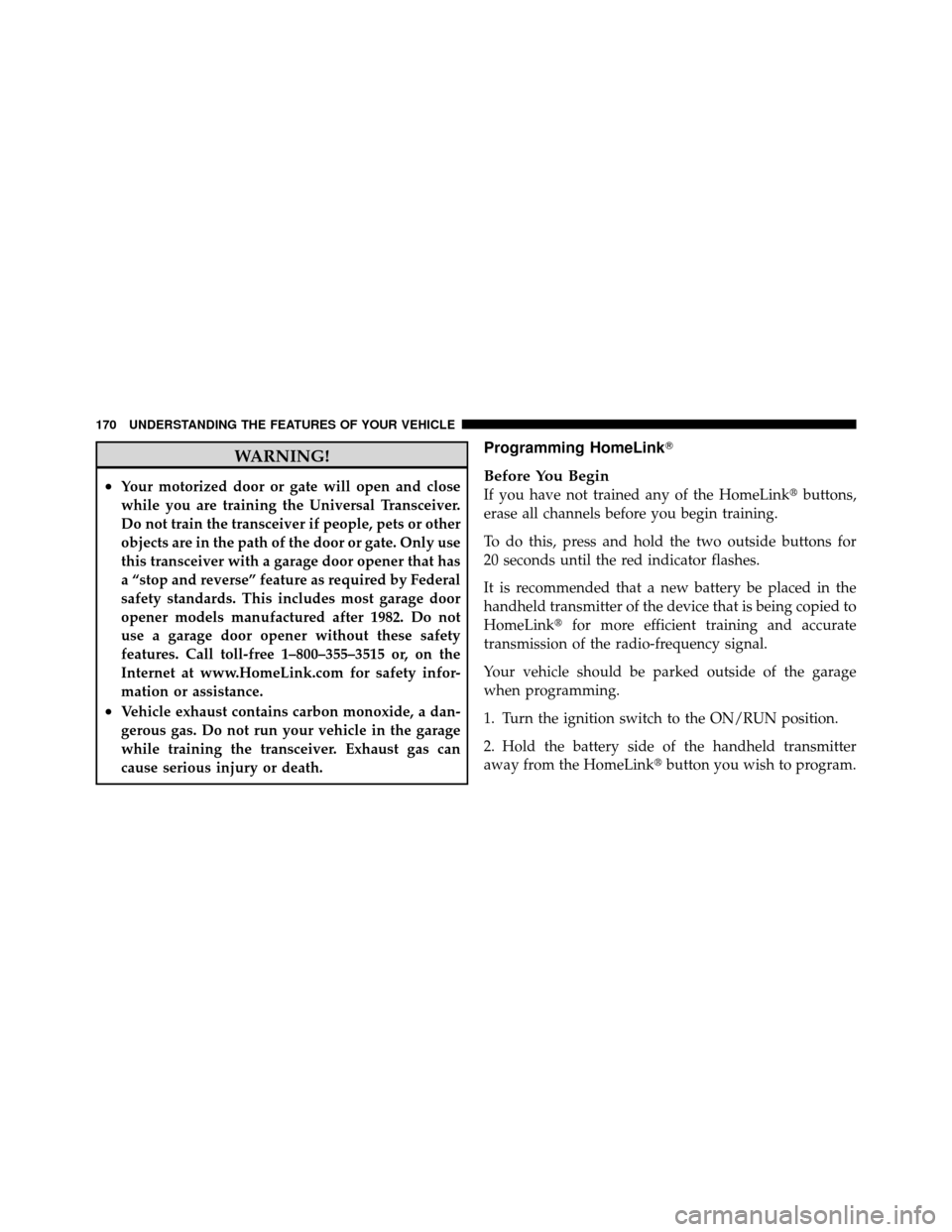
The HomeLink� buttons that are located in the headliner
or sun visor designate the three different HomeLink�
channels. NOTE:
HomeLink� is disabled when the Vehicle Secu-
rity Alarm is active.
HomeLink� Buttons
3
UNDERSTANDING THE FEATURES OF YOUR VEHICLE 169
Page 173 of 497
WARNING!
•Your motorized door or gate will open and close
while you are training the Universal Transceiver.
Do not train the transceiver if people, pets or other
objects are in the path of the door or gate. Only use
this transceiver with a garage door opener that has
a “stop and reverse” feature as required by Federal
safety standards. This includes most garage door
opener models manufactured after 1982. Do not
use a garage door opener without these safety
features. Call toll-free 1–800–355–3515 or, on the
Internet at www.HomeLink.com for safety infor-
mation or assistance.
•Vehicle exhaust contains carbon monoxide, a dan-
gerous gas. Do not run your vehicle in the garage
while training the transceiver. Exhaust gas can
cause serious injury or death.
Programming HomeLink�
Before You Begin
If you have not trained any of the HomeLink�buttons,
erase all channels before you begin training.
To do this, press and hold the two outside buttons for
20 seconds until the red indicator flashes.
It is recommended that a new battery be placed in the
handheld transmitter of the device that is being copied to
HomeLink� for more efficient training and accurate
transmission of the radio-frequency signal.
Your vehicle should be parked outside of the garage
when programming.
1. Turn the ignition switch to the ON/RUN position.
2. Hold the battery side of the handheld transmitter
away from the HomeLink� button you wish to program.
170 UNDERSTANDING THE FEATURES OF YOUR VEHICLE
Page 177 of 497
2. Press and hold the desired HomeLink�button until
the indicator light begins to flash after 20 seconds. Do not
release the button.
3. Without releasing the button, proceed with Program-
ming HomeLink� Step 2 and follow all remaining steps.
Security
It is advised to erase all channels before you sell or turn
in your vehicle.
To do this, press and hold the two outside buttons for
20 seconds until the red indicator flashes. Note that all
channels will be erased. Individual channels cannot be
erased.
The HomeLink�Universal Transceiver is disabled when
the Vehicle Security Alarm is active.
Troubleshooting Tips
If you are having trouble programming HomeLink �, here
are some of the most common solutions:
•Replace the battery in the original transmitter.
•Press the LEARN button on the Garage Door Opener
to complete the training for a Rolling Code.
•Did you unplug the device for training, and remember
to plug it back in?
If you have any problems, or require assistance, please
call toll-free 1–800–355–3515 or, on the Internet at
www.HomeLink.com for information or assistance.
General Information
This device complies with FCC rules Part 15 and Industry
Canada RSS-210. Operation is subject to the following
two conditions:
1. This device may not cause harmful interference.
174 UNDERSTANDING THE FEATURES OF YOUR VEHICLE
Page 184 of 497
WARNING!
To avoid serious injury or death:
•Only devices designed for use in this type of
outlet should be inserted into any 12 Volt outlet.
•Do not touch with wet hands.
•Close the lid when not in use and while driving
the vehicle.
•If this outlet is mishandled, it may cause an
electric shock and failure.
CAUTION!
•Many accessories that can be plugged in draw
power from the vehicle’s battery, even when not in
use (i.e., cellular phones, etc.). Eventually, if
plugged in long enough, the vehicle’s battery will
discharge sufficiently to degrade battery life
and/or prevent the engine from starting.(Continued)
CAUTION! (Continued)
•Accessories that draw higher power (i.e., coolers,
vacuum cleaners, lights, etc.) will degrade the
battery even more quickly. Only use these inter-
mittently and with greater caution.
•After the use of high power draw accessories, or
long periods of the vehicle not being started (with
accessories still plugged in), the vehicle must be
driven a sufficient length of time to allow the
alternator to recharge the vehicle’s battery.
•Power outlets are designed for accessory plugs
only. Do not hang any type of accessory or acces-
sory bracket from the plug.
3
UNDERSTANDING THE FEATURES OF YOUR VEHICLE 181
Page 192 of 497
Rotate the switch upward to the first detent posi-
tion for rear wiper operation.
NOTE: The rear wiper operates in an intermittent mode
only.
Rotate the switch upward past the first detent to
activate the rear washer. The washer pump will
continue to operate as long as the switch is held
(for a maximum of 10 seconds). Upon release, the wiper
will cycle two times before returning to the set position.
If the rear wiper is operating when the ignition is turned
OFF, the wiper will automatically return to the “park”
position. When the vehicle is restarted, the wiper will
resume function at whichever position the switch is set.
NOTE: The rear wiper and the rear washer will not
operate If the liftgate flipper glass is open.Rear Window Defroster
The rear window defroster button is located on the
climate control (Mode) knob. Press this button to
turn on the rear window defroster and the heated outside
mirrors. An indicator in the button will illuminate when
the rear window defroster is on. The rear window
defroster automatically turns off after approximately
10 minutes. For an additional five minutes of operation,
press the button a second time.
NOTE: To prevent excessive battery drain, use the rear
window defroster only when the engine is operating.
CAUTION!
Failure to follow these cautions can cause damage to
the heating elements:
(Continued)
3
UNDERSTANDING THE FEATURES OF YOUR VEHICLE 189
Page 221 of 497
•Left front turn signal light out (with a single chime)
•Left rear turn signal light out (with a single chime)
•Right front turn signal light out (with a single chime)
•Right rear turn signal light out (with a single chime)
•RKE Battery Low (with a single chime)
•Personal Settings not available – vehicle not in PARK
•Left/right front door ajar (one or more doors open,
with a single chime if speed is above 1 mph/1.6 km/h)
•Left/right rear door ajar (one or more doors open,
with a single chime if speed is above 1 mph/1.6 km/h)
•Door(s) ajar (with a single chime if vehicle is in
motion)
•Liftgate ajar (with a single chime)
•Left front low pressure (with a single chime). Refer to
“Tire Pressure Monitoring System” in “Starting And
Operating”.
•Left rear low pressure (with a single chime). Refer to
“Tire Pressure Monitoring System” in “Starting And
Operating”.
•Right front low pressure (with a single chime). Refer to
“Tire Pressure Monitoring System” in “Starting And
Operating”.
•Right rear low pressure (with a single chime). Refer to
“Tire Pressure Monitoring System” in “Starting And
Operating”.
•Check TPM System (with a single chime). Refer to
“Tire Pressure Monitoring System” in “Starting And
Operating”.
•Check Gascap (refer to “Adding Fuel” in “Starting
And Operating”).
218 UNDERSTANDING YOUR INSTRUMENT PANEL