Page 88 of 566
If you are required to drive with the trunk/liftgate open,
make sure that all windows are closed and the climate
control BLOWER switch is set at high speed. DO NOT
use the recirculation mode.
The best protection against carbon monoxide entry into
the vehicle body is a properly maintained engine exhaust
system.
Whenever a change is noticed in the sound of the exhaust
system, when exhaust fumes can be detected inside the
vehicle, or when the underside or rear of the vehicle is
damaged, have a competent mechanic inspect the com-
plete exhaust system and adjacent body areas for broken,
damaged, deteriorated, or mispositioned parts. Open
seams or loose connections could permit exhaust fumes
to seep into the passenger compartment. In addition,
inspect the exhaust system each time the vehicle is raised
for lubrication or oil change. Replace as required.Safety Checks You Should Make Inside The
Vehicle
Seat Belts
Inspect the belt system periodically, checking for cuts,
frays, and loose parts. Damaged parts must be replaced
immediately. Do not disassemble or modify the system.
Front seat belt assemblies must be replaced after a
collision. Rear seat belt assemblies must be replaced after
a collision if they have been damaged (i.e., bent retractor,
torn webbing, etc.). If there is any question regarding belt
or retractor condition, replace the belt.
Air Bag Warning Light
The light should come on and remain on for four to eight
seconds as a bulb check when the ignition switch is first
turned ON. If the light is not lit during starting, see your
authorized dealer. If the light stays on, flickers, or comes
on while driving, have the system checked by an autho-
rized dealer.
86 THINGS TO KNOW BEFORE STARTING YOUR VEHICLE
Page 176 of 566
Heated Seats — If Equipped
On some models, the front and rear seats may be
equipped with heaters in both the seat cushions and
seatbacks.
The front driver and passenger heated seats are operated
using the Uconnect Touch™ System.
WARNING!
•Persons who are unable to feel pain to the skin
because of advanced age, chronic illness, diabetes,
spinal cord injury, medication, alcohol use, ex-
haustion or other physical condition must exercise
care when using the seat heater. It may cause burns
even at low temperatures, especially if used for
long periods of time.(Continued)
WARNING! (Continued)
•Do not place anything on the seat that insulates
against heat, such as a blanket or cushion. This
may cause the seat heater to overheat. Sitting in a
seat that has been overheated could cause serious
burns due to the increased surface temperature of
the seat.
Front Heated Seat Operation — Vehicles Equipped
With Uconnect Touch™ 4.3:
Press the CLIMATE hard-key (located next to the Uconnect
Touch™ display) to enter the climate control screen.
Press the “Driver” or “Pass” seat soft-key (lo-
cated on the Uconnect Touch™ display) once to
select HI-level heating. Press the soft-key a
second time to select LO-level heating. Press
the soft-key a third time to shut the heating elements
OFF.
174 UNDERSTANDING THE FEATURES OF YOUR VEHICLE
Page 271 of 566
REAR WINDOW FEATURES
Rear Window Defroster
The rear window defroster button is located on the
climate control. Press this button to turn on the
rear window defroster and the heated outside mirrors (if
equipped). An indicator in the button will illuminate
when the rear window defroster is on. The rear window
defroster automatically turns off after approximately
10 minutes. For an additional five minutes of operation,
press the button a second time.
CAUTION!
Failure to follow these cautions can cause damage to
the heating elements:
•Use care when washing the inside of the rear
window. Do not use abrasive window cleaners on
the interior surface of the window. Use a soft cloth
and a mild washing solution, wiping parallel to
the heating elements. Labels can be peeled off
after soaking with warm water.
•Do not use scrapers, sharp instruments, or abra-
sive window cleaners on the interior surface of the
window.
•Keep all objects a safe distance from the window.
3
UNDERSTANDING THE FEATURES OF YOUR VEHICLE 269
Page 274 of 566
�Uconnect Touch™ Settings ............... 298
▫ Hard-Keys ......................... 298
▫ Soft-Keys .......................... 298
▫ Customer Programmable Features —
Uconnect Touch™ 4.3 Settings ........... 298
▫ Customer Programmable Features —
Uconnect Touch™ System 8.4 Settings ...... 312
� iPod�/USB/MP3 Control — If Equipped ..... 327
� Steering Wheel Audio Controls —
If Equipped .......................... 327
▫ Radio Operation ..................... 328 ▫
CD Player ......................... 328
� CD/DVD Disc Maintenance .............. 329
� Radio Operation And Mobile Phones ....... 329
� Climate Controls ...................... 330
▫ General Overview .................... 330
▫ Climate Control Functions .............. 336
▫ Automatic Temperature Control (ATC) ..... 338
▫ Operating Tips ...................... 339
272 UNDERSTANDING YOUR INSTRUMENT PANEL
Page 275 of 566
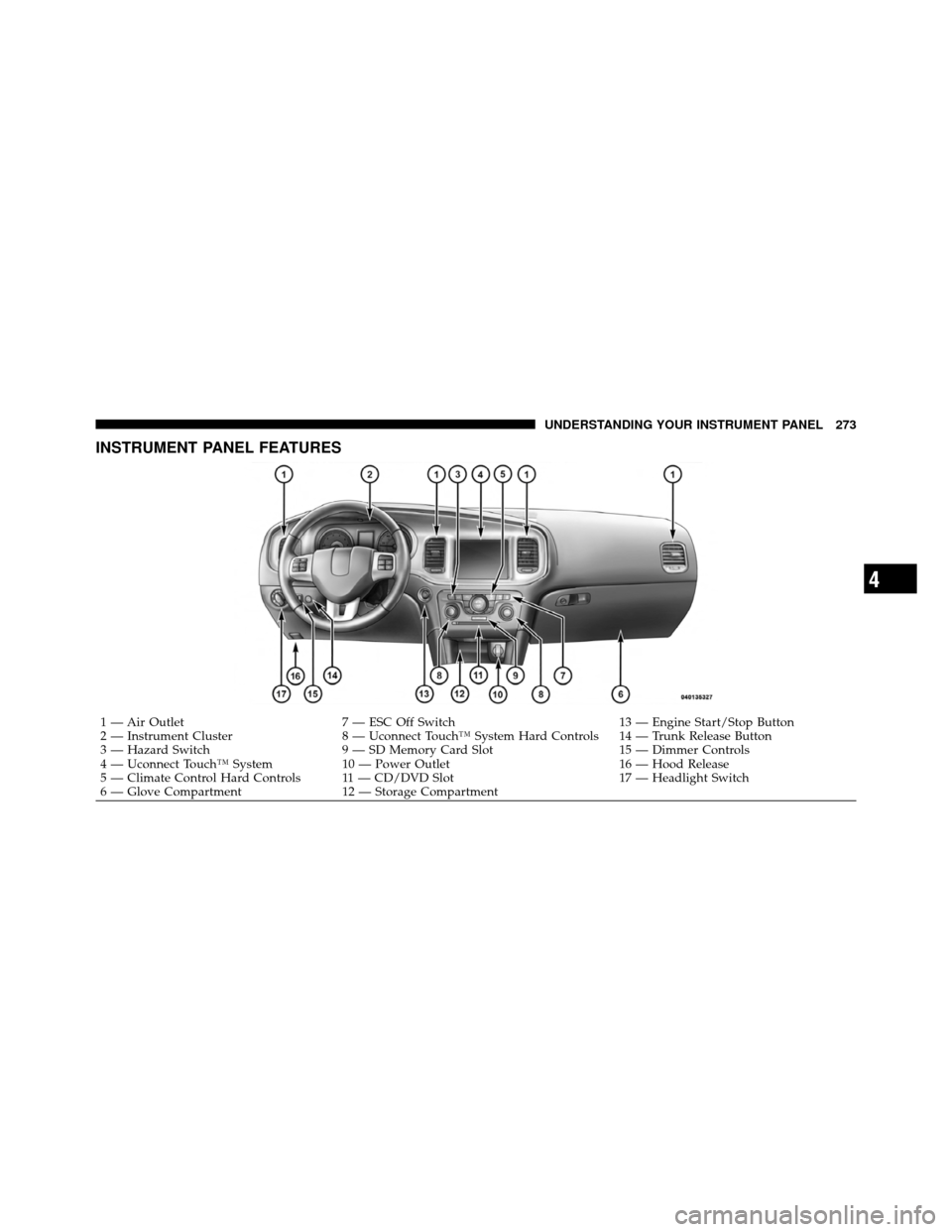
INSTRUMENT PANEL FEATURES
1 — Air Outlet7 — ESC Off Switch 13 — Engine Start/Stop Button
2 — Instrument Cluster 8 — Uconnect Touch™ System Hard Controls 14 — Trunk Release Button
3 — Hazard Switch 9 — SD Memory Card Slot 15 — Dimmer Controls
4 — Uconnect Touch™ System 10 — Power Outlet 16 — Hood Release
5 — Climate Control Hard Controls 11 — CD/DVD Slot 17 — Headlight Switch
6 — Glove Compartment 12 — Storage Compartment
4
UNDERSTANDING YOUR INSTRUMENT PANEL 273
Page 300 of 566
Turn Menu OFF
Select from Main Menu using the DOWN button. Press-
ing the SELECT button blanks the menu display. Pressing
any one of the four steering wheel buttons brings the
menu back.
Uconnect TOUCH™ SETTINGS
The Uconnect Touch™ system uses a combination of soft
and hard keys located on the center of the instrument
panel that allows you to access and change the customer
programmable features.
Hard-Keys
Hard-Keys are located on the left and right side of the
Uconnect Touch™ 4.3 screen. In addition, there is a
Scroll/Enter control knob located on the right side of the
Climate Controls in the center of the instrument panel.
Turn the control knob to scroll through menus andchange settings (i.e., 30, 60, 90), press the center of the
control knob one or more times to select or change a
setting (i.e., ON, OFF).
Soft-Keys
Soft-Keys are accessible on the Uconnect Touch™ screen.
Customer Programmable Features — Uconnect
Touch™ 4.3 Settings
In this mode the Uconnect Touch™ system allows you to
access programmable features that may be equipped
such as Display, Clock, Safety/Assistance, Lights, Doors
& Locks, Heated Seats, Engine Off Operation, Compass
Settings, Audio, Phone/Bluetooth and SIRIUS Setup
through hard-keys and soft-keys.
NOTE:
Only one touchscreen area may be selected at a
time.
298 UNDERSTANDING YOUR INSTRUMENT PANEL
Page 332 of 566
CLIMATE CONTROLS
The air conditioning and heating system is designed to
make you comfortable in all types of weather. This
system can be operated through either the Automatic
Climate Controls on the instrument panel or through the
Uconnect Touch™ system display.
When the Uconnect Touch™ system is in different modes
(Radio, Player, Settings, More, etc.) the driver and pas-
senger temperature settings will be indicated at the top of
the display.
General Overview
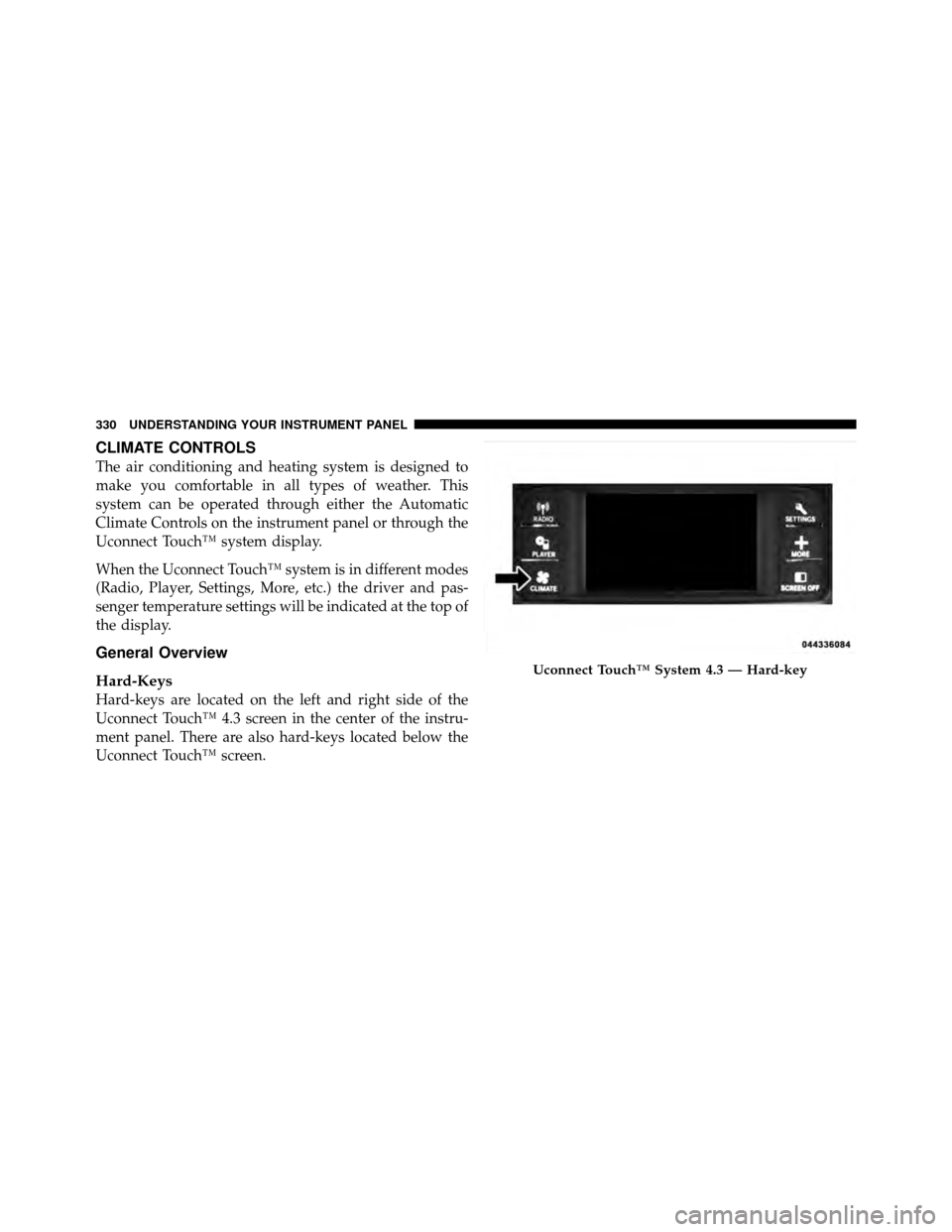
Hard-Keys
Hard-keys are located on the left and right side of the
Uconnect Touch™ 4.3 screen in the center of the instru-
ment panel. There are also hard-keys located below the
Uconnect Touch™ screen.
Uconnect Touch™ System 4.3 — Hard-key
330 UNDERSTANDING YOUR INSTRUMENT PANEL
Page 333 of 566
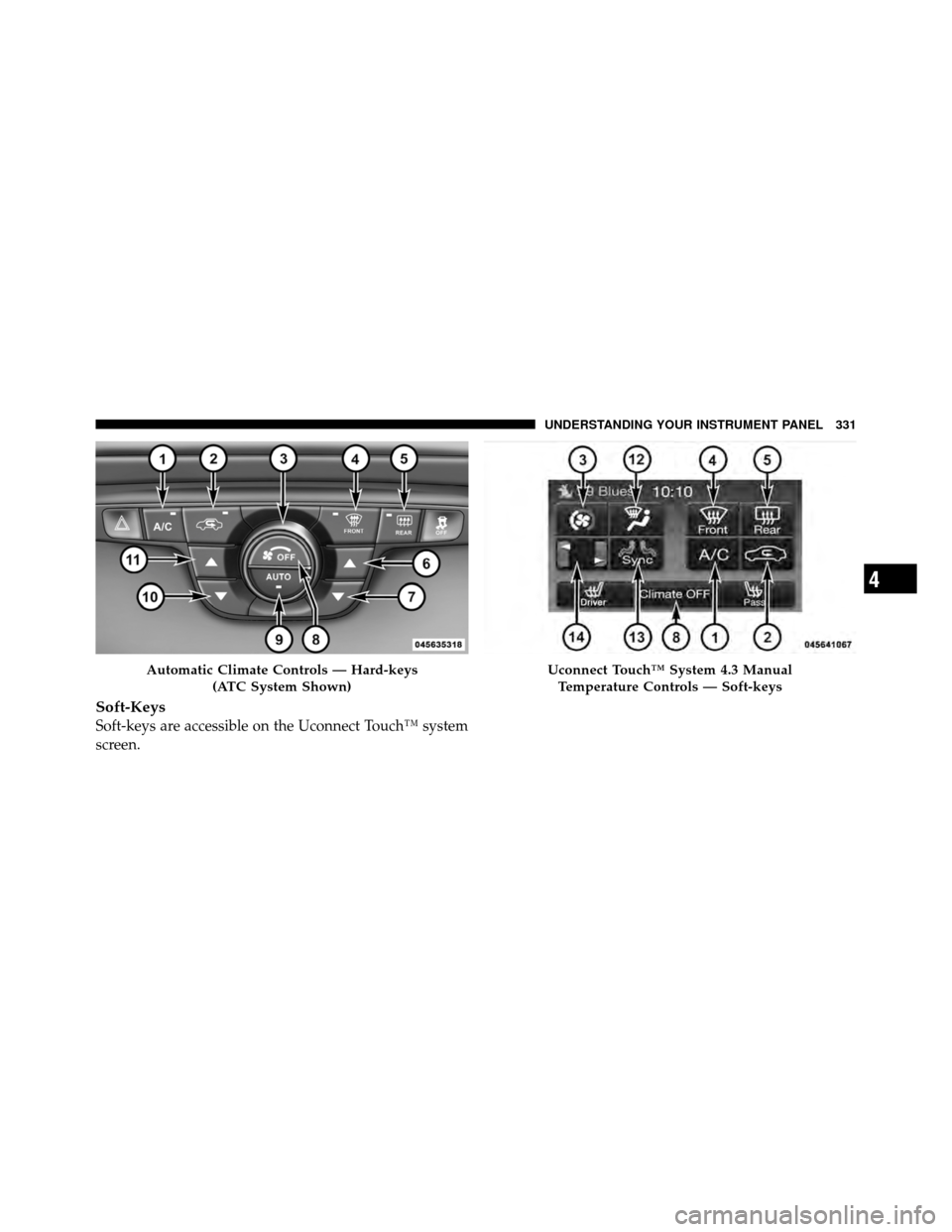
Soft-Keys
Soft-keys are accessible on the Uconnect Touch™ system
screen.
Automatic Climate Controls — Hard-keys(ATC System Shown)Uconnect Touch™ System 4.3 ManualTemperature Controls — Soft-keys
4
UNDERSTANDING YOUR INSTRUMENT PANEL 331