Page 235 of 566
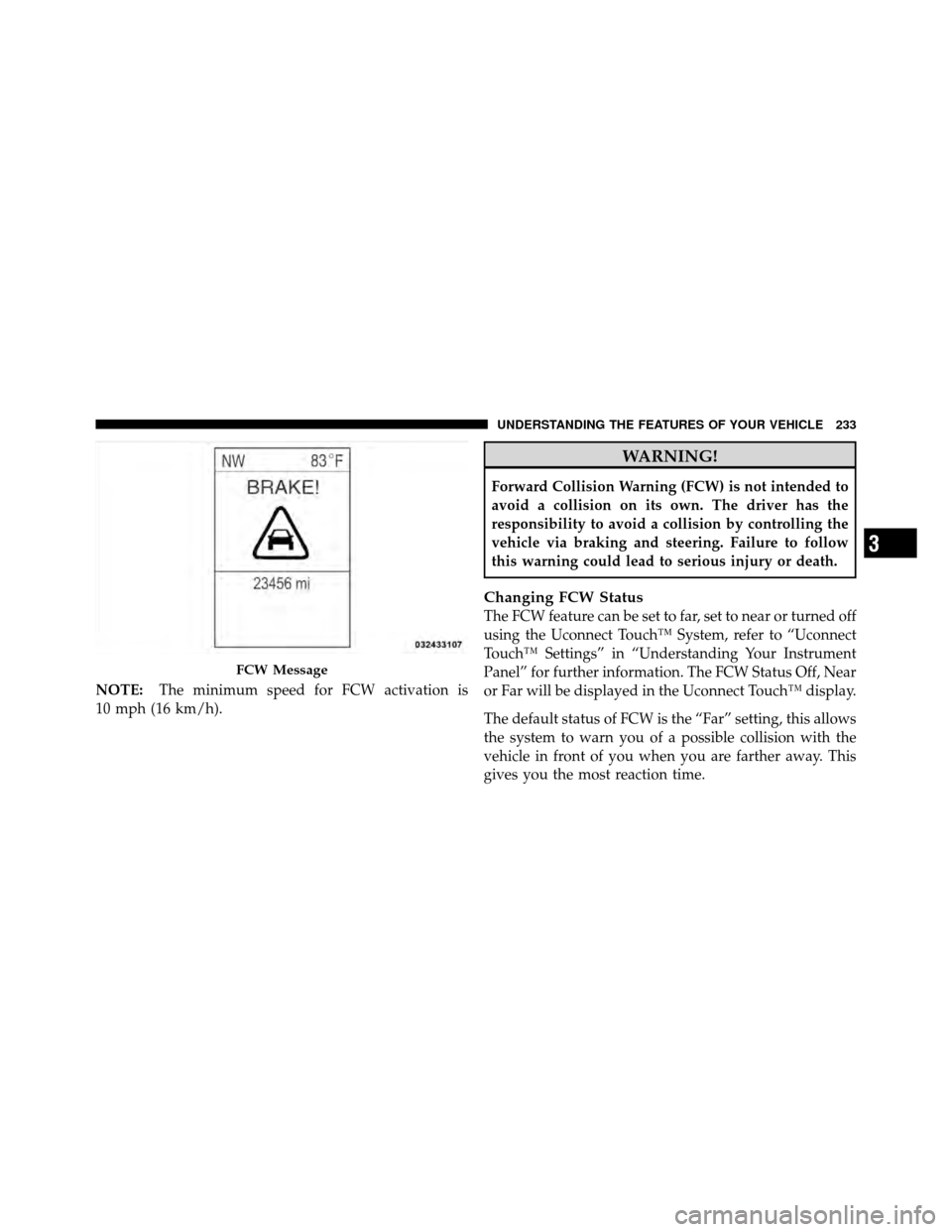
NOTE:The minimum speed for FCW activation is
10 mph (16 km/h).
WARNING!
Forward Collision Warning (FCW) is not intended to
avoid a collision on its own. The driver has the
responsibility to avoid a collision by controlling the
vehicle via braking and steering. Failure to follow
this warning could lead to serious injury or death.
Changing FCW Status
The FCW feature can be set to far, set to near or turned off
using the Uconnect Touch™ System, refer to “Uconnect
Touch™ Settings” in “Understanding Your Instrument
Panel” for further information. The FCW Status Off, Near
or Far will be displayed in the Uconnect Touch™ display.
The default status of FCW is the “Far” setting, this allows
the system to warn you of a possible collision with the
vehicle in front of you when you are farther away. This
gives you the most reaction time.
FCW Message
3
UNDERSTANDING THE FEATURES OF YOUR VEHICLE 233
Page 238 of 566

ParkSense�Sensors
The four ParkSense� sensors, located in the rear fascia/
bumper, monitor the area behind the vehicle that is
within the sensors’ field of view. The sensors can detect
obstacles from approximately 12 in (30 cm) up to 79 in
(200 cm) from the rear fascia/bumper in the horizontal
direction, depending on the location, type and orienta-
tion of the obstacle.
ParkSense� Warning Display
The ParkSense� Warning screen will only be displayed if
Sound and Display is selected from the Uconnect Touch™
System. Refer to “Uconnect Touch™ Settings” in “Under-
standing Your Instrument Panel” for further information.
The ParkSense� Warning screen is located within the Elec-
tronic Vehicle Information Center (EVIC). It provides visual
warnings to indicate the distance between the rear fascia/
bumper and the detected obstacle. Refer to “Electronic Vehicle Information Center (EVIC)/Settings” in Under-
standing Your Instrument Panel” for further information.
ParkSense�
Display
When the vehicle is in REVERSE, the warning display
will turn ON indicating the system status.
Rear Park Assist Display
236 UNDERSTANDING THE FEATURES OF YOUR VEHICLE
Page 241 of 566
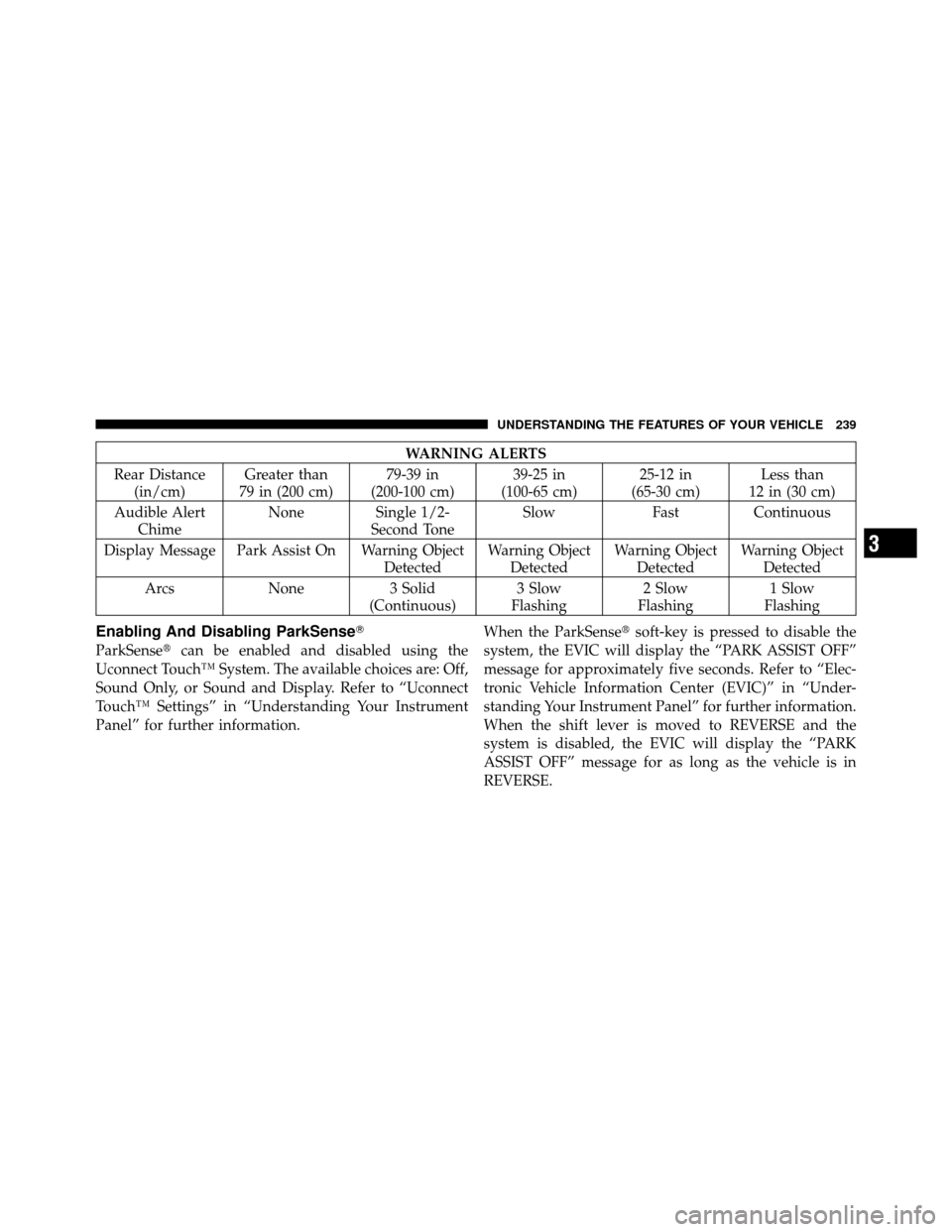
WARNING ALERTS
Rear Distance (in/cm) Greater than
79 in (200 cm) 79-39 in
(200-100 cm) 39-25 in
(100-65 cm) 25-12 in
(65-30 cm) Less than
12 in (30 cm)
Audible Alert Chime None Single 1/2-
Second Tone Slow
FastContinuous
Display Message Park Assist On Warning Object DetectedWarning Object
Detected Warning Object
Detected Warning Object
Detected
Arcs None3 Solid
(Continuous) 3 Slow
Flashing 2 Slow
Flashing 1 Slow
Flashing
Enabling And Disabling ParkSense�
ParkSense� can be enabled and disabled using the
Uconnect Touch™ System. The available choices are: Off,
Sound Only, or Sound and Display. Refer to “Uconnect
Touch™ Settings” in “Understanding Your Instrument
Panel” for further information. When the ParkSense�
soft-key is pressed to disable the
system, the EVIC will display the “PARK ASSIST OFF”
message for approximately five seconds. Refer to “Elec-
tronic Vehicle Information Center (EVIC)” in “Under-
standing Your Instrument Panel” for further information.
When the shift lever is moved to REVERSE and the
system is disabled, the EVIC will display the “PARK
ASSIST OFF” message for as long as the vehicle is in
REVERSE.
3
UNDERSTANDING THE FEATURES OF YOUR VEHICLE 239
Page 242 of 566

The ParkSense�system uses four sensors located in the
rear bumper fascia to scan for obstacles up to 79 in
(200 cm) away from the rear bumper fascia. ParkSense�
provides both visual and audible warnings to indicate
the range of the object.
Service The ParkSense� Rear Park Assist System
When the ParkSense�Rear Park Assist system is mal-
functioning, the Electronic Vehicle Information Center
(EVIC) will actuate a single chime, once per ignition
cycle, and it will display the “CLEAN PARK ASSIST
SENSORS” or the “SERVICE PARK ASSIST SYSTEM”
message. Refer to “Electronic Vehicle Information Center
(EVIC)” in “Understanding Your Instrument Panel” for
further information. When the shift lever is moved to
REVERSE and the system has detected a fault condition,
the EVIC will display the “CLEAN PARK ASSIST SEN-
SORS” or the “SERVICE PARK ASSIST SYSTEM” mes-
sage for as long as the vehicle is in REVERSE. Under this
condition, ParkSense� will not operate. If “CLEAN PARK ASSIST SENSORS” appears in the
EVIC and the rear fascia/bumper is clean and clear of
snow, ice, mud, dirt or other obstruction, see your
authorized dealer.
If “SERVICE PARK ASSIST SYSTEM” appears in the
EVIC, see your authorized dealer.Cleaning The ParkSense�
System
Clean the ParkSense�sensors with water, car wash soap
and a soft cloth. Do not use rough or hard cloths. Do not
scratch or poke the sensors. Otherwise, you could dam-
age the sensors.
ParkSense� System Usage Precautions
NOTE:
•Ensure that the rear bumper is free of snow, ice, mud,
dirt and debris to keep the ParkSense� system operat-
ing properly.
240 UNDERSTANDING THE FEATURES OF YOUR VEHICLE
Page 258 of 566
Wind Buffeting
Wind buffeting can be described as the perception of
pressure on the ears or a helicopter-type sound in the
ears. Your vehicle may exhibit wind buffeting with the
windows down, or the sunroof (if equipped) is in certain
open or partially open positions. This is a normal occur-
rence and can be minimized. If the buffeting occurs with
the rear windows open, then open the front and rear
windows together to minimize the buffeting. If the
buffeting occurs with the sunroof open, then adjust the
sunroof opening to minimize the buffeting or open any
window.
Sunroof Maintenance
Use only a non-abrasive cleaner and a soft cloth to clean
the glass panel.
Ignition Off Operation
For vehicles not equipped with the Electronic Vehicle
Information Center (EVIC), the power sunroof switch
will remain active for 45 seconds after the ignition switch
is turned to the LOCK position. Opening either front
door will cancel this feature.
NOTE:
•For vehicles equipped with the EVIC, the power
sunroof switch will remain active for up to approxi-
mately ten minutes after the ignition switch is turned
to the LOCK position. Opening either front door will
cancel this feature.
•The Ignition Off time is programmable using the
Uconnect Touch™ System. Refer to “Uconnect
Touch™ Settings” in “Understanding Your Instrument
Panel” for further information.
256 UNDERSTANDING THE FEATURES OF YOUR VEHICLE
Page 262 of 566
WARNING!
To avoid serious injury or death:
•Only devices designed for use in this type of
outlet should be inserted into any 12 Volt outlet.
•Do not touch with wet hands.
•Close the lid when not in use and while driving
the vehicle.
•If this outlet is mishandled, it may cause an
electric shock and failure.
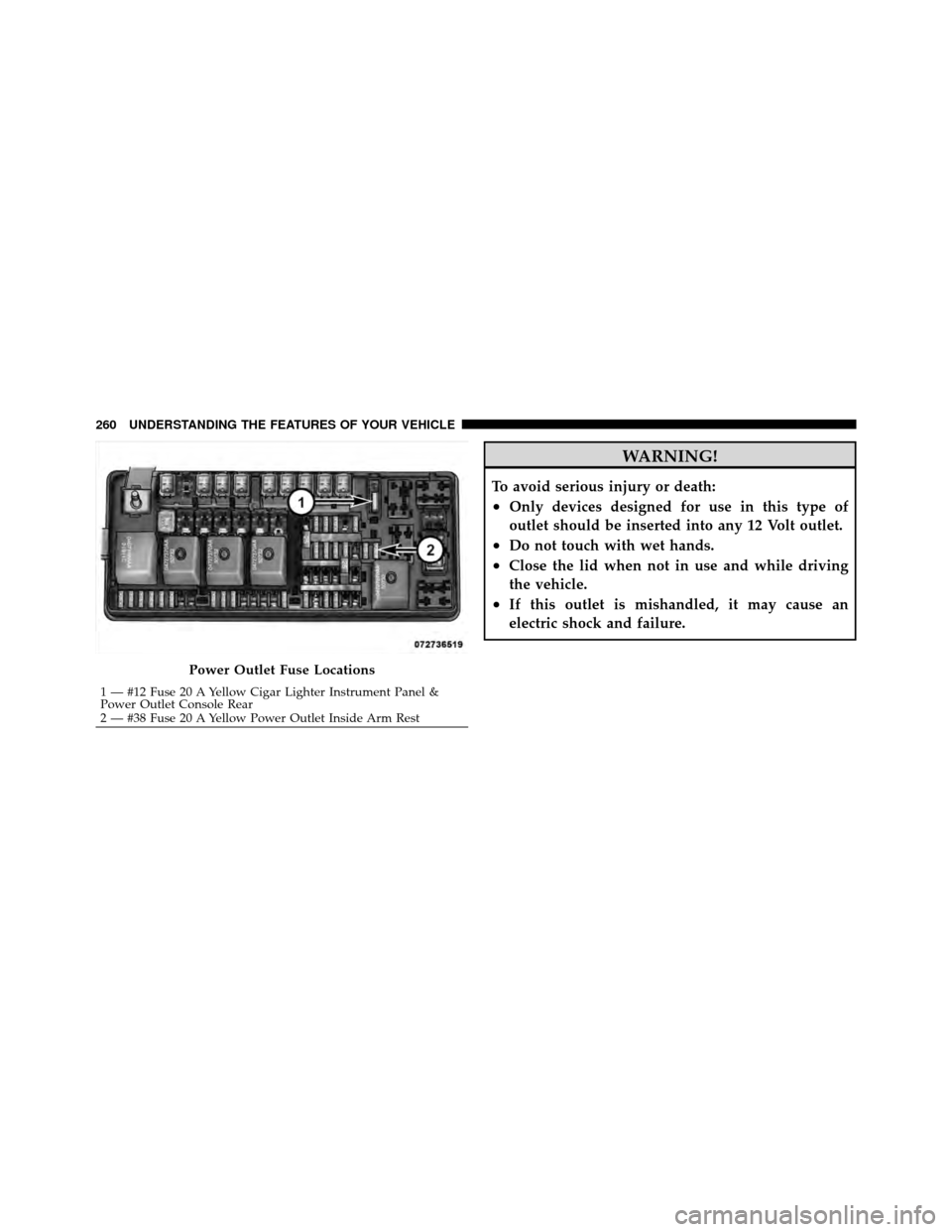
Power Outlet Fuse Locations
1 — #12 Fuse 20 A Yellow Cigar Lighter Instrument Panel &
Power Outlet Console Rear
2 — #38 Fuse 20 A Yellow Power Outlet Inside Arm Rest
260 UNDERSTANDING THE FEATURES OF YOUR VEHICLE
Page 267 of 566
STORAGE
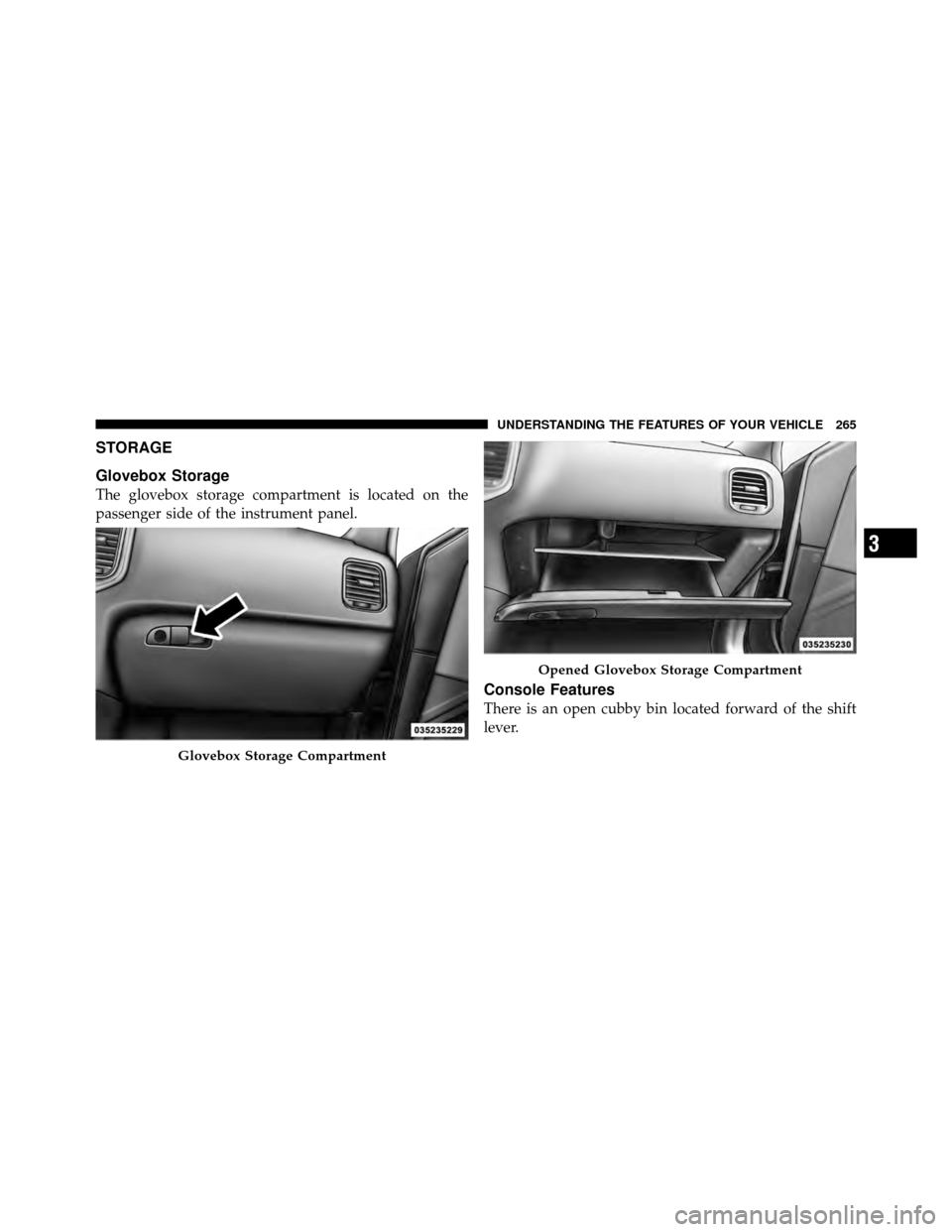
Glovebox Storage
The glovebox storage compartment is located on the
passenger side of the instrument panel.
Console Features
There is an open cubby bin located forward of the shift
lever.
Glovebox Storage Compartment
Opened Glovebox Storage Compartment
3
UNDERSTANDING THE FEATURES OF YOUR VEHICLE 265
Page 273 of 566
UNDERSTANDING YOUR INSTRUMENT PANEL
CONTENTS
�Instrument Panel Features ............... 273
� Instrument Cluster .................... 274
� Instrument Cluster Descriptions ........... 275
� Electronic Vehicle Information Center (EVIC) . . 285
▫ Electronic Vehicle Information Center (EVIC)
Displays ........................... 287
▫ EVIC White Telltale Lights .............. 288
▫ EVIC Amber Telltale Lights ............. 289
▫ EVIC Red Telltale Lights ............... 290 ▫
Oil Change Due ..................... 293
▫ Fuel Economy ...................... 294
▫ Vehicle Speed ....................... 295
▫ Trip Info .......................... 295
▫ Units ............................. 296
▫ Vehicle Info
(Customer Information Features) ......... 297
▫ Messages # ......................... 297
▫ Turn Menu Off ...................... 298
4