2011 DODGE CHARGER instrument panel
[x] Cancel search: instrument panelPage 68 of 566

The side air bags will not deploy in all side collisions.
Side air bag deployment will depend on the severity and
type of collision.
Because air bag sensors measure vehicle deceleration
over time, vehicle speed and damage by themselves are
not good indicators of whether or not an air bag should
have deployed.
Seat belts are necessary for your protection in all acci-
dents, and also are needed to help keep you in position,
away from an inflating air bag.
The ORC monitors the readiness of the electronic parts of
the air bag system whenever the ignition is in the
ON/RUN position. If the key is in the OFF position, or in
the ACC position, the air bag system is not on and the air
bags will not inflate.The ORC contains a backup power supply system that
may deploy the air bags even if the battery loses power or
it becomes disconnected prior to deployment.
Also, the ORC turns on the Air Bag Warning
Light in the instrument panel for approxi-
mately four to eight seconds for a self-check
when the ignition is first turned on. After the
self-check, the Air Bag Warning Light will turn off. If the
ORC detects a malfunction in any part of the system, it
turns on the Air Bag Warning Light, either momentarily
or continuously. A single chime will sound if the light
comes on again after initial startup.
It also includes diagnostics that will illuminate the instru-
ment cluster Air Bag Warning Light if a malfunction is
noted that could affect the air bag system. The diagnos-
tics also record the nature of the malfunction.
66 THINGS TO KNOW BEFORE STARTING YOUR VEHICLE
Page 69 of 566
WARNING!
Ignoring the Air Bag Warning Light in your instru-
ment panel could mean you won’t have the air bags
to protect you in a collision. If the light does not come
on as a bulb check when the ignition is first turned
on, stays on after you start the vehicle, or if it comes
on as you drive, have an authorized dealer service the
air bag system immediately.
Driver And Passenger Advanced Front Air Bag
Inflator Units
The Driver and Passenger Advanced Front Air Bag
Inflator Units are located in the center of the steering
wheel and on the right side of the instrument panel.
When the ORC detects a collision requiring the Ad-
vanced Front Air Bags, it signals the inflator units. A large
quantity of non-toxic gas is generated to inflate the
Advanced Front Air Bags. Different air bag inflation ratesare possible, based on the collision type and severity. The
steering wheel hub trim cover and the upper right side of
the instrument panel separate and fold out of the way as
the air bags inflate to their full size. The air bags fully
inflate in about 50 to 70 milliseconds. This is about half of
the time it takes to blink your eyes. The air bags then
quickly deflate while helping to restrain the driver and
front passenger.
The Advanced Front Air Bag gas is vented through the
vent holes in the sides of the air bag. In this way, the air
bags do not interfere with your control of the vehicle.Supplemental Driver Side Knee Air Bag Inflator
Unit
The Supplemental Driver Side Knee Air Bag unit is
located in the instrument panel trim beneath the steering
column. When the ORC detects a collision requiring the
air bag, it signals the inflator units. A large quantity of
non-toxic gas is generated to inflate the Supplemental
2
THINGS TO KNOW BEFORE STARTING YOUR VEHICLE 67
Page 73 of 566
Maintaining Your Air Bag System
WARNING!
•Modifications to any part of the air bag system
could cause it to fail when you need it. You could
be injured if the air bag system is not there to
protect you. Do not modify the components or
wiring, including adding any kind of badges or
stickers to the steering wheel hub trim cover or the
upper right side of the instrument panel. Do not
modify the front bumper, vehicle body structure,
or add aftermarket side steps or running boards.
•It is dangerous to try to repair any part of the air
bag system yourself. Be sure to tell anyone who
works on your vehicle that it has an air bag system.(Continued)
WARNING! (Continued)
•Do not attempt to modify any part of your air bag
system. The air bag may inflate accidentally or
may not function properly if modifications are
made. Take your vehicle to an authorized dealer
for any air bag system service. If your seat includ-
ing your trim cover and cushion needs to be
serviced in any way (including removal or
loosening/tightening of seat attachment bolts),
take the vehicle to your authorized dealer. Only
manufacturer approved seat accessories may be
used. If it is necessary to modify the air bag system
for persons with disabilities, contact your autho-
rized dealer.
2
THINGS TO KNOW BEFORE STARTING YOUR VEHICLE 71
Page 90 of 566
WARNING! (Continued)
•Always make sure that objects cannot fall into the
driver footwell while the vehicle is moving. Ob-
jects can become trapped under the brake pedal
and accelerator pedal causing a loss of vehicle
control.
•If required, mounting posts must be properly
installed, if not equipped from the factory.
Failure to properly follow floor mat installation or
mounting can cause interference with the brake
pedal and accelerator pedal operation causing loss
of control of the vehicle.
Periodic Safety Checks You Should Make Outside
The Vehicle
Tires
Examine tires for excessive tread wear and uneven wear
patterns. Check for stones, nails, glass, or other objectslodged in the tread or sidewall. Inspect the tread for cuts
and cracks. Inspect sidewalls for cuts, cracks and bulges.
Check the wheel nuts for tightness. Check the tires
(including spare) for proper cold inflation pressure.
Lights
Have someone observe the operation of exterior lights
while you work the controls. Check turn signal and high
beam indicator lights on the instrument panel.
Door Latches
Check for positive closing, latching, and locking.
Fluid Leaks
Check area under vehicle after overnight parking for fuel,
engine coolant, oil, or other fluid leaks. Also, if gasoline
fumes are detected or if fuel, power steering fluid, or
brake fluid leaks are suspected, the cause should be
located and corrected immediately.
88 THINGS TO KNOW BEFORE STARTING YOUR VEHICLE
Page 101 of 566
NOTE:
•The Tilt Mirrors in Reverse feature is not turned on
when delivered from the factory. The Tilt Mirrors in
Reverse feature can be turned on and off using the
Uconnect Touch™ System.
•Refer to “Uconnect Touch™ Settings” in “Understand-
ing Your Instrument Panel” for further information.
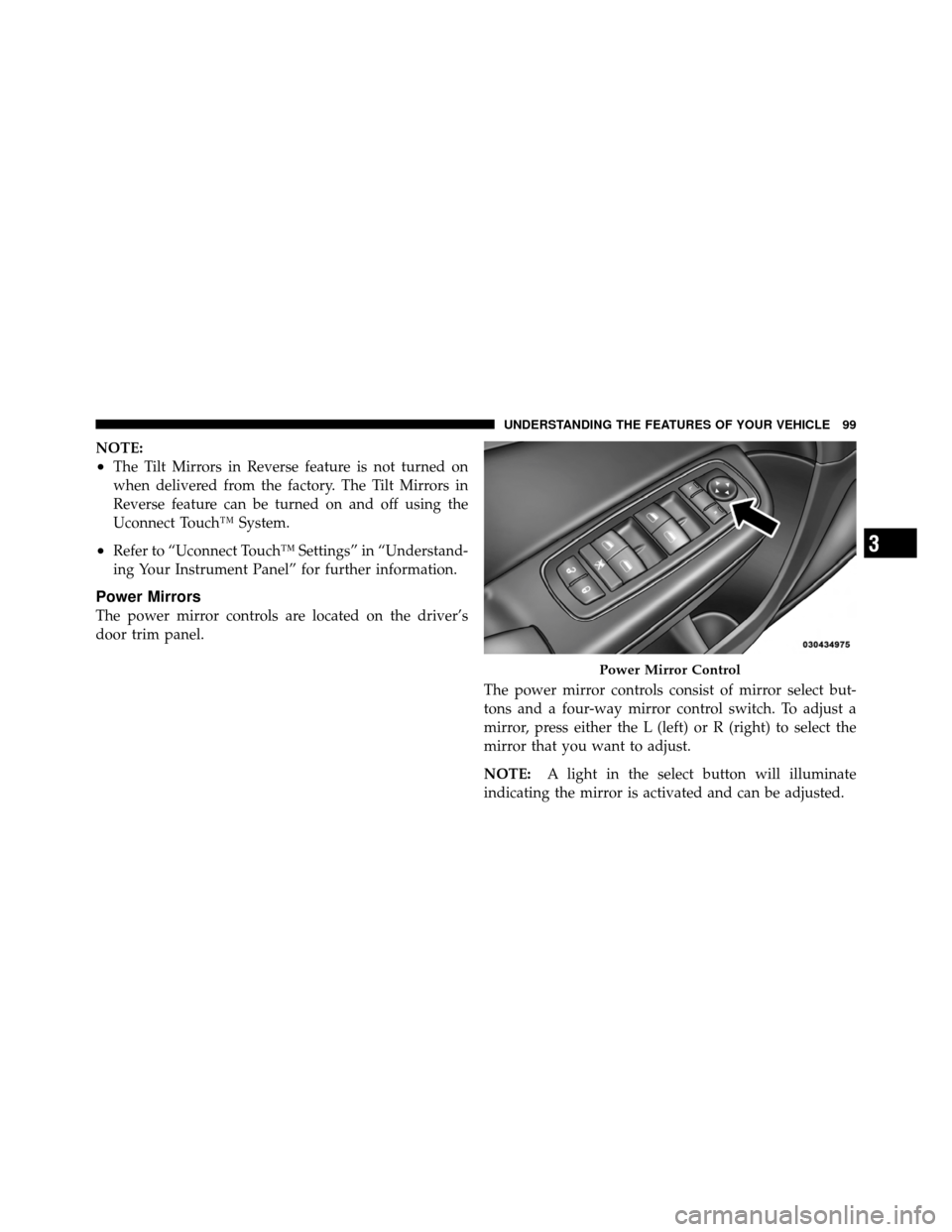
Power Mirrors
The power mirror controls are located on the driver’s
door trim panel.The power mirror controls consist of mirror select but-
tons and a four-way mirror control switch. To adjust a
mirror, press either the L (left) or R (right) to select the
mirror that you want to adjust.
NOTE:A light in the select button will illuminate
indicating the mirror is activated and can be adjusted.
Power Mirror Control
3
UNDERSTANDING THE FEATURES OF YOUR VEHICLE 99
Page 110 of 566
Modes Of Operation
Three selectable modes of operation are available in the
Uconnect Touch™ System. Refer to “Uconnect Touch™
Settings” in “Understanding Your Instrument Panel” for
further information.
Blind Spot Alert
When operating in Blind Spot Alert mode, the BSM
system will provide a visual alert in the appropriate side
view mirror based on a detected object. However, when
the system is operating in RCP, the system will respond
with both visual and audible alerts when a detected
object is present. Whenever an audible alert is requested,
the radio volume is reduced.
Blind Spot Alert Lights/Chime
When operating in Blind Spot Alert Lights/Chime mode,
the BSM system will provide a visual alert in the appro-
priate side view mirror based on a detected object. If the
turn signal is then activated, and it corresponds to analert present on that side of the vehicle, an audible chime
will also be sounded. Whenever a turn signal and de-
tected object are present on the same side at the same
time, both the visual and audio alerts will be issued. In
addition to the audible alert, the radio (if on) volume will
be reduced.
NOTE:
•Whenever an audible alert is requested by the BSM
system, the radio volume is reduced.
•If the hazard flashers are on, the system will request
the appropriate visual alert only.
When the system is in RCP, the system shall respond
with both visual and audible alerts when a detected
object is present. Whenever an audible alert is re-
quested, the radio is also muted. Turn/hazard signal
status is ignored; the RCP state always requests the
chime.
108 UNDERSTANDING THE FEATURES OF YOUR VEHICLE
Page 187 of 566
NOTE:
•Memory profiles can be set without the vehicle in
PARK, but the vehicle must be in PARK to recall a
memory profile.
•The Recall Memory with Remote Key Unlock feature
can be turned on and off using the Uconnect Touch™
System, refer to “Uconnect Touch™ Settings” in “Un-
derstanding Your Instrument Panel” for further
information.
Linking And Unlinking The Remote Keyless Entry
Transmitter To Memory
Your RKE transmitters can be programmed to recall one
of two pre-programmed memory profiles by pressing the
UNLOCK button on the RKE transmitter.To program your RKE transmitters, perform the follow-
ing:
1. Remove the Key Fob from the ignition (or change the
ignition to OFF, for vehicles equipped with Keyless
Enter-N-Go).
2. Select desired memory profile 1 or 2.
3. Once the profile has been recalled, press and release
the SET (S) button on the memory switch, then press and
release the side of the rocker switch labeled 1 or 2
accordingly. “Memory Profile Set” (1 or 2) will display in
the instrument cluster on vehicles equipped with the
EVIC.
4. Press and release the LOCK button on the RKE
transmitter within 10 seconds.
3
UNDERSTANDING THE FEATURES OF YOUR VEHICLE 185
Page 189 of 566
•When you remove the Key Fob from the ignition (or
change the ignition to OFF, for vehicles equipped with
Keyless Enter-N-Go), the driver’s seat will move about
2.4 in (60 mm) rearward if the driver’s seat position is
greater than or equal to 2.7 in (67.7 mm) forward of the
rear stop. The seat will return to its previously set
position when you place the ignition into the ACC or
RUN position.
•When you remove the Key Fob from the ignition (or
change the ignition to OFF, for vehicles equipped with
Keyless Enter-N-Go), the driver’s seat will move to a
position 0.3 in (7.7 mm) forward of the rear stop if the
driver’s seat position is between 0.9 in and 2.7 in
(22.7 mm and 67.7 mm) forward of the rear stop. Theseat will return to its previously set position when you
place the ignition in the ACC or RUN position.
•The Easy Entry/Easy Exit feature is disabled when the
driver’s seat position is less than 0.9 in (22.7 mm)
forward of the rear stop. At this position, there is no
benefit to the driver by moving the seat for Easy Exit
or Easy Entry.
Each stored memory setting will have an associated Easy
Entry and Easy Exit position.
NOTE: The Easy Entry/Easy Exit feature can be turned
on and off using the Uconnect Touch™ System, refer to
“Uconnect Touch™ Settings ” in “Understanding Your
Instrument Panel” for further information.
3
UNDERSTANDING THE FEATURES OF YOUR VEHICLE 187