2011 CHEVROLET VOLT service
[x] Cancel search: servicePage 166 of 516

Black plate (46,1)Chevrolet Volt Owner Manual - 2011
5-46 Instruments and Controls
SERVICE HIGH VOLTAGE
CHARGING SYSTEM
This message displays when there
is a problem with the high voltage
charging system. See your dealer
for service.
Brake System Messages
BRAKE FLUID LOW
This message displays when the
brake fluid level is low. SeeBrake
Fluid on page 10‑26.
RELEASE PARKING BRAKE
This message displays if the electric
parking brake is on while the vehicle
is in motion. Release it before
attempting to drive. See Electric
Parking Brake on page 9‑35 for
more information.
SERVICE BRAKE ASSIST
This message displays when there
is a problem with the brake boost
assist system. When this message
displays, the brake boost assist
motor might be heard operating
and a pulsation may be felt in the
brake pedal. Take the vehicle to
your dealer for service.
SERVICE PARKING BRAKE
This message displays when there
is a problem with the parking brake.
Take the vehicle to your dealer for
service.
STEP ON BRAKE TO
RELEASE PARK BRAKE
This message displays when
attempting to release the electric
parking brake without the brake
pedal applied. See Electric Parking
Brake on page 9‑35 for more
information.
Cruise Control Messages
CRUISE SET TO XXX
This message displays when the
cruise control is set and shows the
speed it was set to. See Cruise
Control on page 9‑40 for more
information.
Door Ajar Messages
DOOR(S) OPEN, HOOD OPEN,
HATCH OPEN
A symbol will appear on the display
showing the area that is open.
See Door, Hood, or Hatch Open
Light on page 5‑30.
Page 168 of 516

Black plate (48,1)Chevrolet Volt Owner Manual - 2011
5-48 Instruments and Controls
Engine Oil Messages
CHANGE ENGINE OIL SOON
This message displays when the
engine oil needs to be changed.
After changing the engine oil,
the Engine Oil Life System must
be reset. SeeEngine Oil Life
System on page 10‑15 and
Driver Information Center (DIC) on
page 5‑43 for information on how
to reset the system. See Engine
Oil on page 10‑12 andScheduled
Maintenance on page 11‑2 for
more information.
OIL PRESSURE LOW —TURN
VEHICLE OFF
This message displays if low oil
pressure levels occur. Stop the
vehicle as soon as safely possible
and do not operate it until the cause
of the low oil pressure has been
corrected. Check the oil as soon
as possible and have the vehicle
serviced by your dealer.
Fuel System Messages
CLOSE FUEL DOOR
This message displays when the
fuel door is open and the vehicle is
moving.
ENGINE NOT AVAILABLE
ADD FUEL
This message displays when
the engine is not available due to
running out of fuel. The vehicle can
continue to be driven in Electric
Mode until the battery is depleted,
but will have reduced acceleration.
When this message is displayed,
refuel the vehicle. See Out of Fuel/
Engine Unavailable on page 9‑28.
FUEL LEVEL LOW
This message displays when the
vehicle is low on fuel. Refuel as
soon as possible.
READY TO REFUEL
This message displays when the
fuel system is depressurized and
the vehicle can be refueled.
TIGHTEN GAS CAP
This message displays when the
fuel cap is not on tight. Tighten the
fuel cap.
WAIT TO REFUEL
This message displays when the
fuel system is pressurized and you
must to wait to refuel the vehicle.
Key and Lock Messages
When programming new Remote
Keyless Entry (RKE) transmitters,
DIC messages display. See Remote
Keyless Entry (RKE) System
Operation on page 2‑3 for more
information.
Page 169 of 516

Black plate (49,1)Chevrolet Volt Owner Manual - 2011
Instruments and Controls 5-49
NO REMOTE DETECTED
This message displays when the
RKE transmitter is not detected
while attempting to start the vehicle.
The transmitter battery may be
weak. See“Starting the Vehicle
with a Low Transmitter Battery”
under Remote Keyless Entry (RKE)
System Operation on page 2‑3 for
more information.
NO REMOTE DETECTED,
PRESS BRAKE TO RESTART
This message displays if the RKE
transmitter is no longer detected
in the vehicle. Press the brake
pedal and the POWER
Obutton
to restart the vehicle, or press the
POWER
Obutton without pressing
the brake pedal to turn the vehicle
off. If the vehicle is turned off and
a valid transmitter is not available,
the vehicle will not restart.
REMINDER: KEY LEFT IN
VEHICLE
This message displays when
leaving the vehicle with the RKE
transmitter still inside.
REPLACE BATTERY IN
REMOTE KEY
This message displays when the
battery in the RKE transmitter needs
to be replaced.
SERVICE KEYLESS START
SYSTEM
This message displays when the
keyless start system needs service.
Take the vehicle to your dealer.
Lamp Messages
AUTOMATIC LIGHT CONTROL
ON OR OFF
A message will display when the
automatic light control has been
turned on or off.
CHECK LAMP or LAMP
FAILURE
Depending on the lamp, one of
these messages may display.
See Bulb Replacement on
page 10‑34.
TURN SIGNAL ON
This message displays if the turn
signal has been left on. Turn off the
turn signal.
Object Detection System
Messages
PARK ASSIST OFF
This message displays when the
park assist system has been turned
off. See Ultrasonic Parking Assist
on page 9‑43.
SERVICE PARKING ASSIST
This message displays if there is a
problem with the park assist system.
Take the vehicle to your dealer for
service.
Page 170 of 516

Black plate (50,1)Chevrolet Volt Owner Manual - 2011
5-50 Instruments and Controls
Propulsion Power
Messages
PROPULSION POWER IS
REDUCED
This message displays when the
propulsion power is reduced and
can affect the ability to accelerate.
If this message is on, but there
is no reduction in performance,
proceed to your destination.
The performance may be reduced
the next time the vehicle is driven.
The vehicle may be driven at a
reduced speed while this message
is on, but maximum acceleration
and speed may be reduced.
If this message stays on when
the malfunction indicator lamp is
on, the vehicle should be taken to
your dealer for service as soon as
possible.This message can display when
driving in mountainous terrain
without using Mountain Mode or by
not entering Mountain Mode soon
enough to build a sufficient battery
charge reserve before climbing
steep grades. This is normal
operation to protect the high
voltage battery. Only if both
the PROPULSION POWER IS
REDUCED message and the
malfunction indicator lamp are
on should the vehicle be taken
to the dealer for service.
While climbing the grade with this
message displayed, the vehicle
speed may be reduced until the
engine can recover the battery
state of charge to a normal level.
See
“Mountain Mode” underDriver
Selected Operating Modes on
page 9‑26.
Ride Control System
Messages
LOW TRACTION
This message displays when the
Antilock Brake System (ABS) is
active and is working to assist the
driver with control of the vehicle in
difficult driving conditions.
SERVICE STABILITRAK
This message displays when
there is a problem detected with
the StabiliTrak system. The vehicle
is safe to drive, but the StabiliTrak
system is not operational.
See Electronic Stability Control
(ESC) on page 9‑39 for information
on resetting the system.
Page 171 of 516

Black plate (51,1)Chevrolet Volt Owner Manual - 2011
Instruments and Controls 5-51
SERVICE TRACTION
CONTROL
This message displays when there
is a problem detected with the
Traction Control System (TCS).
The vehicle is safe to drive, but the
TCS is not operational. SeeTraction
Control System (TCS) on page 9‑37
for information on resetting the
system.
Airbag System Messages
SERVICE AIRBAG
This message displays if there is
a problem with the airbag system.
Take the vehicle to your dealer for
service.
Anti-theft Alarm System
Messages
SERVICE THEFT ALARM
This message displays if there is a
problem with the alarm. See your
dealer for service.
SERVICE THEFT DETERRENT
SYSTEM
This message displays if there is
a problem with the theft-deterrent
system. See your dealer for service.
Service Vehicle Messages
ENGINE MAINTENANCE XXX%
COMPLETE
This message displays when
the Engine Maintenance Mode is
running. See “Engine Maintenance
Mode” underMaintenance Modes
on page 9‑28.
ENGINE NOT AVAILABLE
SERVICE SOON
This message displays when the
engine is not available due to a
malfunction that will not allow the
engine to start. The vehicle can
continue to be driven in Electric
Mode until the battery is depleted,
but will have reduced acceleration.
When this message is displayed,
the vehicle should be taken to
your dealer for service as soon as
possible. See Out of Fuel/Engine
Unavailable on page 9‑28.
SERVICE AC SYSTEM
This message displays if there is a
problem with the air conditioning
system. Take the vehicle to your
dealer for service.
SERVICE HEATER SOON
This message displays if there is
a problem with the heater system.
Take the vehicle to your dealer for
service.
Page 172 of 516

Black plate (52,1)Chevrolet Volt Owner Manual - 2011
5-52 Instruments and Controls
SERVICE POWER STEERING
This message displays if there is a
problem with the power steering
system. Take the vehicle to your
dealer for service.
SERVICE VEHICLE SOON
This message displays if there is a
problem with the vehicle. Take the
vehicle to your dealer for service.
Depending on the severity of a
crash, this message may come
on along with the airbag readiness
light.
Starting the Vehicle
Messages
PRESS BRAKE TO START
VEHICLE
This message displays when
attempting to start the vehicle
without first pressing the brake
pedal.
PRESS BUTTON AGAIN TO
TURN OFF
This message displays as a
reminder to press the POWER
O
button to turn the vehicle off when
an attempt is made to turn off the
vehicle while it is in motion.
Tire Messages
SERVICE TIRE MONITOR
SYSTEM
This message displays if there is
a problem with the Tire Pressure
Monitor System (TPMS). SeeTire
Pressure Monitor Operation on
page 10‑57 for more information.
TIRE LEARNING ACTIVE
This message displays when
the system is learning new tires.
SeeTire Pressure Monitor
Operation on page 10‑57 for
more information.
TIRE LOW ADD AIR TO TIRE
This message displays when the
pressure in one or more of the tires
is low.
This message also displays
LEFT FRONT, RIGHT FRONT,
LEFT REAR, or RIGHT REAR to
indicate the location of the low tire.
The low tire pressure warning
light will also come on. See Tire
Pressure Light on page 5‑27.
If a tire pressure message appears
on the DIC, stop as soon as you
can. Inflate the tires by adding air
until the tire pressure is equal to
the values shown on the Tire and
Loading Information label. See Tires
on page 10‑48, Vehicle Load Limits
on page 9‑14, and Tire Pressure on
page 10‑54.
You can receive more than one
tire pressure message at a time.
The DIC also shows the tire
pressure values. See Driver
Information Center (DIC) on
page 5‑43.
Page 191 of 516
Black plate (1,1)Chevrolet Volt Owner Manual - 2011
Infotainment System 7-1
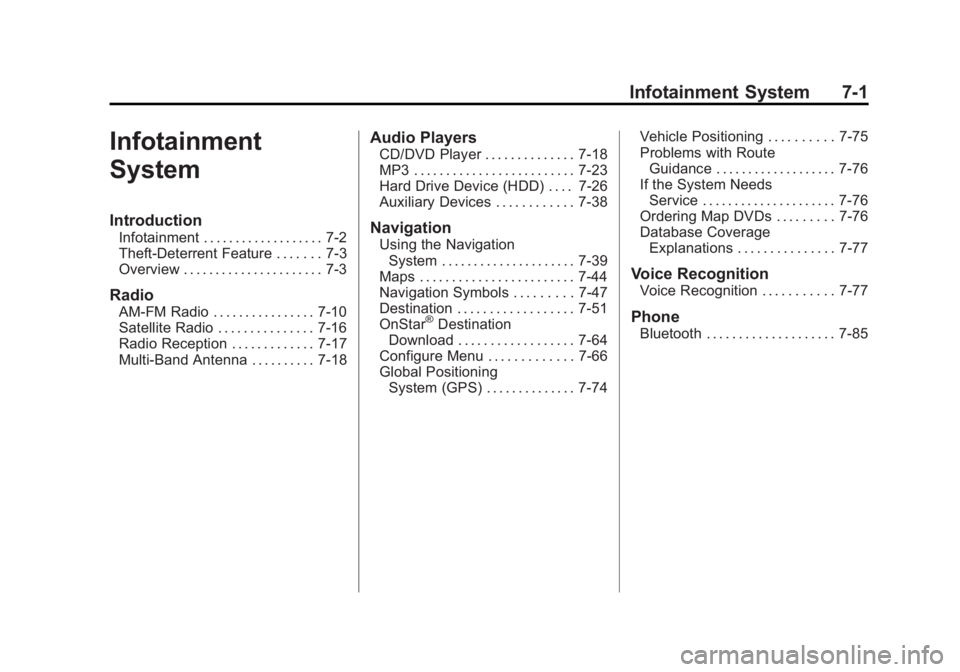
Infotainment
System
Introduction
Infotainment . . . . . . . . . . . . . . . . . . . 7-2
Theft-Deterrent Feature . . . . . . . 7-3
Overview . . . . . . . . . . . . . . . . . . . . . . 7-3
Radio
AM-FM Radio . . . . . . . . . . . . . . . . 7-10
Satellite Radio . . . . . . . . . . . . . . . 7-16
Radio Reception . . . . . . . . . . . . . 7-17
Multi-Band Antenna . . . . . . . . . . 7-18
Audio Players
CD/DVD Player . . . . . . . . . . . . . . 7-18
MP3 . . . . . . . . . . . . . . . . . . . . . . . . . 7-23
Hard Drive Device (HDD) . . . . 7-26
Auxiliary Devices . . . . . . . . . . . . 7-38
Navigation
Using the NavigationSystem . . . . . . . . . . . . . . . . . . . . . 7-39
Maps . . . . . . . . . . . . . . . . . . . . . . . . 7-44
Navigation Symbols . . . . . . . . . 7-47
Destination . . . . . . . . . . . . . . . . . . 7-51
OnStar
®Destination
Download . . . . . . . . . . . . . . . . . . 7-64
Configure Menu . . . . . . . . . . . . . 7-66
Global Positioning System (GPS) . . . . . . . . . . . . . . 7-74 Vehicle Positioning . . . . . . . . . . 7-75
Problems with Route
Guidance . . . . . . . . . . . . . . . . . . . 7-76
If the System Needs Service . . . . . . . . . . . . . . . . . . . . . 7-76
Ordering Map DVDs . . . . . . . . . 7-76
Database Coverage Explanations . . . . . . . . . . . . . . . 7-77
Voice Recognition
Voice Recognition . . . . . . . . . . . 7-77
Phone
Bluetooth . . . . . . . . . . . . . . . . . . . . 7-85
Page 206 of 516

Black plate (16,1)Chevrolet Volt Owner Manual - 2011
7-16 Infotainment System
Satellite Radio
XM™Satellite Radio Service
Vehicles with an XM satellite radio
tuner and an XM satellite radio
subscription can receive XM
programming.
XM is a satellite radio service based
in the 48 contiguous United States
and 10 Canadian provinces. XM
satellite radio has a wide variety of
programming and commercial-free
music, coast to coast, and in
digital-quality sound. A service
fee is required to receive the XM
service. For more information,
see www.xmradio.com or call
1-800-929-2100 in the U.S.
In Canada, see www.xmradio.ca
or call 1-877-438-9677.
When XM is active, the channel
name and number, category name,
song title, and artist display on the
screen.
XM Categories
XM stations are organized in
categories.
Removing or Adding Categories
1. Press the CONFIG button.
Turn the TUNE/MENU knob
until Radio displays. Press the
TUNE/MENU knob or press
Radio to display the radio
settings menu.
2. Select the Show/Hide XM Categories screen button.
3. Press the category buttons on the screen to show or hide the
category.
XM Messages
XL (Explicit Language
Channels): These channels, or any
others, can be blocked by request,
by calling 1-800-929-2100 in the
U.S., and 1-877-438-9677 in
Canada. XM Updating:
The encryption code
in the receiver is being updated.
No action is required. This process
should take no longer than
30 seconds.
Loading XM: The audio system
is acquiring and processing audio
and text data. No action is needed.
This message should disappear
shortly.
Channel Off Air: This channel is
not currently in service. Tune in to
another channel.
Channel Unauth: This channel is
blocked or cannot be received with
your XM subscription package.
Channel Unavailable: This
previously assigned channel is
no longer assigned. Tune to
another station.
No Artist Info: The system
is working properly. No artist
information is available at this
time on this channel.