2011 CHEVROLET SUBURBAN keyless entry
[x] Cancel search: keyless entryPage 46 of 542
Black plate (8,1)Chevrolet Tahoe/Suburban Owner Manual - 2011
2-8 Keys, Doors and Windows
Door Locks
{WARNING
Unlocked doors can be
dangerous.
.Passengers, especially
children, can easily open the
doors and fall out of a moving
vehicle. When a door is
locked, the handle will not
open it. The chance of being
thrown out of the vehicle in a
crash is increased if the
doors are not locked. So, all
passengers should wear
safety belts properly and the
doors should be locked
whenever the vehicle is
driven.(Continued)
WARNING (Continued)
.Young children who get into
unlocked vehicles may be
unable to get out. A child can
be overcome by extreme heat
and can suffer permanent
injuries or even death from
heat stroke. Always lock the
vehicle whenever leaving it.
.Outsiders can easily enter
through an unlocked door
when you slow down or stop
your vehicle. Locking your
doors can help prevent this
from happening.
There are several ways to lock and
unlock the vehicle.
From outside, use the Remote
Keyless Entry (RKE) transmitter or
the key in the driver door. From inside, use the power door
locks or manual door locks. To lock
or unlock the door with the manual
locks, push down or pull up on the
manual lock knob.
Power Door Locks
With power door locks, the switches
on the front doors can be used to
lock and unlock the vehicle.
K(Unlock):
Press to unlock the
doors.
Q(Lock): Press to lock the doors.
Page 49 of 542
Black plate (11,1)Chevrolet Tahoe/Suburban Owner Manual - 2011
Keys, Doors and Windows 2-11
The power liftgate can be power
opened and closed in the
following ways:
.Press and hold&on the
Remote Keyless Entry (RKE)
transmitter until the liftgate starts
moving. See Remote Keyless
Entry (RKE) System Operation
on page 2‑3.
.Press&on the overhead
console.
.Press the touchpad on the
outside liftgate handle.
Pressing the buttons, or touchpad
switch a second time while the
liftgate is moving reverses the
direction.
l: The liftgate can also be
closed by pressing this button next
to the liftgate latch.
Press the button a second time
during liftgate operation to reverse
that operation. The power liftgate may be
temporarily disabled under extreme
temperatures, or under low battery
conditions. If this occurs, the liftgate
can still be operated manually.
If the transmission is shifted out of
P (Park) while the power function is
in progress, the liftgate power
function will continue to completion.
If the transmission is shifted out of
P (Park) and the vehicle accelerates
before the power liftgate latches
closed, the liftgate may reverse to
the open position. Cargo could fall
out of the vehicle. Always make
sure the power liftgate is closed and
latched before you drive away.
If you power open the liftgate and
the liftgate support struts have lost
pressure, the lamps will flash and a
chime will sound. The liftgate will
stay open temporarily, then slowly
close. See your dealer for service
before using the liftgate.
Obstacle Detection Features
If the liftgate encounters an obstacle
during a power open or close cycle,
a warning chime will sound and the
liftgate will automatically reverse
direction to the full closed or open
position. After removing the
obstruction, the power liftgate
operation can be used again. If the
liftgate encounters multiple
obstacles on the same power cycle,
the power function will deactivate,
and you must manually open or
close the liftgate. The REAR
ACCESS OPEN warning message
in the Driver Information Center
(DIC) will indicate that the liftgate is
open. After removing the
obstructions, manually open the
liftgate to the full open position or
close the liftgate to the fully closed
and latched position. The liftgate will
now resume normal power
operation.
Page 51 of 542
Black plate (13,1)Chevrolet Tahoe/Suburban Owner Manual - 2011
Keys, Doors and Windows 2-13
WARNING (Continued)
Systems on page 9‑37or
Dual Automatic Climate
Control System on page 8‑4.
.If you have air outlets on or
under the instrument panel,
open them all the way.
.If your vehicle has a power
liftgate, disable the power
liftgate function.
See Engine Exhaust on
page 9‑37.
Press
Kon the Remote Keyless
Entry (RKE) transmitter or use the
power door lock switches to unlock
the liftgate. See Remote Keyless
Entry (RKE) System Operation on
page 2‑3.
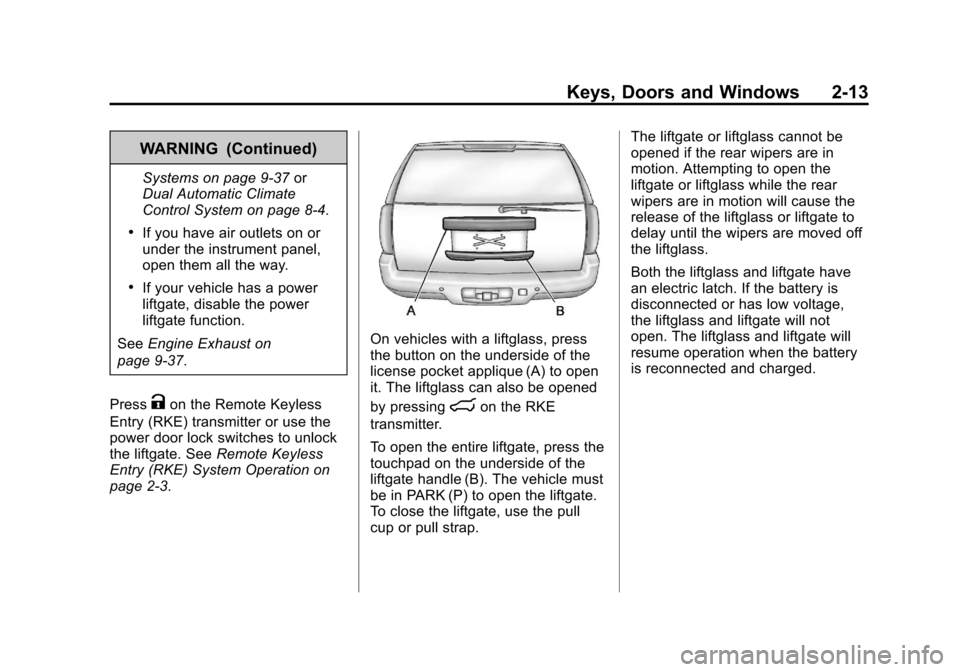
On vehicles with a liftglass, press
the button on the underside of the
license pocket applique (A) to open
it. The liftglass can also be opened
by pressing
mon the RKE
transmitter.
To open the entire liftgate, press the
touchpad on the underside of the
liftgate handle (B). The vehicle must
be in PARK (P) to open the liftgate.
To close the liftgate, use the pull
cup or pull strap. The liftgate or liftglass cannot be
opened if the rear wipers are in
motion. Attempting to open the
liftgate or liftglass while the rear
wipers are in motion will cause the
release of the liftglass or liftgate to
delay until the wipers are moved off
the liftglass.
Both the liftglass and liftgate have
an electric latch. If the battery is
disconnected or has low voltage,
the liftglass and liftgate will not
open. The liftglass and liftgate will
resume operation when the battery
is reconnected and charged.
Page 52 of 542
Black plate (14,1)Chevrolet Tahoe/Suburban Owner Manual - 2011
2-14 Keys, Doors and Windows
Power Assist Steps
The vehicle may have power assist
steps.
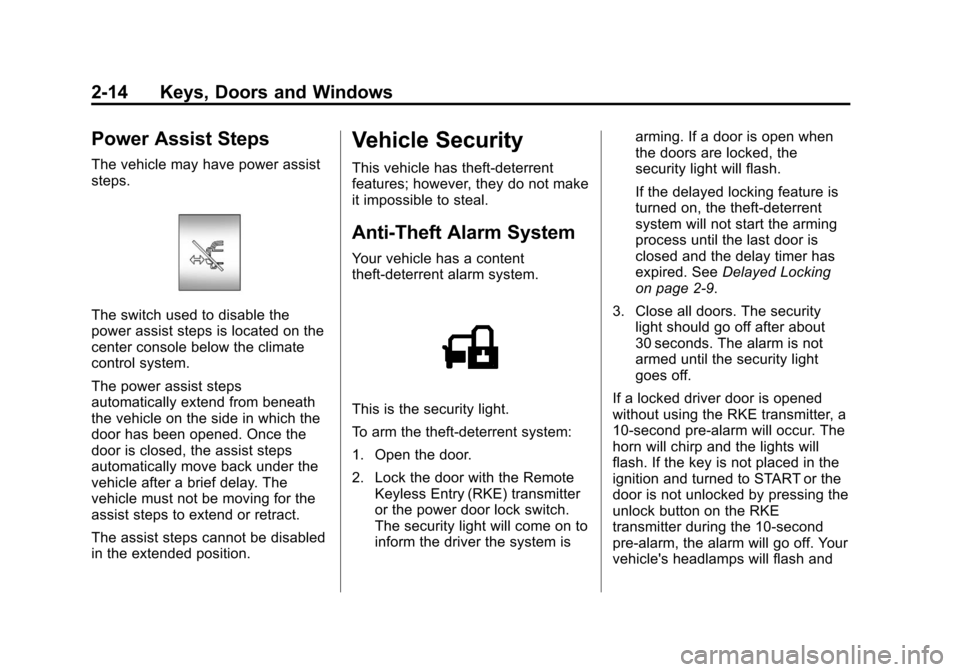
The switch used to disable the
power assist steps is located on the
center console below the climate
control system.
The power assist steps
automatically extend from beneath
the vehicle on the side in which the
door has been opened. Once the
door is closed, the assist steps
automatically move back under the
vehicle after a brief delay. The
vehicle must not be moving for the
assist steps to extend or retract.
The assist steps cannot be disabled
in the extended position.
Vehicle Security
This vehicle has theft-deterrent
features; however, they do not make
it impossible to steal.
Anti-Theft Alarm System
Your vehicle has a content
theft-deterrent alarm system.
This is the security light.
To arm the theft-deterrent system:
1. Open the door.
2. Lock the door with the RemoteKeyless Entry (RKE) transmitter
or the power door lock switch.
The security light will come on to
inform the driver the system is arming. If a door is open when
the doors are locked, the
security light will flash.
If the delayed locking feature is
turned on, the theft‐deterrent
system will not start the arming
process until the last door is
closed and the delay timer has
expired. See
Delayed Locking
on page 2‑9.
3. Close all doors. The security light should go off after about
30 seconds. The alarm is not
armed until the security light
goes off.
If a locked driver door is opened
without using the RKE transmitter, a
10-second pre-alarm will occur. The
horn will chirp and the lights will
flash. If the key is not placed in the
ignition and turned to START or the
door is not unlocked by pressing the
unlock button on the RKE
transmitter during the 10-second
pre-alarm, the alarm will go off. Your
vehicle's headlamps will flash and
Page 69 of 542
Black plate (5,1)Chevrolet Tahoe/Suburban Owner Manual - 2011
Seats and Restraints 3-5
Storing Memory Positions
To save into memory:
1. Adjust the driver seat, seatbackrecliner, both outside mirrors,
and the throttle and brake
pedals, if available.
See Power Mirrors on page 2‑18
and Adjustable Throttle and
Brake Pedal on page 9‑29 for
more information.
Not all mirrors and adjustable
throttles and brake pedals will
have the ability to save and
recall their positions.
2. Press and hold “1”until
two beeps sound.
3. Repeat for a second driver position using “2.”
To recall, press and release “1”or
“2.” The vehicle must be in P (Park).
A single beep will sound. The seat,
outside mirrors, and adjustable
throttle and brake pedals will move
to the position previously stored for
the identified driver. Memory Remote Recall
The memory feature can recall the
driver seat, outside mirrors, and
pedals, if available, to stored
positions when entering the vehicle.
To activate, unlock the driver
door with the Remote Keyless
Entry (RKE) transmitter. The driver
seat, outside mirrors, and adjustable
pedals, if available, will move to the
memory position associated with the
transmitter used to unlock the
vehicle.
This feature can be turned on or off
using the vehicle personalization
menu. See
“Memory Seat Recall”
under Vehicle Personalization (With
DIC Buttons) on page 5‑49 for more
information.
To stop recall movement, press one
of the power seat controls, memory
buttons, or power mirror buttons,
or the adjustable pedal switch. If something has blocked the driver
seat and/or the adjustable pedals
while recalling a memory position,
the recall may stop. Remove the
obstruction; then press and hold the
appropriate manual control for the
memory item that is not recalling for
two seconds. Try recalling the
memory position again by pressing
the appropriate memory button.
If the memory position is still not
recalling, see your dealer for
service.
Easy Exit Driver Seat
This feature can move the seat
rearward to allow extra room to exit
the vehicle.
B(Easy Exit Driver Seat):
Press
to recall the easy exit seat position.
The vehicle must be in P (Park).
If the easy exit seat feature is
programmed on in the vehicle
personalization menu, automatic
seat movement occurs when the
ignition key is removed.
Page 191 of 542
Black plate (43,1)Chevrolet Tahoe/Suburban Owner Manual - 2011
Instruments and Controls 5-43
Key and Lock Messages
REPLACE BATTERY IN
REMOTE KEY
This message displays if a Remote
Keyless Entry (RKE) transmitter
battery is low. The battery needs to
be replaced in the transmitter. See
“Battery Replacement”under
Remote Keyless Entry (RKE)
System Operation on page 2‑3.
Lamp Messages
TURN SIGNAL ON
This message displays and a chime
sounds if a turn signal is left on for
1.2 km (0.75 mile). Move the turn
signal/multifunction lever to the off
position.
Object Detection System
Messages
PARK ASST BLOCKED SEE
OWNERS MANUAL
If your vehicle has the Ultrasonic
Rear Parking Assist (URPA) system,
this message displays if there is
something interfering with the park
assist system. See Ultrasonic
Parking Assist on page 9‑61 for
more information.
PARK ASSIST OFF
If your vehicle has the Ultrasonic
Rear Parking Assist (URPA) system,
after the vehicle has been started,
this message displays to remind the
driver that the URPA system has
been turned off. Press the set/reset
button or the trip odometer reset
stem to acknowledge this message
and clear it from the DIC display. To
turn the URPA system back on, see
Ultrasonic Parking Assist on
page 9‑61.
SERVICE PARK ASSIST
If your vehicle has the Ultrasonic
Rear Parking Assist (URPA) system,
this message displays if there is a
problem with the URPA system. Do
not use this system to help you
park. See Ultrasonic Parking Assist
on page 9‑61 for more information.
See your dealer for service.
SERVICE SIDE BLIND ZONE
ALERT SYSTEM
If your vehicle has the Side Blind
Zone Alert (SBZA) system and this
message displays, both SBZA
displays will remain on indicating
there is a problem with the SBZA
system. If these displays remain on
after continued driving, the system
needs service. See your dealer. See
Side Blind Zone Alert (SBZA) on
page 9‑63 for more information.
Page 199 of 542

Black plate (51,1)Chevrolet Tahoe/Suburban Owner Manual - 2011
Instruments and Controls 5-51
ALL AT KEY OUT:All of the doors
will unlock when the key is taken
out of the ignition.
ALL IN PARK (default): All of the
doors will unlock when the vehicle is
shifted into P (Park).
NO CHANGE: No change will be
made to this feature. The current
setting will remain.
To select a setting, press the set/
reset button while the desired
setting is displayed on the DIC.
REMOTE DOOR LOCK
This feature allows you to select the
type of feedback you will receive
when locking the vehicle with the
Remote Keyless Entry (RKE)
transmitter. You will not receive
feedback when locking the vehicle
with the RKE transmitter if the doors
are open. See Remote Keyless
Entry (RKE) System Operation on
page 2‑3 for more information. Press the customization button until
REMOTE DOOR LOCK appears on
the DIC display. Press the set/reset
button once to access the settings
for this feature. Then press the
customization button to scroll
through the following settings:
OFF:
There will be no feedback
when you press the lock button on
the RKE transmitter.
LIGHTS ONLY: The exterior lamps
will flash when you press the lock
button on the RKE transmitter.
HORN ONLY: The horn will sound
on the second press of the lock
button on the RKE transmitter.
HORN & LIGHTS (default): The
exterior lamps will flash when you
press the lock button on the RKE
transmitter, and the horn will sound
when the lock button is pressed
again within five seconds of the
previous command.
NO CHANGE: No change will be
made to this feature. The current
setting will remain. To select a setting, press the set/
reset button while the desired
setting is displayed on the DIC.
REMOTE DOOR UNLOCK
This feature allows you to select the
type of feedback you will receive
when unlocking the vehicle with the
Remote Keyless Entry (RKE)
transmitter. You will not receive
feedback when unlocking the
vehicle with the RKE transmitter if
the doors are open. See
Remote
Keyless Entry (RKE) System
Operation on page 2‑3 for more
information.
Press the customization button until
REMOTE DOOR UNLOCK appears
on the DIC display. Press the set/
reset button once to access the
settings for this feature. Then press
the customization button to scroll
through the following settings:
LIGHTS OFF: The exterior lamps
will not flash when you press the
unlock button on the RKE
transmitter.
Page 201 of 542
Black plate (53,1)Chevrolet Tahoe/Suburban Owner Manual - 2011
Instruments and Controls 5-53
NO CHANGE:No change will be
made to this feature. The current
setting will remain.
To select a setting, press the set/
reset button while the desired
setting is displayed on the DIC.
APPROACH LIGHTING
This feature allows you to select
whether or not to have the exterior
lights turn on briefly during low light
periods after unlocking the vehicle
using the Remote Keyless Entry
(RKE) transmitter.
Press the customization button until
APPROACH LIGHTING appears on
the DIC display. Press the set/reset
button once to access the settings
for this feature. Then press the
customization button to scroll
through the following settings:
OFF: The exterior lights will not
turn on when you unlock the vehicle
with the RKE transmitter. ON (default):
If it is dark enough
outside, the exterior lights will turn
on briefly when you unlock the
vehicle with the RKE transmitter.
The lights will remain on for
20 seconds or until the lock button
on the RKE transmitter is pressed,
or the vehicle is no longer off. See
Remote Keyless Entry (RKE)
System Operation on page 2‑3 for
more information.
NO CHANGE : No change will be
made to this feature. The current
setting will remain.
To select a setting, press the set/
reset button while the desired
setting is displayed on the DIC.
CHIME VOLUME
This feature allows you to select the
volume level of the chime. Press the customization button until
CHIME VOLUME appears on the
DIC display. Press the set/reset
button once to access the settings
for this feature. Then press the
customization button to scroll
through the following settings:
NORMAL:
The chime volume will
be set to a normal level.
LOUD: The chime volume will be
set to a loud level.
NO CHANGE: No change will be
made to this feature. The current
setting will remain.
There is no default for chime
volume. The volume will stay at the
last known setting.
To select a setting, press the set/
reset button while the desired
setting is displayed on the DIC.