Page 260 of 430
Black plate (22,1)Chevrolet HHR Owner Manual - 2011
reverse directions causes a rocking motion that could
free the vehicle. If that does not get the vehicle out after
a few tries, it might need to be towed out. If the vehicle
does need to be towed out, seeTowing Your Vehicle
on
page 5‑28.
Loading the Vehicle
It is very important to know how much weight your
vehicle can carry. Two labels on your vehicle
show how much weight it may properly carry, the
Tire and Loading Information label and the Vehicle
Certification label.
{WARNING:
Do not load the vehicle any heavier than the
Gross Vehicle Weight Rating (GVWR),
or either the maximum front or rear Gross
Axle Weight Rating (GAWR). If you do, parts
on the vehicle can break, and it can change
the way the vehicle handles. These could
cause you to lose control and crash. Also,
overloading can shorten the life of the
vehicle.
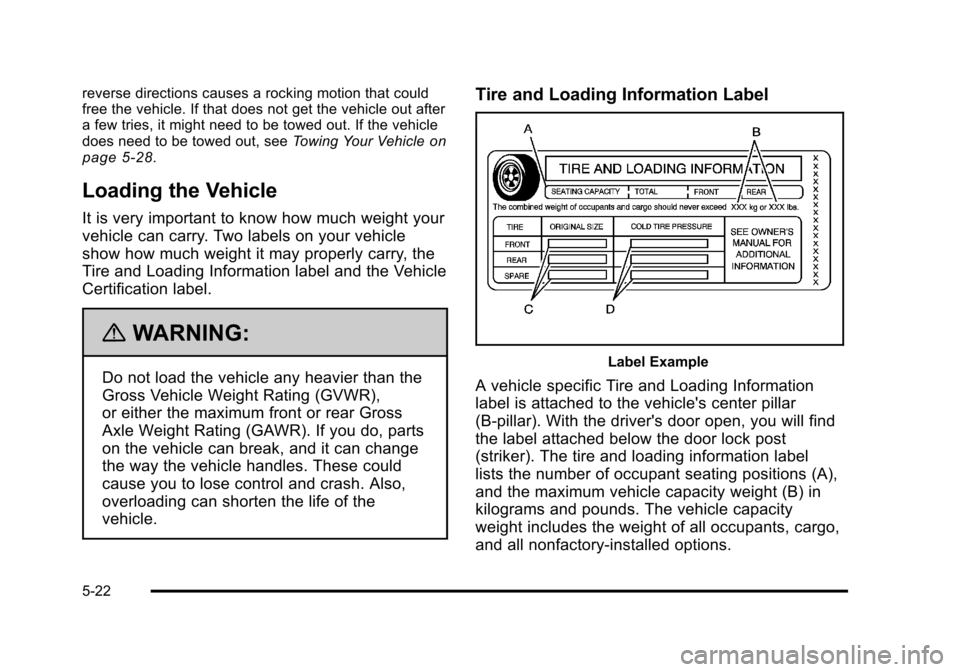
Tire and Loading Information Label
Label Example
A vehicle specific Tire and Loading Information
label is attached to the vehicle's center pillar
(B-pillar). With the driver's door open, you will find
the label attached below the door lock post
(striker). The tire and loading information label
lists the number of occupant seating positions (A),
and the maximum vehicle capacity weight (B) in
kilograms and pounds. The vehicle capacity
weight includes the weight of all occupants, cargo,
and all nonfactory‐installed options.
5-22
Page 286 of 430
Black plate (10,1)Chevrolet HHR Owner Manual - 2011
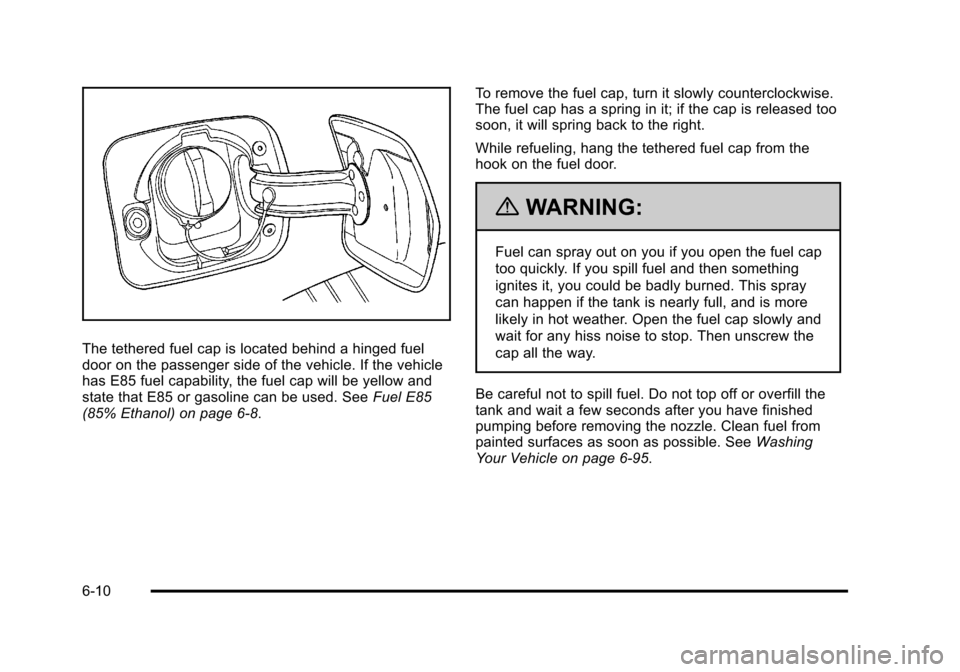
The tethered fuel cap is located behind a hinged fuel
door on the passenger side of the vehicle. If the vehicle
has E85 fuel capability, the fuel cap will be yellow and
state that E85 or gasoline can be used. SeeFuel E85
(85% Ethanol) on page 6‑8. To remove the fuel cap, turn it slowly counterclockwise.
The fuel cap has a spring in it; if the cap is released too
soon, it will spring back to the right.
While refueling, hang the tethered fuel cap from the
hook on the fuel door.
{WARNING:
Fuel can spray out on you if you open the fuel cap
too quickly. If you spill fuel and then something
ignites it, you could be badly burned. This spray
can happen if the tank is nearly full, and is more
likely in hot weather. Open the fuel cap slowly and
wait for any hiss noise to stop. Then unscrew the
cap all the way.
Be careful not to spill fuel. Do not top off or overfill the
tank and wait a few seconds after you have finished
pumping before removing the nozzle. Clean fuel from
painted surfaces as soon as possible. See Washing
Your Vehicle on page 6‑95.
6-10
Page 287 of 430
Black plate (11,1)Chevrolet HHR Owner Manual - 2011
When replacing the fuel cap, turn it clockwise until it
clicks. Make sure the cap is fully installed. The
diagnostic system can determine if the fuel cap has
been left off or improperly installed. This would allow
fuel to evaporate into the atmosphere. SeeMalfunction
Indicator Lamp on page 4‑33.
The CHECK GAS CAP message displays on the Driver
Information Center (DIC) if the fuel cap is not properly
installed. See DIC Warnings and Messages
on
page 4‑40for more information.
To close the fuel door securely, push the door to the
closed position.
{WARNING:
If a fire starts while you are refueling, do not
remove the nozzle. Shut off the flow of fuel by
shutting off the pump or by notifying the station
attendant. Leave the area immediately.
Notice: If you need a new fuel cap, be sure to get
the right type. Your dealer can get one for you.
If you get the wrong type, it may not fit properly.
This may cause the malfunction indicator lamp to
light and may damage the fuel tank and emissions
system. See Malfunction Indicator Lamp
on
page 4‑33.
6-11
Page 349 of 430
Black plate (73,1)Chevrolet HHR Owner Manual - 2011
6. Plug the power plug (G) into the accessory poweroutlet in the vehicle. Unplug all items from other
accessory power outlets. See Accessory Power
Outlet(s) on page 4‑15.
If the vehicle has an accessory power outlet, do
not use the cigarette lighter.
If the vehicle only has a cigarette lighter, use the
cigarette lighter.
Do not pinch the power plug cord in the door or
window.
7. Start the vehicle. The vehicle must be running while using the air compressor.
8. Turn the selector switch (B) clockwise to the Sealant + Air position.
9. Press the on/off (A) button to turn the tire sealant and compressor kit on.
The compressor will inject sealant and air into
the tire.
The pressure gauge (D) will initially show a high
pressure while the compressor pushes the sealant
into the tire. Once the sealant is completely
dispersed into the tire, the pressure will quickly
drop and start to rise again as the tire inflates with
air only. 10. Inflate the tire to the recommended inflation
pressure using the pressure gauge (D). The
recommended inflation pressure can be found on
the Tire and Loading Information label. See
Inflation - Tire Pressure on page 6‑54.
The pressure gauge (D) may read higher than the
actual tire pressure while the compressor is on.
Turn the compressor off to get an accurate
pressure reading. The compressor may be turned
on/off until the correct pressure is reached.
Notice: If the recommended pressure cannot be
reached after approximately 25 minutes, the vehicle
should not be driven farther. The tire is too severely
damaged and the tire sealant and compressor kit
cannot inflate the tire. Remove the power plug from
the accessory power outlet and unscrew the
inflating hose from the tire valve. See Roadside
Assistance Program on page 8‑6.
11. Press the on/off button (A) to turn the tire sealant and compressor kit off.
The tire is not sealed and will continue to leak air
until the vehicle is driven and the sealant is
distributed in the tire, therefore, Steps 12 through
18 must be done immediately after Step 11.
Be careful while handling the tire sealant and
compressor kit as it could be warm after usage.
6-73
Page 352 of 430

Black plate (76,1)Chevrolet HHR Owner Manual - 2011
6. Plug the power plug (G) into the accessory poweroutlet in the vehicle. Unplug all items from other
accessory power outlets. See Accessory Power
Outlet(s) on page 4‑15.
If the vehicle has an accessory power outlet, do
not use the cigarette lighter.
If the vehicle only has a cigarette lighter, use the
cigarette lighter.
Do not pinch the power plug cord in the door or
window.
7. Start the vehicle. The vehicle must be running while using the air compressor.
8. Turn the selector switch (B) counterclockwise to the Air Only position.
9. Press the on/off (A) button to turn the compressor on.
The compressor will inflate the tire with air only.
10. Inflate the tire to the recommended inflation pressure using the pressure gauge (D). The
recommended inflation pressure can be found on
the Tire and Loading Information label. See
Inflation - Tire Pressure on page 6‑54. The pressure gauge (D) may read higher than the
actual tire pressure while the compressor is on.
Turn the compressor off to get an accurate
reading. The compressor may be turned on/off until
the correct pressure is reached.
11. Press the on/off button (A) to turn the tire sealant and compressor kit off.
Be careful while handling the tire sealant and
compressor kit as it could be warm after usage.
12. Unplug the power plug (G) from the accessory power outlet in the vehicle.
13. Disconnect the air only hose (E) from the tire valve stem, by turning it counterclockwise, and replace
the tire valve stem cap.
14. Replace the air only hose (E) and the power plug (G) and cord back in its original location.
15. Place the equipment in the original storage location in the vehicle.
6-76
Page 379 of 430
Black plate (103,1)Chevrolet HHR Owner Manual - 2011
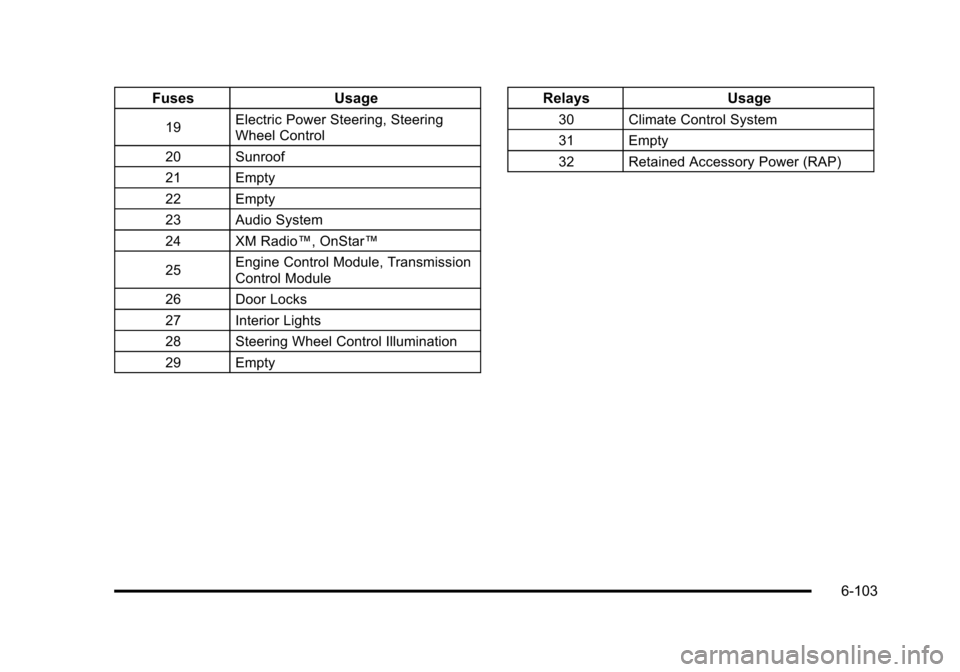
FusesUsage
19Electric Power Steering, Steering
Wheel Control
20 Sunroof
21 Empty
22 Empty
23 Audio System
24 XM Radio™, OnStar™
25 Engine Control Module, Transmission
Control Module
26 Door Locks
27 Interior Lights
28 Steering Wheel Control Illumination
29 Empty
Relays Usage
30 Climate Control System
31 Empty
32 Retained Accessory Power (RAP)
6-103
Page 382 of 430
Black plate (106,1)Chevrolet HHR Owner Manual - 2011
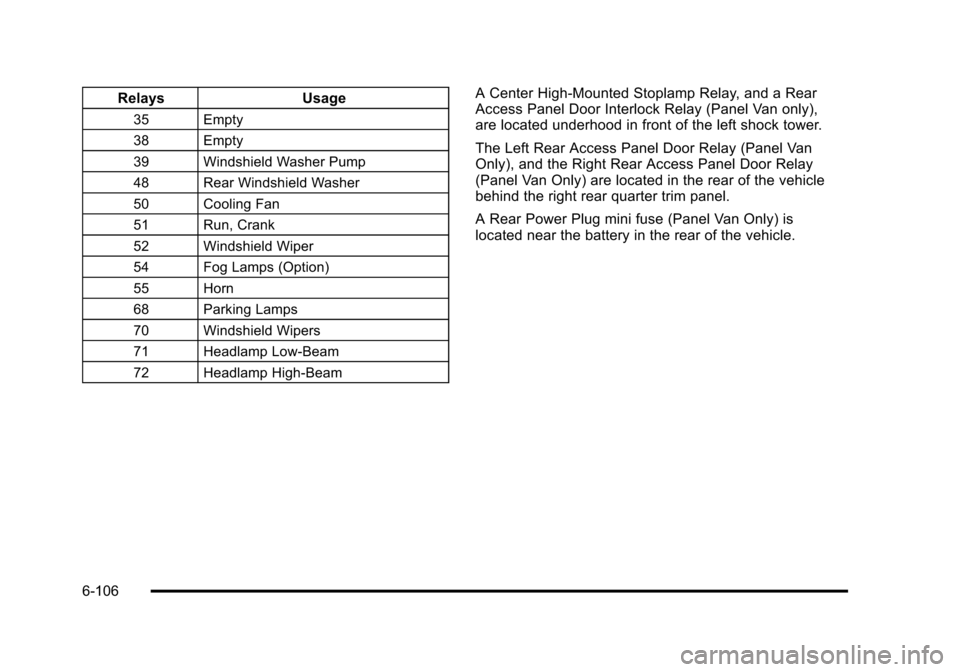
RelaysUsage
35 Empty
38 Empty
39 Windshield Washer Pump
48 Rear Windshield Washer
50 Cooling Fan
51 Run, Crank
52 Windshield Wiper
54 Fog Lamps (Option)
55 Horn
68 Parking Lamps
70 Windshield Wipers
71 Headlamp Low-Beam
72 Headlamp High-Beam
A Center High-Mounted Stoplamp Relay, and a Rear
Access Panel Door Interlock Relay (Panel Van only),
are located underhood in front of the left shock tower.
The Left Rear Access Panel Door Relay (Panel Van
Only), and the Right Rear Access Panel Door Relay
(Panel Van Only) are located in the rear of the vehicle
behind the right rear quarter trim panel.
A Rear Power Plug mini fuse (Panel Van Only) is
located near the battery in the rear of the vehicle.
6-106
Page 393 of 430
Black plate (9,1)Chevrolet HHR Owner Manual - 2011
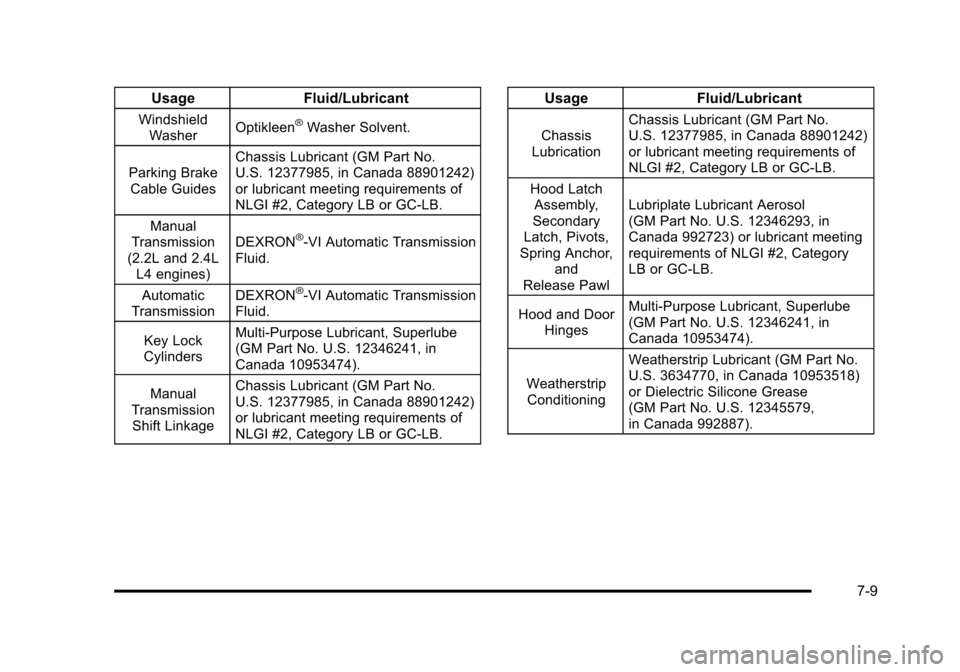
UsageFluid/Lubricant
Windshield
Washer Optikleen®Washer Solvent.
Parking Brake Cable Guides Chassis Lubricant (GM Part No.
U.S. 12377985, in Canada 88901242)
or lubricant meeting requirements of
NLGI #2, Category LB or GC‐LB.
Manual
Transmission
(2.2L and 2.4L
L4 engines) DEXRON
®-VI Automatic Transmission
Fluid.
Automatic
Transmission DEXRON
®-VI Automatic Transmission
Fluid.
Key Lock
Cylinders Multi-Purpose Lubricant, Superlube
(GM Part No. U.S. 12346241, in
Canada 10953474).
Manual
Transmission Shift Linkage Chassis Lubricant (GM Part No.
U.S. 12377985, in Canada 88901242)
or lubricant meeting requirements of
NLGI #2, Category LB or GC-LB.
Usage
Fluid/Lubricant
Chassis
Lubrication Chassis Lubricant (GM Part No.
U.S. 12377985, in Canada 88901242)
or lubricant meeting requirements of
NLGI #2, Category LB or GC-LB.
Hood Latch Assembly,
Secondary
Latch, Pivots,
Spring Anchor,
and
Release Pawl Lubriplate Lubricant Aerosol
(GM Part No. U.S. 12346293, in
Canada 992723) or lubricant meeting
requirements of NLGI #2, Category
LB or GC-LB.
Hood and Door Hinges Multi-Purpose Lubricant, Superlube
(GM Part No. U.S. 12346241, in
Canada 10953474).
Weatherstrip Conditioning Weatherstrip Lubricant (GM Part No.
U.S. 3634770, in Canada 10953518)
or Dielectric Silicone Grease
(GM Part No. U.S. 12345579,
in Canada 992887).
7-9