2011 CHEVROLET HHR door lock
[x] Cancel search: door lockPage 116 of 430
Black plate (10,1)Chevrolet HHR Owner Manual - 2011
Automatic Door Lock
On vehicles with power door locks, the doors
automatically lock when the shift lever is moved out
of (P) Park for a vehicle with an automatic transmission.
For a vehicle with a manual transmission, the speed
must be greater than 5 mph (8 km/h).
The automatic door locking feature cannot be disabled.
Programmable Automatic Door
Unlock
Your vehicle will automatically unlock all doors when the
shift lever is moved into (P) Park for a vehicle with an
automatic transmission, and when the ignition is turned
off for a vehicle with a manual transmission.
If your vehicle has a Driver Information Center (DIC),
the doors can be programmed to automatically unlock
several ways for vehicles with an automatic
transmission. SeeDIC Vehicle Personalization
on
page 4‑45for more information.
Rear Door Security Locks
Vehicles with rear door security locks prevent
passengers from opening the rear doors from the
inside.
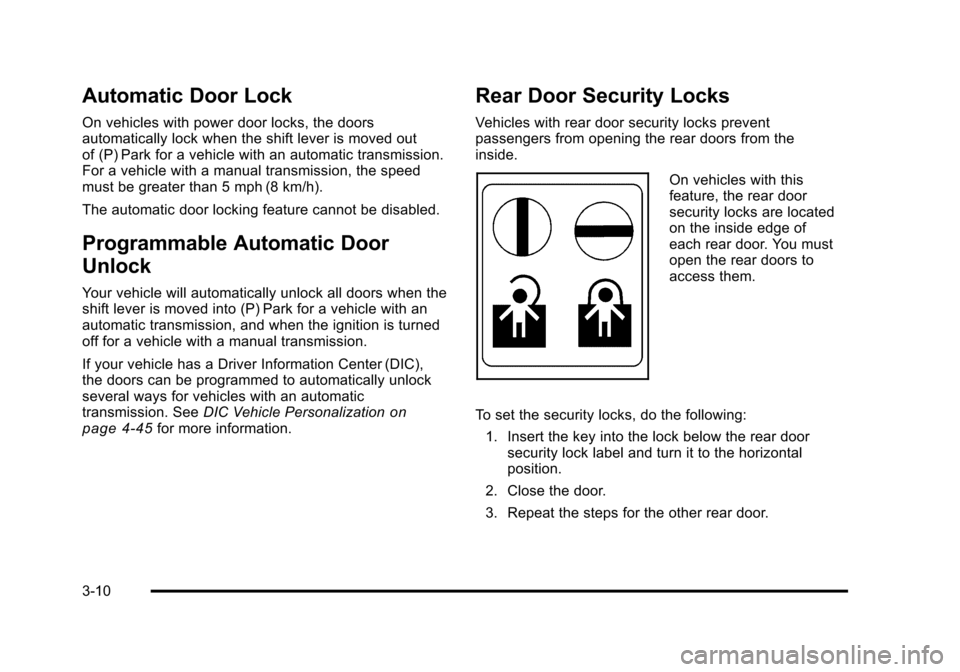
On vehicles with this
feature, the rear door
security locks are located
on the inside edge of
each rear door. You must
open the rear doors to
access them.
To set the security locks, do the following: 1. Insert the key into the lock below the rear door security lock label and turn it to the horizontal
position.
2. Close the door.
3. Repeat the steps for the other rear door.
3-10
Page 117 of 430
Black plate (11,1)Chevrolet HHR Owner Manual - 2011
To open a rear door while the security lock is on, do the
following:1. Unlock the door using the remote keyless entry transmitter, the power door lock switch, or by lifting
the rear door manual lock.
2. Open the door from the outside.
To cancel the rear door security lock, do the following: 1. Unlock the door and open it from the outside.
2. Insert the key into the lock below the rear door security lock label and turn it to the vertical
position.
3. Repeat the steps for the other lock.
Lockout Protection
If you press the power door lock switch when the key is
in the ignition and any door is open, all the doors will
lock and the driver's door will unlock. Be sure to remove
the key from the ignition when locking your vehicle.
The lockout protection can be overridden by pressing
and holding the power door lock in the lock position for
three seconds.
Rear Side Cargo Door
The rear side cargo doors can be opened by pressing
the buttons located on the driver and passenger sides
of the instrument panel, or by using the Remote Keyless
Entry (RKE) transmitter. See Instrument Panel
on
page 1‑2, and Remote Keyless Entry (RKE) System
Operationon page 3‑4for more information.
To use the buttons on the instrument panel, the driver
side door must be unlocked.
Push the door to close.
Liftgate
To lock the liftgate from the outside, press the lock
button on the Remote Keyless Entry (RKE) transmitter.
To unlock the liftgate with the RKE, press the unlock
button twice within five seconds. For more information,
see Remote Keyless Entry (RKE) System Operation
on
page 3‑4. You can also use the power door lock
switch to lock and unlock the liftgate.
3-11
Page 122 of 430
Black plate (16,1)Chevrolet HHR Owner Manual - 2011
Power Windows
{WARNING:
Leaving children in a vehicle with the keys is
dangerous for many reasons. Children or others
could be badly injured or even killed. They could
operate the power windows or other controls or
even make the vehicle move. The windows will
function and they could be seriously injured or
killed if caught in the path of a closing window.
Do not leave keys in a vehicle with children.
When there are children in the rear seat use the
window lockout button to prevent unintentional
operation of the windows.
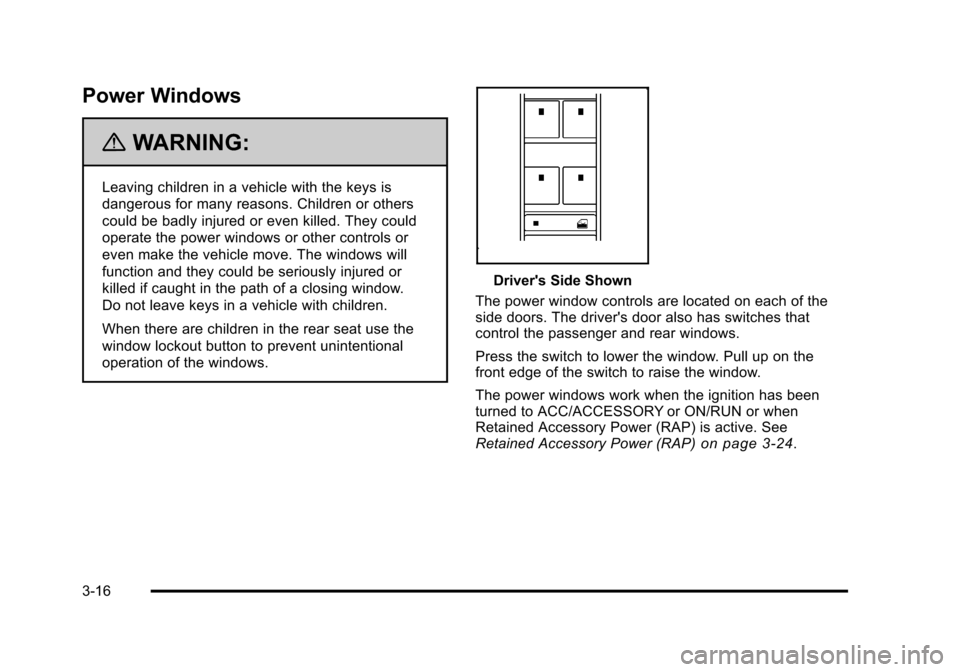
Driver's Side Shown
The power window controls are located on each of the
side doors. The driver's door also has switches that
control the passenger and rear windows.
Press the switch to lower the window. Pull up on the
front edge of the switch to raise the window.
The power windows work when the ignition has been
turned to ACC/ACCESSORY or ON/RUN or when
Retained Accessory Power (RAP) is active. See
Retained Accessory Power (RAP)
on page 3‑24.
3-16
Page 124 of 430
Black plate (18,1)Chevrolet HHR Owner Manual - 2011
The system will arm after either of the following occur:
.30 seconds after all the doors are closed.
.60 seconds with any door open.
Press the lock button on the RKE transmitter a second
time, while all the doors are closed, to immediately arm
the system. The system still arms in 60 seconds if a
door is open. When the open door is closed, it
also arms.
The security light turns on to indicate that arming has
been initiated. Once the system is armed, the security
light flashes once every three seconds.
If the security light flashes twice per second, a door
is open.
Locking the vehicle with the manual lock knobs on the
doors will not arm the system.
Disarming the System
Disarm the system by doing any one of the following:
.Press the RKE transmitter unlock button.
.Turn the ignition on.
Once the system is disarmed, the security light stops
flashing.
How the System Alarm is Activated
If the system is armed, it can be activated by either:
.Opening the driver's door or tailgate. This causes a
10 second pre-alarm chirp followed by a 30 second
full alarm of horn and lights.
.Opening any other door. This immediately causes
a full alarm of horn and lights for 30 seconds.
When an alarm event has finished, the system re-arms
itself automatically.
How to Turn Off the System Alarm
To turn off the system alarm, do one of the following:
.Press the lock button on the RKE transmitter. The
system will then re-arm itself.
.Press the unlock button on the RKE transmitter.
This will also disarm the system.
.Insert the key in the ignition and turn it on. This will
also disarm the system.
How to Detect a Tamper Condition
The content theft security system alarm was previously
activated if three chirps sound when you press the lock
or unlock buttons on the RKE transmitter.
3-18
Page 128 of 430
Black plate (22,1)Chevrolet HHR Owner Manual - 2011
3. Come to a complete stop, shift to P (Park), andturn the ignition to LOCK/OFF. On vehicles with an
automatic transmission, the shift lever must be in
P (Park) to turn the ignition switch to the LOCK/
OFF position.
4. Set the parking brake. See Parking Brake
on
page 3‑30.
The steering can bind with the wheel turned off center.
If this happens, move it from right to left while turning
the key to ACC/ACCESSORY. If this does not work,
then the vehicle needs service.
{WARNING:
If you have a manual transmission removing the
key from the ignition switch will lock the steering
column and result in a loss of ability to steer the
vehicle. This could cause a collision. If you need
to turn the engine off while the vehicle is moving,
turn the key to ACC/ACCESSORY. ACC (ACC/ACCESSORY):
This position operates
some of the electrical accessories. It unlocks the
steering wheel and ignition.
R (ON/RUN): This is the position in which you can
operate the electrical accessories and to display some
instrument panel cluster warning and indicator lights.
The switch stays in this position when the engine is
running.
If you leave the key in the ACC/ACCESSORY or ON/
RUN position with the engine off, the battery could be
drained. You may not be able to start the vehicle if the
battery is allowed to drain for an extended period
of time.
/ (START): This position starts the engine. When the
engine starts, release the key. The ignition switch will
return to ON/RUN for driving.
A warning tone will sound when the driver door is
opened, the ignition is in LOCK/OFF or ACC/
ACCESSORY and the key is in the ignition.
3-22
Page 130 of 430
Black plate (24,1)Chevrolet HHR Owner Manual - 2011
Retained Accessory Power (RAP)
These vehicle accessories may be used for up to
10 minutes after the engine is turned off.
.Audio System
.Power Windows, if equipped
.Sunroof, if equipped
The power windows and sunroof will continue to work
for up to 10 minutes or until any door is opened. The
radio will work when the key is in ON/RUN or ACC/
ACCESSORY. Once the key is turned from ON/RUN to
OFF/LOCK, the radio will continue to work for
10 minutes or until the driver's door is opened.
Starting the Engine
Place the transmission in the proper gear.
Automatic Transmission
Move the shift lever to P (Park) or N (Neutral). The
engine will not start in any other position. To restart the
vehicle when it is already moving, use N (Neutral) only.
Notice: Do not try to shift to P (Park) if the vehicle is
moving. If you do, you could damage the
transmission. Shift to P (Park) only when the vehicle
is stopped.
Manual Transmission
The shift lever should be in N (Neutral) and the parking
brake engaged. Hold the clutch pedal down to the floor
and start the engine. The vehicle will not start if the
clutch pedal is not all the way down.
Starting Procedure
1. With your foot off the accelerator pedal, turn the ignition key to START. When the engine starts, let
go of the key. The idle speed will go down as the
engine warms. Do not race the engine immediately
after starting it. Operate the engine and
transmission gently to allow the oil to warm up and
lubricate all moving parts.
The vehicle has a Computer-Controlled Cranking
System. This feature assists in starting the engine
and protects components. If the ignition key is
turned to the START position, and then released
when the engine begins cranking, the engine will
continue cranking for a few seconds or until the
vehicle starts. If the engine does not start and the
key is held in START for many seconds, cranking
will be stopped after 15 seconds to prevent
cranking motor damage. To prevent gear damage,
this system also prevents cranking if the engine is
already running. Engine cranking can be stopped
by turning the ignition switch to ACC/ACCESSORY
or LOCK/OFF.
3-24
Page 204 of 430
Black plate (48,1)Chevrolet HHR Owner Manual - 2011
DELAY LOCK
This feature, which delays the actual locking of the
vehicle, can be enabled or disabled. When DELAY
LOCK appears on the display, press and hold the reset
button for at least one second to scroll through the
available settings:
ON (default):The doors will not lock until five seconds
after the last door is closed. You can temporarily
override delayed locking by pressing the power lock
switch or the lock button on the Remote Keyless Entry
(RKE) transmitter a second time.
OFF: The doors will lock immediately when pressing
the power lock switch or the lock button on the
RKE transmitter.
See Power Door Locks
on page 3‑9,Delayed Lockingon page 3‑9, and Remote Keyless Entry (RKE)
System Operationon page 3‑4for more information.
To select a setting and move on to the next feature,
press the information button while the desired setting is
displayed on the DIC.
AUTO UNLK (Unlock)
This feature, which allows the vehicle to automatically
unlock certain doors, can be enabled or disabled. When
AUTO UNLK appears on the display, press and hold the
reset button for at least one second to scroll through the
available settings:
ALL (default): All of the doors will automatically unlock.
DRIVER: The driver's door will automatically unlock.
NONE: None of the doors will automatically unlock.
You will need to manually unlock the doors.
If you have a manual transmission vehicle, the door(s)
will automatically unlock when the key is turned off.
If you have an automatic transmission vehicle, you can
select when the automatic unlocking will occur. See
“UNLK (Unlock) (Automatic Transmission Only)”
following.
See Programmable Automatic Door Unlock
on
page 3‑10for more information.
To select a setting and move on to the next feature,
press the information button while the desired setting is
displayed on the DIC.
4-48
Page 205 of 430
Black plate (49,1)Chevrolet HHR Owner Manual - 2011
UNLK (Unlock) (Automatic
Transmission Only)
This screen displays only if your vehicle has an
automatic transmission and DRIVER or ALL is selected
for the AUTO UNLK feature. This feature determines
when the automatic door unlocking will occur. When
UNLK appears on the display, press and hold the reset
button for at least one second to scroll through the
available settings:
KEY OFF:The door(s) will unlock when the key is
turned off.
SHIFT TO P (Park) (default): The door(s) will unlock
when the vehicle is shifted into P (Park).
See Programmable Automatic Door Unlock
on
page 3‑10for more information.
To select a setting and move on to the next feature,
press the information button while the desired setting is
displayed on the DIC.
EXT (Exterior) LIGHTS
This feature, which allows the vehicle's exterior
perimeter lighting to turn on each time the unlock
button on the Remote Keyless Entry (RKE) transmitter
is pressed, can be enabled or disabled. When
EXT LIGHTS appears on the display, press and hold
the reset button for at least one second to scroll through
the available settings:
OFF: The exterior perimeter lighting will not turn on
when the unlock button on the RKE transmitter is
pressed.
ON (default): The exterior perimeter lighting will turn on
when the unlock button on the RKE transmitter is
pressed.
See Remote Keyless Entry (RKE) System Operation
on
page 3‑4for more information.
To select a setting and move on to the next feature,
press the information button while the desired setting is
displayed on the DIC.
4-49