2011 CHEVROLET HHR battery
[x] Cancel search: batteryPage 202 of 430
Black plate (46,1)Chevrolet HHR Owner Manual - 2011
To change feature settings, use the following procedure:
Entering Personalization Menu
1. Turn the ignition on while the vehicle is stopped.To avoid excessive drain on the battery, it is
recommended that the headlamps are turned off.
2. Press and hold the information and reset buttons at the same time for one second, then release to
enter the personalization menu.
If the vehicle speed is greater than 2 mph (3 km/h),
only the UNITS menu will be accessible.
3. Press the information button to scroll through the available personalization menu modes.
Press the reset button to scroll through the
available settings for each mode.
If you do not make a selection within ten seconds,
the display will go back to the previous information
displayed.
Personalization Menu Modes
OIL LIFE RESET
When this feature is displayed, you can reset the
engine oil life system. To reset the system, see Engine
Oil Life System
on page 6‑19. See “OIL LIFE” under
DIC Operation and Displayson page 4‑38for more
information.
UNITS
This feature allows you to select the units of
measurement in which the DIC will display the vehicle
information. When UNITS appears on the display, press
and hold the reset button for at least one second to
scroll through the available settings:
ENGLISH (default in United States): All information
will be displayed in English units.
METRIC (default in Canada): All information will be
displayed in metric units.
To select a setting and move on to the next feature,
press the information button while the desired setting is
displayed on the DIC.
LOCK HORN
This feature, which allows the vehicle's horn to chirp
every time the lock button on the Remote Keyless Entry
(RKE) transmitter is pressed, can be enabled or
disabled. When LOCK HORN appears on the display,
press and hold the reset button for at least one second
to scroll through the available settings:
OFF (default): The horn will not chirp on the first press
of the lock button on the RKE transmitter. The horn will
still chirp on the second press.
4-46
Page 223 of 430
Black plate (67,1)Chevrolet HHR Owner Manual - 2011
Connecting a USB Storage Device
or iPod®
The USB Port can be used to control an iPod or a
USB storage device.
To connect a USB storage device, connect the device to
the USB port located on the front of the radio.
To connect an iPod, connect one end of the USB cable
that came with the iPod to the iPod’s dock connector
and connect the other end to the USB port located on
the front of the radio. If the vehicle is on and the
USB connection works, “OK to disconnect”and a
GM logo may appear on the iPod and iPod appears on
the radio's display. The iPod music appears on the
radio’s display and begins playing.
The iPod charges while it is connected to the vehicle if
the vehicle is in the ACC/ACCESSORY or ON/RUN
position. When the vehicle is turned off, the iPod
automatically powers off and will not charge or draw
power from the vehicle's battery.
If you have an older iPod model that is not supported, it
can still be used by connecting it to the Auxiliary Input
Jack using a standard 3.5 mm (1/8 in) stereo cable. See
“Using the Auxiliary Input Jack” earlier for more
information.
Using the Radio to Control a USB
Storage Device or iPod
The radio can control a USB storage device or an iPod
using the radio buttons and knobs and display song
information on the radio’s display.
f(Tune): Turn to select files.
©SEEK:Press to go to the start of the track, if more
than ten seconds have played. Press and hold or press
multiple times to continue moving backward through
tracks.
¨SEEK: Press to go to the next track. Press and hold
or press multiple times to continue moving forward
through tracks.
sREV (Reverse): Press and hold to reverse playback
quickly. Sound is heard at a reduced volume. Release
sREV to resume playing. The elapsed time of the file
displays.
\FWD (Fast Forward): Press and hold to advance
playback quickly. Sound is heard at a reduced volume.
Release
\FWD to resume playing. The elapsed time
of the file displays.
4(Information): Press to display additional information
about the selected track.
4-67
Page 237 of 430
Black plate (81,1)Chevrolet HHR Owner Manual - 2011
Cellular Phone Usage
Cellular phone usage may cause interference with the
vehicle's radio. This interference may occur when
making or receiving phone calls, charging the phone's
battery, or simply having the phone on. This
interference causes an increased level of static while
listening to the radio. If static is received while listening
to the radio, unplug the cellular phone and turn it off.
Fixed Mast Antenna
The fixed mast antenna can withstand most car washes
without being damaged as long as it is securely
attached to the base. If the mast becomes slightly bent,
straighten it out by hand. If the mast is badly bent,
replace it.
Occasionally check to make sure the antenna is
tightened to its base. If tightening is required, tighten by
hand until fully seated plus one quarter turn.
XM™Satellite Radio Antenna
System
The XM Satellite Radio antenna is located on the roof of
the vehicle. Keep the antenna clear of obstructions for
clear radio reception.
If the vehicle has a sunroof, the performance of the
XM system may be affected if the sunroof is open.
Chime Level Adjustment
The radio may be used to adjust the vehicle's chime
level. If the radio can be used to change the volume
level of the chime, press and hold the sixth numbered
pushbutton or the sixth FAV pushbutton with the ignition
on and the radio power off. The volume level changes
between Normal and Loud. The selected volume level
appears on the radio display.
Removing the radio and not replacing it with a factory
radio or chime module will disable vehicle chimes.
4-81
Page 259 of 430
Black plate (21,1)Chevrolet HHR Owner Manual - 2011
To save fuel, run the engine for only short periods as
needed to warm the vehicle and then shut the engine
off and close the window most of the way to save heat.
Repeat this until help arrives but only when you feel
really uncomfortable from the cold. Moving about to
keep warm also helps.
If it takes some time for help to arrive, now and then
when you run the engine, push the accelerator pedal
slightly so the engine runs faster than the idle speed.
This keeps the battery charged to restart the vehicle
and to signal for help with the headlamps. Do this as
little as possible to save fuel.
If Your Vehicle is Stuck in Sand,
Mud, Ice, or Snow
Slowly and cautiously spin the wheels to free the
vehicle when stuck in sand, mud, ice, or snow. See
Rocking Your Vehicle to Get It Out on page 5‑21.
If the vehicle has a traction system, it can often help to
free a stuck vehicle. Refer to the vehicle's traction
system in the Index. If stuck too severely for the traction
system to free the vehicle, turn the traction system off
and use the rocking method.
{WARNING:
If the vehicle's tires spin at high speed, they can
explode, and you or others could be injured. The
vehicle can overheat, causing an engine
compartment fire or other damage. Spin the
wheels as little as possible and avoid going above
55 km/h (35 mph) as shown on the speedometer.
For information about using tire chains on the vehicle,
see Tire Chains on page 6‑68.
Rocking Your Vehicle to Get It Out
Turn the steering wheel left and right to clear the area
around the front wheels. Turn off any traction system.
Shift back and forth between R (Reverse) and a forward
gear, or with a manual transmission, between 1 (First) or
2 (Second) and R (Reverse), spinning the wheels as
little as possible. To prevent transmission wear, wait
until the wheels stop spinning before shifting gears.
Release the accelerator pedal while shifting, and press
lightly on the accelerator pedal when the transmission is
in gear. Slowly spinning the wheels in the forward and
5-21
Page 267 of 430
Black plate (29,1)Chevrolet HHR Owner Manual - 2011
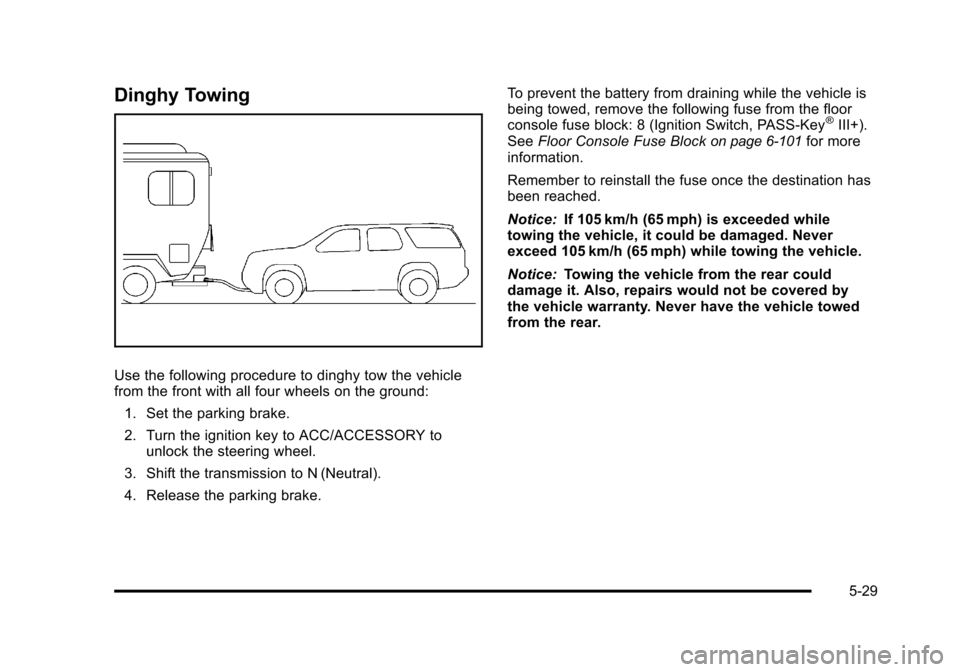
Dinghy Towing
Use the following procedure to dinghy tow the vehicle
from the front with all four wheels on the ground:1. Set the parking brake.
2. Turn the ignition key to ACC/ACCESSORY to unlock the steering wheel.
3. Shift the transmission to N (Neutral).
4. Release the parking brake. To prevent the battery from draining while the vehicle is
being towed, remove the following fuse from the floor
console fuse block: 8 (Ignition Switch, PASS‐Key
®III+).
See Floor Console Fuse Blockon page 6‑101for more
information.
Remember to reinstall the fuse once the destination has
been reached.
Notice: If 105 km/h (65 mph) is exceeded while
towing the vehicle, it could be damaged. Never
exceed 105 km/h (65 mph) while towing the vehicle.
Notice: Towing the vehicle from the rear could
damage it. Also, repairs would not be covered by
the vehicle warranty. Never have the vehicle towed
from the rear.
5-29
Page 277 of 430
Black plate (1,1)Chevrolet HHR Owner Manual - 2011
Section 6 Service and Appearance Care
Service. . . . . . . . . . . . . . . . . . . . . . . . . . . . . . . . . . . . . . . . . . . . . 6-3
Accessories and Modifications . . . . . . . . . . . . . . . . . . 6-3
California Proposition 65 Warning . . . . . . . . . . . . . . . 6-4
California Perchlorate Materials Requirements . . . . . . . . . . . . . . . . . . . . . . . . . . . . . . . . . 6-4
Doing Your Own Service Work . . . . . . . . . . . . . . . . . . 6-4
Adding Equipment to the Outside of the Vehicle . . . . . . . . . . . . . . . . . . . . . . . . . . . . . . . . . . . . . . . . 6-5
Fuel . . . . . . . . . . . . . . . . . . . . . . . . . . . . . . . . . . . . . . . . . . . . . . . . . 6-5
Gasoline Octane . . . . . . . . . . . . . . . . . . . . . . . . . . . . . . . . 6-6
Gasoline Specifications . . . . . . . . . . . . . . . . . . . . . . . . . 6-6
California Fuel . . . . . . . . . . . . . . . . . . . . . . . . . . . . . . . . . . 6-6
Additives . . . . . . . . . . . . . . . . . . . . . . . . . . . . . . . . . . . . . . . . 6-7
Fuel E85 (85% Ethanol) . . . . . . . . . . . . . . . . . . . . . . . . . 6-8
Fuels in Foreign Countries . . . . . . . . . . . . . . . . . . . . . . 6-9
Filling the Tank . . . . . . . . . . . . . . . . . . . . . . . . . . . . . . . . . . 6-9
Filling a Portable Fuel Container . . . . . . . . . . . . . . . 6-12
Checking Things Under the Hood . . . . . . . . . . . . . . .6-12
Hood Release . . . . . . . . . . . . . . . . . . . . . . . . . . . . . . . . . 6-13
Engine Compartment Overview . . . . . . . . . . . . . . . . 6-14
Engine Oil . . . . . . . . . . . . . . . . . . . . . . . . . . . . . . . . . . . . . 6-16
Engine Oil Life System . . . . . . . . . . . . . . . . . . . . . . . . 6-19
Engine Air Cleaner/Filter . . . . . . . . . . . . . . . . . . . . . . . 6-20
Automatic Transmission Fluid . . . . . . . . . . . . . . . . . . 6-21
Manual Transmission Fluid . . . . . . . . . . . . . . . . . . . . 6-22
Hydraulic Clutch . . . . . . . . . . . . . . . . . . . . . . . . . . . . . . . 6-22 Cooling System . . . . . . . . . . . . . . . . . . . . . . . . . . . . . . . . 6-22
Engine Coolant . . . . . . . . . . . . . . . . . . . . . . . . . . . . . . . . 6-24
Engine Overheating . . . . . . . . . . . . . . . . . . . . . . . . . . . 6-28
Windshield Washer Fluid . . . . . . . . . . . . . . . . . . . . . . 6-30
Brakes . . . . . . . . . . . . . . . . . . . . . . . . . . . . . . . . . . . . . . . . . 6-30
Battery . . . . . . . . . . . . . . . . . . . . . . . . . . . . . . . . . . . . . . . . . 6-33
Jump Starting . . . . . . . . . . . . . . . . . . . . . . . . . . . . . . . . . . 6-34
Headlamp Aiming . . . . . . . . . . . . . . . . . . . . . . . . . . . . . . . . 6-38
Bulb Replacement . . . . . . . . . . . . . . . . . . . . . . . . . . . . . . . . 6-41
Halogen Bulbs . . . . . . . . . . . . . . . . . . . . . . . . . . . . . . . . . 6-41
Headlamps, Front Turn Signal, and Parking Lamps . . . . . . . . . . . . . . . . . . . . . . . . . . . . . . . . . . . . . . . 6-41
Center High-Mounted Stoplamp (CHMSL) . . . . . 6-43
Taillamps, Turn Signal, Stoplamps and Back-up Lamps . . . . . . . . . . . . . . . . . . . . . . . . . . . . . . . . . . . . . . . 6-44
License Plate Lamp . . . . . . . . . . . . . . . . . . . . . . . . . . . . 6-45
Replacement Bulbs . . . . . . . . . . . . . . . . . . . . . . . . . . . . 6-45
Windshield Wiper Blade Replacement . . . . . . . . . . .6-46
Tires . . . . . . . . . . . . . . . . . . . . . . . . . . . . . . . . . . . . . . . . . . . . . . . 6-47
Tire Sidewall Labeling . . . . . . . . . . . . . . . . . . . . . . . . . 6-48
Tire Terminology and Definitions . . . . . . . . . . . . . . . 6-51
Inflation - Tire Pressure . . . . . . . . . . . . . . . . . . . . . . . . 6-54
Tire Pressure Monitor System . . . . . . . . . . . . . . . . . 6-55
Tire Pressure Monitor Operation . . . . . . . . . . . . . . . 6-57
Tire Inspection and Rotation . . . . . . . . . . . . . . . . . . . 6-60
6-1
Page 309 of 430
Black plate (33,1)Chevrolet HHR Owner Manual - 2011
Replacing Brake System Parts
The braking system on a vehicle is complex. Its many
parts have to be of top quality and work well together if
the vehicle is to have really good braking. The vehicle
was designed and tested with top-quality brake parts.
When parts of the braking system are replaced—for
example, when the brake linings wear down and new
ones are installed —be sure to get new approved
replacement parts. If this is not done, the brakes might
not work properly. For example, if someone puts in
brake linings that are wrong for the vehicle, the balance
between the front and rear brakes can change —for the
worse. The braking performance expected can change
in many other ways if the wrong replacement brake
parts are installed.
Battery
Refer to the replacement number on the original battery
label when a new battery is needed.
The battery is located in the cargo area. Access to the
battery is not necessary to jump start the vehicle. See
Jump Starting on page 6‑34.
{DANGER:
Battery posts, terminals, and related accessories
contain lead and lead compounds, chemicals
known to the State of California to cause cancer
and reproductive harm. Wash hands after
handling.
Vehicle Storage
{WARNING:
Batteries have acid that can burn you and gas
that can explode. You can be badly hurt if you are
not careful. See Jump Starting
on page 6‑34for
tips on working around a battery without
getting hurt.
Infrequent Usage: Remove the black, negative (−) cable
from the battery to keep the battery from running down.
Extended Storage: Remove the black, negative (−)
cable from the battery or use a battery trickle charger.
6-33
Page 310 of 430
Black plate (34,1)Chevrolet HHR Owner Manual - 2011
Jump Starting
For more information about the vehicle battery, see
Battery on page 6‑33.
If the vehicle's battery has run down, you may want to
use another vehicle and some jumper cables to start the
vehicle. Be sure to use the following steps to do it
safely.
{WARNING:
Batteries can hurt you. They can be dangerous
because:
.They contain acid that can burn you.
.They contain gas that can explode or ignite.
.They contain enough electricity to burn you.
If you do not follow these steps exactly, some or
all of these things can hurt you.
Notice: Ignoring these steps could result in costly
damage to the vehicle that would not be covered by
the warranty.
Trying to start the vehicle by pushing or pulling it
will not work, and it could damage the vehicle.
1. Check the other vehicle. It must have a 12-volt battery with a negative ground system. Notice:
If the other vehicle's system is not a
12-volt system with a negative ground, both
vehicles can be damaged. Only use vehicles with
12-volt systems with negative grounds to jump start
your vehicle.
2. Get the vehicles close enough so the jumper cables can reach, but be sure the vehicles are not
touching each other. If they are, it could cause a
ground connection you do not want. You would not
be able to start the vehicle, and the bad grounding
could damage the electrical systems.
To avoid the possibility of the vehicles rolling, set
the parking brake firmly on both vehicles involved
in the jump start procedure. Put an automatic
transmission in P (Park) or a manual transmission
in N (Neutral) before setting the parking brake.
Notice: If you leave the radio or other accessories
on during the jump starting procedure, they could
be damaged. The repairs would not be covered by
the warranty. Always turn off the radio and other
accessories when jump starting the vehicle.
3. Turn off the ignition on both vehicles. Unplug unnecessary accessories plugged into the
cigarette lighter or the accessory power outlet.
Turn off the radio and all lamps that are not
needed. This will avoid sparks and help save both
batteries. And it could save the radio!
6-34