2011 CHEVROLET HHR automatic transmission
[x] Cancel search: automatic transmissionPage 167 of 430
Black plate (11,1)Chevrolet HHR Owner Manual - 2011
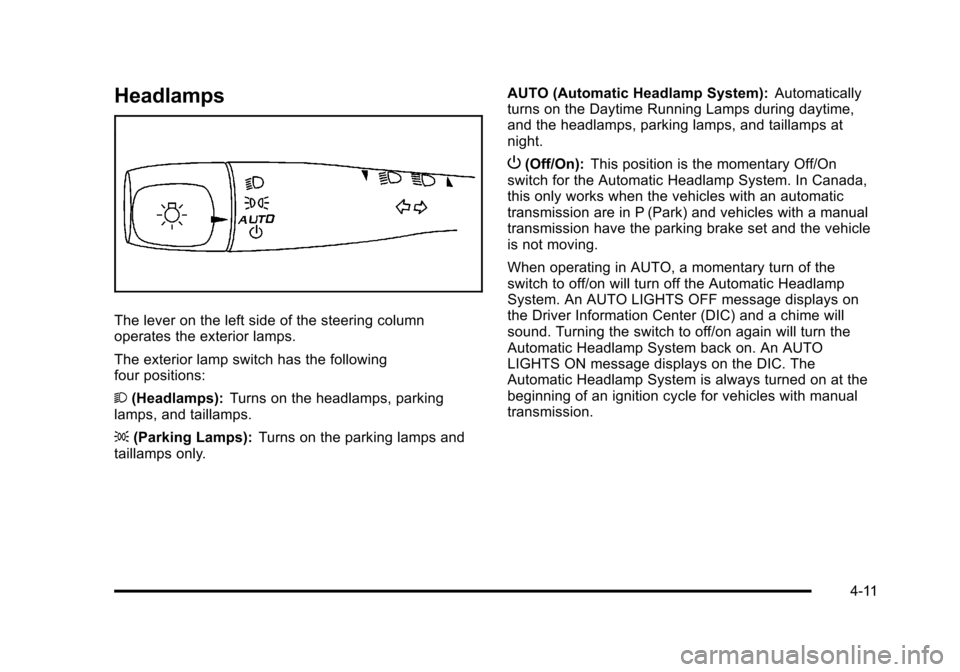
Headlamps
The lever on the left side of the steering column
operates the exterior lamps.
The exterior lamp switch has the following
four positions:
2(Headlamps): Turns on the headlamps, parking
lamps, and taillamps.
; (Parking Lamps): Turns on the parking lamps and
taillamps only. AUTO (Automatic Headlamp System):
Automatically
turns on the Daytime Running Lamps during daytime,
and the headlamps, parking lamps, and taillamps at
night.
P (Off/On): This position is the momentary Off/On
switch for the Automatic Headlamp System. In Canada,
this only works when the vehicles with an automatic
transmission are in P (Park) and vehicles with a manual
transmission have the parking brake set and the vehicle
is not moving.
When operating in AUTO, a momentary turn of the
switch to off/on will turn off the Automatic Headlamp
System. An AUTO LIGHTS OFF message displays on
the Driver Information Center (DIC) and a chime will
sound. Turning the switch to off/on again will turn the
Automatic Headlamp System back on. An AUTO
LIGHTS ON message displays on the DIC. The
Automatic Headlamp System is always turned on at the
beginning of an ignition cycle for vehicles with manual
transmission.
4-11
Page 168 of 430
Black plate (12,1)Chevrolet HHR Owner Manual - 2011
Wiper Activated Headlamps
The headlamps and parking lamps are activated
15 seconds after the windshield wipers are turned on.
For this feature to work, automatic lighting must be
enabled. SeeHeadlamps
on page 4‑11for additional
information.
When the ignition is turned off, the wiper-activated
headlamps will immediately turn off. They also turn off
15 seconds after the windshield wiper control is
turned off.
Headlamps on Reminder
If the drivers door is opened with the ignition off and the
lamps on, a warning chime will sound. This indicates
that the headlamps are still on.
Daytime Running Lamps (DRL)
Daytime Running Lamps (DRL) can make it easier for
others to see the front of your vehicle during the day.
Fully functional daytime running lamps are required on
all vehicles first sold in Canada. The vehicle has a light sensor on top of the instrument
panel. Do not cover this sensor or the headlamps will
come on when they are not needed.
The DRL system will make the headlamps come on at
reduced brightness when the following conditions
are met:
.The ignition is on.
.The exterior lamp control is turned to AUTO.
.The light sensor detects daytime light.
.The shift lever is not in P (Park).
While the DRL system is on, the taillamps, sidemarker
lamps, and instrument panel lights will not be on.
For vehicles with an Automatic Transmission, the
DRL system is off any time the vehicle is in P (Park).
For vehicles with a Manual Transmission, the DRL
system will be off when the vehicle is first started, the
park brake is applied, and the vehicle has not moved.
The DRL system on U.S. vehicles can also be turned
off by using the off/on switch for one ignition cycle.
The regular headlamp system should be turned on
when needed.
4-12
Page 169 of 430
Black plate (13,1)Chevrolet HHR Owner Manual - 2011
Automatic Headlamp System
When it is dark enough outside, the automatic system
turns on the headlamps at the normal brightness along
with other lamps such as the taillamps, sidemarker,
parking lamps, instrument panel lights, and interior
switch backlighting.
Do not cover the light sensor, located on top of the
instrument panel. If the sensor is covered the
headlamps may remain on when they are not needed.
If the vehicle is driven through a parking garage,
overcast weather or a tunnel, the automatic headlamp
system may turn on.
There is a delay in the transition between the daytime
and nighttime operation of the automatic lamp control
system so that driving under bridges or bright overhead
street lights does not affect the system. The automatic
lamp control system will only be affected when the light
sensor sees a change in lighting lasting longer than this
delay.
If the vehicle is started in a dark garage, the automatic
lamp system turns on immediately. Once the vehicle
exits the garage, it will take about 20 seconds for the
automatic lamp system to change to DRL if it is light
outside. During that delay, the instrument panel cluster
may not be as bright as usual. Make sure theinstrument panel brightness control is in the full bright
position. See
Instrument Panel Brightnesson
page 4‑14.
To idle the vehicle with the system off, turn the ignition
on and turn the exterior light switch to the off/on
position. For vehicles first sold in Canada, the
transmission must stay in P (Park) for this function or
the parking brake must be set for vehicles with manual
transmissions.
Turn on the regular headlamps when they are needed.
Fog Lamps
For vehicles with fog lamps, the button is located on the
instrument panel, to the right of the steering wheel.
The ignition must be on to use the fog lamps.
#: Press to turn the fog lamps on and off. An indicator
light on the button comes on when the fog lamps
are on.
The parking lamps automatically turn on and off when
the fog lamps are turned on and off.
The fog lamps will turn off while the high-beam
headlamps are turned on.
Some localities have laws that require the headlamps to
be on along with the fog lamps.
4-13
Page 179 of 430
Black plate (23,1)Chevrolet HHR Owner Manual - 2011
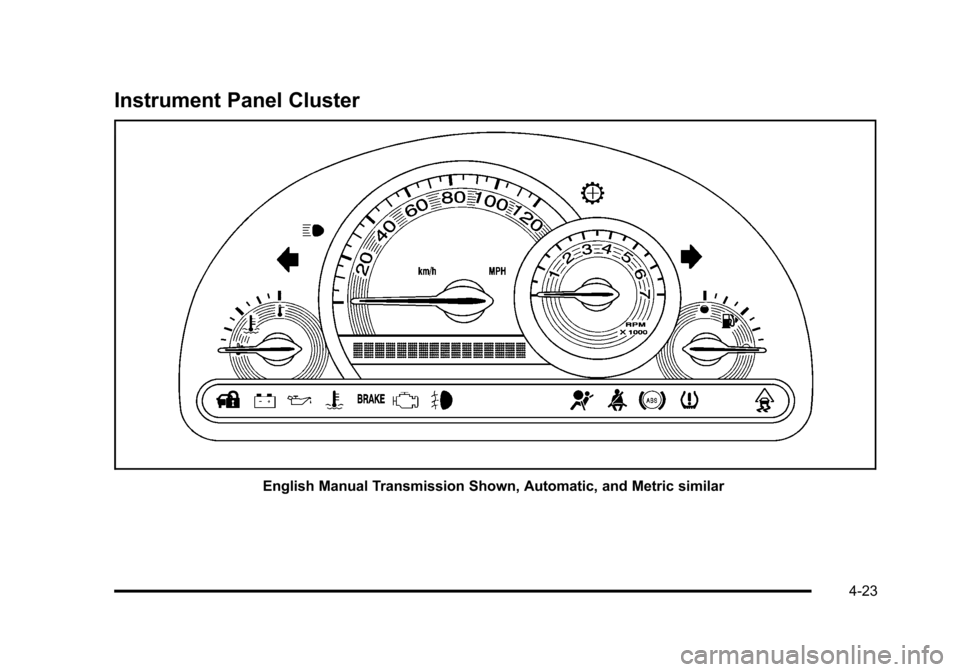
Instrument Panel Cluster
English Manual Transmission Shown, Automatic, and Metric similar
4-23
Page 197 of 430
Black plate (41,1)Chevrolet HHR Owner Manual - 2011
AUTO (Automatic) LIGHTS OFF
This message displays if the automatic headlamp
system is disabled with the headlamp switch. See
Automatic Headlamp System
on page 4‑13for more
information.
AUTO (Automatic) LIGHTS ON
This message displays if the automatic headlamp
system is enabled with the headlamp switch. See
Automatic Headlamp System
on page 4‑13for more
information.
BRAKE FLUID
This message displays, while the ignition is on, when
the brake fluid level is low. The brake system warning
light on the instrument panel cluster also comes on.
See Brake System Warning Light
on page 4‑29for
more information. Have the brake system serviced by
your dealer as soon as possible.
CHANGE OIL SOON
This message displays when the life of the engine oil
has expired and it should be changed.
When this message is acknowledged and cleared from
the display, the engine oil life system must still be reset
separately. See Engine Oil Life System
on page 6‑19andScheduled Maintenanceon page 7‑3for more
information.
CHECK GAS CAP
This message displays if the fuel cap has not been fully
tightened. Recheck the fuel cap to make sure that it is
on properly. A few driving trips with the cap properly
installed should turn the message off.
COOLING MODE ON
This message may display on some vehicles. Under
severe conditions, hot ambient temperatures, steep
grades, and towing, your vehicle may experience more
transmission shifting. This is temporary and normal
under these conditions. This does not require engine or
transmission service.
CRUISE ENGAGED
This message displays when the cruise control system
is active. See Cruise Controlon page 4‑8for more
information.
DOOR AJAR
This message displays if one or more of the vehicle's
doors are open. Make sure that the door(s) are closed
completely.
ENGINE DISABLED
This message displays if the starting of the engine is
disabled. Have your vehicle serviced by your dealer
immediately.
4-41
Page 204 of 430
Black plate (48,1)Chevrolet HHR Owner Manual - 2011
DELAY LOCK
This feature, which delays the actual locking of the
vehicle, can be enabled or disabled. When DELAY
LOCK appears on the display, press and hold the reset
button for at least one second to scroll through the
available settings:
ON (default):The doors will not lock until five seconds
after the last door is closed. You can temporarily
override delayed locking by pressing the power lock
switch or the lock button on the Remote Keyless Entry
(RKE) transmitter a second time.
OFF: The doors will lock immediately when pressing
the power lock switch or the lock button on the
RKE transmitter.
See Power Door Locks
on page 3‑9,Delayed Lockingon page 3‑9, and Remote Keyless Entry (RKE)
System Operationon page 3‑4for more information.
To select a setting and move on to the next feature,
press the information button while the desired setting is
displayed on the DIC.
AUTO UNLK (Unlock)
This feature, which allows the vehicle to automatically
unlock certain doors, can be enabled or disabled. When
AUTO UNLK appears on the display, press and hold the
reset button for at least one second to scroll through the
available settings:
ALL (default): All of the doors will automatically unlock.
DRIVER: The driver's door will automatically unlock.
NONE: None of the doors will automatically unlock.
You will need to manually unlock the doors.
If you have a manual transmission vehicle, the door(s)
will automatically unlock when the key is turned off.
If you have an automatic transmission vehicle, you can
select when the automatic unlocking will occur. See
“UNLK (Unlock) (Automatic Transmission Only)”
following.
See Programmable Automatic Door Unlock
on
page 3‑10for more information.
To select a setting and move on to the next feature,
press the information button while the desired setting is
displayed on the DIC.
4-48
Page 205 of 430
Black plate (49,1)Chevrolet HHR Owner Manual - 2011
UNLK (Unlock) (Automatic
Transmission Only)
This screen displays only if your vehicle has an
automatic transmission and DRIVER or ALL is selected
for the AUTO UNLK feature. This feature determines
when the automatic door unlocking will occur. When
UNLK appears on the display, press and hold the reset
button for at least one second to scroll through the
available settings:
KEY OFF:The door(s) will unlock when the key is
turned off.
SHIFT TO P (Park) (default): The door(s) will unlock
when the vehicle is shifted into P (Park).
See Programmable Automatic Door Unlock
on
page 3‑10for more information.
To select a setting and move on to the next feature,
press the information button while the desired setting is
displayed on the DIC.
EXT (Exterior) LIGHTS
This feature, which allows the vehicle's exterior
perimeter lighting to turn on each time the unlock
button on the Remote Keyless Entry (RKE) transmitter
is pressed, can be enabled or disabled. When
EXT LIGHTS appears on the display, press and hold
the reset button for at least one second to scroll through
the available settings:
OFF: The exterior perimeter lighting will not turn on
when the unlock button on the RKE transmitter is
pressed.
ON (default): The exterior perimeter lighting will turn on
when the unlock button on the RKE transmitter is
pressed.
See Remote Keyless Entry (RKE) System Operation
on
page 3‑4for more information.
To select a setting and move on to the next feature,
press the information button while the desired setting is
displayed on the DIC.
4-49
Page 239 of 430
Black plate (1,1)Chevrolet HHR Owner Manual - 2011
Section 5 Driving Your Vehicle
Your Driving, the Road, and the Vehicle. . . . . . . . . .5-2
Defensive Driving . . . . . . . . . . . . . . . . . . . . . . . . . . . . . . . 5-2
Drunk Driving . . . . . . . . . . . . . . . . . . . . . . . . . . . . . . . . . . . 5-2
Control of a Vehicle . . . . . . . . . . . . . . . . . . . . . . . . . . . . . 5-3
Braking . . . . . . . . . . . . . . . . . . . . . . . . . . . . . . . . . . . . . . . . . 5-3
Antilock Brake System (ABS) . . . . . . . . . . . . . . . . . . . 5-4
Braking in Emergencies . . . . . . . . . . . . . . . . . . . . . . . . . 5-5
Electronic Stability Control (ESC) . . . . . . . . . . . . . . . 5-6
Traction Control System (TCS) . . . . . . . . . . . . . . . . . . 5-8
Enhanced Traction System (ETS) . . . . . . . . . . . . . . 5-10
Limited-Slip Differential . . . . . . . . . . . . . . . . . . . . . . . . 5-11
Steering . . . . . . . . . . . . . . . . . . . . . . . . . . . . . . . . . . . . . . . 5-12
Off-Road Recovery . . . . . . . . . . . . . . . . . . . . . . . . . . . . 5-13
Passing . . . . . . . . . . . . . . . . . . . . . . . . . . . . . . . . . . . . . . . . 5-14
Loss of Control . . . . . . . . . . . . . . . . . . . . . . . . . . . . . . . . 5-14
Racing or Other Competitive Driving . . . . . . . . . . . 5-15 Driving at Night . . . . . . . . . . . . . . . . . . . . . . . . . . . . . . . . 5-16
Driving in Rain and on Wet Roads . . . . . . . . . . . . . 5-16
Before Leaving on a Long Trip . . . . . . . . . . . . . . . . . 5-17
Highway Hypnosis . . . . . . . . . . . . . . . . . . . . . . . . . . . . . 5-18
Hill and Mountain Roads . . . . . . . . . . . . . . . . . . . . . . . 5-18
Winter Driving . . . . . . . . . . . . . . . . . . . . . . . . . . . . . . . . . 5-19
If Your Vehicle is Stuck in Sand, Mud, Ice,
or Snow . . . . . . . . . . . . . . . . . . . . . . . . . . . . . . . . . . . . . 5-21
Rocking Your Vehicle to Get It Out . . . . . . . . . . . . . 5-21
Loading the Vehicle . . . . . . . . . . . . . . . . . . . . . . . . . . . . 5-22
Towing . . . . . . . . . . . . . . . . . . . . . . . . . . . . . . . . . . . . . . . . . . . . 5-28
Towing Your Vehicle . . . . . . . . . . . . . . . . . . . . . . . . . . . 5-28
Recreational Vehicle Towing . . . . . . . . . . . . . . . . . . . 5-28
Towing a Trailer (Automatic Transmission) . . . . . 5-31
Towing a Trailer (Manual Transmission) . . . . . . . . 5-37
5-1