Page 295 of 430
Black plate (19,1)Chevrolet HHR Owner Manual - 2011
Used oil can be a threat to the environment. If you
change your own oil, be sure to drain all the oil from the
filter before disposal. Never dispose of oil by putting it in
the trash or pouring it on the ground, into sewers,
or into streams or bodies of water. Recycle it by taking it
to a place that collects used oil.
Engine Oil Life System
When to Change Engine Oil
This vehicle has the Engine Oil Life System, a computer
system that indicates when to change the engine oil
and filter. This is based on engine revolutions and
engine temperature, and not on mileage. Based on
driving conditions, the mileage at which an oil change is
indicated can vary considerably. For the oil life system
to work properly, the system must be reset every time
the oil is changed.
When the system has calculated that oil life has been
diminished, it indicates that an oil change is necessary.
A CHANGE OIL SOON message comes on. SeeDIC
Warnings and Messages
on page 4‑40. Change the
oil as soon as possible within the next 600 miles
(1 000 km). It is possible that, if driving under the best
conditions, the oil life system might indicate that an oil
change is not necessary for up to a year. The engine oil
and filter must be changed at least once a year and, at
this time, the system must be reset. Your dealer has
trained service people who will perform this work and reset the system. It is also important to check the oil
regularly over the course of an oil drain interval and
keep it at the proper level.
If the system is ever reset accidentally, the oil must be
changed at 3,000 miles (5 000 km) since the last oil
change. Remember to reset the oil life system
whenever the oil is changed.
How to Reset the Engine Oil Life
System
Reset the system whenever the engine oil is changed
so that the system can calculate the next engine oil
change. To reset the system:
1. Turn the ignition to ON/RUN, with the engine off.
2. Press the information and reset buttons on the Driver Information Center (DIC) at the same time to
enter the personalization menu. See DIC Vehicle
Personalization on page 4‑45.
3. Press the information button to scroll through the available personalization menu modes until the
DIC display shows OIL‐LIFE RESET.
4. Press and hold the reset button until the DIC display shows ACKNOWLEDGED. This will tell you
the system has been reset.
5. Turn the key to LOCK/OFF.
6-19
Page 296 of 430
Black plate (20,1)Chevrolet HHR Owner Manual - 2011
For vehicles with the 2.2L (VIN Code V) or 2.4L
(VIN Code B) engines, you can also reset the system
as follows:1. Turn the ignition key to ON/RUN with the engine off.
2. Fully press and release the accelerator pedal slowly three times within five seconds.
3. Turn the key to LOCK/OFF, then start the engine.
If the CHANGE ENGINE OIL SOON message comes
back on when the vehicle is started, the engine oil life
system has not been reset. Repeat the procedure.
Engine Air Cleaner/Filter
When to Inspect the Engine Air Cleaner/
Filter
Inspect the air cleaner/filter at the scheduled
maintenance intervals and replace it at the first oil
change after each 80 000 km (50,000 mi) interval. See
Scheduled Maintenance
on page 7‑3for more
information. If you are driving in dusty/dirty conditions,
inspect the filter at each engine oil change. Replace
filter if appears dusty or dirty.
How to Inspect the Engine Air Cleaner/
Filter
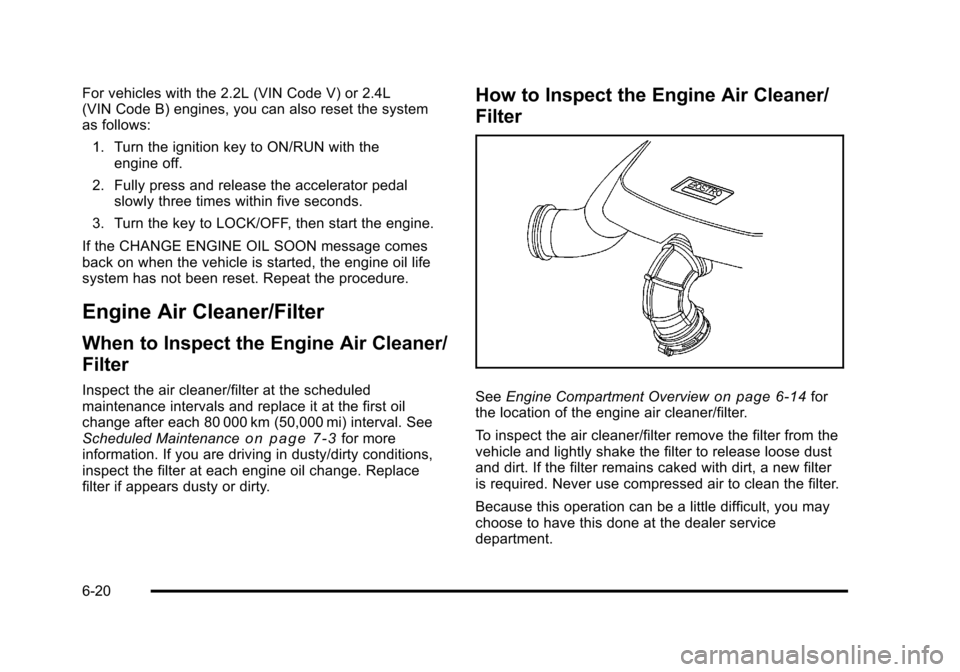
See Engine Compartment Overviewon page 6‑14for
the location of the engine air cleaner/filter.
To inspect the air cleaner/filter remove the filter from the
vehicle and lightly shake the filter to release loose dust
and dirt. If the filter remains caked with dirt, a new filter
is required. Never use compressed air to clean the filter.
Because this operation can be a little difficult, you may
choose to have this done at the dealer service
department.
6-20
Page 303 of 430
Black plate (27,1)Chevrolet HHR Owner Manual - 2011
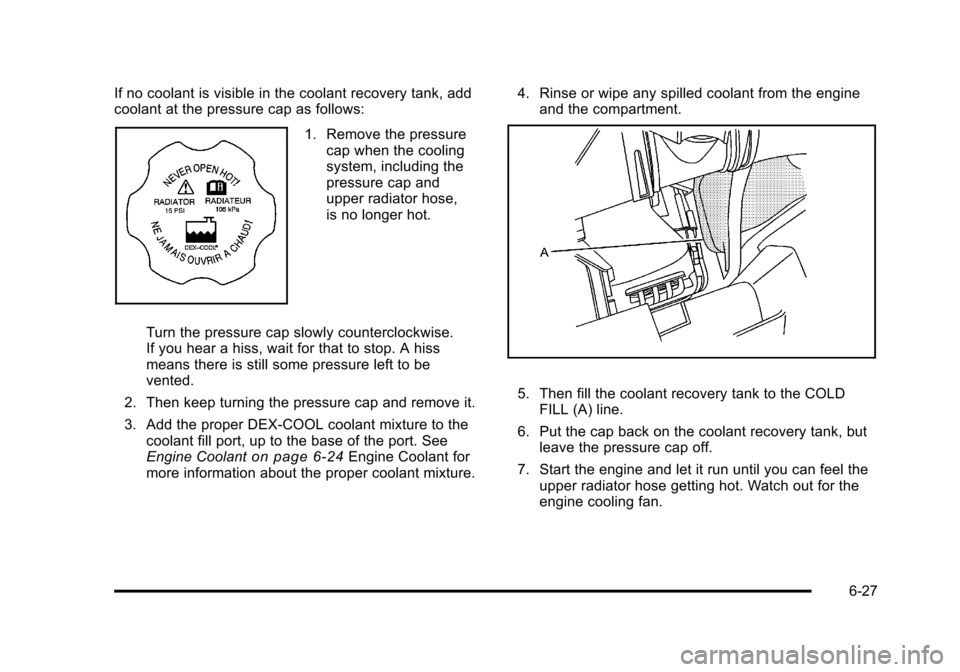
If no coolant is visible in the coolant recovery tank, add
coolant at the pressure cap as follows:
1. Remove the pressurecap when the cooling
system, including the
pressure cap and
upper radiator hose,
is no longer hot.
Turn the pressure cap slowly counterclockwise.
If you hear a hiss, wait for that to stop. A hiss
means there is still some pressure left to be
vented.
2. Then keep turning the pressure cap and remove it.
3. Add the proper DEX-COOL coolant mixture to the coolant fill port, up to the base of the port. See
Engine Coolant
on page 6‑24Engine Coolant for
more information about the proper coolant mixture. 4. Rinse or wipe any spilled coolant from the engine
and the compartment.
5. Then fill the coolant recovery tank to the COLDFILL (A) line.
6. Put the cap back on the coolant recovery tank, but leave the pressure cap off.
7. Start the engine and let it run until you can feel the upper radiator hose getting hot. Watch out for the
engine cooling fan.
6-27
Page 311 of 430
Black plate (35,1)Chevrolet HHR Owner Manual - 2011
4. Open the hood on the other vehicle and locate thepositive (+) and negative (−) terminal locations on
that vehicle.
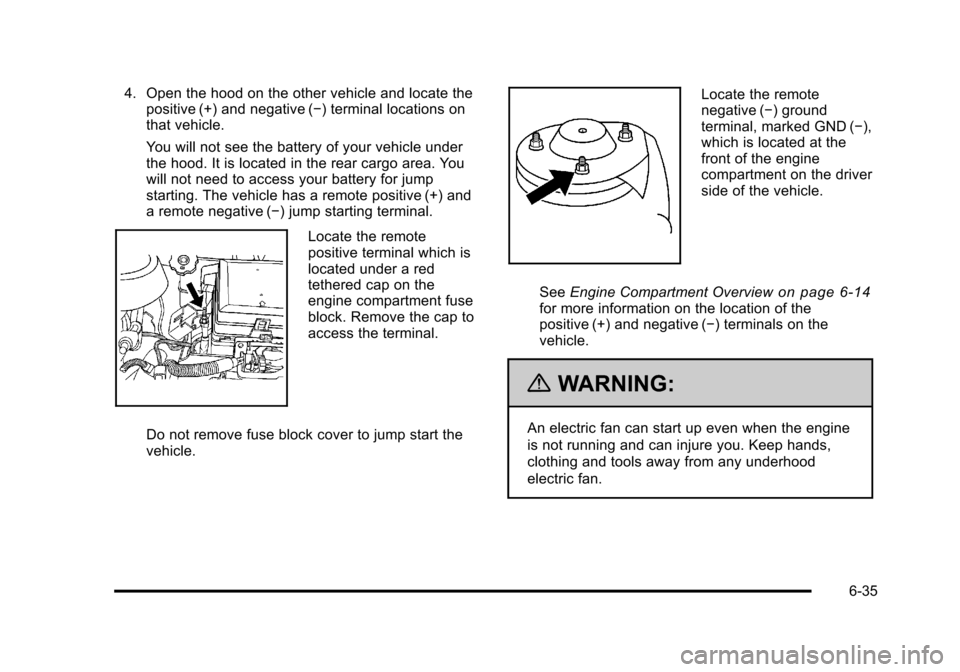
You will not see the battery of your vehicle under
the hood. It is located in the rear cargo area. You
will not need to access your battery for jump
starting. The vehicle has a remote positive (+) and
a remote negative (−) jump starting terminal.
Locate the remote
positive terminal which is
located under a red
tethered cap on the
engine compartment fuse
block. Remove the cap to
access the terminal.
Do not remove fuse block cover to jump start the
vehicle.
Locate the remote
negative (−) ground
terminal, marked GND (−),
which is located at the
front of the engine
compartment on the driver
side of the vehicle.
See Engine Compartment Overview
on page 6‑14for more information on the location of the
positive (+) and negative (−) terminals on the
vehicle.
{WARNING:
An electric fan can start up even when the engine
is not running and can injure you. Keep hands,
clothing and tools away from any underhood
electric fan.
6-35
Page 316 of 430
Black plate (40,1)Chevrolet HHR Owner Manual - 2011
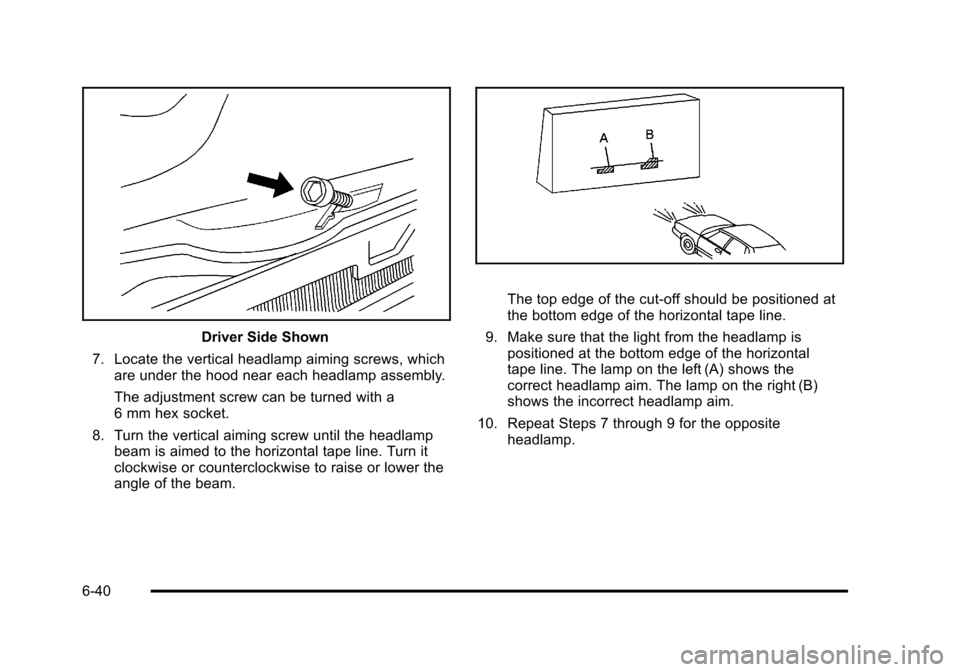
Driver Side Shown
7. Locate the vertical headlamp aiming screws, which are under the hood near each headlamp assembly.
The adjustment screw can be turned with a
6 mm hex socket.
8. Turn the vertical aiming screw until the headlamp beam is aimed to the horizontal tape line. Turn it
clockwise or counterclockwise to raise or lower the
angle of the beam.
The top edge of the cut-off should be positioned at
the bottom edge of the horizontal tape line.
9. Make sure that the light from the headlamp is positioned at the bottom edge of the horizontal
tape line. The lamp on the left (A) shows the
correct headlamp aim. The lamp on the right (B)
shows the incorrect headlamp aim.
10. Repeat Steps 7 through 9 for the opposite headlamp.
6-40
Page 318 of 430
Black plate (42,1)Chevrolet HHR Owner Manual - 2011
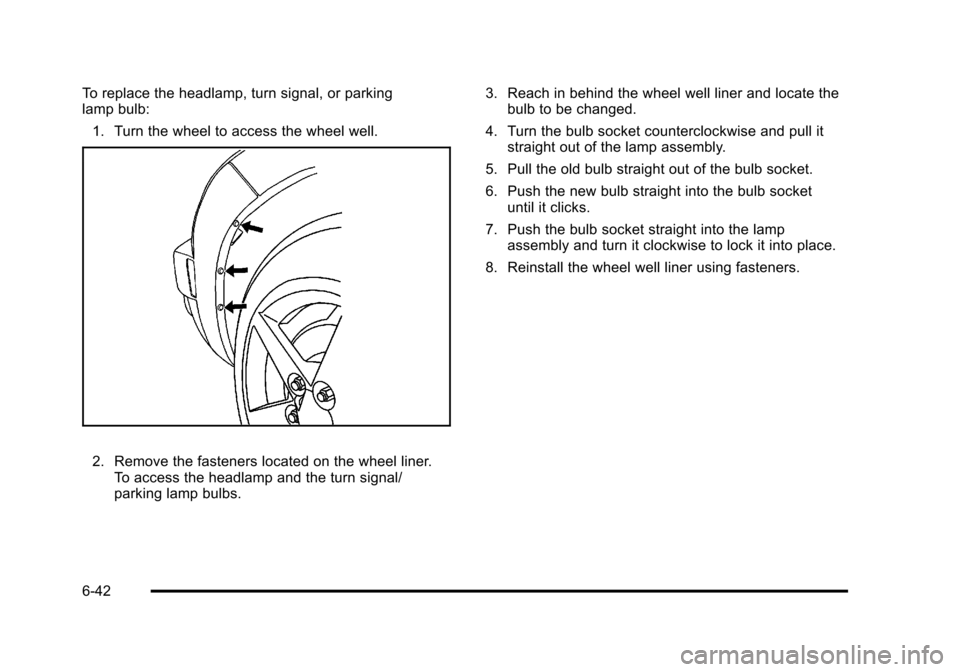
To replace the headlamp, turn signal, or parking
lamp bulb:1. Turn the wheel to access the wheel well.
2. Remove the fasteners located on the wheel liner. To access the headlamp and the turn signal/
parking lamp bulbs. 3. Reach in behind the wheel well liner and locate the
bulb to be changed.
4. Turn the bulb socket counterclockwise and pull it straight out of the lamp assembly.
5. Pull the old bulb straight out of the bulb socket.
6. Push the new bulb straight into the bulb socket until it clicks.
7. Push the bulb socket straight into the lamp assembly and turn it clockwise to lock it into place.
8. Reinstall the wheel well liner using fasteners.
6-42
Page 319 of 430
Black plate (43,1)Chevrolet HHR Owner Manual - 2011
Center High-Mounted Stoplamp
(CHMSL)
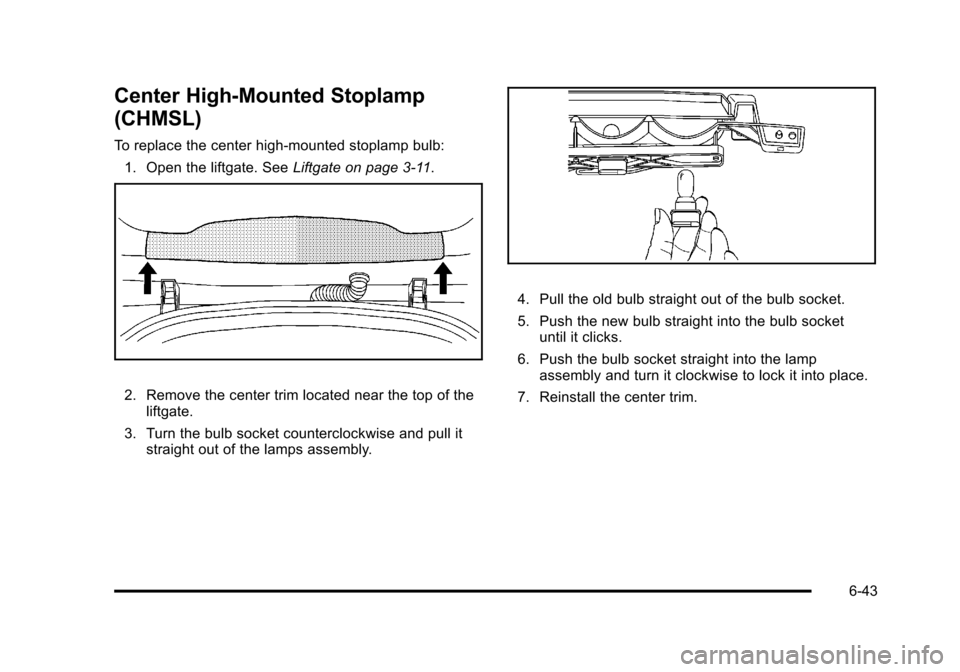
To replace the center high-mounted stoplamp bulb:1. Open the liftgate. See Liftgate on page 3‑11.
2. Remove the center trim located near the top of the
liftgate.
3. Turn the bulb socket counterclockwise and pull it straight out of the lamps assembly.
4. Pull the old bulb straight out of the bulb socket.
5. Push the new bulb straight into the bulb socketuntil it clicks.
6. Push the bulb socket straight into the lamp assembly and turn it clockwise to lock it into place.
7. Reinstall the center trim.
6-43
Page 320 of 430
Black plate (44,1)Chevrolet HHR Owner Manual - 2011
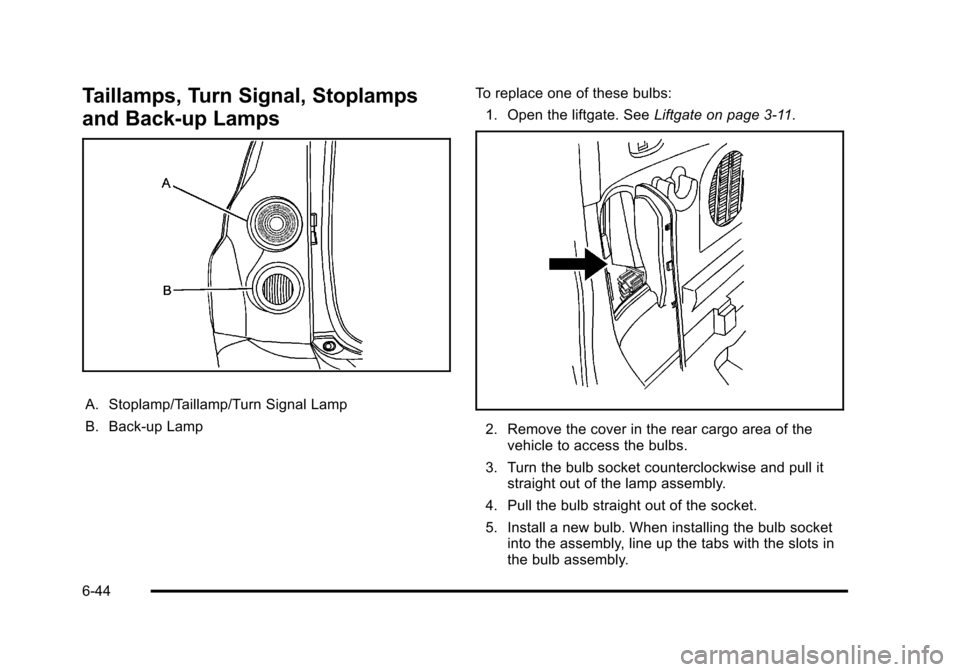
Taillamps, Turn Signal, Stoplamps
and Back-up Lamps
A. Stoplamp/Taillamp/Turn Signal Lamp
B. Back-up LampTo replace one of these bulbs:
1. Open the liftgate. See Liftgate on page 3‑11.
2. Remove the cover in the rear cargo area of the
vehicle to access the bulbs.
3. Turn the bulb socket counterclockwise and pull it straight out of the lamp assembly.
4. Pull the bulb straight out of the socket.
5. Install a new bulb. When installing the bulb socket into the assembly, line up the tabs with the slots in
the bulb assembly.
6-44