2011 CHEVROLET EQUINOX navigation system
[x] Cancel search: navigation systemPage 7 of 446
Black plate (1,1)Chevrolet Equinox Owner Manual - 2011
In Brief 1-1
In Brief
Instrument Panel
Instrument Panel . . . . . . . . . . . . . . 1-2
Initial Drive Information
Initial Drive Information . . . . . . . . 1-4
Remote Keyless Entry (RKE)System . . . . . . . . . . . . . . . . . . . . . . 1-4
Remote Vehicle Start . . . . . . . . . 1-5
Door Locks . . . . . . . . . . . . . . . . . . . 1-5
Liftgate . . . . . . . . . . . . . . . . . . . . . . . . 1-6
Windows . . . . . . . . . . . . . . . . . . . . . . 1-7
Seat Adjustment . . . . . . . . . . . . . . 1-7
Memory Features . . . . . . . . . . . . . 1-9
Heated Seats . . . . . . . . . . . . . . . . 1-11
Head Restraint Adjustment . . . . . . . . . . . . . . . . . 1-11
Safety Belts . . . . . . . . . . . . . . . . . . 1-11
Sensing System for Passenger Airbag . . . . . . . . . . 1-12
Mirror Adjustment . . . . . . . . . . . . 1-12 Steering Wheel
Adjustment . . . . . . . . . . . . . . . . . 1-13
Interior Lighting . . . . . . . . . . . . . . 1-13
Exterior Lighting . . . . . . . . . . . . . 1-14
Windshield Wiper/Washer . . . . 1-14
Climate Controls . . . . . . . . . . . . . 1-16
Parking Brake . . . . . . . . . . . . . . . 1-18
Transmission . . . . . . . . . . . . . . . . 1-18
Vehicle Features
Radio(s) . . . . . . . . . . . . . . . . . . . . . 1-19
Satellite Radio . . . . . . . . . . . . . . . 1-20
Portable Audio Devices . . . . . . 1-21
Bluetooth
®. . . . . . . . . . . . . . . . . . . 1-21
Steering Wheel Controls . . . . . 1-21
Cruise Control . . . . . . . . . . . . . . . 1-22
Navigation System . . . . . . . . . . . 1-22
Driver Information Center (DIC) . . . . . . . . . . . . . . . 1-22
Vehicle Personalization . . . . . . 1-23
Rear Vision Camera (RVC) . . . . . . . . . . . . . 1-23
Ultrasonic Parking Assist . . . . 1-23
Roof Rack System . . . . . . . . . . . 1-24
Power Outlets . . . . . . . . . . . . . . . 1-24
Performance and Maintenance
Traction Control System (TCS) . . . . . . . . . . . . . . 1-24
StabiliTrak
®System . . . . . . . . . 1-25
Tire Pressure Monitor . . . . . . . . 1-25
Engine Oil Life System . . . . . . 1-26
Fuel E85 (85% Ethanol) . . . . . 1-26
Driving for Better Fuel Economy . . . . . . . . . . . . . . . . . . . 1-26
Roadside Assistance Program . . . . . . . . . . . . . . . . . . . . 1-27
OnStar
®. . . . . . . . . . . . . . . . . . . . . 1-27
Page 9 of 446

Black plate (3,1)Chevrolet Equinox Owner Manual - 2011
In Brief 1-3
A.Air Vents on page 8‑5.
B. Turn and Lane‐Change Lever. See Turn and Lane-Change
Signals on page 6‑3.
Exterior Lamp Controls on
page 6‑1.
Fog Lamps on page 6‑3
(If Equipped).
C. Instrument Cluster on page 5‑9.
D. Windshield Wiper/Washer on
page 5‑4.
Rear Window Wiper/Washer on
page 5‑5.
E. Power Door Locks on page 2‑7.
F. Instrument Panel Storage on
page 4‑1.
G. Safety Locks on page 2‑8.
H. AM-FM Radio on page 7‑11.
Navigation System
(If Equipped). See Navigation
System Manual. I. Data Link Connector (DLC).
See Malfunction Indicator Lamp
on page 5‑14.
J. Cruise Control on page 9‑44.
K. Instrument Panel Illumination
Control on page 6‑4.
L. Steering Wheel Adjustment on
page 5‑2.
M. Horn on page 5‑3.
N. Steering Wheel Controls on
page 5‑3.
O. Ignition Positions on page 9‑28.
P. Climate Control Systems on
page 8‑1 (If Equipped).
Automatic Climate Control
System on page 8‑3
(If Equipped).
Q. Shift Lever. See Shifting Into
Park on page 9‑32.
R. Fuel Economy Mode on
page 9‑38 (If Equipped). S.
StabiliTrak®System on
page 9‑43.
T. Cupholders on page 4‑1.
U. Power Outlets on page 5‑7.
V. CD Player on page 7‑19.
W. Driver Information Center Buttons (If Equipped). See
Driver Information Center (DIC)
on page 5‑22.
X. Hazard Warning Flashers on
page 6‑3.
Y. Glove Box on page 4‑1.
Page 28 of 446
Black plate (22,1)Chevrolet Equinox Owner Manual - 2011
1-22 In Brief
Cruise Control
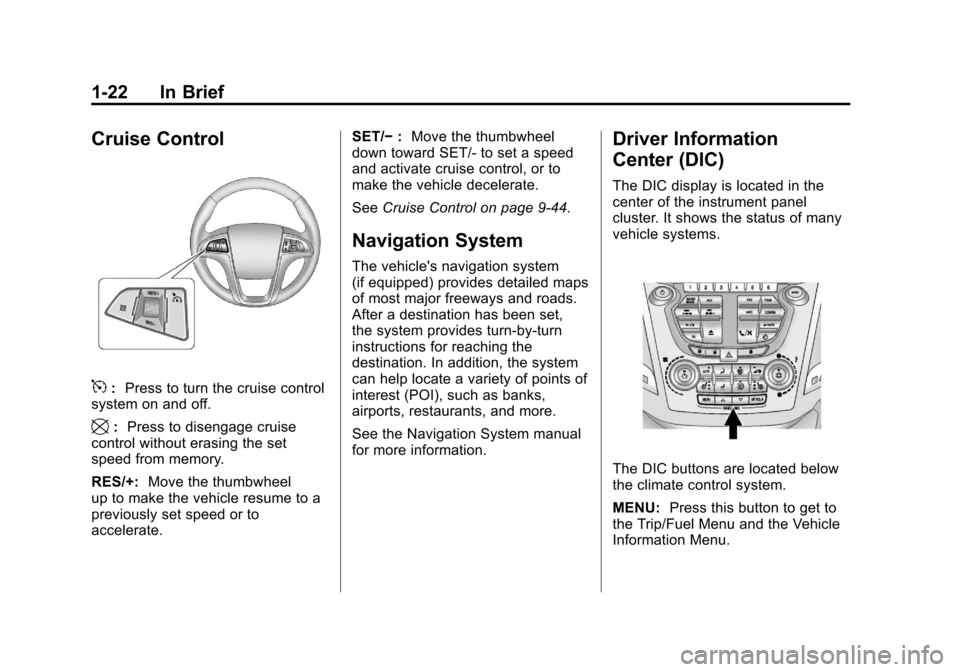
5:Press to turn the cruise control
system on and off.
\: Press to disengage cruise
control without erasing the set
speed from memory.
RES/+: Move the thumbwheel
up to make the vehicle resume to a
previously set speed or to
accelerate. SET/−
:Move the thumbwheel
down toward SET/- to set a speed
and activate cruise control, or to
make the vehicle decelerate.
See Cruise Control on page 9‑44.
Navigation System
The vehicle's navigation system
(if equipped) provides detailed maps
of most major freeways and roads.
After a destination has been set,
the system provides turn-by-turn
instructions for reaching the
destination. In addition, the system
can help locate a variety of points of
interest (POI), such as banks,
airports, restaurants, and more.
See the Navigation System manual
for more information.
Driver Information
Center (DIC)
The DIC display is located in the
center of the instrument panel
cluster. It shows the status of many
vehicle systems.
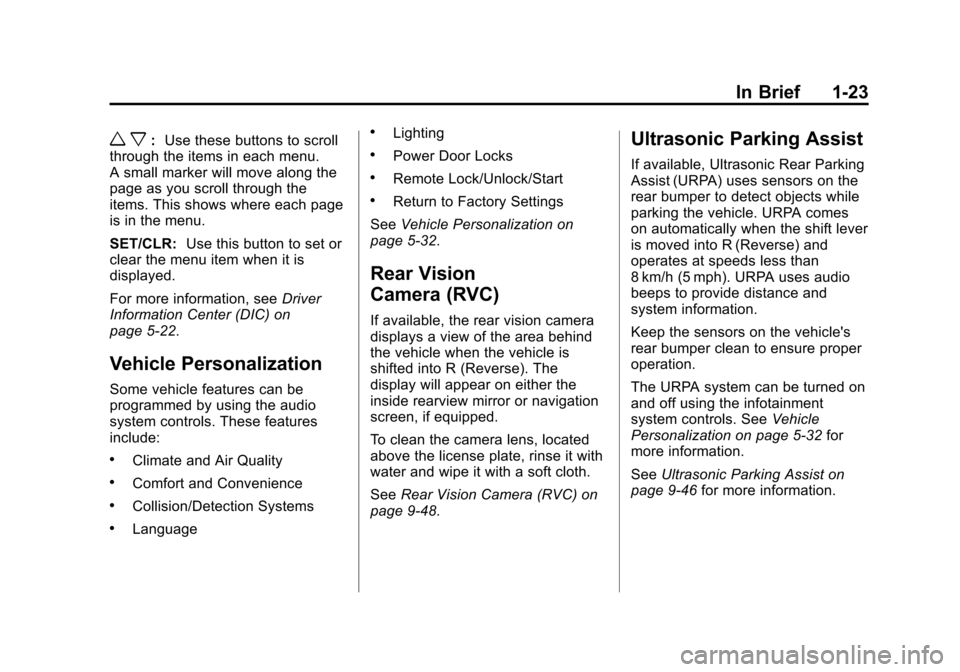
The DIC buttons are located below
the climate control system.
MENU: Press this button to get to
the Trip/Fuel Menu and the Vehicle
Information Menu.
Page 29 of 446
Black plate (23,1)Chevrolet Equinox Owner Manual - 2011
In Brief 1-23
w x:Use these buttons to scroll
through the items in each menu.
A small marker will move along the
page as you scroll through the
items. This shows where each page
is in the menu.
SET/CLR: Use this button to set or
clear the menu item when it is
displayed.
For more information, see Driver
Information Center (DIC) on
page 5‑22.
Vehicle Personalization
Some vehicle features can be
programmed by using the audio
system controls. These features
include:
.Climate and Air Quality
.Comfort and Convenience
.Collision/Detection Systems
.Language
.Lighting
.Power Door Locks
.Remote Lock/Unlock/Start
.Return to Factory Settings
See Vehicle Personalization on
page 5‑32.
Rear Vision
Camera (RVC)
If available, the rear vision camera
displays a view of the area behind
the vehicle when the vehicle is
shifted into R (Reverse). The
display will appear on either the
inside rearview mirror or navigation
screen, if equipped.
To clean the camera lens, located
above the license plate, rinse it with
water and wipe it with a soft cloth.
See Rear Vision Camera (RVC) on
page 9‑48.
Ultrasonic Parking Assist
If available, Ultrasonic Rear Parking
Assist (URPA) uses sensors on the
rear bumper to detect objects while
parking the vehicle. URPA comes
on automatically when the shift lever
is moved into R (Reverse) and
operates at speeds less than
8 km/h (5 mph). URPA uses audio
beeps to provide distance and
system information.
Keep the sensors on the vehicle's
rear bumper clean to ensure proper
operation.
The URPA system can be turned on
and off using the infotainment
system controls. See Vehicle
Personalization on page 5‑32 for
more information.
See Ultrasonic Parking Assist on
page 9‑46 for more information.
Page 34 of 446
Black plate (28,1)Chevrolet Equinox Owner Manual - 2011
1-28 In Brief
How OnStar Service Works
Q:Push this blue button to
connect to a specially trained
OnStar Advisor to verify your
account information and to answer
questions.
]: Push this red emergency
button to get priority help from
specially trained OnStar Emergency
Advisors.
X: Push this button for hands‐free,
voice‐activated calling and to give
voice commands for Hands‐Free
Calling and Turn‐by‐Turn
Navigation.
Automatic Crash Response,
Emergency Services, Crisis Assist,
Stolen Vehicle Assistance, Vehicle
Diagnostics, Remote Door Unlock,
Roadside Assistance, Turn‐by‐Turn
Navigation, and Hands‐Free Calling
are available on most vehicles. Not all OnStar services are
available on all vehicles. For more
information, see the OnStar Owner's
Guide; visit www.onstar.com (U.S.)
or www.onstar.ca (Canada); contact
OnStar at 1-888-4-ONSTAR
(1‐888‐466‐7827) or
TTY 1‐877‐248‐2080; or
push the
Qbutton to speak
with an OnStar Advisor 24 hours a
day, 7 days a week.
For a full description of OnStar
services and system limitations, see
the OnStar Owner's Guide in the
glove box.
OnStar service is subject to the
OnStar Terms and Conditions
included in the OnStar Glove
Box Kit. OnStar service requires wireless
communication networks and the
Global Positioning System (GPS)
satellite network. Not all OnStar
services are available everywhere
or on all vehicles at all times.
OnStar service can’t work unless
your vehicle is in a place where
OnStar has an agreement with a
wireless service provider for service
in that area, and the wireless
service provider has coverage,
network capacity, reception, and
technology compatible with OnStar's
service. Service involving location
information about your vehicle can’t
work unless GPS signals are
available, unobstructed, and
compatible with the OnStar
hardware. The vehicle has to have a
working electrical system and
adequate battery power for the
OnStar equipment to operate.
Page 148 of 446
Black plate (24,1)Chevrolet Equinox Owner Manual - 2011
5-24 Instruments and Controls
The fuel economy can be reset
by pressing SET/CLR while the
Average Fuel Economy display is
showing. The display may not reset
to zero.
Instantaneous Fuel Economy
This display shows the current
fuel economy in either liters per
100 kilometers (L/100 km) or miles
per gallon (mpg). This number
reflects only the fuel economy that
the vehicle has right now and
changes frequently as driving
conditions change. Unlike average
economy, this display cannot be
reset.
Average Vehicle Speed
This display shows the average
speed of the vehicle in kilometers
per hour (km/h) or miles per
hour (mph). This average is
calculated based on the various
vehicle speeds recorded since the
last reset of this value. The average
speed can be reset by pressing
SET/CLR while the Average Vehicle
Speed display is showing.Timer
This display can be used as a timer.
To start the timer, press SET/CLR
while Timer is displayed. The
display will show the amount of time
that has passed since the timer was
last reset, not including time the
ignition is off. Time will continue to
be counted as long as the ignition is
on, even if another display is being
shown on the DIC. The timer will
record up to 99 hours, 59 minutes
and 59 seconds (99:59:59) after
which the display will return to zero.
To stop the timer, press SET/CLR
briefly while Timer is displayed. To
reset the timer to zero, press and
hold SET/CLR.
Digital Speedometer
The speedometer shows how fast
the vehicle is moving in either
kilometers per hour (km/h) or miles
per hour (mph). The speedometer
cannot be reset.
Turn-by-Turn
This display is used for the OnStar
or Navigation System Turn-by-Turn
guidance. See The OnStar Owner's
Guide or the Navigation manual,
if the vehicle has navigation, for
more information.
Blank Display
This display shows no information.
Vehicle Information Menu
Items
Press the MENU button until
Vehicle Information Menu is
displayed. Then press
xto scroll
through the following menu items:
.Unit
.Tire Pressure
.Remaining Oil Life
.Blank Display
Page 170 of 446
Black plate (2,1)Chevrolet Equinox Owner Manual - 2011
7-2 Infotainment System
To minimize taking your eyes off the
road while driving, do the following
while the vehicle is parked:
.Become familiar with the
operation and controls of the
audio system.
.Set up the tone, speaker
adjustments, and preset radio
stations.
For more information, see Defensive
Driving on page 9‑2.
This vehicle's infotainment system
may be equipped with a noise
reduction system which can work
improperly if the audio amplifier,
engine calibrations, exhaust system,
microphones, radio, or speakers are
modified or replaced. This could
result in more noticeable engine
noise at certain speeds. Notice:
Contact your dealer
before adding any equipment.
Adding audio or communication
equipment could interfere with
the operation of the vehicle's
engine, radio, or other systems,
and could damage them. Follow
federal rules covering mobile
radio and telephone equipment.
The vehicle has Retained
Accessory Power (RAP). With RAP,
the audio system can be played
even after the ignition is turned off.
See Retained Accessory Power
(RAP) on page 9‑31 for more
information.
Navigation System
For vehicles with a navigation
system, see the separate Navigation
System Manual.
Theft-Deterrent Feature
The theft-deterrent feature works by
learning a portion of the Vehicle
Identification Number (VIN) to the
infotainment system. The
infotainment system does not
operate if it is stolen or moved to a
different vehicle.
Page 201 of 446
Black plate (33,1)Chevrolet Equinox Owner Manual - 2011
Infotainment System 7-33
Selecting a track in a different
folder:
1. Press the MENU/SEL knob.
2. Select Folder List.
3. Select the folder.
4. Select the track.
Searching for Tracks
It is normal for the search feature
to take some time to display the
information after reading the device
due to the amount of information
stored.
Files that do not have any meta
data stored in the ID3 tag display
as Unknown.
Tracks can be searched by:
.Playlists
.Artists
.Albums
.Song Titles
.GenresThe number of objects in each
category is shown in parentheses
after the category.
To search for tracks:
1. Press the MENU/SEL knob.
2. Select Search.
3. Select: Playlists, Artists,
Albums, Song Titles, Genres,
Composers, or Audiobooks.
4. Select the track. The search rate increases if the MENU/SEL knob
is continuously turned while
searching in a list.
Recording Tracks to MEM
See Mass Storage Media (MEM) on
page 7‑24 for more information.
Rear Seat
Infotainment
Rear Seat Entertainment
(RSE) System
The vehicle may have a DVD Rear
Seat Entertainment (RSE) system.
The RSE system works with the
vehicle's infotainment system. The
DVD player is part of the front radio.
The RSE system includes a radio
with a DVD player, two rear seat
video display screens, audio/video
jacks, two wireless headphones,
and a remote control. See CD/DVD
Player on page 7‑21 or the separate
navigation system manual for more
information on the vehicle's DVD
system.