2011 CHEVROLET CORVETTE warning light
[x] Cancel search: warning lightPage 156 of 428

Black plate (36,1)Chevrolet Corvette Owner Manual - 2011
5-36 Instruments and Controls
SERVICE CHARGING SYSTEM
If this message displays while you
are driving, there may be a problem
with the electrical charging system.
It could mean that there is a loose
or broken drive belt or that there is
another electrical problem. Have the
vehicle checked right away by your
dealer. Driving while this message is
on could drain the battery.
If you must drive a short distance
with the message on, be certain to
turn off the vehicle's accessories,
such as the radio and air
conditioner.
Multiple chimes sound when this
message is displayed.
To acknowledge the message, press
the RESET button. The message
reappears every 10 minutes until
this condition changes.
Brake System Messages
ABS (Antilock Brake System)
ACTIVE
This message displays when the
Antilock Brake System (ABS) is
adjusting brake pressure to help
avoid a braking skid.
Slippery road conditions may exist
if this message is displayed, so
adjust your driving accordingly.
The message stays on for a few
seconds after the system stops
adjusting brake pressure. See
Antilock Brake System (ABS) on
page 9‑34for more information.
CHANGE BRAKE PADS
On vehicles with electronic brake
pad wear sensors, this message will
be displayed when the pads are
worn. See your dealer for service.
CHECK BRAKE FLUID
This message displays, a sound
will be heard, and the brake
system warning light on the
instrument panel cluster turns
on if the ignition is on to inform the
driver that the brake fluid level is
low. SeeBrake System Warning
Light on page 5‑21. Have the brake
system serviced by your dealer as
soon as possible. See Brakes on
page 10‑38.
SERVICE ANTILOCK BRAKES
If this message displays while
you are driving, stop as soon as
possible and turn the ignition off.
Then start the engine again to reset
the system. If the message stays
on, or comes back on again while
you are driving, the vehicle is in
need of service. See your dealer.
If the antilock brake system (ABS)
warning light is on and the regular
brake system warning light
is not on, you still have brakes,
but do not have ABS.
Page 157 of 428
Black plate (37,1)Chevrolet Corvette Owner Manual - 2011
Instruments and Controls 5-37
If the regular brake system warning
light is also on, you do not have
ABS and there is a problem with the
brakes. SeeAntilock Brake System
(ABS) Warning Light on page 5‑22
and Brake System Warning Light on
page 5‑21.
If this message is displayed, the
Traction Control System (TCS)
and the Active Handling System
will also be disabled. The DIC will
scroll three messages: SERVICE
ANTILOCK BRAKES, SERVICE
TRACTION SYSTEM, and
SERVICE ACTIVE HANDLING,
and the instrument panel cluster
lights will come on along with a
sound. When the service message
is displayed, the computer
controlled systems will not assist the
driver. Have the system repaired by
your dealer as soon as possible.
Adjust your driving accordingly.
To acknowledge these messages,
press the RESET button.Convertible Top
Messages
ATTACH TRUNK PARTITION
If the vehicle has a power
convertible top, this message
displays and a sound will be heard
if the trunk partition is not in place.
Open the hatch/trunk and make
sure the trunk partition is secure
and no objects are on the trunk
partition. See Rear Storage on
page 4‑1 for more information.
CLOSE TRUNK TO MOVE TOP
This message displays and a sound
will be heard if the trunk is open
while you are trying to operate
the convertible top. Make sure
the trunk is closed before operating
the convertible top. See Convertible
Top on page 2‑22.
SET PARK BRAKE TO
MOVE TOP
If the vehicle has a manual
transmission, this message displays
and a sound will be heard if you
try to operate the power convertible
top without first setting the parking
brake. Set the parking brake
before trying to operate the power
convertible top. See Convertible Top
on page 2‑22 for more information.
SHIFT TO PARK OR SET PARK
BRAKE FOR TOP
If the vehicle has an automatic
transmission, this message displays
and a sound will be heard if you try
to operate the power convertible top
without first shifting into P (Park) or
setting the parking brake. Either
shift the vehicle into P (Park) or set
the parking brake before trying to
operate the power convertible top.
SeeConvertible Top on page 2‑22
for more information.
Page 167 of 428
Black plate (47,1)Chevrolet Corvette Owner Manual - 2011
Instruments and Controls 5-47
SERVICE ACTIVE HANDLING
SYSTEM
This message displays if there is a
problem with the Active Handling
System and the vehicle needs
service. The active handling system
light on the instrument panel cluster
also turns on and a sound will be
heard. See your dealer. When this
message is displayed, the system
is not working. Adjust your driving
accordingly. SeeActive Handling
System on page 9‑37 for more
information.
SERVICE RIDE CONTROL
This message displays when the
Selective Ride Control system
has detected a malfunction and
the system must be serviced.
See your dealer. If a fault is
present in the Selective Ride
Control system which causes
the shocks to be in their full soft
condition, the messages SERVICE
RIDE CONTROL, SHOCKS
INOPERATIVE, and MAXIMUM
SPEED 129 km/h (80 MPH) will
display together. See Selective Ride
Control on page 9‑42 for more
information.
SERVICE TRACTION SYSTEM
If this message displays when you
are driving, there is a problem with
the Traction Control System (TCS)
and the vehicle is in need of
service. See your dealer. When this
message is displayed, the system
will not limit wheel spin. Adjust your
driving accordingly.
The traction control system (TCS)
warning light on the instrument
panel cluster will also turn on and
a sound will be heard.
When this message is displayed,
the computer controlled systems will
not assist the driver in controlling
the vehicle. Have the system
repaired by your dealer as soon
as possible. Adjust your driving
accordingly. See Traction Control
System (TCS) on page 9‑36 for
more information.
To acknowledge the message, press
the RESET button.
Page 168 of 428
Black plate (48,1)Chevrolet Corvette Owner Manual - 2011
5-48 Instruments and Controls
SHOCKS INOPERATIVE
This message displays when a
malfunction is present in the
Selective Ride Control system
which is causing the shocks to
be in their full soft mode. This is a
warning to the driver that the vehicle
handling may be affected. Have the
vehicle serviced by your dealer as
soon as possible.
To acknowledge the message, press
the RESET button. The message
reappears every 10 minutes until
this condition changes.
TRACTION SYSTEM ACTIVE
This message displays when the
Traction Control System (TCS) is
limiting wheel spin. Slippery road
conditions may exist if this message
is displayed, so adjust your driving
accordingly. The message stays
on for a few seconds after the
TCS stops limiting wheel spin.
SeeTraction Control System (TCS)
on page 9‑36 for more information.
TRACTION SYSTEM AND
ACTIVE HANDLING –OFF
This message displays, the
instrument panel cluster light
turns on, and a sound will be
heard when the Traction Control
System (TCS) and Active Handling
System are turned off by pressing
the Active Handling System button
on the console for five seconds.
The Antilock Brake System (ABS)
remains on with the TCS and Active
Handling System off. Adjust your
driving accordingly. See Traction
Control System (TCS) on page 9‑36
and Active Handling System on
page 9‑37 for more information.
To acknowledge this message,
press the RESET button.
TRACTION SYSTEM AND
ACTIVE HANDLING –ON
If the Traction Control System (TCS)
and Active Handling System are
off, this message displays briefly,
the instrument panel cluster light
turns off, and a sound will be heard
when the TCS and Active Handling
System are turned on by briefly
pressing the Active Handling
System button on the console.
See Traction Control System (TCS)
on page 9‑36 andActive Handling
System on page 9‑37 for more
information.
Page 169 of 428
Black plate (49,1)Chevrolet Corvette Owner Manual - 2011
Instruments and Controls 5-49
TRACTION SYSTEM–OFF
This message displays and stays
on, a sound will be heard, and
the traction control system (TCS)
warning light on the instrument
panel cluster turns on when the
TCS is turned off by pressing the
Active Handling System button on
the console. See Traction Control
System (TCS) Warning Light on
page 5‑23. See Traction Control
System (TCS) on page 9‑36 for
more information.
To acknowledge the message, press
the RESET button.
TRACTION SYSTEM –ON
This message displays and a sound
will be heard when the Traction
Control System (TCS) is turned on
by pressing the Active Handling
System button on the console.
This message automatically clears
from the DIC display on its own.
See Traction Control System (TCS)
on page 9‑36 for more information.
Safety Belt Messages
BUCKLE PASSENGER
This message reminds you to
buckle the passenger's safety belt.
This message displays and a sound
will be heard when the ignition is on,
the driver's safety belt is buckled,
the passenger's safety belt is
unbuckled with the passenger
airbag enabled, and the vehicle
is in motion. You should have the
passenger buckle their safety belt.
The reminder will be repeated if
the ignition is on, the vehicle is in
motion, the driver is buckled and the
passenger is still unbuckled, and the
passenger airbag is enabled. If the
passenger's safety belt is already
buckled, this message will not
come on.
BUCKLE SEATBELT
This message reminds you to
buckle the driver's safety belt.
This message displays and a sound
will be heard when the ignition is on,
the driver's safety belt is unbuckled,
and the vehicle is in motion. You
should buckle your safety belt.
If the driver remains unbuckled
when the ignition is on and the
vehicle is in motion, the reminder
will be repeated. If the driver's
safety belt is already buckled, this
message will not come on.
This message is an additional
reminder to the safety belt reminder
light in the instrument panel cluster.
SeeSafety Belt Reminders on
page 5‑16 for more information.
Page 171 of 428
Black plate (51,1)Chevrolet Corvette Owner Manual - 2011
Instruments and Controls 5-51
Tire Messages
HIGH TIRE PRESSURE
This message may be displayed
when one or more of the tires is
over-inflated. This message also
displays LEFT FRONT, RIGHT
FRONT, LEFT REAR, or RIGHT
REAR to indicate which tire is
affected. You can receive more
than one tire pressure message
at a time. To read other messages
that may have been sent at the
same time, press the RESET
button. If a tire pressure message
appears on the DIC, stop as soon
as you can. Have the tire pressures
checked and set to those shown on
the Tire Loading Information label.
SeeRun-Flat Tires on page 10‑59,
Vehicle Load Limits on page 9‑14,
Tire Pressure on page 10‑66, and
Tire Pressure Monitor System on
page 10‑68. The DIC also shows
the tire pressure values. See Driver
Information Center (DIC) on
page 5‑25. To acknowledge the message, press
the RESET button. A message
reappears every 10 minutes until
the condition is corrected.
LOW TIRE PRESSURE or TIRE
LOW ADD AIR TO TIRE
{WARNING
When the LOW TIRE
PRESSURE or TIRE FLAT
message is displayed on the
Driver Information Center, your
vehicle's handling capabilities
will be reduced during severe
maneuvers. The active handling
system will be affected. See
Active Handling System on
page 9‑37. If you drive too fast,
you could lose control of your
vehicle. You or others could be
injured. Do not drive over 90 km/h
(55 mph) when the LOW TIRE
PRESSURE or TIRE FLAT
(Continued)
WARNING (Continued)
message is displayed. Drive
cautiously and check your tire
pressures as soon as you can.
This message displays when one or
more of the tires is under-inflated.
This message also displays LEFT
FRONT, RIGHT FRONT, LEFT
REAR, or RIGHT REAR to indicate
which tire is affected. Multiple
chimes sound and the tire pressure
light on the instrument panel cluster
turns on when this message is
displayed. See Tire Pressure Light
on page 5‑24. You can receive more
than one tire pressure message at a
time. To read other messages that
may have been sent at the same
time, press the RESET button. If a
tire pressure message appears on
the DIC, stop as soon as you can.
Have the tire pressures checked
and set to those shown on the
Tire Loading Information label.
Page 172 of 428

Black plate (52,1)Chevrolet Corvette Owner Manual - 2011
5-52 Instruments and Controls
SeeRun-Flat Tires on page 10‑59,
Vehicle Load Limits on page 9‑14,
Tire Pressure on page 10‑66, and
Tire Pressure Monitor System on
page 10‑68. The DIC also shows
the tire pressure values. See Driver
Information Center (DIC) on
page 5‑25.
To acknowledge the message, press
the RESET button. A message
reappears every 10 minutes until the
condition is corrected.
SERVICE TIRE MONITOR
This message displays if a part
on the Tire Pressure Monitor
System (TPMS) is not working
properly. The tire pressure light
also flashes and then remains
on during the same ignition cycle.
See Tire Pressure Light on
page 5‑24. Several conditions may
cause this message to appear. See
Tire Pressure Monitor Operation on
page 10‑69 for more information.
If the warning comes on and stays
on, there may be a problem with the
TPMS. See your dealer.
TIRE FLAT
{WARNING
When the LOW TIRE
PRESSURE or TIRE FLAT
message is displayed on the
Driver Information Center, your
vehicle's handling capabilities
will be reduced during severe
maneuvers. If you drive too fast,
you could lose control of your
vehicle. You or others could be
injured. Do not drive over 55 mph
(90 km/h) when the LOW TIRE
PRESSURE or TIRE FLAT
message is displayed. Drive
cautiously and check your tire
pressures as soon as you can. This message displays when
one or more of the tires is flat.
This message also displays LEFT
FRONT, RIGHT FRONT, LEFT
REAR, or RIGHT REAR to indicate
which tire is affected. Multiple
chimes sound and the tire pressure
light on the instrument panel cluster
comes on when this message is
displayed. See
Tire Pressure Light
on page 5‑24.
This message is followed by
the MAXIMUM SPEED 90 km/h
(55 MPH) message, and then by the
REDUCED HANDLING message.
The Active Handling System will
intervene more quickly when a flat
tire has been detected. Adjust your
driving accordingly.
Page 191 of 428
Black plate (1,1)Chevrolet Corvette Owner Manual - 2011
Lighting 6-1
Lighting
Exterior Lighting
Exterior Lamp Controls . . . . . . . . 6-1
Exterior Lamps OffReminder . . . . . . . . . . . . . . . . . . . . 6-2
Headlamp High/Low-Beam Changer . . . . . . . . . . . . . . . . . . . . . 6-2
Flash-to-Pass . . . . . . . . . . . . . . . . . 6-2
Daytime Running Lamps (DRL) . . . . . . . . . . . . . . . . 6-2
Twilight Sentinel . . . . . . . . . . . . . . 6-3
Hazard Warning Flashers . . . . . 6-4
Turn and Lane-Change Signals (Auto Signal) . . . . . . . . . . . . . . . . 6-4
Fog Lamps . . . . . . . . . . . . . . . . . . . . 6-5
Interior Lighting
Instrument Panel Illumination Control . . . . . . . . . . . . . . . . . . . . . . 6-5
Courtesy Lamps . . . . . . . . . . . . . . 6-6
Reading Lamps . . . . . . . . . . . . . . . 6-6
Lighting Features
Entry/Exit Lighting . . . . . . . . . . . . . 6-6
Battery Power Protection . . . . . . 6-7
Exterior Lighting Battery Saver . . . . . . . . . . . . . . . . . . . . . . . . 6-7
Exterior Lighting
Exterior Lamp Controls
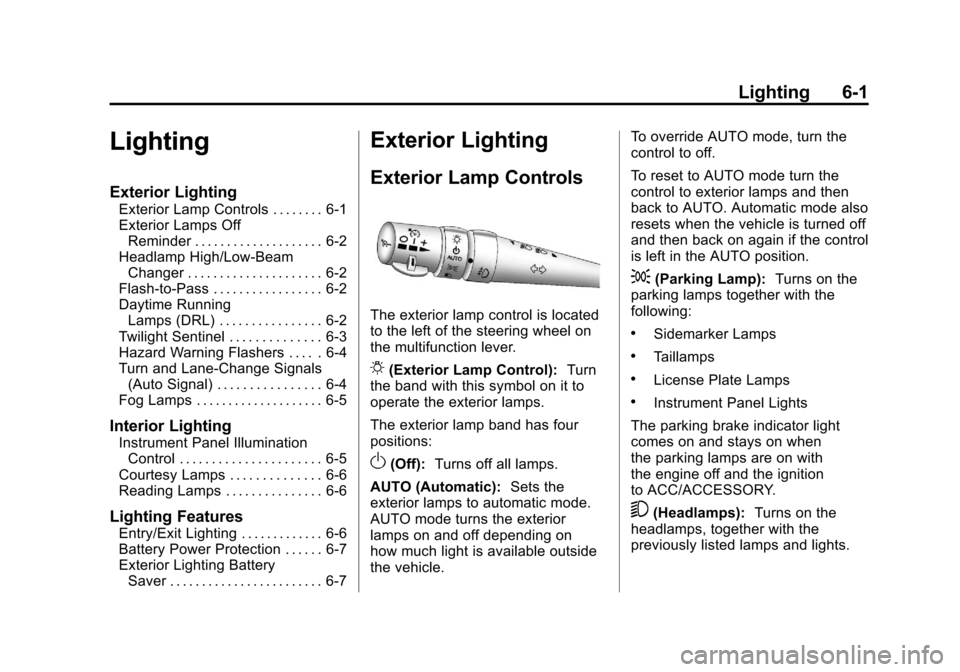
The exterior lamp control is located
to the left of the steering wheel on
the multifunction lever.
O(Exterior Lamp Control): Turn
the band with this symbol on it to
operate the exterior lamps.
The exterior lamp band has four
positions:
O(Off): Turns off all lamps.
AUTO (Automatic): Sets the
exterior lamps to automatic mode.
AUTO mode turns the exterior
lamps on and off depending on
how much light is available outside
the vehicle. To override AUTO mode, turn the
control to off.
To reset to AUTO mode turn the
control to exterior lamps and then
back to AUTO. Automatic mode also
resets when the vehicle is turned off
and then back on again if the control
is left in the AUTO position.
;(Parking Lamp):
Turns on the
parking lamps together with the
following:
.Sidemarker Lamps
.Taillamps
.License Plate Lamps
.Instrument Panel Lights
The parking brake indicator light
comes on and stays on when
the parking lamps are on with
the engine off and the ignition
to ACC/ACCESSORY.
5(Headlamps): Turns on the
headlamps, together with the
previously listed lamps and lights.