2011 CHEVROLET CORVETTE transmission
[x] Cancel search: transmissionPage 60 of 428
Black plate (28,1)Chevrolet Corvette Owner Manual - 2011
2-28 Keys, Doors and Windows
Power Operation
For care and cleaning of the
convertible top see“Cleaning the
Convertible Top” in this section.
High pressure car washes may
cause water to enter the vehicle.
To operate the power convertible
top use the following steps.
Notice: Leaving the convertible
top down and exposing the
interior of your vehicle to outdoor
conditions may cause damage.
Always close the convertible top
if leaving your vehicle outdoors.
Notice: Lowering the convertible
top when there are objects in the
storage area could damage it or
break the glass rear window.
Always verify that no objects
are in the storage area before
lowering the convertible top.
Notice: Lowering the top if it is
damp, wet, or dirty can cause
stains, mildew, and damage to the
inside of your vehicle. Dry off the
top before lowering it. Notice:
If you lower the top on
your vehicle in cold weather
(0°F/-18°C or lower), you may
damage top components. Do not
lower the top in cold weather.
Notice: If you raise or lower the
convertible top while the vehicle
is in motion, you could damage
the top or the top mechanism.
The repairs would not be covered
by your warranty. Always put
an automatic transmission
in (P) Park or a manual
transmission in (N) Neutral
before raising or lowering the
convertible top.
Lowering the Power
Convertible Top
1. Park on a level surface. Start the engine. Shift an automatic
transmission into P (Park) and
set the parking brake. Shift
a manual transmission into
N (Neutral), and set the parking
brake. 2. Make sure the trunk is closed
and the rear trunk partition in
the rear storage area is in the
fastened upright position, and
that no objects are forward of
the divider. See “Rear Trunk
Partition” underRear Storage on
page 4‑1.
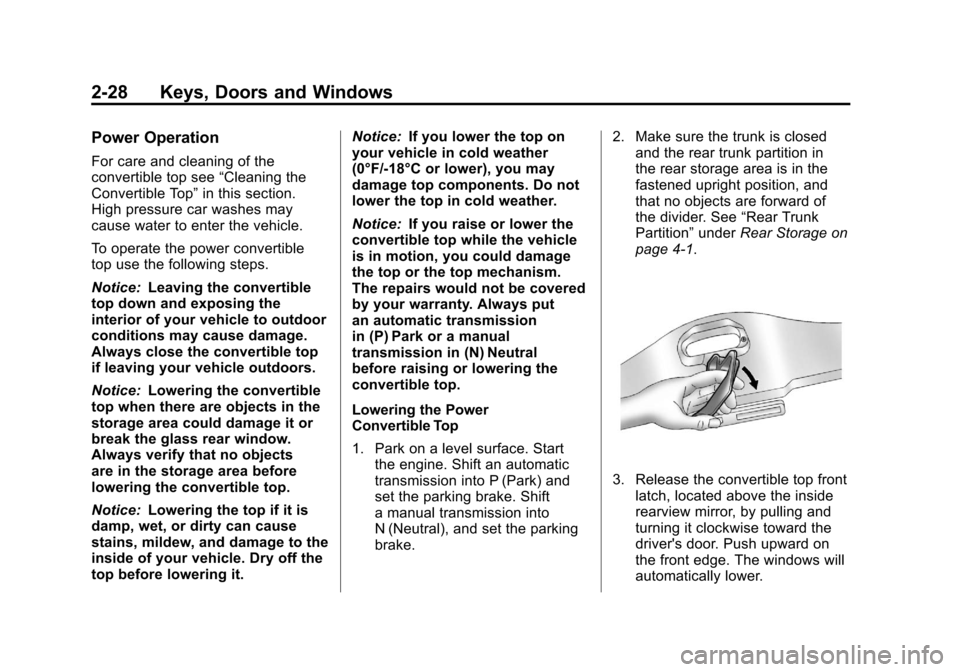
3. Release the convertible top front latch, located above the inside
rearview mirror, by pulling and
turning it clockwise toward the
driver's door. Push upward on
the front edge. The windows will
automatically lower.
Page 61 of 428

Black plate (29,1)Chevrolet Corvette Owner Manual - 2011
Keys, Doors and Windows 2-29
4. Return the convertible top frontlatch to the closed position.
5. Push and hold the bottom of thepower convertible top button,
located to the left of the steering
wheel, on the instrument panel. The convertible top will lower into
the rear of the vehicle. A chime will
sound when the convertible top has
lowered completely. If the radio is
on the sound may be muted for a
brief time due to a new audio
system equalization being loaded.
If the convertible top is operated
multiple times, the engine should
be running to prevent drain on the
vehicle's battery. Under certain
conditions, the Driver Information
Center (DIC) may display a
message regarding the power
convertible top. See
Convertible
Top Messages on page 5‑37 for
more information. Raising the Power Convertible Top
Notice:
If you raise or lower
the convertible top while the
vehicle is in motion, you could
damage the top or the top
mechanism. The repairs would
not be covered by your warranty.
Always put an automatic
transmission in (P) Park
or a manual transmission
in (N) Neutral before raising or
lowering the convertible top.
1. Park on a level surface. Start the engine. Shift an automatic
transmission into P (Park) and
set the parking brake. Shift
a manual transmission into
N (Neutral) and set the parking
brake.
2. Make sure the trunk lid is closed and the rear trunk partition in
the rear storage area is in the
fastened upright position, and
that no objects are forward of
the divider. See “Rear Trunk
Partition” underRear Storage on
page 4‑1.
Page 68 of 428

Black plate (4,1)Chevrolet Corvette Owner Manual - 2011
3-4 Seats and Restraints
Storing Memory Positions
To save into memory:
1. Adjust the driver seat, bothoutside mirrors, and the
telescopic steering column,
if equipped.
2. Press and hold “1”until
two beeps sound.
3. Repeat for a second driver position using “2.”
To recall a memory position:
.On vehicles with an automatic
transmission, press and release
“1” or“2.”
If the vehicle is in P (Park), a
single beep sounds and the
memory position is recalled
after a brief delay.
If the vehicle is not in P (Park),
three beeps sound and the
memory position is not recalled.
.On vehicles with a manual
transmission, when the vehicle
is on, the parking brake must be
set to recall a memory position.
Press and release “1”or“2.”
A single beep sounds and the
memory position is recalled after
a brief delay.
If the vehicle is on and the
parking brake is not set,
three beeps sound and the
memory position is not recalled.
Memory Remote Recall
(Automatic Transmission)
The memory feature can recall
the driver seat, outside mirrors,
and telescopic steering column,
if equipped, to stored positions
when entering the vehicle.
To activate memory remote recall,
enter the vehicle and start the
engine. The driver seat, outside
mirrors, and telescopic steering
column will move to the memory
position associated with the
transmitter used to unlock the
vehicle. The automatic recall feature can be
turned on or off using the vehicle
personalization menu. See
“Auto
Memory Recall” underVehicle
Personalization on page 5‑55 for
more information.
To stop recall movement, press one
of the power seat controls, power
mirror or memory buttons, or the
telescopic steering column switch.
If something has blocked the driver
seat while recalling a memory
position, the recall may stop.
Remove the obstruction; then
press and hold the appropriate
manual control for the memory item
that is not recalling for two seconds.
Try recalling the memory position
again by pressing the appropriate
memory button. If the memory
position is still not recalling,
see your dealer for service.
Page 69 of 428
Black plate (5,1)Chevrolet Corvette Owner Manual - 2011
Seats and Restraints 3-5
Easy Exit Driver Seat
The easy exit driver seat feature
can move the seat rearward and
the telescopic steering column,
if equipped, out of the way to allow
extra room to exit the vehicle.
B(Easy Exit Driver Seat):Press
to save and recall the easy exit seat
position.
To save into memory:
1. Recall the desired driving
position by pressing “1.”
2. Adjust the seat and the telescopic steering column
to the desired exit position.
3. Press and hold Buntil
two beeps sound.
4. Repeat for a second driver position using “2.” To recall an exit position, press
and release
B. The vehicle must
be in P (Park) for an automatic
transmission or the parking
brake must be set for a manual
transmission. A single beep sounds.
The seat and telescopic steering
column will move to the position
previously stored for the identified
driver.
If the easy exit seat feature is
programmed on in the vehicle
personalization menu, automatic
recall occurs when one of the
following conditions is met:
.The vehicle is turned off,
in Retained Accessory
Power (RAP) or accessory
mode, and the driver door is
opened.
.The vehicle is turned off, or in
RAP, and the unlock button on
the keyless access transmitter
is pressed. If something has blocked the driver
seat while recalling the exit position,
the recall may stop. Remove the
obstruction; then press and hold
the power seat control rearward for
two seconds. Try recalling the exit
position again. If the exit position is
still not recalling, see your dealer for
service.
See
“Auto Exit Recall” underVehicle
Personalization on page 5‑55 for
more information.
Page 117 of 428
Black plate (1,1)Chevrolet Corvette Owner Manual - 2011
Storage 4-1
Storage
Storage Compartments
Glove Box . . . . . . . . . . . . . . . . . . . . 4-1
Cupholders . . . . . . . . . . . . . . . . . . . 4-1
Rear Storage . . . . . . . . . . . . . . . . . 4-1
Center Console Storage . . . . . . 4-2
Additional Storage Features
Cargo Cover . . . . . . . . . . . . . . . . . . 4-2
Convenience Net . . . . . . . . . . . . . 4-3
Storage
Compartments
Glove Box
Open the glove box by lifting up on
the lever. Use the key to lock and
unlock the lighted glove box.
Cupholders
Two cupholders are located on the
center console next to the shift
lever. Slide the handle from the left
to the right side to access the lid.
Rear Storage
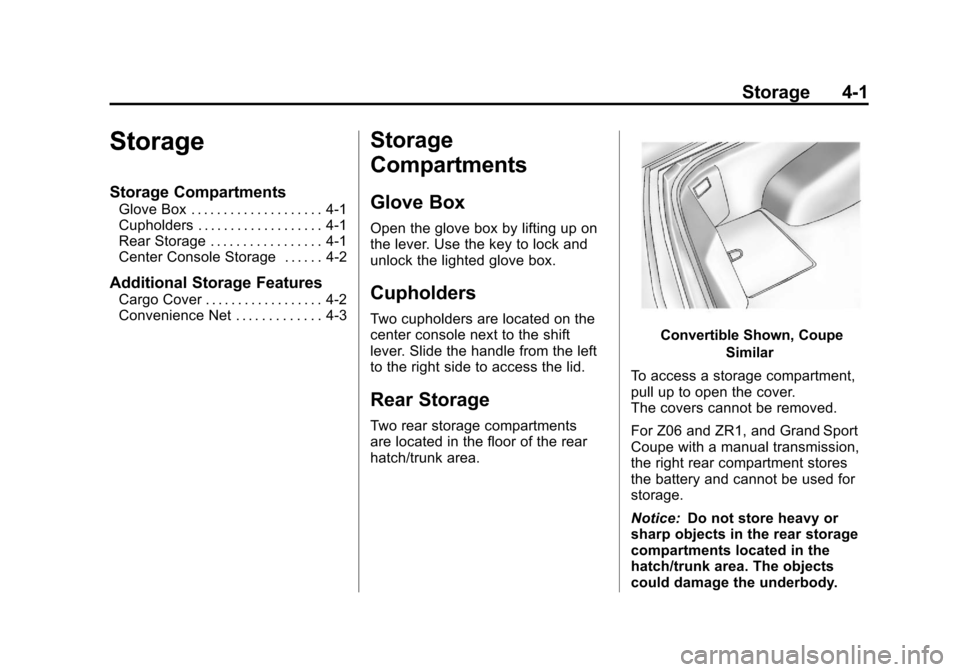
Two rear storage compartments
are located in the floor of the rear
hatch/trunk area.
Convertible Shown, CoupeSimilar
To access a storage compartment,
pull up to open the cover.
The covers cannot be removed.
For Z06 and ZR1, and Grand Sport
Coupe with a manual transmission,
the right rear compartment stores
the battery and cannot be used for
storage.
Notice: Do not store heavy or
sharp objects in the rear storage
compartments located in the
hatch/trunk area. The objects
could damage the underbody.
Page 121 of 428

Black plate (1,1)Chevrolet Corvette Owner Manual - 2011
Instruments and Controls 5-1
Instruments and
Controls
Controls
Steering Wheel Adjustment . . . 5-2
Steering Wheel Controls . . . . . . 5-3
Horn . . . . . . . . . . . . . . . . . . . . . . . . . . 5-4
Windshield Wiper/Washer . . . . . 5-4
Compass . . . . . . . . . . . . . . . . . . . . . 5-5
Clock . . . . . . . . . . . . . . . . . . . . . . . . . 5-6
Power Outlets . . . . . . . . . . . . . . . . . 5-6
Cigarette Lighter . . . . . . . . . . . . . . 5-7
Ashtrays . . . . . . . . . . . . . . . . . . . . . . 5-8
Warning Lights, Gauges, and
Indicators
Warning Lights, Gauges, andIndicators . . . . . . . . . . . . . . . . . . . . 5-8
Instrument Cluster . . . . . . . . . . . . 5-9
Speedometer . . . . . . . . . . . . . . . . 5-11
Odometer . . . . . . . . . . . . . . . . . . . . 5-11
Tachometer . . . . . . . . . . . . . . . . . . 5-11
Fuel Gauge . . . . . . . . . . . . . . . . . . 5-11
Boost Gauge (ZR1) . . . . . . . . . . 5-12
Engine Oil Pressure Gauge . . . . . . . . . . . . . . . . . . . . . . 5-13 Engine Coolant Temperature
Gauge . . . . . . . . . . . . . . . . . . . . . . 5-15
Voltmeter Gauge . . . . . . . . . . . . . 5-15
Safety Belt Reminders . . . . . . . 5-16
Airbag Readiness Light . . . . . . 5-16
Passenger Airbag Status Indicator . . . . . . . . . . . . . . . . . . . . 5-17
Malfunction Indicator Lamp . . . . . . . . . . . . . 5-18
Brake System Warning Light . . . . . . . . . . . . . . . . . . . . . . . 5-21
Antilock Brake System (ABS) Warning Light . . . . . . . . . . . . . . 5-22
One-to-Four Shift Light (Manual Transmission) . . . . . 5-22
Active Handling System Light . . . . . . . . . . . . . . . . . . . . . . . 5-23
Traction Control System (TCS) Warning Light . . . . . . . 5-23
Tire Pressure Light . . . . . . . . . . 5-24
Security Light . . . . . . . . . . . . . . . . 5-24
High-Beam on Light . . . . . . . . . 5-25
Front Fog Lamp Light . . . . . . . . 5-25
Lamps on Reminder . . . . . . . . . 5-25
Information Displays
Driver Information Center (DIC) . . . . . . . . . . . . . . . 5-25
Head-Up Display (HUD) . . . . . 5-31
Vehicle Messages
Vehicle Messages . . . . . . . . . . . 5-35
Battery Voltage and Charging Messages . . . . . . . . . . . . . . . . . . 5-35
Brake System Messages . . . . 5-36
Convertible Top Messages . . . 5-37
Cruise Control Messages . . . . 5-38
Door Ajar Messages . . . . . . . . . 5-39
Engine Cooling System Messages . . . . . . . . . . . . . . . . . . 5-39
Engine Oil Messages . . . . . . . . 5-40
Engine Power Messages . . . . 5-41
Fuel System Messages . . . . . . 5-41
Key and Lock Messages . . . . . 5-42
Lamp Messages . . . . . . . . . . . . . 5-44
Ride Control System Messages . . . . . . . . . . . . . . . . . . 5-44
Safety Belt Messages . . . . . . . 5-49
Anti-Theft Alarm System Messages . . . . . . . . . . . . . . . . . . 5-50
Service Vehicle Messages . . . 5-50
Starting the Vehicle Messages . . . . . . . . . . . . . . . . . . 5-50
Tire Messages . . . . . . . . . . . . . . . 5-51
Transmission Messages . . . . . 5-53
Vehicle Reminder Messages . . . . . . . . . . . . . . . . . . 5-54
Washer Fluid Messages . . . . . 5-54
Page 139 of 428

Black plate (19,1)Chevrolet Corvette Owner Manual - 2011
Instruments and Controls 5-19
Notice:If the vehicle is
continually driven with this
light on, after a while, the
emission controls might not
work as well, the vehicle fuel
economy might not be as good,
and the engine might not run
as smoothly. This could lead to
costly repairs that might not be
covered by the vehicle warranty.
Notice: Modifications made to
the engine, transmission,
exhaust, intake, or fuel system
of the vehicle or the replacement
of the original tires with other
than those of the same Tire
Performance Criteria (TPC) can
affect the vehicle's emission
controls and can cause this light
to come on. Modifications to
these systems could lead to
costly repairs not covered by
the vehicle warranty. This
could also result in a failure
to pass a required Emission
Inspection/Maintenance test.
See Accessories and
Modifications on page 10‑4. This light comes on during a
malfunction in one of two ways:
Light Flashing:
A misfire condition
has been detected. A misfire
increases vehicle emissions and
could damage the emission control
system on the vehicle. Diagnosis
and service might be required.
The following can prevent more
serious damage to the vehicle:
.Reduce vehicle speed.
.Avoid hard accelerations.
.Avoid steep uphill grades.
If the light continues to flash, when
it is safe to do so, stop the vehicle.
Find a safe place to park the
vehicle. Turn off the vehicle, wait at
least 10 seconds, and restart the
engine. If the light is still flashing,
follow the previous steps and see
your dealer for service as soon as
possible. Light On Steady:
An emission
control system malfunction has
been detected on the vehicle.
Diagnosis and service might be
required.
An emission system malfunction
might be corrected by doing the
following:
.Make sure the fuel cap is fully
installed. See Filling the Tank on
page 9‑51. The diagnostic
system can determine if the
fuel cap has been left off or
improperly installed. A loose or
missing fuel cap allows fuel to
evaporate into the atmosphere.
A few driving trips with the cap
properly installed should turn
the light off.
.If the vehicle has been driven
through a deep puddle of water,
the vehicle's electrical system
might be wet. The condition
is usually corrected when the
electrical system dries out.
A few driving trips should turn
the light off.
Page 142 of 428

Black plate (22,1)Chevrolet Corvette Owner Manual - 2011
5-22 Instruments and Controls
Antilock Brake System
(ABS) Warning Light
For vehicles with the Antilock Brake
System (ABS), this light comes on
briefly when the engine is started.
If it does not, have the vehicle
serviced by your dealer. If the
system is working normally the
indicator light then goes off.
If the ABS light stays on, turn the
ignition off. If the light comes on
while driving, stop as soon as it is
safely possible and turn the ignition
off. Then start the engine again to
reset the system. If the ABS light
stays on, or comes on again while
driving, the vehicle needs service.If the regular brake system warning
light is not on, the vehicle still has
brakes, but not antilock brakes.
If the regular brake system warning
light is also on, the vehicle does not
have antilock brakes and there is a
problem with the regular brakes.
See
Brake System Warning Light on
page 5‑21.One-to-Four Shift Light
(Manual Transmission)
When this light comes on, the
vehicle can only be shifted from
1 (First) to 4 (Fourth) instead of
1 (First) to 2 (Second). The shift must be completed into
4 (Fourth) to turn off this feature.
This helps the vehicle get the best
possible fuel economy.
After shifting to 4 (Fourth), the
vehicle can be downshifted to a
lower gear.
Notice:
Forcing the shift lever
into any gear except 4 (Fourth)
when the 1 TO 4 SHIFT light
comes on may damage the
transmission. Shift only from
1 (First) to 4 (Fourth) when the
light comes on.
This light comes on when:
.The engine coolant temperature
is higher than 76°C (169°F),
.The vehicle is going 24 to
31 km/h (15 to 19 mph) and
.The vehicle 21 percent throttle
or less.