2011 CHEVROLET CORVETTE maintenance
[x] Cancel search: maintenancePage 139 of 428

Black plate (19,1)Chevrolet Corvette Owner Manual - 2011
Instruments and Controls 5-19
Notice:If the vehicle is
continually driven with this
light on, after a while, the
emission controls might not
work as well, the vehicle fuel
economy might not be as good,
and the engine might not run
as smoothly. This could lead to
costly repairs that might not be
covered by the vehicle warranty.
Notice: Modifications made to
the engine, transmission,
exhaust, intake, or fuel system
of the vehicle or the replacement
of the original tires with other
than those of the same Tire
Performance Criteria (TPC) can
affect the vehicle's emission
controls and can cause this light
to come on. Modifications to
these systems could lead to
costly repairs not covered by
the vehicle warranty. This
could also result in a failure
to pass a required Emission
Inspection/Maintenance test.
See Accessories and
Modifications on page 10‑4. This light comes on during a
malfunction in one of two ways:
Light Flashing:
A misfire condition
has been detected. A misfire
increases vehicle emissions and
could damage the emission control
system on the vehicle. Diagnosis
and service might be required.
The following can prevent more
serious damage to the vehicle:
.Reduce vehicle speed.
.Avoid hard accelerations.
.Avoid steep uphill grades.
If the light continues to flash, when
it is safe to do so, stop the vehicle.
Find a safe place to park the
vehicle. Turn off the vehicle, wait at
least 10 seconds, and restart the
engine. If the light is still flashing,
follow the previous steps and see
your dealer for service as soon as
possible. Light On Steady:
An emission
control system malfunction has
been detected on the vehicle.
Diagnosis and service might be
required.
An emission system malfunction
might be corrected by doing the
following:
.Make sure the fuel cap is fully
installed. See Filling the Tank on
page 9‑51. The diagnostic
system can determine if the
fuel cap has been left off or
improperly installed. A loose or
missing fuel cap allows fuel to
evaporate into the atmosphere.
A few driving trips with the cap
properly installed should turn
the light off.
.If the vehicle has been driven
through a deep puddle of water,
the vehicle's electrical system
might be wet. The condition
is usually corrected when the
electrical system dries out.
A few driving trips should turn
the light off.
Page 140 of 428

Black plate (20,1)Chevrolet Corvette Owner Manual - 2011
5-20 Instruments and Controls
.Make sure to fuel the vehicle
with quality fuel. Poor fuel quality
causes the engine not to run as
efficiently as designed and may
cause: stalling after start-up,
stalling when the vehicle is
changed into gear, misfiring,
hesitation on acceleration,
or stumbling on acceleration.
These conditions might go away
once the engine is warmed up.
If one or more of these
conditions occurs, change
the fuel brand used. It will
require at least one full tank
of the proper fuel to turn the
light off.
SeeRecommended Fuel on
page 9‑48.
If none of the above have made
the light turn off, your dealer can
check the vehicle. The dealer
has the proper test equipment
and diagnostic tools to fix any
mechanical or electrical problems
that might have developed.Emissions Inspection and
Maintenance Programs
Some state/provincial and
local governments may have
programs to inspect the on-vehicle
emission control equipment For
the inspection, the emission
system test equipment is connected
to the vehicle’s Data Link
Connector (DLC).
The DLC is under the instrument
panel to the left of the steering
wheel. See your dealer if assistance
is needed. The vehicle may not pass
inspection if:
.the check engine light is on with
the engine running, or if the light
does not come on when the
ignition is in ON/RUN while
the engine is off.
.the critical emission control
systems have not been
completely diagnosed by
the system. This can happen
if the battery has recently
been replaced or if the battery
has run down. The diagnostic
system evaluates critical
emission control systems during
normal driving. This can take
several days of routine driving.
If this has been done and the
vehicle still does not pass the
inspection, your dealer can
prepare the vehicle for
inspection.
Page 150 of 428

Black plate (30,1)Chevrolet Corvette Owner Manual - 2011
5-30 Instruments and Controls
You can start or stop the elapsed
time by pressing the RESET button.
To reset the elapsed time to zero,
press the RESET button for
three seconds while the timer
is displayed.
Pressing and holding the RESET
button for at least 10 seconds will
reset the timer display to the time
since last ignition cycle.
Average Speed:Press the TRIP
button until the average speed is
displayed, such as:
.AVERAGE SPEED 100 km/h or
.AVERAGE SPEED 62 MPH
Press and hold the RESET button to
reset to 0.0 km/h (mph). Engine Oil Life:
Press the TRIP
button until the engine oil life is
displayed, such as OIL LIFE
REMAINING 89%.
This is an estimate of the engine
oil's remaining useful life. It will
show 100% when the system is
reset after an oil change. It will
alert you to change the oil on a
schedule consistent with your
driving conditions.
When the remaining oil life is low,
the system will alert you with the
message CHANGE ENGINE OIL.
Remember, you must reset the
engine oil life system yourself
after each oil change. It will not
reset itself. To reset the system,
see Engine Oil Life System on
page 10‑22. Be careful not to
reset the engine oil life system accidentally at any time other than
when the oil has just been changed.
It cannot be reset accurately until
the next oil change.
See
Scheduled Maintenance on
page 11‑2 andEngine Oil on
page 10‑15 for more information.
OPTION Button
The OPTION button allows you
to access the PERSONAL
OPTIONS menu and customize
the personalization settings on your
vehicle. See Vehicle Personalization
on page 5‑55 for more information.
RESET Button
The RESET button, used along
with other buttons, will reset
system functions and turn off or
acknowledge messages on the DIC.
Page 160 of 428

Black plate (40,1)Chevrolet Corvette Owner Manual - 2011
5-40 Instruments and Controls
ENGINE OVERHEATED–
STOP ENGINE
This message displays and a sound
will be heard when the engine
has overheated. Stop and turn the
engine off immediately to avoid
severe engine damage. See Engine
Overheating on page 10‑34.
ENGINE PROTECTION
REDUCE ENGINE RPM
This message displays if the
engine oil temperature exceeds
160°C (320°F). Check the engine
coolant temperature and engine oil
level. If the engine is too hot, see
Engine Overheating on page 10‑34.
The vehicle may need service, so
see your dealer.
You can monitor the oil temperature
with the gauges button on the DIC.
See Driver Information Center (DIC)
on page 5‑25.
Multiple chimes sound when
this message is displayed. This
message remains displayed and
active until the issue is resolved.
HOT ENGINE AIR
CONDITIONING OFF
This message displays when
the engine coolant becomes
hotter than the normal operating
temperature. To avoid added strain
on a hot engine, the air conditioning
compressor is automatically turned
off. When the coolant temperature
returns to normal, the A/C operation
automatically resumes. You can
continue to drive the vehicle. If this
message continues to appear, have
the system repaired by your dealer
as soon as possible to avoid
compressor damage.
Engine Oil Messages
CHANGE ENGINE OIL
This message displays when the
life of the engine oil has expired.
See Scheduled Maintenance on
page 11‑2. After an oil change, the engine oil life system must be reset.
See
“Engine Oil Life” underDriver
Information Center (DIC) on
page 5‑25. Also, see Engine Oil on
page 10‑15 andEngine Oil Life
System on page 10‑22 for more
information.
CHECK OIL LEVEL
On some vehicles, this message
displays and two chimes sound if
the oil level in the vehicle is low.
Once the vehicle senses a change
in the engine oil level, the light
remains off.
If this message appears after
starting the engine, the engine oil
level may be too low. You may need
to add oil. See Engine Overheating
on page 10‑34.
To acknowledge the message, press
the RESET button. The message
reappears every 10 minutes until
this condition changes.
Page 209 of 428
Black plate (11,1)Chevrolet Corvette Owner Manual - 2011
Infotainment System 7-11
XM™Satellite Radio Service
XM Satellite Radio Service gives
digital radio reception from coast
to coast in the 48 contiguous
United States, and in Canada.
Just as with FM, tall buildings or
hills can interfere with satellite radio
signals, causing the sound to fade
in and out. In addition, traveling
or standing under heavy foliage,
bridges, garages, or tunnels may
cause loss of the XM signal for a
period of time.
Cellular Phone Usage
Cellular phone usage may cause
interference with the vehicle's radio.
This interference may occur when
making or receiving phone calls,
charging the phone's battery,
or simply having the phone on.
This interference causes an
increased level of static while
listening to the radio. If static is
received while listening to the
radio, unplug the cellular phone
and turn it off.
Diversity Antenna System
The AM-FM antenna is a hidden
self tuning system. It optimizes the
AM and FM signals relative to the
vehicle's position and radio station
source. No maintenance or
adjustments are needed.
Satellite Radio Antenna
For vehicles with XM Satellite Radio
Service, the antenna is located on
the roof or on the trunk lid of the
vehicle. Keep the antenna clear
of obstructions for clear radio
reception.
Audio Players
CD Player
Care of the CD Player
Do not add labels to a CD, it could
get caught in the CD player. Use a
marking pen to write on the top of
the CD if a description is needed.
Do not use CD lens cleaners, they
could damage the CD player.
Notice: If a label is added to a
CD, or more than one CD is
inserted into the slot at a time,
or an attempt is made to play
scratched or damaged CDs, the
CD player could be damaged.
While using the CD player, use
only CDs in good condition
without any label, load one CD at
a time, and keep the CD player
and the loading slot free of
foreign materials, liquids, and
debris.
If an error displays, see “CD
Messages” later in this section.
Page 223 of 428
Black plate (1,1)Chevrolet Corvette Owner Manual - 2011
Climate Controls 8-1
Climate Controls
Climate Control Systems
Dual Automatic Climate ControlSystem . . . . . . . . . . . . . . . . . . . . . . 8-1
Air Vents
Air Vents . . . . . . . . . . . . . . . . . . . . . . 8-6
Maintenance
Passenger Compartment AirFilter . . . . . . . . . . . . . . . . . . . . . . . . . 8-7
Climate Control Systems
Dual Automatic Climate Control System
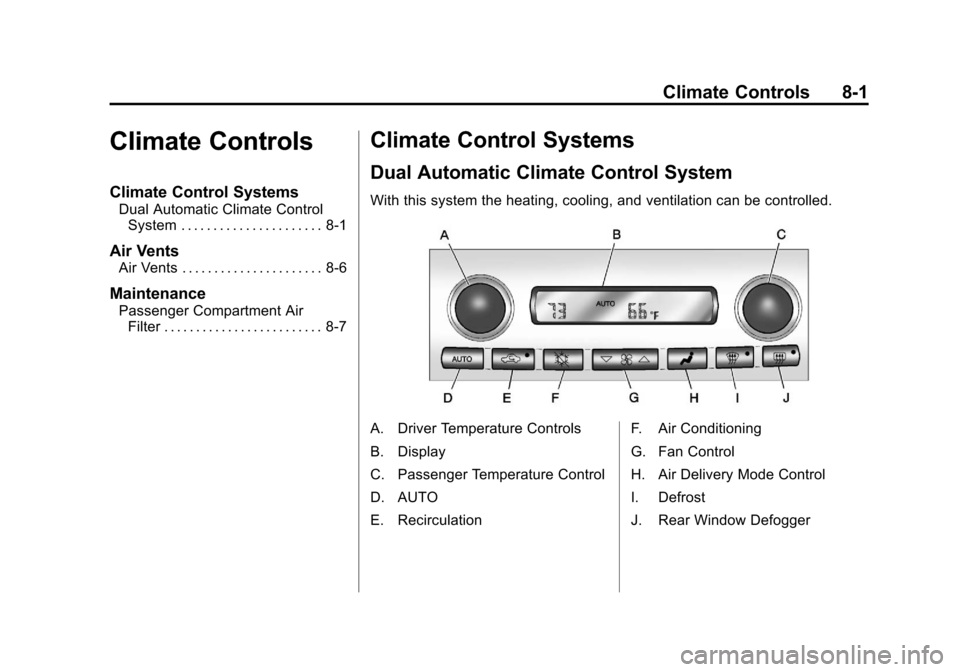
With this system the heating, cooling, and ventilation can be controlled.
A. Driver Temperature Controls
B. Display
C. Passenger Temperature Control
D. AUTO
E. Recirculation F. Air Conditioning
G. Fan Control
H. Air Delivery Mode Control
I. Defrost
J. Rear Window Defogger
Page 229 of 428
Black plate (7,1)Chevrolet Corvette Owner Manual - 2011
Climate Controls 8-7
Maintenance
Passenger Compartment
Air Filter
The passenger compartment air
filter removes certain particles from
the air including pollen and dust
particles. Reductions in airflow,
which may occur more often in
dusty areas, indicate that the
filter may need to be replaced.
SeeMaintenance Replacement
Parts on page 11‑8.
Notice: Driving without a
passenger compartment air filter
in place can cause water and
small particles, like paper and
leaves, to be pulled into your
climate control system which may
cause damage to it. Make sure
you always replace the old filter
with a new one. The passenger compartment air
filter is located on the passenger
side of the engine compartment
near the battery. See
Engine
Compartment Overview on
page 10‑10.
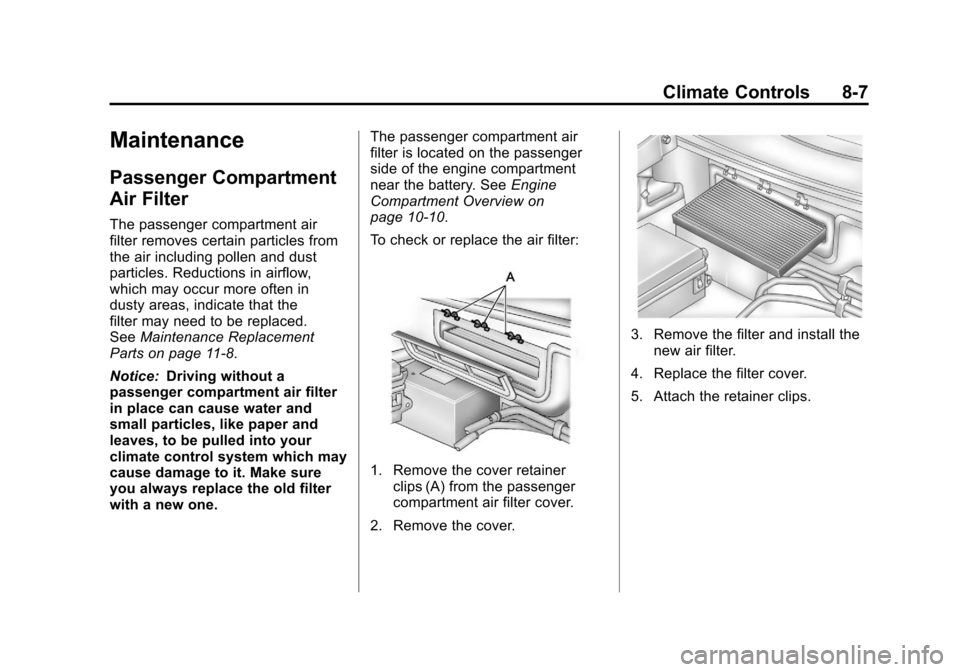
To check or replace the air filter:
1. Remove the cover retainer clips (A) from the passenger
compartment air filter cover.
2. Remove the cover.
3. Remove the filter and install the new air filter.
4. Replace the filter cover.
5. Attach the retainer clips.
Page 237 of 428
Black plate (7,1)Chevrolet Corvette Owner Manual - 2011
Driving and Operating 9-7
Racing or Other
Competitive Driving
Racing or competitive driving
may affect the vehicle warranty.
See the warranty book before
using the vehicle for racing or
other competitive driving.
Notice:If you use the vehicle
for racing or other competitive
driving, the engine may use more
oil than it would with normal use.
Low oil levels can damage the
engine. For information on how
to add oil, see Engine Oil on
page 10‑15.
Z06, ZR1, and Grand Sport Only:
Be sure to check the oil level
often during racing or other
competitive driving and keep the
level at or near the upper mark
that shows the proper operating
range on the engine oil dipstick. Except Z06, ZR1, and Grand
Sport: Be sure to check the oil
level often during racing or other
competitive driving and keep the
level at or near 1 L (1 quart) above
the upper mark that shows the
proper operating range on the
engine oil dipstick. After the
competitive driving, remove
excess oil so that the level on
the dipstick is not above the
upper mark that shows the
proper operating range.
Z06, ZR1, and Grand Sport
Only: For racing or competitive
driving, it is recommended that
the brake fluid be replaced with a
high performance brake fluid that
has a dry boiling point greater than
279°C (534°F). After conversion to
the high performance brake fluid,
follow the brake fluid service
recommendations outlined by the
fluid manufacturer. Do not use
silicone or DOT‐5 brake fluids.Z06, ZR1, and Grand Sport Only:
For racing or competitive driving, it
is recommended that the loading of
the vehicle be limited to the driver
only, with no other cargo, and that
tires be inflated to 180 kPa (26 psi)
for a maximum speed of 230 km/h
(143 mph).
If the vehicle is a Z06, ZR1,
or Grand Sport model, it has
greaseable outer ends on both
of the rear toe‐links. Under
normal use, lubrication should
be performed as described in
the maintenance schedule.
See
Scheduled Maintenance on
page 11‑2 andRecommended
Fluids and Lubricants on page 11‑6.
If using the vehicle for racing,
lubrication should be performed
at the end of each racing day.
See your dealer for lubrication
and make sure any needed
repairs are made at once. Proper
procedures for performing these
services can be found in the service
manual. See Service Publications
Ordering Information on page 13‑15.