2011 CHEVROLET COLORADO clock
[x] Cancel search: clockPage 20 of 392

Black plate (14,1)Chevrolet Colorado Owner Manual - 2011
1-14 In Brief
qSEEKr:Press to go to the
previous or to the next station and
stay there.
For more information about these
and other radio features, see
Introduction on page 7‑1.
Setting Preset Stations
Radio stations are stored as
presets.
For vehicles with an XM radio, a
maximum of 30 stations can be
stored as presets using the six
numbered pushbuttons.
If the radio does not have XM, up to
18 stations (six FM1, six FM2, and
six AM), can be programmed on the
six numbered buttons.
See “Setting Preset Stations” under
Operation on page 7‑3.
Setting the Clock
To set the time and date for the
radio with CD (MP3/WMA):
Press and hold the HR button until
the correct hour displays. Press and
hold the MIN button until the correct
minute displays. The time can be
set with the ignition on or off.
To synchronize the time with an
FM station broadcasting Radio Data
System (RDS) information, press
and hold the HR and MIN buttons at
the same time until RDS TIME
displays. To accept this time, press
and hold the HR and MIN buttons,
at the same time, for another
2 seconds. If the time is not
available from the station, NO
UPDAT (update) displays.
RDS time is broadcast once a
minute. After tuning to an RDS
broadcast station, it could take a
few minutes for the time to update.
For detailed instructions on setting
the clock for your specific audio
system, see Clock on page 5‑4.
Satellite Radio
XM is a satellite radio service that is
based in the 48 contiguous United
States and 10 Canadian provinces.
XM satellite radio has a wide variety
of programming and
commercial-free music, coast to
coast, and in digital-quality sound.
A fee is required to receive the
XM service.
For more information, refer to:
.www.xmradio.com or call
1-800-929-2100 (U.S.)
.www.xmradio.ca or call
1-877-438-9677 (Canada)
See “XM Satellite Radio Service”
under Satellite Radio on page 7‑11.
Page 33 of 392

Black plate (7,1)Chevrolet Colorado Owner Manual - 2011
Keys, Doors and Windows 2-7
Doors
Rear Doors
(Extended Cab)
To open a rear door, open the front
door. Then, use the handle located
on the front edge of the rear door
panel to open it. The rear doors
must be closed before closing the
front door.
Tailgate
{WARNING
It is extremely dangerous to ride
on the tailgate, even when the
vehicle is operated at low speeds.
People riding on the tailgate can
easily lose their balance and fall
in response to vehicle
maneuvers. Falling from a moving
vehicle may result in serious
injuries or death. Do not allow
people to ride on the tailgate. Be
sure everyone in your vehicle is in
a seat and using a safety belt
properly.
Open the tailgate by pulling up on
the outside handle while pulling the
tailgate down.
When the tailgate is shut, be sure it
is latched securely.
On vehicles with a locking tailgate,
use the ignition key. Turn the key
counterclockwise to lock the
tailgate. Turn the key clockwise to
unlock the tailgate.
Page 113 of 392
Black plate (1,1)Chevrolet Colorado Owner Manual - 2011
Instruments and Controls 5-1
Instruments and
Controls
Controls
Steering Wheel Adjustment . . . 5-2
Horn . . . . . . . . . . . . . . . . . . . . . . . . . . 5-2
Windshield Wiper/Washer . . . . . 5-2
Compass . . . . . . . . . . . . . . . . . . . . . 5-3
Clock . . . . . . . . . . . . . . . . . . . . . . . . . 5-4
Power Outlets . . . . . . . . . . . . . . . . . 5-5
Cigarette Lighter . . . . . . . . . . . . . . 5-5
Ashtrays . . . . . . . . . . . . . . . . . . . . . . 5-6
Warning Lights, Gauges, and
Indicators
Warning Lights, Gauges, andIndicators . . . . . . . . . . . . . . . . . . . . 5-6
Chime Level Adjustment . . . . . . 5-6
Instrument Cluster . . . . . . . . . . . . 5-7
Speedometer . . . . . . . . . . . . . . . . . 5-8
Odometer . . . . . . . . . . . . . . . . . . . . . 5-8
Trip Odometer . . . . . . . . . . . . . . . . . 5-8 Tachometer . . . . . . . . . . . . . . . . . . . 5-8
Fuel Gauge . . . . . . . . . . . . . . . . . . . 5-8
Engine Coolant Temperature
Gauge . . . . . . . . . . . . . . . . . . . . . . . 5-9
Safety Belt Reminders . . . . . . . . 5-9
Airbag Readiness Light . . . . . . 5-10
Passenger Airbag Status
Indicator . . . . . . . . . . . . . . . . . . . . 5-11
Charging System Light . . . . . . 5-12
Malfunction Indicator Lamp . . . . . . . . . . . . . 5-12
Brake System Warning Light . . . . . . . . . . . . . . . . . . . . . . . 5-15
Antilock Brake System (ABS) Warning Light . . . . . . . . . . . . . . 5-16
Up-Shift Light . . . . . . . . . . . . . . . . 5-16
Traction Control System (TCS)/StabiliTrak®Light . . . . 5-17
Tire Pressure Light . . . . . . . . . . 5-17
Engine Oil Pressure Light . . . . 5-18
Security Light . . . . . . . . . . . . . . . . 5-18
High-Beam On Light . . . . . . . . . 5-19
Cruise Control Light . . . . . . . . . 5-19
Information Displays
Driver Information Center (DIC) . . . . . . . . . . . . . . . 5-19
Vehicle Messages
Vehicle Messages . . . . . . . . . . . 5-22
Battery Voltage and ChargingMessages . . . . . . . . . . . . . . . . . . 5-23
Brake System Messages . . . . 5-23
Door Ajar Messages . . . . . . . . . 5-24
Engine Cooling System Messages . . . . . . . . . . . . . . . . . . 5-24
Engine Oil Messages . . . . . . . . 5-24
Engine Power Messages . . . . 5-24
Fuel System Messages . . . . . . 5-25
Lamp Messages . . . . . . . . . . . . . 5-25
Ride Control System Messages . . . . . . . . . . . . . . . . . . 5-25
Service Vehicle Messages . . . 5-26
Tire Messages . . . . . . . . . . . . . . . 5-26
Transmission Messages . . . . . 5-26
Page 116 of 392
Black plate (4,1)Chevrolet Colorado Owner Manual - 2011
5-4 Instruments and Controls
The compass can be calibrated by
driving the vehicle in circles at
8 km/h (5 mph) or less until the
display reads a direction.
Compass Variance
The mirror is set to zone eight.
If you do not live in zone eight or
drive out of the area, the compass
variance needs to be changed to
the appropriate zone.
To adjust for compass variance:
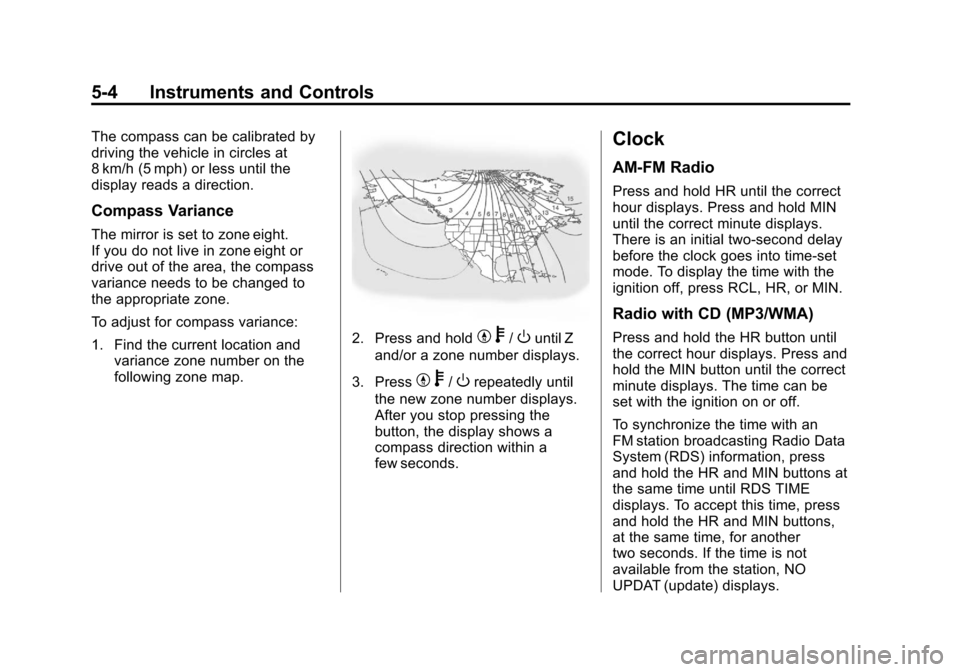
1. Find the current location andvariance zone number on the
following zone map.
2. Press and holdYb/Ountil Z
and/or a zone number displays.
3. Press
Y b/Orepeatedly until
the new zone number displays.
After you stop pressing the
button, the display shows a
compass direction within a
few seconds.
Clock
AM-FM Radio
Press and hold HR until the correct
hour displays. Press and hold MIN
until the correct minute displays.
There is an initial two-second delay
before the clock goes into time-set
mode. To display the time with the
ignition off, press RCL, HR, or MIN.
Radio with CD (MP3/WMA)
Press and hold the HR button until
the correct hour displays. Press and
hold the MIN button until the correct
minute displays. The time can be
set with the ignition on or off.
To synchronize the time with an
FM station broadcasting Radio Data
System (RDS) information, press
and hold the HR and MIN buttons at
the same time until RDS TIME
displays. To accept this time, press
and hold the HR and MIN buttons,
at the same time, for another
two seconds. If the time is not
available from the station, NO
UPDAT (update) displays.
Page 171 of 392

Black plate (1,1)Chevrolet Colorado Owner Manual - 2011
Climate Controls 8-1
Climate Controls
Climate Control Systems
Climate Control Systems . . . . . . 8-1
Air Vents
Air Vents . . . . . . . . . . . . . . . . . . . . . . 8-3
Climate Control Systems
The heating, cooling, and ventilation for the vehicle can be controlled with
this system.
A. Temperature Control
B. Fan Control
C. Air Delivery Mode Control
D. Air Conditioning
E. RecirculationTemperature Control:
Turn the
knob clockwise or counterclockwise
to increase or decrease the
temperature of the air inside the
vehicle.
9(Fan Control): Turn the knob
clockwise or counterclockwise to
increase or decrease the fan speed.
Page 172 of 392

Black plate (2,1)Chevrolet Colorado Owner Manual - 2011
8-2 Climate Controls
If the knob is set on“0”(zero), some
outside air will still enter the vehicle
and will be directed according to the
position of the mode knob.
Air Delivery Mode Control: Turn
the knob clockwise or
counterclockwise to change the
current airflow mode.
Select from the following modes:
H(Vent): Air is directed to the
instrument panel outlets.
\(Bi-Level): Air is divided
between the instrument panel
outlets and floor and side window
outlets. Cooler air is directed to the
upper outlets and warmer air to the
floor outlets.
[(Floor): Air is directed to the
floor outlets. Recirculation cannot
be selected while in floor mode
because this could cause the
interior window to fog.
/(Floor/Defog): This mode
clears the windows of fog or
moisture. Air is directed to the floor,
windshield, and side window outlets.
When this mode is selected, the
system runs the air conditioning
compressor unless the outside
temperature is near freezing or
below. Recirculation is not available
in this mode.
0(Defrost): This mode clears
the windshield of fog or frost more
quickly. Air is directed to the
windshield and side window outlets.
When this mode is selected, the
system runs the air conditioning
compressor unless the outside
temperature is near, or below
freezing. Recirculation is not
available in this mode.
Do not drive the vehicle until all the
windows are clear.
#(Air Conditioning): Press to
turn the air conditioning system on
or off. An indicator light on the
button comes on to show that the air
conditioning is on.
The fan control must be on to use
the air conditioning.
There might be a slight change in
engine performance when the air
conditioning compressor shuts off
and turns on again. This is normal.
The system is designed to make
adjustments to help with fuel
economy while still maintaining the
selected temperature.
The air conditioning system
removes moisture from the air, so a
small amount of water might drip
under the vehicle while idling or
after turning off the engine. This is
normal.
Page 179 of 392

Black plate (5,1)Chevrolet Colorado Owner Manual - 2011
Driving and Operating 9-5
page 9‑3. It is better to remove as
much speed as possible from a
collision. Then steer around the
problem, to the left or right
depending on the space available.
An emergency like this requires
close attention and a quick decision.
If holding the steering wheel at the
recommended 9 and 3 o'clock
positions, it can be turned a full
180 degrees very quickly without
removing either hand. But you have
to act fast, steer quickly, and just as
quickly straighten the wheel once
you have avoided the object.The fact that such emergency
situations are always possible is a
good reason to practice defensive
driving at all times and wear safety
belts properly.
Off-Road Recovery
The vehicle's right wheels can drop
off the edge of a road onto the
shoulder while driving.
If the level of the shoulder is only
slightly below the pavement,
recovery should be fairly easy. Ease
off the accelerator and then, if there
is nothing in the way, steer so that
the vehicle straddles the edge of the
pavement. Turn the steering wheel
8 to 13 cm (3 to 5 inches), about
one-eighth turn, until the right front
tire contacts the pavement edge.
Then turn the steering wheel to go
straight down the roadway.
Loss of Control
Let us review what driving experts
say about what happens when the
three control systems
—brakes,
steering, and acceleration —do not
have enough friction where the tires
meet the road to do what the driver
has asked.
In any emergency, do not give up.
Keep trying to steer and constantly
seek an escape route or area of
less danger.
Skidding
In a skid, a driver can lose control of
the vehicle. Defensive drivers avoid
most skids by taking reasonable
care suited to existing conditions,
Page 186 of 392

Black plate (12,1)Chevrolet Colorado Owner Manual - 2011
9-12 Driving and Operating
.While backing down the hill, put
your left hand on the steering
wheel at the 12 o'clock position
so you can tell if the wheels are
straight and can maneuver as
you back down. It is best to back
down the hill with the wheels
straight rather than in the left or
right direction. Turning the wheel
too far to the left or right will
increase the possibility of a
rollover.
Things not to do if the vehicle stalls,
or is about to stall, when going up
a hill:
.Never attempt to prevent a stall
by shifting into N (Neutral),
or pressing the clutch pedal if
the vehicle has a manual
transmission, to rev-up the
engine and regain forward
momentum. This will not work.
The vehicle can roll backward
very quickly and could go out of
control.
.Never try to turn around if about
to stall when going up a hill.
If the hill is steep enough to stall the vehicle, it is steep enough to
cause it to roll over. If you
cannot make it up the hill, back
straight down the hill.
If, after stalling, you try to back
down the hill and decide you just
cannot do it, set the parking brake,
shift to P (Park) or 1 (First) with a
manual transmission, and turn off
the engine. Leave the vehicle and
go get some help. Exit on the uphill
side and stay clear of the path the
vehicle would take if it rolled
downhill. Do not shift the transfer
case to Neutral when you leave the
vehicle. Leave it in some gear.
{WARNING
Shifting the transfer case to
Neutral can cause your vehicle to
roll even if the transmission is in
P (Park). This is because the
Neutral position on the transfer
case overrides the transmission.
You or someone else could be (Continued)
WARNING (Continued)
injured. If you are going to leave
your vehicle, set the parking
brake and shift the transmission
to P (Park). But do not shift the
transfer case to Neutral.
Driving Downhill
When off-roading takes you
downhill, consider:
.How steep is the downhill? Will I
be able to maintain vehicle
control?
.What is the surface like?
Smooth? Rough? Slippery?
Hard-packed dirt? Gravel?
.Are there hidden surface
obstacles? Ruts? Logs?
Boulders?
.What is at the bottom of the hill?
Is there a hidden creek bank or
even a river bottom with large
rocks?