2011 CHEVROLET CAMARO steering
[x] Cancel search: steeringPage 161 of 414

Black plate (5,1)Chevrolet Camaro Owner Manual - 2011
Lighting 6-5
Hazard Warning Flashers
|
Hazard Warning Flasher:
Press this button located on the
instrument panel near the audio
system, to make the front and rear
turn signal lamps flash on and off.
This warns others that you are
having trouble. Press again to
turn the flashers off.
Turn and Lane-Change
Signals
An arrow on the instrument panel
cluster flashes in the direction of the
turn or lane change.
Move the lever all the way up or
down to signal a turn. Raise or lower the lever until the
arrow starts to flash to signal a lane
change. Hold it there until the lane
change is completed. If the lever
is briefly pressed and released,
the turn signal flashes three times.
The lever returns to its starting
position whenever it is released.
If after signaling a turn or lane
change the arrow flashes rapidly or
does not come on, a signal bulb
might be burned out.
Have the bulbs replaced. If the bulb
is not burned out, check the fuse.
See
Electrical System Overload on
page 10‑43.
Front Fog Lamps
For vehicles with front fog lamps,
the button is located on the exterior
lamp control, on the outboard side
of the steering wheel.
The ignition must be turned to
ON/RUN to turn on the fog lamps.
#: Press to turn the fog lamps
on or off. An indicator light on the
instrument panel cluster comes on
when the fog lamps are on.
The fog lamps come on together
with the parking and sidemarker
lamps.
If the high‐beam headlamps are
turned on, the fog lamps will turn
off. If the high‐beam headlamps are
turned off, the fog lamps will turn
back on again.
For vehicles with High Intensity
Discharge (HID) headlamps, the
Daytime Running Lamps (DRL)
replace the fog lamps.
Some localities have laws that
require the headlamps to be on
along with the fog lamps.
Page 168 of 414

Black plate (4,1)Chevrolet Camaro Owner Manual - 2011
7-4 Infotainment System
Operation
Controls
The infotainment system is
operated by using the pushbuttons,
multifunction knobs, and menus
that are shown on the display, and
steering wheel controls, if equipped.
Turning the System On or Off
OVOL (Power/Volume):Press to
turn the system on and off.
Automatic Off
If the infotainment system has
been turned on after the ignition
is turned off, the system turns off
automatically after 10 minutes.
Volume Control
OVOL (Power/Volume): Turn to
adjust the volume.
PHONE: For vehicles with
OnStar
®, press and hold PHONE
to mute the infotainment system.
Press and hold PHONE again,
or turn
OVOL to cancel mute.
For vehicles without OnStar
®, press
PHONE to mute the infotainment
system. Press PHONE again,
or turn
OVOL to cancel mute.
Menu System
Controls
The MENU/SELECT knob and
the
0BACK button are used to
navigate the menu system. MENU/SELECT:
Press to:
.Enter the menu system.
.Select or activate the highlighted
menu option.
.Confirm a set value.
.Switch a system setting on
or off.
Turn to:
.Highlight a menu option.
.Select a value.
0BACK: Press to:
.Exit a menu.
.Return from a submenu screen
to the previous menu screen.
.Delete the last character in a
sequence.
Page 187 of 414

Black plate (23,1)Chevrolet Camaro Owner Manual - 2011
Infotainment System 7-23
Phone
Bluetooth (Overview)
Vehicles with a Bluetooth system
can use a Bluetooth capable cell
phone with a Hands Free Profile
to make and receive phone calls.
The infotainment system and voice
recognition are used to control
the system. The system can be
used while in ON/RUN or ACC/
ACCESSORY. The range of the
Bluetooth system can be up to
9.1 m (30 ft). Not all phones support
all functions and not all phones
work with the Bluetooth system.
See www.gm.com/bluetooth for
more information about compatible
phones.
Bluetooth Controls
Use the buttons located on the
infotainment system and the
steering wheel to operate the
Bluetooth system.
Steering Wheel Controls
bg(Push To Talk): Press to
answer incoming calls, to confirm
system information, and to start
voice recognition.
$ c(End Call/Mute): Press to
end a call, reject a call, or cancel an
operation.
Infotainment System Controls
MENU/SELECT: Press and turn
to navigate the menu screens.
See Operation on page 7‑4 for
more information.
PHONE: Press to enter the Phone
main menu.
CONFIG: Press to enter the
System Configuration menu.
Voice Recognition
The voice recognition system is
used to interpret commands that
control the system and dial phone
numbers.
Noise: The system may not
recognize voice commands if there
is too much background noise.
When to Speak: A tone sounds to
indicate that the system is ready for
a voice command. Wait for the tone
and then speak.
How to Speak: Speak clearly in a
calm and natural voice.
Page 192 of 414

Black plate (28,1)Chevrolet Camaro Owner Manual - 2011
7-28 Infotainment System
Ending a Call
Press the MENU/SELECT knob and
select Hang Up.
Muting a Call
To Mute a Call
Press the MENU/SELECT knob and
select Mute Call.
To Cancel Mute
Press the MENU/SELECT knob and
select Mute Call.
Dual Tone Multi-Frequency
(DTMF) Tones
The Bluetooth system can send
numbers during a call. This is used
when calling a menu driven phone
system.
1. Press the MENU/SELECT knoband select Enter Number.
2. Enter the character sequence. See “Entering a Character
Sequence” underOperation on
page 7‑4 for more information.
Bluetooth
(Voice Recognition)
Using Voice Recognition
To use voice recognition, press
the
bgbutton located on the
steering wheel. The system
responds “Ready,”followed by
a tone. After the tone, say a
command.
For additional information say
“Help” while you are in a voice
recognition menu.
Pairing
A Bluetooth cell phone must be
paired to the Bluetooth system
and then connected to the vehicle
before it can be used. See your cell
phone manufacturers user guide for
Bluetooth functions before pairing
the cell phone. If a Bluetooth phone
is not connected, calls will be made
using OnStar
®Hands‐Free Calling,
if available. Refer to the OnStar
owner's guide for more information. Pairing Information
.Up to five cell phones can be
paired to the Bluetooth system.
.The pairing process is disabled
when the vehicle is moving.
.Pairing only needs to be
completed once, unless the
pairing information on the cell
phone changes or the cell phone
is deleted from the system.
.Only one paired cell phone can
be connected to the Bluetooth
system at a time.
.If multiple paired cell phones
are within range of the system,
the system connects to the first
available paired cell phone in
the order that they were first
paired to the system. To link to
a different paired phone, see
“Connecting to a Different
Phone”
later in this section.
Page 203 of 414

Black plate (1,1)Chevrolet Camaro Owner Manual - 2011
Driving and Operating 9-1
Driving and
Operating
Driving Information
Defensive Driving . . . . . . . . . . . . . 9-2
Drunk Driving . . . . . . . . . . . . . . . . . 9-2
Control of a Vehicle . . . . . . . . . . . 9-3
Braking . . . . . . . . . . . . . . . . . . . . . . . 9-4
Steering . . . . . . . . . . . . . . . . . . . . . . . 9-5
Off-Road Recovery . . . . . . . . . . . . 9-6
Loss of Control . . . . . . . . . . . . . . . . 9-6
Competitive Driving . . . . . . . . . . . 9-7
Driving on Wet Roads . . . . . . . . . 9-8
Highway Hypnosis . . . . . . . . . . . . 9-9
Hill and Mountain Roads . . . . . . 9-9
Winter Driving . . . . . . . . . . . . . . . 9-10
If the Vehicle is Stuck . . . . . . . . 9-12
Vehicle Load Limits . . . . . . . . . . 9-13
Starting and Operating
New Vehicle Break-In . . . . . . . . 9-18
Ignition Positions . . . . . . . . . . . . 9-19
Starting the Engine . . . . . . . . . . 9-21
Engine Heater . . . . . . . . . . . . . . . 9-23
Retained AccessoryPower (RAP) . . . . . . . . . . . . . . . 9-24
Shifting Into Park (Automatic Transmission) . . . . . . . . . . . . . . 9-24
Shifting Out of Park . . . . . . . . . . 9-25
Parking (Manual Transmission) . . . . . . . . . . . . . . 9-27
Parking Over Things That Burn . . . . . . . . . . . . . . . . . . 9-28
Active Fuel Management
®. . . 9-28
Engine Exhaust
Engine Exhaust . . . . . . . . . . . . . . 9-28
Running the Vehicle While Parked . . . . . . . . . . . . . . . . . . . . . 9-29
Automatic Transmission
Automatic Transmission . . . . . 9-30
Manual Mode . . . . . . . . . . . . . . . . 9-32
Manual Transmission
Manual Transmission . . . . . . . . 9-34
Brakes
Antilock BrakeSystem (ABS) . . . . . . . . . . . . . . 9-36
Parking Brake . . . . . . . . . . . . . . . 9-37
Brake Assist . . . . . . . . . . . . . . . . . 9-38
Ride Control Systems
Traction Control System (TCS) . . . . . . . . . . . . . . 9-38
StabiliTrak
®System . . . . . . . . . 9-39
Competitive Driving Mode . . . 9-41
Limited-Slip Rear Axle . . . . . . . 9-43
Cruise Control
Cruise Control . . . . . . . . . . . . . . . 9-43
Object Detection Systems
Ultrasonic Parking Assist . . . . 9-46
Page 205 of 414

Black plate (3,1)Chevrolet Camaro Owner Manual - 2011
Driving and Operating 9-3
Death and injury associated with
drinking and driving is a global
tragedy.
Alcohol affects four things that
anyone needs to drive a vehicle:
judgment, muscular coordination,
vision, and attentiveness.
Police records show that
almost 40 percent of all motor
vehicle-related deaths involve
alcohol. In most cases, these
deaths are the result of someone
who was drinking and driving.
In recent years, more than
17,000 annual motor vehicle-related
deaths have been associated with
the use of alcohol, with about
250,000 people injured.For persons under 21, it is against
the law in every U.S. state to drink
alcohol. There are good medical,
psychological, and developmental
reasons for these laws.
The obvious way to eliminate the
leading highway safety problem is
for people never to drink alcohol
and then drive.
Medical research shows that
alcohol in a person's system
can make crash injuries worse,
especially injuries to the brain,
spinal cord, or heart. This means
that when anyone who has been
drinking
—driver or passenger —is
in a crash, that person's chance of
being killed or permanently disabled
is higher than if the person had not
been drinking.Control of a Vehicle
The following three systems
help to control the vehicle while
driving —brakes, steering, and
accelerator. At times, as when
driving on snow or ice, it is easy to
ask more of those control systems
than the tires and road can provide.
Meaning, you can lose control of the
vehicle. See StabiliTrak
®System on
page 9‑39.
Adding non‐dealer accessories
can affect vehicle performance.
See Accessories and Modifications
on page 10‑3.
Page 207 of 414

Black plate (5,1)Chevrolet Camaro Owner Manual - 2011
Driving and Operating 9-5
Steering
Power Steering
If power steering assist is lost
because the engine stops or the
power steering system is not
functioning, the vehicle can be
steered but it will take more effort.
Steering Tips
It is important to take curves at a
reasonable speed.
Traction in a curve depends on
the condition of the tires and the
road surface, the angle at which the
curve is banked, and vehicle speed.
While in a curve, speed is the one
factor that can be controlled.
If there is a need to reduce speed,
do it before entering the curve, while
the front wheels are straight.
Try to adjust the speed so you can
drive through the curve. Maintain a
reasonable, steady speed. Wait to
accelerate until out of the curve,
and then accelerate gently into the
straightaway.
Steering in Emergencies
There are times when steering
can be more effective than braking.
For example, you come over a hill
and find a truck stopped in your
lane, or a car suddenly pulls out
from nowhere, or a child darts out
from between parked cars and stops
right in front of you. These problems
can be avoided by braking—if you
can stop in time. But sometimes you
cannot stop in time because there
is no room. That is the time for
evasive action —steering around
the problem.
The vehicle can perform very
well in emergencies like these.
First apply the brakes. See Braking
on page 9‑4. It is better to remove
as much speed as possible from
a collision. Then steer around
the problem, to the left or right
depending on the space available.
An emergency like this requires
close attention and a quick decision.
If holding the steering wheel at
the recommended 9 and 3 o'clock
positions, it can be turned a full
180 degrees very quickly without
removing either hand. But you have
to act fast, steer quickly, and just as
quickly straighten the wheel once
you have avoided the object.
The fact that such emergency
situations are always possible is a
good reason to practice defensive
driving at all times and wear safety
belts properly.
Page 208 of 414
Black plate (6,1)Chevrolet Camaro Owner Manual - 2011
9-6 Driving and Operating
Off-Road Recovery
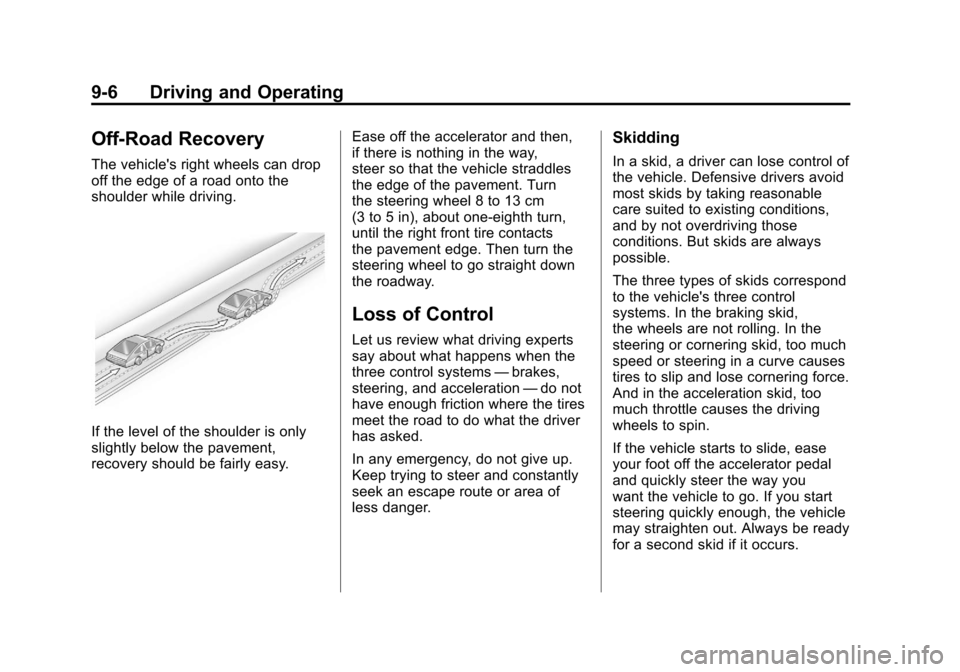
The vehicle's right wheels can drop
off the edge of a road onto the
shoulder while driving.
If the level of the shoulder is only
slightly below the pavement,
recovery should be fairly easy.Ease off the accelerator and then,
if there is nothing in the way,
steer so that the vehicle straddles
the edge of the pavement. Turn
the steering wheel 8 to 13 cm
(3 to 5 in), about one-eighth turn,
until the right front tire contacts
the pavement edge. Then turn the
steering wheel to go straight down
the roadway.
Loss of Control
Let us review what driving experts
say about what happens when the
three control systems
—brakes,
steering, and acceleration —do not
have enough friction where the tires
meet the road to do what the driver
has asked.
In any emergency, do not give up.
Keep trying to steer and constantly
seek an escape route or area of
less danger.
Skidding
In a skid, a driver can lose control of
the vehicle. Defensive drivers avoid
most skids by taking reasonable
care suited to existing conditions,
and by not overdriving those
conditions. But skids are always
possible.
The three types of skids correspond
to the vehicle's three control
systems. In the braking skid,
the wheels are not rolling. In the
steering or cornering skid, too much
speed or steering in a curve causes
tires to slip and lose cornering force.
And in the acceleration skid, too
much throttle causes the driving
wheels to spin.
If the vehicle starts to slide, ease
your foot off the accelerator pedal
and quickly steer the way you
want the vehicle to go. If you start
steering quickly enough, the vehicle
may straighten out. Always be ready
for a second skid if it occurs.