2011 CHEVROLET CAMARO steering
[x] Cancel search: steeringPage 244 of 414

Black plate (42,1)Chevrolet Camaro Owner Manual - 2011
9-42 Driving and Operating
This light is on when the vehicle is
in the Competitive Driving Mode.
On vehicles with a V8 engine,
this optional handling mode can
be selected by pressing the
StabiliTrak/TCS button on the
console quickly two times.
STABILITRAK COMPETITIVE
MODE displays in the Driver
Information Center (DIC).
SeeRide Control System
Messages on page 5‑38.
When the StabiliTrak button is
pressed again, or the vehicle is
restarted, the StabiliTrak and TCS
systems are on.
Launch Control (V8 with
Manual Transmission
Models Only)
A Launch Control feature is
available, within Competitive
Driving Mode on vehicles with a
manual transmission, to allow the
driver to achieve high levels of
vehicle acceleration in a straight
line. Launch Control is a form of
traction control that manages tire
spin while launching the vehicle.
This feature is intended for use
during closed course race events
where consistent zero to sixty
and quarter mile times are
desirable.
Launch Control is only available
when the following criteria are met:
1. Competitive Driving Mode is selected.
2. The vehicle is not moving.
3. The steering wheel is pointing straight. 4. The clutch is pressed and the
vehicle is in first gear.
5. The accelerator pedal is rapidly applied to wide open throttle.
The Launch Control feature will
initially limit engine speed as
the driver rapidly applies the
accelerator pedal to wide open
throttle. A smooth, quick release
of the clutch, while maintaining
the fully pressed accelerator pedal,
will manage wheel slip. Complete
shifts as described in Manual
Transmission on page 9‑34.
After the vehicle is launched,
the system continues in
Competitive Mode.
Competitive Driving Mode and
Launch Control are systems
designed for a closed course race
track and not intended for use on
public roads. The systems are not
intended to compensate for lack of
driver experience or familiarity with
the race track.
Page 245 of 414
Black plate (43,1)Chevrolet Camaro Owner Manual - 2011
Driving and Operating 9-43
Limited-Slip Rear Axle
Vehicles with a limited-slip rear
axle can give more traction on
snow, mud, ice, sand, or gravel.
When traction is low, this feature
allows the drive wheel with the
most traction to move the vehicle.
The limited-slip rear axle also gives
the driver enhanced control when
cornering hard or completing a
maneuver, such as a lane change.
Cruise Control
With cruise control, the vehicle can
maintain a speed of about 40 km/h
(25 mph) or more without keeping
your foot on the accelerator. Cruise
control does not work at speeds
below 40 km/h (25 mph).
{WARNING
Cruise control can be dangerous
where you cannot drive safely at
a steady speed. So, do not use
the cruise control on winding
roads or in heavy traffic.
Cruise control can be dangerous
on slippery roads. On such roads,
fast changes in tire traction can
cause excessive wheel slip, and
you could lose control. Do not use
cruise control on slippery roads.
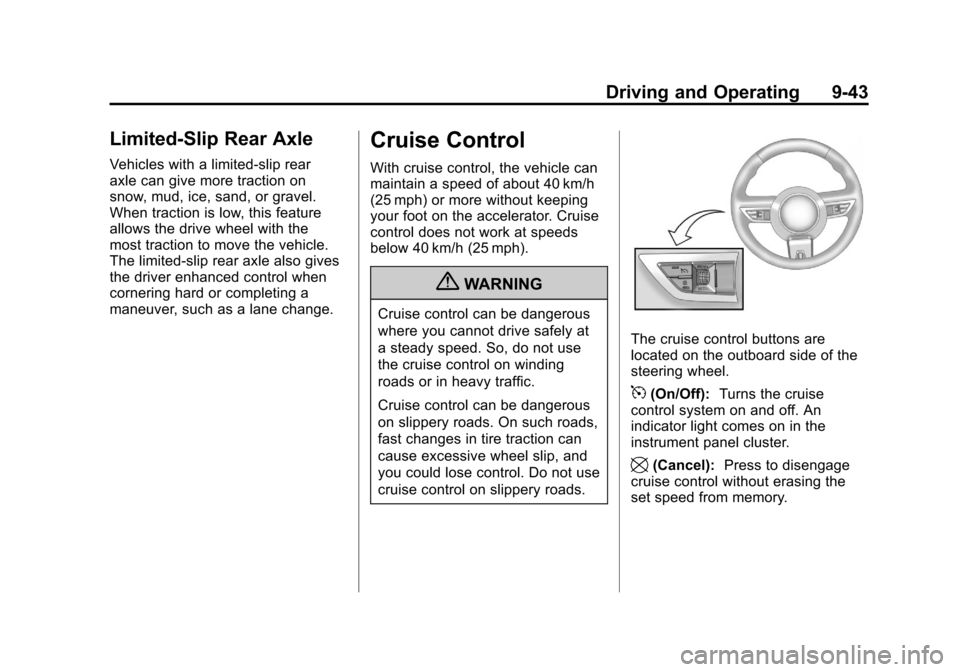
The cruise control buttons are
located on the outboard side of the
steering wheel.
5(On/Off):Turns the cruise
control system on and off. An
indicator light comes on in the
instrument panel cluster.
\(Cancel): Press to disengage
cruise control without erasing the
set speed from memory.
Page 246 of 414

Black plate (44,1)Chevrolet Camaro Owner Manual - 2011
9-44 Driving and Operating
RES/+ (Resume/Accelerate):
Move the thumbwheel up to make
the vehicle resume to a previously
set speed or to accelerate to a
higher speed.
SET/−(Set/Coast): Move the
thumbwheel down to set a speed
or to make the vehicle decelerate.
Setting Cruise Control
If the cruise button is on when not in
use, it could get bumped and go into
cruise when not desired. Keep the
cruise control switch off when cruise
is not being used.
1. Press
5to turn cruise
control on.
2. Get to the speed desired.
3. Press the thumbwheel toward SET/− and release it.
4. Take your foot off the accelerator pedal.
When the brakes are applied, the
cruise control shuts off. Resuming a Set Speed
If the cruise control is set at a
desired speed and then the brakes
are applied, the cruise control is
disengaged without erasing the set
speed from memory.
The indicator light on the instrument
panel cluster goes out when the
cruise is no longer engaged.
Once the vehicle speed reaches
about 40 km/h (25 mph) or more,
press the thumbwheel up toward
RES/+ briefly on the steering wheel.
The vehicle returns to the previous
set speed and stays there.
Increasing Speed While Using
Cruise Control
If the cruise control system is
already activated,
.Press the thumbwheel up toward
RES/+ and hold it until the
vehicle accelerates to the
desired speed, and then
release it.
.To increase the speed in small
amounts, press the thumbwheel
up toward RES/+ briefly and
then release it. Each time this is
done, the vehicle goes about
1.6 km/h (1 mph) faster.
Page 247 of 414
Black plate (45,1)Chevrolet Camaro Owner Manual - 2011
Driving and Operating 9-45
Reducing Speed While Using
Cruise Control
If the cruise control system is
already activated,
.Press the thumbwheel toward
SET/−and hold until the desired
lower speed is reached, then
release it.
.To slow down in small amounts,
press the thumbwheel toward
SET/− briefly. Each time this is
done, the vehicle goes about
1.6 km/h (1 mph) slower. Passing Another Vehicle While
Using Cruise Control
Use the accelerator pedal to
increase the vehicle speed. When
you take your foot off the pedal,
the vehicle will slow down to the
previous set cruise control speed.
Using Cruise Control on Hills
How well the cruise control works
on hills depends upon the vehicle's
speed, load, and the steepness
of the hills. When going up steep
hills, you might have to step on
the accelerator pedal to maintain
the vehicle speed. When going
downhill, you might have to brake
or shift to a lower gear to maintain
the vehicle speed. When the brakes
are applied the cruise control is
disengaged. Ending Cruise Control
There are three ways to end the
cruise control:
.To disengage cruise control;
step lightly on the brake pedal
or clutch. The indicator light on
the instrument panel cluster
goes out.
.Press\on the steering wheel.
.To turn off the cruise control,
press
5on the steering wheel.
Erasing Speed Memory
The cruise control set speed is
erased from memory by pressing
5
button or if the ignition is turned off.
Page 258 of 414

Black plate (56,1)Chevrolet Camaro Owner Manual - 2011
9-56 Driving and Operating
Backing Up
Hold the bottom of the steering
wheel with one hand. Then, to
move the trailer to the left, move
that hand to the left. To move the
trailer to the right, move your hand
to the right. Always back up slowly
and, if possible, have someone
guide you.
Making Turns
Notice:Making very sharp turns
while trailering could cause the
trailer to come in contact with the
vehicle. The vehicle could be
damaged. Avoid making very
sharp turns while trailering.
When turning with a trailer,
make wider turns than normal.
Do this so the trailer won't strike
soft shoulders, curbs, road signs,
trees or other objects. Avoid jerky
or sudden maneuvers. Signal well
in advance.
Turn Signals When Towing a
Trailer
The arrows on the instrument panel
flash whenever signaling a turn or
lane change. Properly hooked up,
the trailer lamps also flash, telling
other drivers the vehicle is turning,
changing lanes, or stopping.
When towing a trailer, the arrows on
the instrument panel flash for turns
even if the bulbs on the trailer are
burned out. For this reason you
may think other drivers are seeing
the signal when they are not. It is
important to check occasionally to
be sure the trailer bulbs are still
working.
Driving On Grades
Reduce speed and shift to a
lower gear before starting down
a long or steep downgrade. If the
transmission is not shifted down,
the brakes might have to be used
so much that they would get hot and
no longer work well. Vehicles with
automatic transmissions can tow in
D (Drive), but M (Manual Mode) is
recommended. See “Manual Mode”
in Automatic Transmission on
page 9‑30 for more information.
Use a lower gear if the transmission
shifts too often. For vehicles with a
manual transmission, it is better not
to use the highest gear.
Page 263 of 414

Black plate (1,1)Chevrolet Camaro Owner Manual - 2011
Vehicle Care 10-1
Vehicle Care
General Information
General Information . . . . . . . . . . 10-2
California Proposition65 Warning . . . . . . . . . . . . . . . . . 10-3
California Perchlorate Materials Requirements . . . . 10-3
Accessories and Modifications . . . . . . . . . . . . . . . 10-3
Vehicle Checks
Doing Your OwnService Work . . . . . . . . . . . . . . . 10-4
Hood . . . . . . . . . . . . . . . . . . . . . . . . 10-5
Engine Compartment Overview . . . . . . . . . . . . . . . . . . . 10-6
Engine Cover . . . . . . . . . . . . . . . . 10-9
Engine Oil . . . . . . . . . . . . . . . . . . 10-10
Engine Oil Life System . . . . . 10-14
Automatic Transmission Fluid . . . . . . . . . . . . . . . . . . . . . . 10-15
Manual Transmission Fluid . . . . . . . . . . . . . . . . . . . . . . 10-16
Hydraulic Clutch . . . . . . . . . . . . 10-16
Engine Air Cleaner/Filter . . . . 10-16 Cooling System . . . . . . . . . . . . 10-18
Engine Coolant . . . . . . . . . . . . . 10-20
Engine Overheating . . . . . . . . 10-25
Power Steering Fluid . . . . . . . 10-27
Washer Fluid . . . . . . . . . . . . . . . 10-28
Brakes . . . . . . . . . . . . . . . . . . . . . 10-29
Brake Fluid . . . . . . . . . . . . . . . . . 10-30
Battery . . . . . . . . . . . . . . . . . . . . . 10-31
Starter Switch Check . . . . . . . 10-32
Automatic Transmission Shift
Lock Control Function
Check . . . . . . . . . . . . . . . . . . . . . 10-33
Ignition Transmission Lock Check . . . . . . . . . . . . . . . . . . . . . 10-33
Park Brake and P (Park) Mechanism Check . . . . . . . . 10-34
Wiper Blade Replacement . . . . . . . . . . . . . . 10-34
Windshield Replacement . . . 10-35
Headlamp Aiming
Headlamp Aiming . . . . . . . . . . 10-35
Bulb Replacement
Bulb Replacement . . . . . . . . . . 10-38
Halogen Bulbs . . . . . . . . . . . . . . 10-38
High Intensity Discharge (HID) Lighting . . . . . . . . . . . . . 10-38 Headlamps, Front Turn
Signal and Parking Lamps
(Base Vehicle) . . . . . . . . . . . . 10-39
Headlamps, Front Turn Signal and Parking Lamps
(Up-Level Vehicle) . . . . . . . . 10-40
Daytime Running Lamps (DRL) . . . . . . . . . . . . . 10-41
Fog Lamps . . . . . . . . . . . . . . . . . 10-41
Taillamps, Turn Signal, and Stoplamps . . . . . . . . . . . . . . . . 10-42
License Plate Lamp . . . . . . . . 10-42
Replacement Bulbs . . . . . . . . . 10-43
Electrical System
Electrical System Overload . . . . . . . . . . . . . . . . . . 10-43
Fuses and Circuit Breakers . . . . . . . . . . . . . . . . . . 10-44
Engine Compartment Fuse Block . . . . . . . . . . . . . . . . . . . . . 10-44
Instrument Panel Fuse Block . . . . . . . . . . . . . . . . . . . . . 10-47
Rear Compartment Fuse Block . . . . . . . . . . . . . . . . . . . . . 10-49
Page 267 of 414
Black plate (5,1)Chevrolet Camaro Owner Manual - 2011
Vehicle Care 10-5
Hood
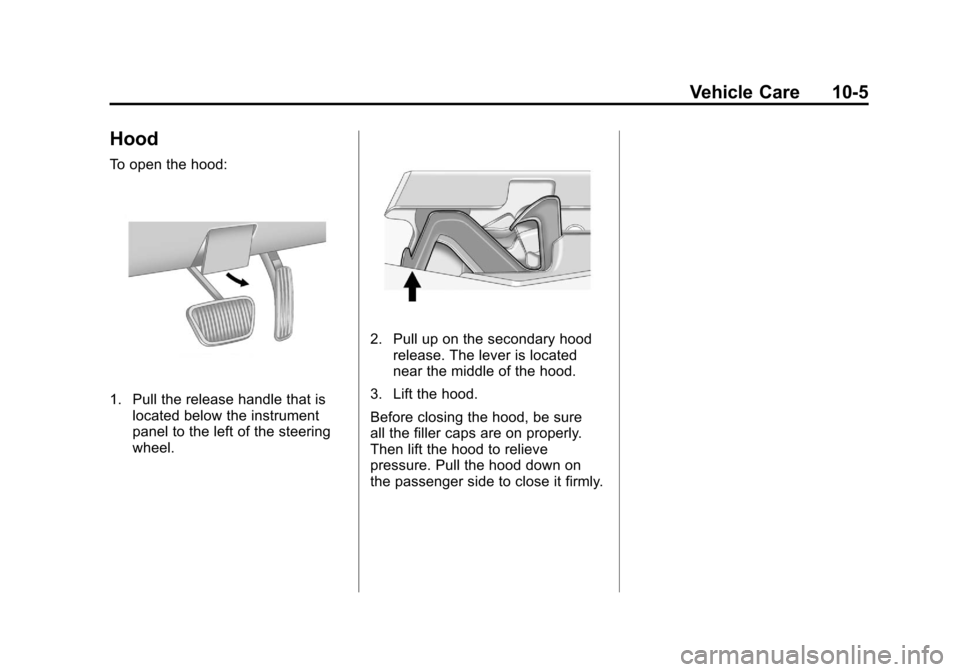
To open the hood:
1. Pull the release handle that islocated below the instrument
panel to the left of the steering
wheel.
2. Pull up on the secondary hoodrelease. The lever is located
near the middle of the hood.
3. Lift the hood.
Before closing the hood, be sure
all the filler caps are on properly.
Then lift the hood to relieve
pressure. Pull the hood down on
the passenger side to close it firmly.
Page 269 of 414

Black plate (7,1)Chevrolet Camaro Owner Manual - 2011
Vehicle Care 10-7
A. Underhood Electrical Center.See Engine Compartment Fuse
Block on page 10‑44.
B. Engine Coolant Recovery Bottle and Cap. See Engine Coolant
on page 10‑20.
C. Engine Cover on page 10‑9.
D. Engine Cooling Fans (Out of View). See Cooling System on
page 10‑18.
E. Radiator Fill Cap (Out of View). See Engine Coolant on
page 10‑20.
F. Power Steering Reservoir and Cap (Out of View). See Power
Steering Fluid on page 10‑27.
G. Engine Oil Fill Cap. See Engine
Oil on page 10‑10. H. Engine Oil Dipstick (Out of
View). See Engine Oil on
page 10‑10.
I. Brake Master Cylinder and Hydraulic Clutch Reservoir
(if equipped with manual
transmission). See Brakes on
page 10‑29 orHydraulic Clutch
on page 10‑16.
J. Remote Positive (+) Terminal. See Battery on page 10‑31.
K. Engine Air Cleaner/Filter on
page 10‑16.
L. Windshield Washer Fluid Reservoir. See Washer Fluid on
page 10‑28.