2011 CHEVROLET AVEO steering wheel
[x] Cancel search: steering wheelPage 180 of 328
Black plate (18,1)Chevrolet Aveo Owner Manual - 2011
9-18 Driving and Operating
LOCK (STOPPING THE ENGINE/
LOCK/OFF):When the vehicle is
stopped, turn the ignition switch to
LOCK/OFF to turn the engine off.
This position locks the steering
wheel, ignition, shift lever and
transmission. This is the only
position in which you can insert or
remove the key.
Do not turn the engine off when the
vehicle is moving. This will cause a
loss of power assist in the brake
and steering systems and disable
the airbags.
In an emergency:
1. Brake using a firm and steady pressure. Do not pump the
brakes repeatedly. This may
deplete power assist, requiring
increased brake pedal force.
2. Shift the vehicle to neutral. This can be done while the vehicle is
moving. After shifting to neutral,
firmly apply the brakes and steer
the vehicle to a safe location. 3. Come to a complete stop. Shift
to P (Park) with an automatic
transmission, or neutral with a
manual transmission. Turn the
ignition to LOCK/OFF.
4. Set the parking brake. See Parking Brake on page 9‑31.
The steering can bind with the
wheels turned off center. If this
happens, move the steering wheel
from right to left while turning the
key to ACC/ACCESSORY. If this
doesn't work, then the vehicle needs
service.
ACC (ACC/ACCESSORY): This
position operates some of the
electrical accessories, such as the
radio, but not the climate control
system. ON (ON/RUN):
This position can
be used to operate the electrical
accessories, and to display some
instrument panel cluster warning
and indicator lights. The switch
stays in this position when the
engine is running. If you leave the
key in the ACC/ACCESSORY or
ON/RUN position with the engine
off, the battery could be drained.
You may not be able to start the
vehicle if the battery is allowed to
drain for an extended period of time.
START: This is the position that
starts the engine. When the engine
cranks, release the key. The ignition
switch returns to ON/RUN for
driving. Do not turn the key to
START if the engine is running.
Page 193 of 328
Black plate (31,1)Chevrolet Aveo Owner Manual - 2011
Driving and Operating 9-31
Remember: ABS does not change
the time needed to get a foot up to
the brake pedal or always decrease
stopping distance. If you get too
close to the vehicle in front of you,
there will not be enough time to
apply the brakes if that vehicle
suddenly slows or stops. Always
leave enough room up ahead to
stop, even with ABS.
Using ABS
Do not pump the brakes. Just hold
the brake pedal down firmly and let
antilock work. You might feel a slight
brake pedal pulsation or hear some
noise, but this is normal.
Braking in Emergencies
At some time, nearly every driver
gets into a situation that requires
hard braking.
If the vehicle has ABS, it allows the
driver to steer and brake at the
same time. However, if the vehicle
does not have ABS, the first
reaction—to hit the brake pedal hard and hold it down
—might be
the wrong thing to do. The wheels
can stop rolling. Once they do, the
vehicle cannot respond to the
driver's steering. Momentum will
carry it in whatever direction it was
headed when the wheels stopped
rolling. That could be off the road,
into the very thing the driver was
trying to avoid, or into traffic.
If the vehicle does not have ABS,
use a “squeeze” braking technique.
This gives maximum braking while
maintaining steering control. Do this
by pushing on the brake pedal with
steadily increasing pressure. In an
emergency, you will probably want
to squeeze the brakes hard without
locking the wheels. If you hear or
feel the wheels sliding, ease off the
brake pedal. This helps retain
steering control.
In many emergencies, steering can
help more than even the very best
braking.
Parking Brake
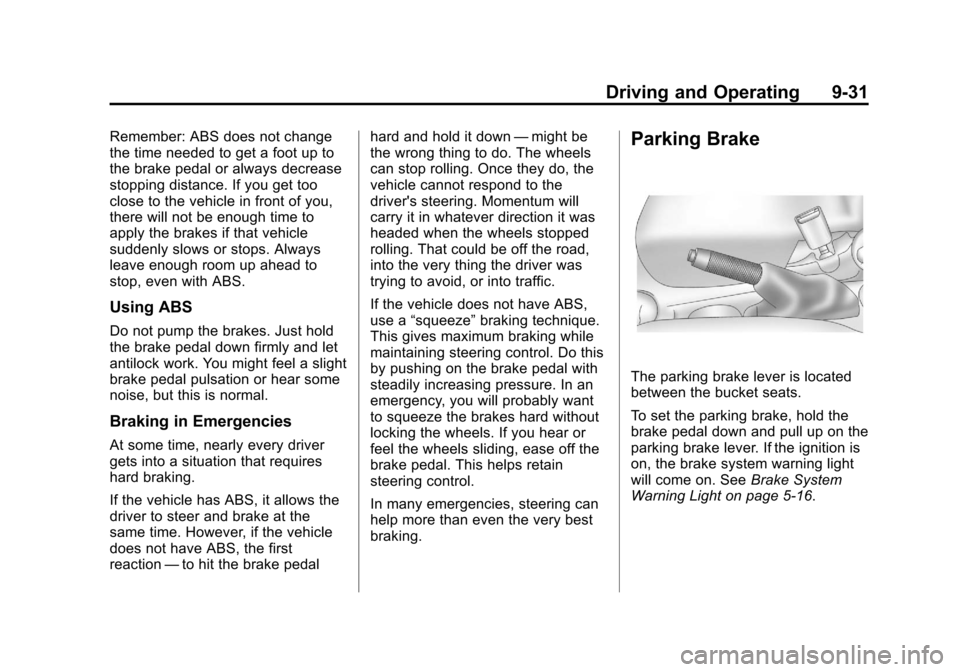
The parking brake lever is located
between the bucket seats.
To set the parking brake, hold the
brake pedal down and pull up on the
parking brake lever. If the ignition is
on, the brake system warning light
will come on. See Brake System
Warning Light on page 5‑16.
Page 194 of 328
Black plate (32,1)Chevrolet Aveo Owner Manual - 2011
9-32 Driving and Operating
To release the parking brake, hold
the brake pedal down. Pull the
parking brake lever up until you can
press the release button. Hold the
release button in as you move the
brake lever all the way down.
Notice:Driving with the parking
brake on can overheat the brake
system and cause premature
wear or damage to brake system
parts. Make sure that the parking
brake is fully released and the
brake warning light is off before
driving.Cruise Control
For vehicles with cruise control, a
speed of about 39 km/h (24 mph)
or more can be maintained
without keeping your foot on the
accelerator. Cruise control does not
work at speeds below 39 km/h
(24 mph).
When the brakes are applied, or the
clutch pedal if you have a manual
transmission, the cruise control
turns off.
{WARNING
Cruise control can be dangerous
where you cannot drive safely at
a steady speed. So, do not use
the cruise control on winding
roads or in heavy traffic.
Cruise control can be dangerous
on slippery roads. On such roads,
fast changes in tire traction can
cause excessive wheel slip, and
you could lose control. Do not use
cruise control on slippery roads.
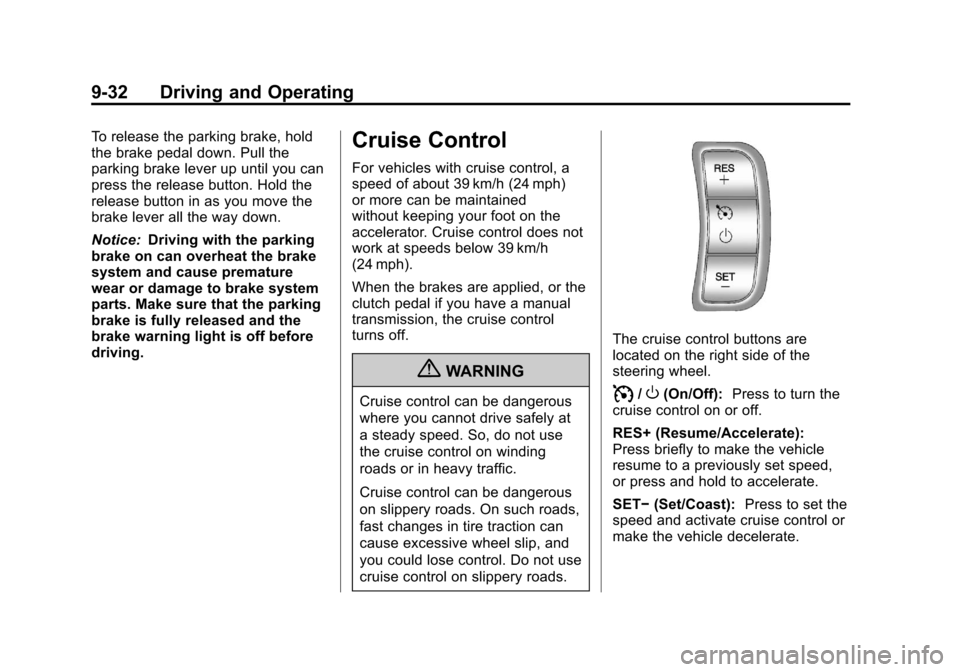
The cruise control buttons are
located on the right side of the
steering wheel.
I/O(On/Off): Press to turn the
cruise control on or off.
RES+ (Resume/Accelerate):
Press briefly to make the vehicle
resume to a previously set speed,
or press and hold to accelerate.
SET− (Set/Coast): Press to set the
speed and activate cruise control or
make the vehicle decelerate.
Page 195 of 328
Black plate (33,1)Chevrolet Aveo Owner Manual - 2011
Driving and Operating 9-33
Setting Cruise Control
If the cruise button is on when not in
use, it could get bumped and go into
cruise when not desired. Keep the
cruise control switch off when cruise
is not being used.
The cruise control light on the
instrument panel cluster will come
on after the cruise control has been
set to the desired speed.
1. Press
I/Oto turn cruise
control on.
2. Accelerate to the speed desired.
3. Press the SET− button and
release it.
4. Take your foot off the accelerate pedal. Resuming a Set Speed
If the cruise control is set at a
desired speed and then the brakes
are applied, or the clutch pedal if
you have a manual transmission,
the cruise control is disengaged
without erasing the set speed from
memory.
Once the vehicle speed reaches
about 39 km/h (24 mph) or more,
press the RES+ button on the
steering wheel. The vehicle returns
to the previous set speed and stays
there.
If the RES+ button is held, the
vehicle speed will continue to
increase until the button is released
or the brake pedal is applied. Do not
hold in the RES+ button, unless you
want the vehicle to go faster. Increasing Speed While Using
Cruise Control
If the cruise control system is
already activated,
.Press and hold the RES+ button
on the steering wheel until the
desired speed is reached, then
release it.
.To increase the vehicle speed in
small amounts, press the RES+
button. Each time this is done,
the vehicle goes about 1.6 km/h
(1 mph) faster.
The accelerate feature only works
after the cruise control is turned on
by pressing the SET− button.
Page 203 of 328

Black plate (1,1)Chevrolet Aveo Owner Manual - 2011
Vehicle Care 10-1
Vehicle Care
General Information
General Information . . . . . . . . . . 10-3
California Proposition65 Warning . . . . . . . . . . . . . . . . . 10-3
California Perchlorate Materials Requirements . . . . 10-3
Accessories and Modifications . . . . . . . . . . . . . . . 10-4
Vehicle Checks
Doing Your OwnService Work . . . . . . . . . . . . . . . 10-5
Hood . . . . . . . . . . . . . . . . . . . . . . . . 10-6
Engine Compartment Overview . . . . . . . . . . . . . . . . . . . 10-8
Engine Oil . . . . . . . . . . . . . . . . . . . 10-9
Engine Oil Life System . . . . . 10-12
Automatic Transmission Fluid . . . . . . . . . . . . . . . . . . . . . . 10-13
Manual Transmission Fluid . . . . . . . . . . . . . . . . . . . . . . 10-15
Hydraulic Clutch . . . . . . . . . . . . 10-15
Engine Air Cleaner/Filter . . . . 10-16
Cooling System . . . . . . . . . . . . 10-17 Engine Coolant . . . . . . . . . . . . . 10-18
Engine Overheating . . . . . . . . 10-21
Power Steering Fluid . . . . . . . 10-23
Washer Fluid . . . . . . . . . . . . . . . 10-24
Brakes . . . . . . . . . . . . . . . . . . . . . 10-24
Brake Fluid . . . . . . . . . . . . . . . . . 10-26
Battery . . . . . . . . . . . . . . . . . . . . . 10-27
Starter Switch Check . . . . . . . 10-28
Automatic Transmission Shift
Lock Control Function
Check . . . . . . . . . . . . . . . . . . . . . 10-28
Ignition Transmission Lock Check . . . . . . . . . . . . . . . . . . . . . 10-29
Park Brake and P (Park) Mechanism Check . . . . . . . . 10-29
Wiper Blade Replacement . . . . . . . . . . . . . . 10-30
Headlamp Aiming
Headlamp Aiming . . . . . . . . . . 10-30
Bulb Replacement
Bulb Replacement . . . . . . . . . . 10-31
Halogen Bulbs . . . . . . . . . . . . . . 10-31
Headlamps . . . . . . . . . . . . . . . . . 10-31
Front Turn Signal,Sidemarker, and Parking
Lamps . . . . . . . . . . . . . . . . . . . . 10-32 Taillamps, Turn Signal,
Sidemarker, Stoplamps,
and Back-Up Lamps . . . . . . 10-33
Center High-Mounted Stoplamp (CHMSL)
(Hatchback) . . . . . . . . . . . . . . . 10-34
Center High-Mounted Stoplamp (CHMSL)
(Sedan) . . . . . . . . . . . . . . . . . . . 10-34
License Plate Lamp . . . . . . . . 10-35
Replacement Bulbs . . . . . . . . . 10-35
Electrical System
Electrical System Overload . . . . . . . . . . . . . . . . . . 10-36
Fuses and Circuit Breakers . . . . . . . . . . . . . . . . . . 10-36
Engine Compartment Fuse Block . . . . . . . . . . . . . . . . . . . . . 10-37
Instrument Panel Fuse Block . . . . . . . . . . . . . . . . . . . . . 10-40
Wheels and Tires
Tires . . . . . . . . . . . . . . . . . . . . . . . . 10-42
Tire Sidewall Labeling . . . . . . 10-42
Tire Designations . . . . . . . . . . . 10-45
Tire Terminology andDefinitions . . . . . . . . . . . . . . . . 10-45
Tire Pressure . . . . . . . . . . . . . . . 10-48
Page 263 of 328
Black plate (61,1)Chevrolet Aveo Owner Manual - 2011
Vehicle Care 10-61
Used Replacement Wheels
{WARNING
Replacing a wheel with a used
one is dangerous. How it has
been used or how far it has been
driven may be unknown. It could
fail suddenly and cause a crash.
When replacing wheels, use a
new GM original equipment
wheel.
Tire Chains
Notice:Use tire chains only
where legal and only when you
must. Use only SAE Class“S”
type chains that are the proper
size for your tires. Install them on
the front tires and tighten them
as tightly as possible with the
ends securely fastened. Drive
slowly and follow the chain
manufacturer's instructions.
If you can hear the chains
contacting your vehicle, stop
and retighten them. If the
contact continues, slow down
until it stops. Driving too fast or
spinning the wheels with chains
on will damage your vehicle.
If a Tire Goes Flat
It is unusual for a tire to blowout
while you are driving, especially if
you maintain the vehicle's tires
properly. If air goes out of a tire, it is
much more likely to leak out slowly.
But if you should ever have a
blowout, here are a few tips about
what to expect and what to do:
If a front tire fails, the flat tire
creates a drag that pulls the vehicle
toward that side. Take your foot off
the accelerator pedal and grip the
steering wheel firmly. Steer to
maintain lane position, and then
gently brake to a stop, well off the
road, if possible.
Page 264 of 328
Black plate (62,1)Chevrolet Aveo Owner Manual - 2011
10-62 Vehicle Care
A rear blowout, particularly on a
curve, acts much like a skid and
may require the same correction
you would use in a skid. In any rear
blowout remove your foot from the
accelerator pedal. Get the vehicle
under control by steering the way
you want the vehicle to go. It may
be very bumpy and noisy, but you
can still steer. Gently brake to a
stop, well off the road, if possible.{WARNING
Driving on a flat tire will cause
permanent damage to the tire.
Re-inflating a tire after it has
been driven on while severely
underinflated or flat may cause a
blowout and a serious crash.
Never attempt to re-inflate a tire
that has been driven on while
severely underinflated or flat.
Have your dealer or an authorized
tire service center repair or
replace the flat tire as soon as
possible.
{WARNING
Lifting a vehicle and getting
under it to do maintenance or
repairs is dangerous without the
appropriate safety equipment and
training. If a jack is provided with
the vehicle, it is designed only for
changing a flat tire. If it is used for
anything else, you or others could
be badly injured or killed if the
vehicle slips off the jack. If a jack
is provided with the vehicle, only
use it for changing a flat tire.
If a tire goes flat, avoid further tire
and wheel damage by driving slowly
to a level place, well off the road,
if possible. Turn on the hazard
warning flashers. See Hazard
Warning Flashers on page 6‑3.
Page 277 of 328
Black plate (75,1)Chevrolet Aveo Owner Manual - 2011
Vehicle Care 10-75
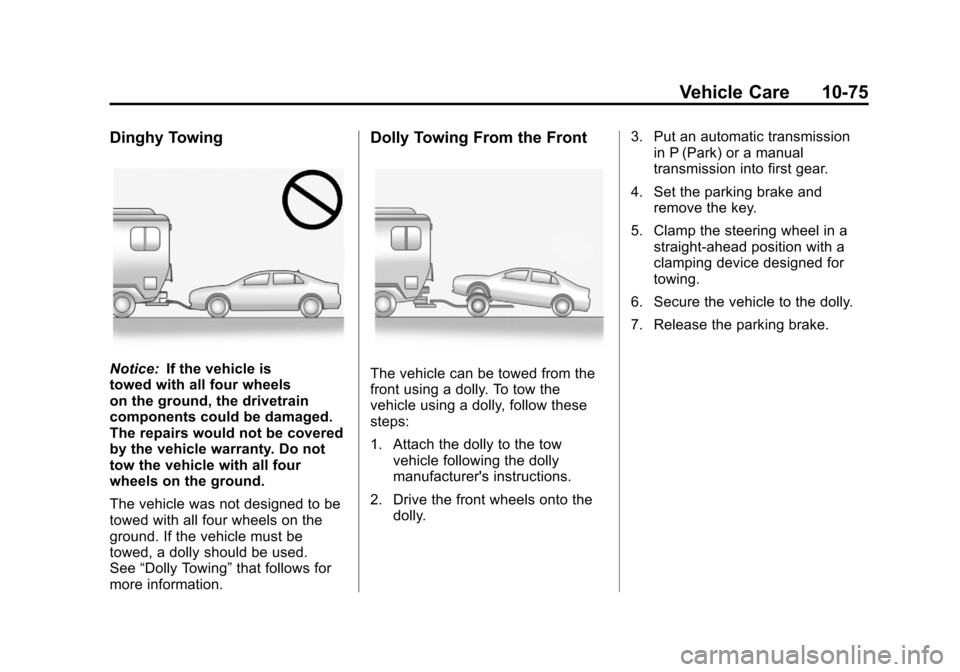
Dinghy Towing
Notice:If the vehicle is
towed with all four wheels
on the ground, the drivetrain
components could be damaged.
The repairs would not be covered
by the vehicle warranty. Do not
tow the vehicle with all four
wheels on the ground.
The vehicle was not designed to be
towed with all four wheels on the
ground. If the vehicle must be
towed, a dolly should be used.
See “Dolly Towing” that follows for
more information.
Dolly Towing From the Front
The vehicle can be towed from the
front using a dolly. To tow the
vehicle using a dolly, follow these
steps:
1. Attach the dolly to the tow vehicle following the dolly
manufacturer's instructions.
2. Drive the front wheels onto the dolly. 3. Put an automatic transmission
in P (Park) or a manual
transmission into first gear.
4. Set the parking brake and remove the key.
5. Clamp the steering wheel in a straight-ahead position with a
clamping device designed for
towing.
6. Secure the vehicle to the dolly.
7. Release the parking brake.