2011 CHEVROLET AVEO reset
[x] Cancel search: resetPage 141 of 328
Black plate (1,1)Chevrolet Aveo Owner Manual - 2011
Infotainment System 7-1
Infotainment
System
Introduction
Infotainment . . . . . . . . . . . . . . . . . . . 7-1
Operation . . . . . . . . . . . . . . . . . . . . . 7-2
Radio
AM-FM Radio . . . . . . . . . . . . . . . . . 7-3
Satellite Radio . . . . . . . . . . . . . . . . 7-6
Radio Reception . . . . . . . . . . . . . . 7-8
Fixed Mast Antenna(Hatchback) . . . . . . . . . . . . . . . . . 7-9
Backglass Antenna (Sedan) . . . . . . . . . . . . . . . . . . . . . . 7-9
Multi-Band Antenna . . . . . . . . . . 7-10
Audio Players
CD Player . . . . . . . . . . . . . . . . . . . 7-10
Auxiliary Devices . . . . . . . . . . . . 7-15
Introduction
Infotainment
Determine which radio the vehicle
has and read the following pages to
become familiar with its features.
{WARNING
Taking your eyes off the road for
extended periods could cause a
crash resulting in injury or death
to you or others. Do not give
extended attention to
entertainment tasks while driving.
This system provides access to
many audio and non‐audio listings. To minimize taking your eyes off the
road while driving, do the following
while the vehicle is parked:
.Become familiar with the
operation and controls of the
audio system.
.Set up the tone, speaker
adjustments, and preset radio
stations.
For more information, see Defensive
Driving on page 9‑2.
Notice: Contact your dealer
before adding any equipment.
Adding audio or communication
equipment could interfere with
the operation of the engine, radio,
or other systems, and could
damage them. Follow federal
rules covering mobile radio and
telephone equipment.
Page 144 of 328
Black plate (4,1)Chevrolet Aveo Owner Manual - 2011
7-4 Infotainment System
SCAN:Press to scan radio
stations. The radio goes to a station,
plays for a few seconds, then goes
to the next station. Press this button
again to stop scanning.
The radio only scans stations with a
strong signal in the selected band.
AST (Automatic Store): Twelve
preset stations with the strongest
reception in the area can be
automatically stored. The radio will
only scan stations with a strong
signal that are in the selected AM or
FM band. If the Automatic Store
function is started in the FM band,
only FM stations are stored in
preset pages A1 and A2. If the
Automatic Store function is started
in the AM band, only AM stations
are stored in A1 and A2.
A combination of AM, FM and XM (if
equipped) stations can be stored
manually into the other four favorite
pages. To use Automatic Store:
1. Press and hold AST to use Auto
Store mode.
2. Press the pushbutton below the ON tab on the radio display.
3. Automatic Store searches for radio stations with a strong
signal and automatically set
presets A1 and A2 with new
stations.
4. After all stations are set, press the pushbutton below the arrow
tab on the radio display to return
to the main radio screen
To reset the automatically stored
radio stations, press and hold AST.
Then press the pushbutton below
the RESE tab on the radio display.
If no stations are stored on preset
pages A1 and A2, the RESE option
does not appear in the radio display.
When the Automatic Store function
is used, any stations that were
previously set will be deleted and
replaced with new stations.Finding a Station
(Radio with CD, and Radio
with Six‐Disc CD)
BAND: Press to choose FM, AM,
or XM (if equipped). The display will
show the selection.
uSEEK: Press to seek the next
radio station with a strong signal in
the selected band.
tSEEK: Press to seek the
previous radio station with a strong
signal in the selected band.
[TUNE: Press to go to the next
station manually.
rTUNE: Press to go to the
previous station manually.
SCAN/AST: Press to scan radio
stations. The radio goes to a station,
plays for a few seconds, then goes
to the next station. The radio only
scans stations with a strong signal
in the selected band. Press SCAN/
AST again to stop scanning.
Page 145 of 328
Black plate (5,1)Chevrolet Aveo Owner Manual - 2011
Infotainment System 7-5
Press and hold SCAN/AST to use
Automatic Store. The radio only
scans stations with a strong signal
in the selected band.
AST (Automatic Store):Twelve
preset stations with the strongest
reception in the area can be
automatically stored. The radio will
only scan stations with a strong
signal that are in the selected AM or
FM band. If the Automatic Store
function is started in the FM band,
only FM stations are stored in
preset pages A1 and A2. If the
Automatic Store function is started
in the AM band, only AM stations
are stored in A1 and A2.
A combination of AM, FM, and XM
(if equipped) stations can be stored
manually into the other four favorite
pages. To use Automatic Store:
1. Press and hold SCAN/AST to
use Automatic Store mode.
2. Press the pushbutton below the ON tab on the radio display.
3. Automatic Store searches for radio stations with a strong
signal and automatically sets
presets A1 and A2 with new
stations.
4. After all stations are set, press the pushbutton below the arrow
tab on the radio display to return
to the main radio screen.
To reset the automatically stored
radio stations, press and hold
SCAN/AST. Then press the
pushbutton below the RESE tab on
the radio display. If no stations are
stored on preset pages A1 and A2,
the RESE option does not appear
in the radio display. When the
Automatic Store function is used,
any stations that were previously set
will be deleted and replaced with
new stations.Storing a Radio Station
Drivers are encouraged to set up
radio station favorites while the
vehicle is in P (Park). Tune to
favorite stations using the
pushbuttons, favorites button, and
steering wheel controls. See
Defensive Driving on page 9‑2.
A maximum of 36 stations can be
programmed as favorites using the
6 pushbuttons positioned below the
radio station frequency labels and
by using the radio favorites page
button (FAV button). Press the FAV
button to go through up to six pages
of favorites, each having six favorite
stations available per page.
If Automatic Store is used, then four
pages of favorites are available.
Each page of favorites can contain
any combination of AM, FM, or XM
(if equipped) stations. To store a
station as a favorite:
1. Tune in the desired station.
2. Press and release the FAV button to display the page where
the station is to be stored.
Page 147 of 328
Black plate (7,1)Chevrolet Aveo Owner Manual - 2011
Infotainment System 7-7
Storing an XM Channel
Drivers are encouraged to set up
XM Channel favorites while the
vehicle is in P (Park). Tune to
favorite stations using the
pushbuttons, favorites button, and
steering wheel controls. See
Defensive Driving on page 9‑2.
A maximum of 36 stations can be
programmed as favorites using the
6 pushbuttons positioned below the
radio station frequency labels and
by using the radio favorites page
button (FAV button). Press the FAV
button to go through up to six pages
of favorites, each having six favorite
stations available per page.
If Automatic Store is used, then four
pages of favorites are available.
Each page of favorites can contain
any combination of AM, FM, or XM
channels. To store an XM channel
as a favorite:
1. Tune in the desired channel.
2. Press and release the FAVbutton to display the page where
the channel is to be stored. 3. Press and hold one of the six
numbered pushbuttons until
a beep sounds. When the
pushbutton is pressed and
released, the channel that was
set will return.
4. Repeat Steps 1 through 3 for each XM channel to be stored
as a favorite.
To set up the number of favorites
pages:
1. Press and hold FAV until the radio setup menu displays.
2. Select the desired number of favorites pages by pressing the
pushbutton located below the
displayed page numbers.
3. Press FAV to return to the original main radio screen
showing the radio frequency
tabs and to begin the process of
programming favorites for the
chosen number of numbered
pages.
XM Radio Messages
UPDATING: The encryption code
in the receiver is being updated, and
no action is required. This process
should take no longer than
30 seconds.
NO SIGNAL: The system is
functioning correctly, but the vehicle
is in a location that is blocking the
XM signal. When the vehicle is
moved into an open area, the signal
should return.
LOADING: The audio system is
acquiring and processing audio and
text data. No action is needed. This
message should disappear shortly.
OFF AIR: This channel is not
currently in service. Tune in to
another channel.
CH UNAVAILABLE: This
previously assigned channel is no
longer assigned. Tune to another
station. If this station was one of the
presets, choose another station for
that preset button.
Page 214 of 328
Black plate (12,1)Chevrolet Aveo Owner Manual - 2011
10-12 Vehicle Care
be used. An oil of this viscosity
grade will provide easier cold
starting for the engine at extremely
low temperatures. When selecting
an oil of the appropriate viscosity
grade, be sure to always select an
oil that meets the required
specification, dexos™. See
“Specification”in this section for
more information.
Engine Oil Additives/Engine
Oil Flushes
Do not add anything to the oil. The
recommended oils with the dexos™
specification and displaying the
dexos™ certification mark are all
that is needed for good performance
and engine protection.
Engine oil system flushes are not
recommended and could cause
engine damage not covered by the
vehicle warranty.
What to Do with Used Oil
Used engine oil contains certain
elements that can be unhealthy for
your skin and could even cause
cancer. Do not let used oil stay on
your skin for very long. Clean your
skin and nails with soap and water,
or a good hand cleaner. Wash or
properly dispose of clothing or rags
containing used engine oil. See the
manufacturer's warnings about the
use and disposal of oil products.
Used oil can be a threat to the
environment. If you change your
own oil, be sure to drain all the oil
from the filter before disposal. Never
dispose of oil by putting it in the
trash or pouring it on the ground,
into sewers, or into streams or
bodies of water. Recycle it by taking
it to a place that collects used oil.
Engine Oil Life System
When to Change Engine Oil
This vehicle has the Engine Oil Life
System, a computer system that
indicates when to change the
engine oil and filter. This is based
on engine revolutions and engine
temperature, and not on mileage.
Based on driving conditions, the
mileage at which an oil change is
indicated can vary considerably. For
the oil life system to work properly,
the system must be reset every time
the oil is changed.
When the system has calculated
that oil life has been diminished, it
indicates that an oil change is
necessary. A change engine oil light
displays. Change the oil as soon as
possible within the next 1 000 km
(600 miles). It is possible that,
if driving under the best conditions,
the oil life system might indicate that
an oil change is not necessary for
up to a year. The engine oil and
filter must be changed at least once
a year and, at this time, the system
Page 215 of 328
Black plate (13,1)Chevrolet Aveo Owner Manual - 2011
Vehicle Care 10-13
must be reset. Your dealer has
trained service people who will
perform this work and reset the
system. It is also important to check
the oil regularly over the course of
an oil drain interval and keep it at
the proper level.
If the system is ever reset
accidentally, the oil must be
changed at 5 000 km (3,000 miles)
since the last oil change.
Remember to reset the oil life
system whenever the oil is changed.
How to Reset the Engine Oil
Life System
Reset the system whenever the
engine oil is changed so that the
system can calculate the next
engine oil change. To reset the
system:
1. Turn the ignition to ON/RUN,with the engine off.
2. Fully press and release the accelerator pedal three times
within five seconds.
3. Turn the key to LOCK/OFF. If the change engine oil light comes
back on when the vehicle is started,
the engine oil life system has not
reset. Repeat the procedure.
Automatic Transmission
Fluid
When to Check Automatic
Transmission Fluid
Check the automatic transmission
fluid level at least twice a year. Add
fluid if needed. See
Scheduled
Maintenance on page 11‑2.
How to Check Automatic
Transmission Fluid
Because this operation can be a
little difficult, it may be decided to
have this done at the dealer service
department.
If not taken to the dealer, be sure to
follow all the instructions here, or a
false reading on the dipstick could
result. Notice:
Too much or too little
fluid can damage the
transmission. Too much can
mean that some of the fluid could
come out and fall on hot engine
parts or exhaust system parts,
starting a fire. Too little fluid
could cause the transmission to
overheat. Be sure to get an
accurate reading if checking the
transmission fluid.
Wait at least 30 minutes before
checking the transmission fluid level
if the vehicle has been driven:
.When outside temperatures are
above 32°C (90°F).
.At high speed for quite a while.
.In heavy traffic —especially in
hot weather.
To get the right reading, the fluid
should be at normal operating
temperature, which is 70°C to 80°C
(158°F to 176°F).
Page 232 of 328
Black plate (30,1)Chevrolet Aveo Owner Manual - 2011
10-30 Vehicle Care
Wiper Blade Replacement
Windshield wiper blades should be
inspected for wear or cracking. See
“Wiper Blade Check”for more
information.
Replacement blades come in
different types and are removed in
different ways. For the proper type,
see Maintenance Replacement
Parts on page 11‑8. Here is how to remove and replace
the windshield wiper blade:
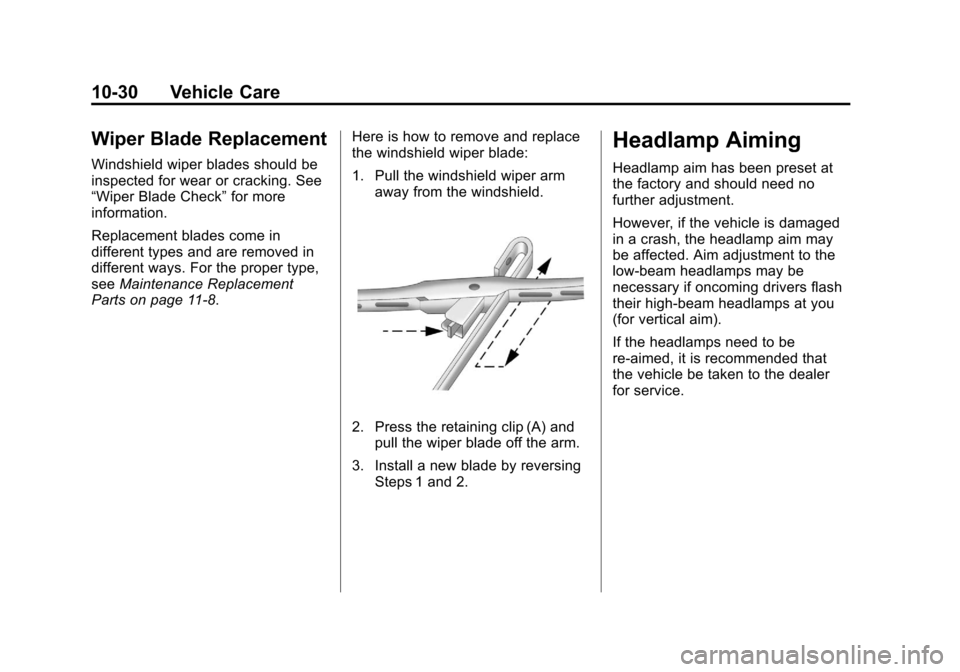
1. Pull the windshield wiper arm
away from the windshield.
2. Press the retaining clip (A) andpull the wiper blade off the arm.
3. Install a new blade by reversing Steps 1 and 2.
Headlamp Aiming
Headlamp aim has been preset at
the factory and should need no
further adjustment.
However, if the vehicle is damaged
in a crash, the headlamp aim may
be affected. Aim adjustment to the
low-beam headlamps may be
necessary if oncoming drivers flash
their high-beam headlamps at you
(for vertical aim).
If the headlamps need to be
re-aimed, it is recommended that
the vehicle be taken to the dealer
for service.
Page 256 of 328
Black plate (54,1)Chevrolet Aveo Owner Manual - 2011
10-54 Vehicle Care
Tire Rotation
Tires should be rotated every
12 000 km (7,500 miles). See
Scheduled Maintenance on
page 11‑2.
The purpose of a regular tire
rotation is to achieve a uniform
wear for all tires on the vehicle.
This will ensure that your vehicle
continues to perform most like it
did when the tires were new.
Any time you notice unusual
wear, rotate your tires as soon
as possible and check wheel
alignment. Also check for
damaged tires or wheels. See
When It Is Time for New Tires
on page 10‑55andWheel
Replacement on page 10‑60 for
more information.
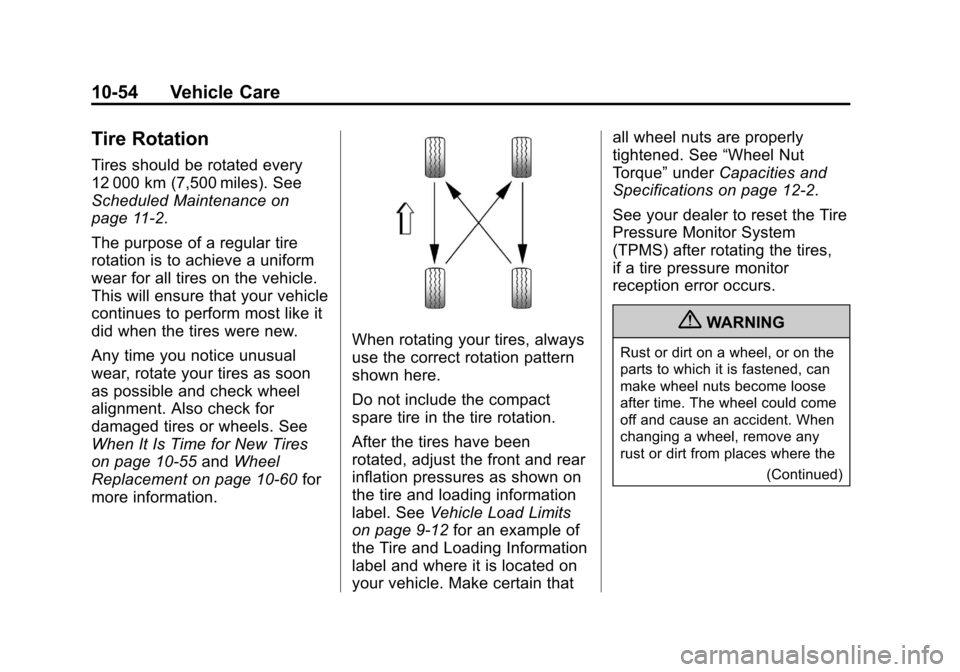
When rotating your tires, always
use the correct rotation pattern
shown here.
Do not include the compact
spare tire in the tire rotation.
After the tires have been
rotated, adjust the front and rear
inflation pressures as shown on
the tire and loading information
label. See Vehicle Load Limits
on page 9‑12 for an example of
the Tire and Loading Information
label and where it is located on
your vehicle. Make certain that all wheel nuts are properly
tightened. See
“Wheel Nut
Torque” underCapacities and
Specifications on page 12‑2.
See your dealer to reset the Tire
Pressure Monitor System
(TPMS) after rotating the tires,
if a tire pressure monitor
reception error occurs.
{WARNING
Rust or dirt on a wheel, or on the
parts to which it is fastened, can
make wheel nuts become loose
after time. The wheel could come
off and cause an accident. When
changing a wheel, remove any
rust or dirt from places where the
(Continued)