Page 201 of 528

Black plate (15,1)Cadillac STS Owner Manual - 2011
When going downhill, you might have to brake to keep
the vehicle speed down. When the brakes are applied
the cruise control is disengaged.
Ending Cruise Control
There are three ways to end cruise control.
.To disengage cruise control; step lightly on the
brake pedal.
.Press the[button on the steering wheel.
.To turn off cruise control, move the cruise control
switch to
9.
Erasing Speed Memory
The cruise control set speed is erased from memory by
moving the cruise control switch to
9or if the ignition
is turned off.
Adaptive Cruise Control
If the vehicle has adaptive cruise control, read the
Radio Frequency Statementon page 8‑20before using
this feature.
Changes or modifications to this system by other than
an authorized service facility could void authorization to
use this equipment.
Adaptive Cruise Control is an enhancement to
traditional cruise control and is not a safety system.
It allows you to keep cruise control engaged in
moderate traffic conditions without having to constantly
be reset. Adaptive Cruise Control uses radar to
detect a vehicle directly ahead in your path, within a
distance of 100 m (328 ft), and operates at speeds
above 48 km/h (30 mph). When it is engaged by
the driver, the system can apply limited braking or
acceleration of the vehicle, automatically, to maintain
a selected following distance to the vehicle ahead.
4-15
Page 203 of 528

Black plate (17,1)Cadillac STS Owner Manual - 2011
WARNING: (Continued)
.On slippery roads, fast changes in tire traction
can cause needless wheel spinning, and you
could lose control. Do not use cruise control
on slippery roads.
.When weather limits visibility, such as when in
fog, rain, or snow conditions, Adaptive Cruise
Control performance is limited. There may not
be enough distance to adapt to the changing
traffic conditions. Do not use cruise control
when visibility is low.
The cruise controls are
located on the end of the
multifunction lever.
The Adaptive Cruise controls are located on the left
side of the steering wheel.
9 (Off): Turns the system off.
R (On): Turns the system on.
S (Resume/Increase): Use this position to make the
vehicle resume a previously set speed or increase the
set speed when Adaptive Cruise Control is already
active.
T (Set/Decrease): Press to set the speed or to
decrease the set speed when Adaptive Cruise Control
is already active.
[(Cancel): Press to disengage cruise control without
erasing the set speed from memory.
4-17
Page 206 of 528

Black plate (20,1)Cadillac STS Owner Manual - 2011
.To increase the set speed in small amounts, move
the switch briefly to resume/increase. Each time
this is done, the vehicle set speed increases by
about 1.6 km/h (1 mph).
Your vehicle will not reach the set speed until the
system determines there is no vehicle in front of you.
At that point, your vehicle speed will increase to the set
speed.
Decreasing Set Speed While Using
Adaptive Cruise Control
If the Adaptive Cruise Control system is already
activated,
.PressTat the end of the lever until the lower
speed desired is reached, then release the button.
.To slow down in small amounts, briefly
press
T. Each time this is done, the vehicle
set speed decreases by about 1.6 km/h (1 mph).
Selecting the Follow Distance (GAP)
When the system detects a slower moving vehicle, it
will adjust your vehicle's speed and maintain the
following distance (gap) selected.
Use the GAP button on the steering wheel to adjust
the follow distance between your vehicle and other
vehicle's.
Press the top of the button to increase the distance or
the bottom of the button to decrease the distance. The
first button press shows the current follow distance
setting on the HUD. The current following distance
setting is maintained until it is changed.
There are six follow distances to choose from. The
follow distance selection ranges from near to far
(one second to two seconds follow time). The distance
maintained for a selected follow distance varies based
on vehicle speed. The faster the vehicle speed the
further back you will follow. Consider traffic and weather
conditions when selecting the follow distance.
4-20
Page 225 of 528
Black plate (39,1)Cadillac STS Owner Manual - 2011
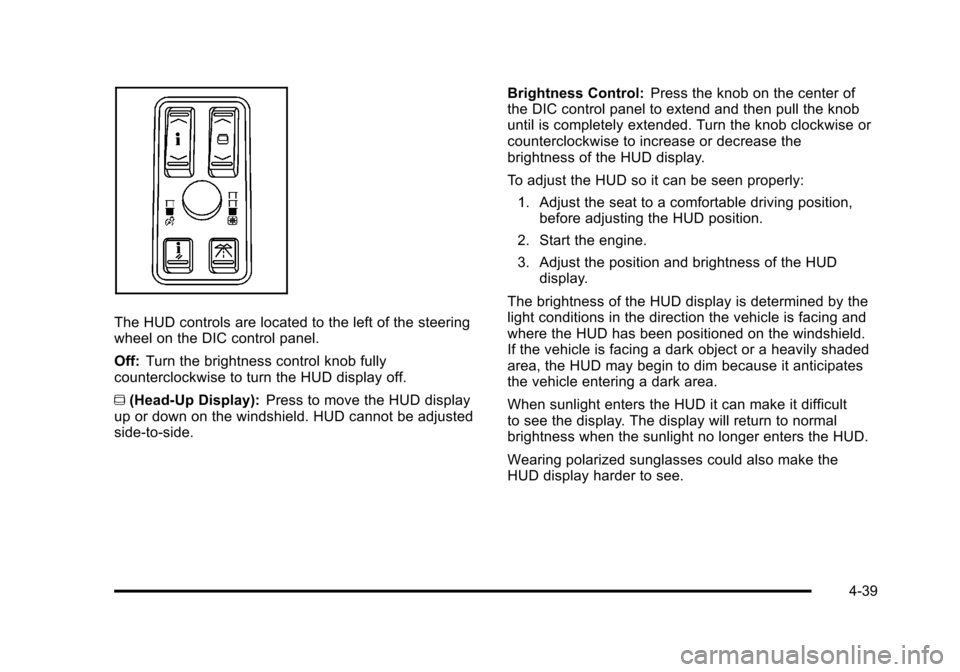
The HUD controls are located to the left of the steering
wheel on the DIC control panel.
Off:Turn the brightness control knob fully
counterclockwise to turn the HUD display off.
~ (Head-Up Display): Press to move the HUD display
up or down on the windshield. HUD cannot be adjusted
side‐to‐side. Brightness Control:
Press the knob on the center of
the DIC control panel to extend and then pull the knob
until is completely extended. Turn the knob clockwise or
counterclockwise to increase or decrease the
brightness of the HUD display.
To adjust the HUD so it can be seen properly:
1. Adjust the seat to a comfortable driving position, before adjusting the HUD position.
2. Start the engine.
3. Adjust the position and brightness of the HUD display.
The brightness of the HUD display is determined by the
light conditions in the direction the vehicle is facing and
where the HUD has been positioned on the windshield.
If the vehicle is facing a dark object or a heavily shaded
area, the HUD may begin to dim because it anticipates
the vehicle entering a dark area.
When sunlight enters the HUD it can make it difficult
to see the display. The display will return to normal
brightness when the sunlight no longer enters the HUD.
Wearing polarized sunglasses could also make the
HUD display harder to see.
4-39
Page 233 of 528
Black plate (47,1)Cadillac STS Owner Manual - 2011
Sensors
The solar sensor located on the instrument panel, near
the windshield, monitors the solar heat.The interior temperature sensor located on the
instrument panel to the right of the steering wheel,
measures the temperature of the air inside the vehicle.
The climate control system uses the information from
these sensors to adjust the temperature, the fan speed
and the air delivery, in order to maintain the selected
temperature. The system may also supply cooler air to
the side of the vehicle facing the sun.
Do not cover the sensors or the automatic climate
control system will not work properly.
4-47
Page 251 of 528

Black plate (65,1)Cadillac STS Owner Manual - 2011
Emissions Inspection and Maintenance
Programs
Some state/provincial and local governments may have
programs to inspect the on-vehicle emission control
equipment For the inspection, the emission system test
equipment is connected to the vehicle’s Data Link
Connector (DLC).
The DLC is under the instrument panel to the left of the
steering wheel. See your dealer if assistance is needed.The vehicle may not pass inspection if:
.the Malfunction Indicator Lamp is on with the
engine running, or if the light does not come on
when the ignition is turned to ON/RUN while the
engine is off.
.the critical emission control systems have not been
completely diagnosed by the system. This can
happen if the battery has recently been replaced or
if the battery has run down. The diagnostic system
evaluates critical emission control systems during
normal driving. This can take several days of
routine driving. If this has been done and the
vehicle still does not pass the inspection, your
dealer can prepare the vehicle for inspection.
4-65
Page 255 of 528

Black plate (69,1)Cadillac STS Owner Manual - 2011
Driver Information Center (DIC)
The Driver Information Center (DIC) gives you the
status of many of your vehicle's systems. The DIC is
also used to display warning/status messages. All
messages will appear in the DIC display located at
the bottom of the instrument panel cluster, below the
tachometer and speedometer. The DIC buttons are
located on the instrument panel, to the left of the
steering wheel.
The DIC comes on when the ignition is on. After a short
delay, the DIC will display the current driver and the
information that was last displayed before the engine
was turned off.
The top line of the DIC display shows the vehicle
system information and the warning/status messages.
The bottom line of the DIC display shows either the
odometer, the trip odometer A or the trip odometer B
information on the left side. Only one odometer can
appear at a time. See“Trip Information”underDIC
Operation and Displays
on page 4‑70for information on changing the display to show the odometer or trip
odometer information. The bottom line of the DIC
display also shows the outside temperature on the
right side and the shift lever position indicator in the
center. See
Automatic Transmission Operation
on
page 3‑30for more information on the shift lever
positions.
When the sport mode is active, an S will appear next
to the shift position indicator on the center of the DIC
display. When the manual mode is active, an M will
appear on the DIC display. When the normal mode is
active, only the shift position indicator will appear. While
the Driver Shift Control (DSC) feature is active, the DIC
will change to show the selected gear. See “Driver Shift
Control (DSC)” underAutomatic Transmission
Operation
on page 3‑30for more information.
If a problem is detected, a warning message will appear
on the display. Be sure to take any message that
appears on the display seriously and remember that
clearing the message will only make the message
disappear, not correct the problem.
4-69
Page 256 of 528

Black plate (70,1)Cadillac STS Owner Manual - 2011
DIC Operation and Displays
The Driver Information Center (DIC) has different
modes which can be accessed by pressing the four
DIC buttons located on the instrument panel, to the
left of the steering wheel.
DIC Buttons (Base Level)
If your vehicle does not
have a Head-Up Display
(HUD), these are the
buttons for the DIC.
«4ª(Information): Press the top or bottom of this
button to scroll through the available vehicle information
displays which include digital speed display, if your
vehicle has this feature, fuel range, fuel economy,
fuel used, average speed, timer, battery voltage, tire
pressure, and engine oil life, if your vehicle has this
feature.
If you have an STS-V, the DIC also has additional
vehicle information displays which include engine boost,
engine oil temperature, oil pressure, and transmission
fluid temperature.
See “MPH (km)” later in this section for more
information on the digital speed display.
AB
300 (Trip Information): Press the top of this
button to scroll through the odometer, trip odometer A
and trip odometer B. Press and hold the bottom of this
button to reset each trip odometer back to zero.
4 //(Reset): Press this button to reset certain DIC
features and to acknowledge DIC warning messages
and clear them from the DIC display.
EM (English/Metric): Press this button to change the
display from English to metric.
4-70
