2011 CADILLAC SRX lock
[x] Cancel search: lockPage 222 of 498

Black plate (18,1)Cadillac SRX Owner Manual - 2011
7-18 Infotainment System
XM Messages
XL (Explicit Language
Channels):These channels,
or any others, can be blocked by
request, by calling 1-800-929-2100.
XM Updating: The encryption code
in the receiver is being updated,
no action is required. This process
should take no longer than
30 seconds.
Loading XM: The audio system is
acquiring and processing audio and
text data, no action is needed. This
message should disappear shortly.
Channel Off Air: This channel is
not currently in service. Tune in to
another channel.
Channel Unauth : This channel is
blocked or cannot be received with
your XM Subscription package.
Channel Unavailable: This
previously assigned channel is no
longer assigned. Tune to another
station. No Artist Info:
The system
is working properly. No artist
information is available at this
time on this channel.
No Title Info: The system is
working properly. No song title
information is available at this
time on this channel.
No CAT Info: The system is
working properly. No category
information is available at this
time on this channel.
No Information: The system
is working properly. No text or
informational messages are
available at this time on this
channel.
No XM Signal: The system is
working properly. The vehicle may
be in a location that where the XM
signal is being blocked. When the
vehicle is moved into an open area,
the signal should return. CAT Not Found:
The system is
working properly. There are no
channels available for the selected
category.
XM Radio ID: If tuned to channel 0,
this message alternates with the
XM Radio 8 digit radio ID label.
This label is needed to activate
the service.
Unknown: If this message is
received when tuned to channel 0,
there could be a receiver fault.
Consult with your dealer.
Check Antenna: If this message
does not clear within a short period
of time, the receiver could have a
fault. Consult with your dealer.
XM Not Available: If this message
does not clear within a short period
of time, the receiver could have a
fault. Consult with your dealer.
Page 243 of 498

Black plate (39,1)Cadillac SRX Owner Manual - 2011
Infotainment System 7-39
Global Off
Depending on the infotainment
system, the RSE system may
have a Global Off feature.
The Global Off feature disables
all RSE system features. Press
and hold the radio power button for
more than three seconds for Global
Off to disable the RSE features.
A padlock icon may display on
the infotainment screen when the
Global Off feature is on. On some
infotainment systems, the Global
Off feature can be turned off by
performing one of the following:
.Press and hold the radio
power button for more than
three seconds.
.Insert or eject any disc.
.Insert a DVD video disc.
.Press the Remote Control power
button.
.Press the MEM/DVD/AUX button
or the
kbutton when a DVD
video disc is in the player.
.Press the SRC button on the
steering wheel when a DVD
video disc is in the player.
.Cycle the ignition.
Headphones
A. Battery cover
B. Channel 1 or 2 switch
C. Power button
D. Volume control
E. Power indicator light
Page 247 of 498
Black plate (43,1)Cadillac SRX Owner Manual - 2011
Infotainment System 7-43
Push the video screen down into its
locked position when it is not in use.
The screen turns off automatically.
Only the left RSE seatback console
contains the infrared transmitters
for the wireless headphones. They
may be visible as eight illuminated
LEDs. These LEDs are not on the
right video screen. Both seatback
consoles contain an infrared
receiver for the remote control.
They are located at the top of
each console.
Notice:Avoid directly touching
the video screen, as damage may
occur. See “Cleaning the Video
Screen” later in this section for
more information.Video Screen Input Jack
Each video screen is equipped
with a video input jack to allow
video cables to be connected
from an auxiliary device such as a
camcorder or a video game system.
This signal will override any video
provided by the RSE system; either
the DVD or Auxiliary A/V jack
source. The RSE system must
be on for this input to operate.
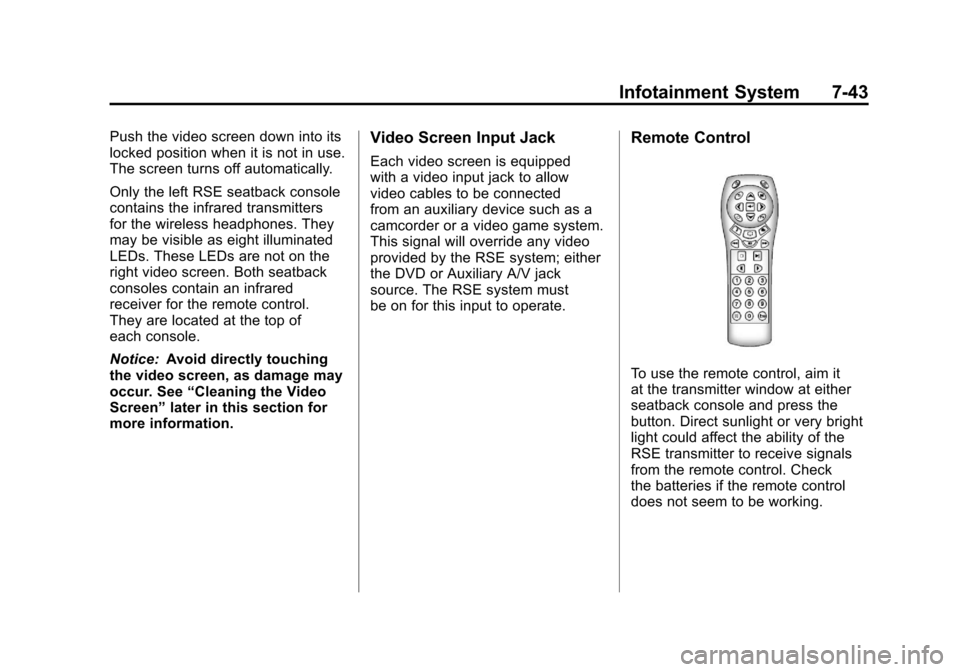
Remote Control
To use the remote control, aim it
at the transmitter window at either
seatback console and press the
button. Direct sunlight or very bright
light could affect the ability of the
RSE transmitter to receive signals
from the remote control. Check
the batteries if the remote control
does not seem to be working.
Page 248 of 498

Black plate (44,1)Cadillac SRX Owner Manual - 2011
7-44 Infotainment System
See“Battery Replacement” later in
this section. Objects blocking the
line of sight could also affect the
function of the remote control.
If a CD, DVD, or MP3 disc is in the
Radio DVD slot, the remote control
Obutton can be used to turn on
the video screen display and start
the disc. The infotainment system
can also turn on the video screen
display. See CD/DVD Player on
page 7‑22 or the separate
navigation system manual for
more information.
Notice: Storing the remote
control in a hot area or in direct
sunlight can damage it, and the
repairs will not be covered by the
warranty. Storage in extreme cold
can weaken the batteries. Keep
the remote control stored in a
cool, dry place. Remote Control Buttons
O(Power):
Press to turn the video
screens on and off.
P(Illumination): Press to turn
the remote control backlight on.
The backlight times out after
several seconds if no other
button is pressed.
v(Title): Press to return to
the main menu of the DVD. This
function could vary for each disc.
y(Main Menu): Press to access
the DVD menu. The DVD menu is
different on every DVD. Use the
navigation arrows to move the
cursor. After making a selection
press the enter button. This button
only operates when using a DVD.
n,q,p,o(Menu Navigation
Arrows): Use the arrow buttons to
navigate through a menu.
r(Enter): Press to select the
highlighted choice in any menu.
z(Display Menu): Press to
adjust the brightness and screen
display mode, and display the
language menu.
q(Return): Press to exit the
current active menu and return to
the previous menu. This button
operates only when the display
menu or a DVD menu is active.
c(Stop): Press to stop playing,
rewinding, or fast forwarding a
DVD. Press twice to return to the
beginning of the DVD.
Page 274 of 498

Black plate (6,1)Cadillac SRX Owner Manual - 2011
8-6 Climate Controls
Automatic Operation
AUTO:Press
Nuntil the AUTO
setting is selected to control the rear
temperature, air delivery, and fan
speed automatically.
Manual Operation
D C(Fan Control): Press these
buttons on the rear seat audio
control panel to increase or
decrease the airflow. Pressing
the fan up button when the system
is off will turn the system on. The
air delivery mode remains in its
previous setting.
+/− (Temperature Control):
Press these buttons to adjust
the temperature of the air flowing
into the passenger area. Press the
+ button for warmer air and press
the −button for cooler air.
N(Air Delivery Mode Control):
Press the mode button to change
the direction of the airflow in the
vehicle. Multiple presses will cycle
through the delivery selections.
Air Vents
Move the sliding knob on the air
outlets up and down or left and
right to direct the airflow. Use the
thumbwheels near the air outlets to
open or close off the airflow.
Operation Tips
.Clear away any ice, snow,
or leaves from air inlets at the
base of the windshield that could
block the flow of air into the
vehicle.
.Keep the path under the front
seats clear of objects to help
circulate the air inside the
vehicle more effectively.
.Use of non‐GM approved hood
deflectors can adversely affect
the performance of the system.
Check with your dealer before
adding equipment to the outside
of the vehicle.
Maintenance
Passenger Compartment
Air Filter
The filter removes dust, pollen, and
other airborne irritants from outside
air that is pulled into the vehicle.
The filter should be replaced as part
of routine scheduled maintenance.
To find out what type of filter to use,
see Maintenance Replacement
Parts on page 11‑9.
1. Open the glove box completely and remove the four screws
along the upper portion of the
glovebox.
2. When released, lower the upper portion of the glovebox.
3. Locate the service door for the passenger compartment air filter.
Page 277 of 498

Black plate (1,1)Cadillac SRX Owner Manual - 2011
Driving and Operating 9-1
Driving and
Operating
Driving Information
Defensive Driving . . . . . . . . . . . . . 9-2
Drunk Driving . . . . . . . . . . . . . . . . . 9-3
Control of a Vehicle . . . . . . . . . . . 9-3
Braking . . . . . . . . . . . . . . . . . . . . . . . 9-4
Steering . . . . . . . . . . . . . . . . . . . . . . . 9-5
Off-Road Recovery . . . . . . . . . . . . 9-6
Loss of Control . . . . . . . . . . . . . . . . 9-6
Driving on Wet Roads . . . . . . . . . 9-7
Highway Hypnosis . . . . . . . . . . . . 9-8
Hill and Mountain Roads . . . . . . 9-8
Winter Driving . . . . . . . . . . . . . . . . . 9-9
If the Vehicle is Stuck . . . . . . . . 9-11
Vehicle Load Limits . . . . . . . . . . 9-12
Starting and Operating
New Vehicle Break-In . . . . . . . . 9-17
Adjustable Throttle and BrakePedal . . . . . . . . . . . . . . . . . . . . . . . 9-17
Ignition Positions . . . . . . . . . . . . 9-18
Starting the Gasoline Engine . . . . . . . . . . . . . . . . . . . . . 9-19 Engine Heater . . . . . . . . . . . . . . . 9-21
Retained Accessory
Power (RAP) . . . . . . . . . . . . . . . 9-22
Shifting Into Park . . . . . . . . . . . . 9-22
Shifting Out of Park . . . . . . . . . . 9-24
Parking Over Things That Burn . . . . . . . . . . . . . . . . . . 9-24
Engine Exhaust
Engine Exhaust . . . . . . . . . . . . . . 9-24
Running the Vehicle WhileParked . . . . . . . . . . . . . . . . . . . . . 9-25
Automatic Transmission
Automatic Transmission . . . . . 9-26
Manual Mode . . . . . . . . . . . . . . . . 9-28
Fuel Economy Mode . . . . . . . . . 9-29
Drive Systems
All-Wheel Drive . . . . . . . . . . . . . . 9-30
Brakes
Antilock BrakeSystem (ABS) . . . . . . . . . . . . . . 9-30
Parking Brake . . . . . . . . . . . . . . . 9-31
Brake Assist . . . . . . . . . . . . . . . . . 9-33
Hill Start Assist (HSA) . . . . . . . 9-33
Ride Control Systems
Traction Control System (TCS) . . . . . . . . . . . . . . 9-34
StabiliTrak
®System . . . . . . . . . 9-35
Limited-Slip Rear Axle . . . . . . . 9-37
Selective Ride Control . . . . . . . 9-37
Cruise Control
Cruise Control . . . . . . . . . . . . . . . 9-38
Object Detection Systems
Ultrasonic Parking Assist . . . . 9-40
Rear Vision Camera (RVC) . . . . . . . . . . . . . 9-43
Fuel
Fuel . . . . . . . . . . . . . . . . . . . . . . . . . 9-47
Recommended Fuel . . . . . . . . . 9-47
Gasoline Specifications . . . . . . 9-48
California FuelRequirements . . . . . . . . . . . . . . 9-48
Fuels in Foreign Countries . . . 9-49
Fuel Additives . . . . . . . . . . . . . . . 9-49
Fuel E85 (85% Ethanol) . . . . . 9-50
Filling the Tank . . . . . . . . . . . . . . 9-52
Filling a Portable Fuel Container . . . . . . . . . . . . . . . . . . . 9-53
Page 281 of 498

Black plate (5,1)Cadillac SRX Owner Manual - 2011
Driving and Operating 9-5
Steering
Power Steering
If power steering assist is lost
because the engine stops or the
power steering system is not
functioning, the vehicle can be
steered but it will take more effort.
Steering Tips
It is important to take curves at a
reasonable speed.
Traction in a curve depends on
the condition of the tires and the
road surface, the angle at which the
curve is banked, and vehicle speed.
While in a curve, speed is the one
factor that can be controlled.
If there is a need to reduce speed,
do it before entering the curve, while
the front wheels are straight.
Try to adjust the speed so you can
drive through the curve. Maintain a
reasonable, steady speed. Wait to
accelerate until out of the curve,
and then accelerate gently into the
straightaway.
Steering in Emergencies
There are times when steering
can be more effective than braking.
For example, you come over a hill
and find a truck stopped in your
lane, or a car suddenly pulls out
from nowhere, or a child darts out
from between parked cars and stops
right in front of you. These problems
can be avoided by braking—if you
can stop in time. But sometimes you
cannot stop in time because there
is no room. That is the time for
evasive action —steering around
the problem.
The vehicle can perform very well
in emergencies like these. First
apply the brakes. See Braking on
page 9‑4. It is better to remove
as much speed as possible from
a collision. Then steer around
the problem, to the left or right
depending on the space available.
An emergency like this requires
close attention and a quick decision.
If holding the steering wheel at the
recommended 9 and 3 o'clock
positions, it can be turned a full
180 degrees very quickly without
removing either hand. But you have
to act fast, steer quickly, and just as
quickly straighten the wheel once
you have avoided the object.
The fact that such emergency
situations are always possible is a
good reason to practice defensive
driving at all times and wear safety
belts properly.
Page 283 of 498

Black plate (7,1)Cadillac SRX Owner Manual - 2011
Driving and Operating 9-7
Of course, traction is reduced when
water, snow, ice, gravel, or other
material is on the road. For safety,
slow down and adjust your driving to
these conditions. It is important to
slow down on slippery surfaces
because stopping distance is longer
and vehicle control more limited.
While driving on a surface with
reduced traction, try to avoid
sudden steering, acceleration,
or braking, including reducing
vehicle speed by shifting to a lower
gear. Any sudden changes could
cause the tires to slide. You might
not realize the surface is slippery
until the vehicle is skidding. Learn
to recognize warning clues—such
as enough water, ice, or packed
snow on the road to make a
mirrored surface —and slow
down when you have any doubt.
Remember: Antilock brakes help
avoid only the braking skid.Driving on Wet Roads
Rain and wet roads can reduce
vehicle traction and affect your
ability to stop and accelerate.
Always drive slower in these types
of driving conditions and avoid
driving through large puddles and
deep‐standing or flowing water.
{WARNING
Wet brakes can cause crashes.
They might not work as well in
a quick stop and could cause
pulling to one side. You could
lose control of the vehicle.
After driving through a large
puddle of water or a car/vehicle
wash, lightly apply the brake
pedal until the brakes work
normally.
(Continued)
WARNING (Continued)
Flowing or rushing water creates
strong forces. Driving through
flowing water could cause your
vehicle to be carried away. If this
happens, you and other vehicle
occupants could drown. Do not
ignore police warnings and be
very cautious about trying to
drive through flowing water.
Hydroplaning
Hydroplaning is dangerous. Water
can build up under the vehicle's
tires so they actually ride on the
water. This can happen if the road
is wet enough and you are going
fast enough. When the vehicle is
hydroplaning, it has little or no
contact with the road.
There is no hard and fast rule about
hydroplaning. The best advice is to
slow down when the road is wet.