2011 BUICK LUCERNE instrument panel
[x] Cancel search: instrument panelPage 177 of 450
Black plate (21,1)Buick Lucerne Owner Manual - 2011
AUTO (Automatic Mode)
1. Turn the fan control to AUTO.
2. Turn the mode control to AUTO.
3. Adjust the temperature to a comfortable settingbetween 68°F (21°C) and 78°F (26°C).
Choosing the coldest or warmest temperature
setting will not cause the system to heat or cool
any faster. In cold weather, the system starts at
reduced fan speeds to avoid blowing cold air
into the vehicle until warmer air is available. The
system will start out blowing air to the floor, but
may change modes automatically as the vehicle
warms up to maintain the chosen temperature
setting. The length of time needed to warm the
interior depends on the outside temperature.
4. Wait a few minutes for the system to automatically regulate. Then adjust the temperature as
necessary to find your comfort setting.
Do not cover the solar sensor located in the center of
the instrument panel, near the windshield. For more
information on the solar sensor, see “Sensors”later in
this section.
After the vehicle is started, the display shows the
interior temperature settings. When the ENG/MET (English/metric) button on the
Driver Information Center (DIC) is pressed, the display
shows readings in Fahrenheit or Celsius. Use the
ENG/MET button to toggle between the readings.
AUTO (Automatic Air Conditioning):
If AUTO is
selected on the fan or mode control, the system
automatically controls the air conditioning compressor.
The A/C compressor runs automatically even at cool
outside temperatures in order to dehumidify the air. The
A/C indicator light is lit when the system is operating
automatically. Press the A/C button on the fan control to
turn off the A/C. To clear windows better in defog or
defrost modes, the A/C compressor runs automatically
in damp cool conditions.
h(Auto Recirculation): If AUTO is selected on
either the fan or mode control, the system automatically
controls the supply of fresh outside air or recirculates
the interior air to cool the car faster. The indicator light
on the recirculation button will light whenever the
system switches to recirculation. You may force outside
air by pressing the outside air button. The next time
AUTO fan or mode is selected, it will reset back to
AUTO operation.
4-21
Page 178 of 450

Black plate (22,1)Buick Lucerne Owner Manual - 2011
Manual Operation
9(Off):Turns the climate control system off. Outside
air still enters the vehicle and is directed to the floor.
The airflow direction and temperature can be adjusted.
If the temperature is adjusted while the system is off,
the display will light to show the current settings.
w x(Driver Temperature Controls): Press these
buttons next to the fan control to increase or decrease
the temperature inside the vehicle.
w x(Passenger Temperature Controls): Press
these buttons next to the mode control to increase or
decrease the temperature for the front passenger. If the
passenger climate control system is off, pressing one of
these buttons turns it on.
9(Fan Control): Turn clockwise or counterclockwise
to increase or decrease the fan speed. Turning this
control completely counterclockwise turns on the
automatic fan operation.
If the airflow seems low when the fan speed is at the
highest setting, the passenger compartment air filter
may need to be replaced. For more information, see
Passenger Compartment Air Filter
on page 4‑25and
Scheduled Maintenance on page 7‑3.
Air Delivery Mode Control: Turn clockwise or
counterclockwise to change the direction of the airflow
in the vehicle. To change the current mode, select one of the following:
F(Vent):
Air is directed to the instrument panel outlets.
*(Bi-Level): Air is divided between the instrument
panel outlets and the floor outlets. In automatic
operation, cooler air is directed to the upper outlets
and warmer air to the floor outlets.
7(Floor): Air is directed to the floor outlets, with some
air directed to the windshield and side window outlets.
If recirculation is selected while in this mode, it stays on
for three minutes to reduce windshield fogging.
W(Floor/Defog): This mode clears the windows of fog
or moisture. Air is directed to the floor outlets, with
some air directed to the windshield and side window
outlets. The system turns off recirculation and runs the
air-conditioning compressor unless the outside
temperature is at or below freezing. The recirculation
mode cannot be selected while in the floor/defog mode.
0(Defrost): This mode removes fog or frost from
the windshield more quickly. Air is directed to the
windshield and the side window outlets. The system
automatically turns off recirculation and runs the
air-conditioning compressor, unless the outside
temperature is at or below freezing. Recirculation
cannot be selected while in the defrost mode.
4-22
Page 179 of 450

Black plate (23,1)Buick Lucerne Owner Manual - 2011
#(Air Conditioning):Press to turn the air
conditioning system on or off and override the
automatic system. An indicator light below the
button comes on to show that this mode is on.
The air conditioning system removes moisture from the
air, so a small amount of water might drip under the
vehicle while idling or after turning off the engine. This
is normal.
:(Outside Air): Press to let outside air enter the
vehicle. An indicator light comes on to show this mode
is on. Pressing
?cancels this mode.
?(Recirculation): Press to turn the recirculation
mode on. An indicator light below the button comes on
to show that this mode is on. This mode recirculates
and helps to quickly cool the air inside the vehicle.
It can be used to prevent outside air and odors from
entering the vehicle. This mode cannot be selected
while in the defog or defrost modes. If you try to select
the recirculation mode, the indicator light flashes
three times and turns off.
Operation in this mode during periods of high humidity
and cool outside temperatures may result in increased
window fogging. If window fogging is experienced,
select the defrost mode.
PASS (Passenger Climate Control): Press to turn the
passenger climate control systems on or off. When the passenger climate control system is on, the
passenger temperature setting is displayed.
If the PASS button is pressed to turn the passenger
temperature setting off, the driver temperature setting
controls the temperature for the entire vehicle.
Sensors
The solar sensor, located in the defrost grille, in the
middle of the instrument panel, monitors the solar
radiation. Do not cover the solar sensor or the system
will not work properly.
4-23
Page 184 of 450

Black plate (28,1)Buick Lucerne Owner Manual - 2011
Instrument Panel Cluster
English Super Model Shown, Metric and Base Similar
4-28
Page 186 of 450

Black plate (30,1)Buick Lucerne Owner Manual - 2011
Passenger Safety Belt Reminder Light
For vehicles equipped with the passenger safety belt
reminder light, several seconds after the engine is
started, a chime sounds for several seconds to remind
the front passenger to buckle their safety belt. The
passenger safety belt light, located on the instrument
panel, comes on and stays on for several seconds and
then flashes for several more.
This chime and light are
repeated if the passenger
remains unbuckled and
the vehicle is in motion.
If the passenger safety belt is buckled, neither the
chime nor the light comes on.
The front passenger safety belt warning light and chime
may turn on if an object is put on the seat such as a
briefcase, handbag, grocery bag, laptop or other
electronic device. To turn off the warning light and or
chime, remove the object from the seat or buckle the
safety belt.
Airbag Readiness Light
The system checks the airbag's electrical system for
possible malfunctions. If the light stays on it indicates
there is an electrical problem. The system check
includes the airbag sensor, the pretensioners, the
airbag modules, the wiring and the crash sensing and
diagnostic module. For more information on the airbag
system, see Airbag System on page 2‑55.
The airbag readiness light
flashes for a few seconds
when the engine is
started. If the light does
not come on then, have it
fixed immediately.
{WARNING:
If the airbag readiness light stays on after the
vehicle is started or comes on while driving, it
means the airbag system might not be working
properly. The airbags in the vehicle might not
inflate in a crash, or they could even inflate
without a crash. To help avoid injury, have the
vehicle serviced right away.
4-30
Page 195 of 450
Black plate (39,1)Buick Lucerne Owner Manual - 2011
.Make sure the electrical system is not wet. The
system could be wet if the vehicle was driven
through a deep puddle of water.
.Make sure to fuel the vehicle with quality fuel.
Poor fuel quality causes the engine not to run as
efficiently as designed and can cause: stalling
after start-up, stalling when the vehicle is changed
into gear, misfiring, hesitation on acceleration,
or stumbling on acceleration. These conditions
might go away once the engine is warmed up.
If one or more of these conditions occurs, change
the fuel brand used. It will require at least one full
tank of the proper fuel to turn the light off.
SeeGasoline Octane on page 6‑6.
If none of the above have made the light turn off,
your dealer can check the vehicle. The dealer has the
proper test equipment and diagnostic tools to fix any
mechanical or electrical problems that might have
developed.
Emissions Inspection and Maintenance
Programs
Some state/provincial and local governments may have
programs to inspect the on-vehicle emission control
equipment For the inspection, the emission system test
equipment is connected to the vehicle’s Data Link
Connector (DLC).
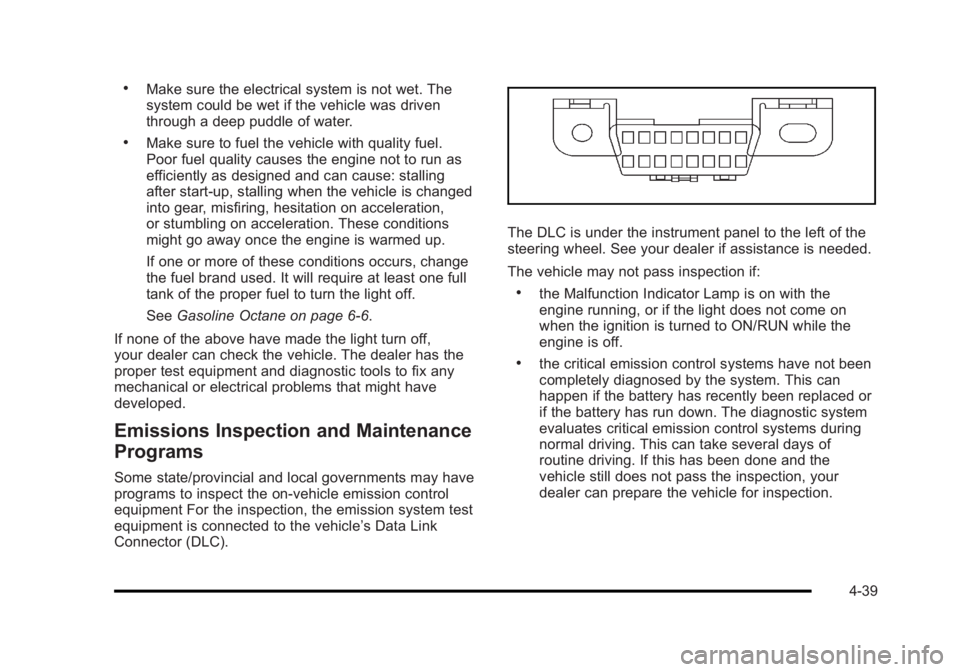
The DLC is under the instrument panel to the left of the
steering wheel. See your dealer if assistance is needed.
The vehicle may not pass inspection if:
.the Malfunction Indicator Lamp is on with the
engine running, or if the light does not come on
when the ignition is turned to ON/RUN while the
engine is off.
.the critical emission control systems have not been
completely diagnosed by the system. This can
happen if the battery has recently been replaced or
if the battery has run down. The diagnostic system
evaluates critical emission control systems during
normal driving. This can take several days of
routine driving. If this has been done and the
vehicle still does not pass the inspection, your
dealer can prepare the vehicle for inspection.
4-39
Page 198 of 450

Black plate (42,1)Buick Lucerne Owner Manual - 2011
Here are some things that some owners ask about.
None of these show a problem with the fuel gauge:
.At the service station, the gas pump shuts off
before the gauge reads full.
.It takes more (or less) fuel to fill up than the gauge
indicated. For example, the gauge may have
indicated half full, but it took more (or less) than
half the tank's capacity to fill it.
.The gauge moves up a little while turning a corner,
speeding up or making a hard stop.
.The gauge does not go back to empty when the
ignition is turned off.
Driver Information Center (DIC)
Your vehicle has a Driver Information Center (DIC).
All messages will appear in the DIC display located
below the speedometer in the instrument panel cluster.
The DIC buttons are located on the instrument panel, to
the left of the instrument panel cluster.
The DIC comes on when the ignition is on. After a short
delay, the DIC will display the information that was last
displayed before the engine was turned off.The DIC displays trip, fuel, and vehicle system
information, and warning messages if a system
problem is detected. The bottom line of the DIC
shows the shift lever position indicator. See
Automatic
Transmission Operation
on page 3‑24for more
information.
If your vehicle's DIC has these features, the compass
direction and the outside air temperature may also
display on the DIC when viewing the trip and fuel
information. The compass direction appears on the
top right corner of the DIC display. The outside air
temperature automatically appears in the bottom right
corner of the DIC display. If there is a problem with
the system that controls the temperature display, the
numbers will be replaced with dashes. If this occurs,
have the vehicle serviced by your dealer.
The DIC also allows some features to be customized.
See DIC Vehicle Customization
on page 4‑58for more
information.
DIC Operation and Displays
The DIC has different displays which can be accessed
by pressing the DIC buttons located on the instrument
panel, to the left of the instrument panel cluster.
4-42
Page 206 of 450

Black plate (50,1)Buick Lucerne Owner Manual - 2011
CHANGE ENGINE OIL SOON
This message displays when service is required for the
vehicle. See your dealer. SeeEngine Oilon page 6‑18andScheduled Maintenanceon page 7‑3for more
information.
Acknowledging the CHANGE ENGINE OIL SOON
message will not reset the OIL LIFE REMAINING. That
must be done at the OIL LIFE screen under the vehicle
information menu. See “Oil Life”underDIC Operation
and Displays
on page 4‑42and Engine Oil Life Systemon page 6‑22.
DRIVER DOOR OPEN
This message displays when the driver door is not
closed properly. Make sure that the door is closed
completely.
ENGINE HOT A/C
(Air Conditioning) OFF
This message displays when the engine coolant
becomes hotter than the normal operating temperature.
To avoid added strain on a hot engine, the air
conditioning compressor is automatically turned off.
When the coolant temperature returns to normal, the
A/C operation automatically resumes. You can continue
to drive your vehicle. If this message continues to
appear, have the system repaired by your dealer as
soon as possible to avoid compressor damage.
ENGINE OVERHEATED IDLE ENGINE
Notice: If you drive your vehicle while the engine is
overheating, severe engine damage may occur. If an
overheat warning appears on the instrument panel
cluster and/or DIC, stop the vehicle as soon as
possible. Do not increase the engine speed above
normal idling speed. See Engine Overheating
on
page 6‑35for more information.
This message displays when the engine coolant
temperature is too hot. Stop and allow the vehicle to
idle until it cools down.
ENGINE OVERHEATED STOP ENGINE
Notice: If you drive your vehicle while the engine is
overheating, severe engine damage may occur. If an
overheat warning appears on the instrument panel
cluster and/or DIC, stop the vehicle as soon as
possible. See Engine Overheating
on page 6‑35for
more information.
This message displays along with a continuous chime
when the engine has overheated. Stop and turn the
engine off immediately to avoid severe engine damage.
See Engine Overheating on page 6‑35.
4-50