2011 AUDI TT ROADSTER engine
[x] Cancel search: enginePage 20 of 260

18 Instrument s and w arn ing /indic ato r light s
See your authorized Audi dealer as soon as
possible .
A WARNING
-If the B warning light does not go
out, or if it comes on while driv ing, the
ABS system is not working properly. The
vehicle can then be stopped only with
the brakes operating without ABS sup port . You will not have the protection
ABS provides. Contact you r A udi dealer
as soon as possible.
- USA models: If both, the~ warning
light and the Bwarning light come
on at the s ame t ime, the rear wheels
cou ld lock up first under hard braking.
Lock-up of the rear whee l brakes can
cause loss of vehicle control and an acci
dent. Have yo ur vehicle repaired immed i
ately by your authorized Audi dealer or a
qualified workshop. Dr ive slowly and
avo id sudden, hard brake applicat ion .
-Canada models: If both, the brake warn
ing light . and the ABS warning light
II] come on at the same t ime, the rear
wheels co uld lock up first unde r hard
braking. Loc k-up of the rear wheel b rakes
can ca use loss of vehicle control and a n
acc iden t. Have you r vehicle repaired im
me diately by your authorized Audi dealer
or a q ualified workshop. Drive slowly and
avo id sudden, hard brake applicat ion
~ Electro-mechanical power assist
If the indicator light illuminates w hile you are
driving, there is a malfunction i n the electro
mechanical steering. If the ind icator light is
show ing
E'2:'~ . the re may be a red uction in pow
e r stee ring assist. If the ind icator light is
show ing • • the re may be a tota l loss of pow
e r steering assis t. T he steering must be in
spected immediate ly by a q uali fied wor ks hop
¢ .&, .With the engine not running (e.g . when
the car is being towed), there is a lso no powe r
assist ava ilable.
A WARNING
-
If there is a ma lfunction, the indicator
light for the electro-mechanical power as
sist illuminates. Seek professional assis
tance.
Page 21 of 260

Driver information
system
Introduction
The Driver information display inside the in
strument cluster provides you, the driver,
with important information .
Fig. 7 Instrument cluster: center display
Fig. 8 Wiper lever: controls for the menu display
Center display
"' 0,
~ .. m
With the ignition on, the display in the Driver
I nformation System shows the fol lowing in
formation:
- CD* inserted or Radio* station set
- Outside temperature*: At temperatures be-
low 41 °F
(+5 °(), a snowflake symbol ap
pears in front of the temperature display
¢&_ .
-Warning: front lid, door or engine compart
ment lid open: The display appears if the
door, the engine compartment lid or front
lid is not closed.
Additional functions
You can open the following functions in the
Driver Information System display by pressing
the
I RESET I button ¢ fig. 8 one or more times:
Driver in format ion syste m 19
Digital speedometer*
Tire pressure monitoring
r:!;> page 212
Trip computer r:::;,page20
Menu display ¢page 21
Efficiency program ¢page23
Service interval display ¢page24
Lap timer* ¢page25
Speed warning r:::;,page 26
Auto Check Control
Some fun ction s and vehicle components are
scanned for their operating status when you
switch the ig nition on and while you are driv
ing . Malfunctions or required service proce
dures are signa led audibly and indicated by
red and yellow illuminated symbols and re
minders in the display
r:::;, page 29 .
.&_ WARNING
-
- Never rely exclusively on the outside
temperature display to determine if a road surface is icy or not. Keep in mind
that road surfaces, especially bridges
and overpasses, could be ice covered and
slippery even at an outside temperature
above 41 °F
(+S 0
().
-Always remember, even if the "snow
flake" symbol (ice warning) does not ap
pear in the display, black ice could be on
the road .
- Always reduce your speed and drive with
special care in cold weather conditions
when the chance of encountering icy
road surfaces increases.
@ Tips
- If the vehicle is stationary, or if you are
driving at a very low speed, the tempera
ture shown in the display might be
slightly higher than the actual outside
temperature. This is caused by the heat
being radiated from the engine.
- On vehicles with Audi Nav igation sys
tem*, the displays may differ from their
normal appearance during navigation.
Page 24 of 260

22 Driv e r in formation sy stem
Each display type in the Start menu contains a
submenu with additional options.
Set Clock
c;:,page23
Computer
c;:,page23
Acoust ic par k assist*
¢page83
Speed alarm (speed warning)
c;:,page27
Language (6 languages)
c:;>page23
Units (distance, fuel consump-
tion, temperature)
c;:,page23
Tire pressure monitoring
c;:,page 212
Lap timer *
c;:,page 25
Lighting*
c;:,page53
Wiper (service position)
c;:,page62
Window
¢page44
Doors (unlocking and locking
mode, for example Auto-lock)
c;:,page 37, c:;>page 37
Check Service
c;:,page24
Chassis number *
c;:, page 23 7
Engine oil temperature*
Registered keys
c:;>page35
Menu off All of the messages show n in ve-
hides without menu display a p-
pear on the display screen.
Navigating the menu
Use the rocker switch on the windshield wiper
lever and the
I Reset I button to operate the
menu and carry out inquiri es and selections.
~-- @
Fig. 1 3 Wiper lever: Controls for the men u display
Fi g. 14 Display: Start menu
I Reset I button @ and rocker switch @
c:;> fig. 13 functions:
To open the menu
.,. Press the I Reset I button @ until the me nu
d isp lay¢
fig. 14 appears
Selections and settings
.,. Press the rocker switch @to reach a menu
disp lay. The switch is operated the same as
the display (up/down) .
Entering and c onfirm ing
.,. Press the I Reset I button @.
Returning to the Start menu
.,. Press the I Reset I butto n longe r tha n 2 sec
onds to return from any menu level to the
Start men u.
U sing the rocke r swi tch , you can se lec t the
me nus in the display or change set tings. A
Page 30 of 260

28 Driv e r in formation sy stem
A few seconds after the adjustment is com
p leted, the illumination for the odometer and
the dig ital clock will go o ut.
@ Tips
This warning threshold can also be con
trolled through the trip computer
~page 22, Navigating the menu.
On-Board Diagnostic
system (OBD)
On-Board Diagnostics
Fig. 25 Locat ion of Data Link Connecto r (DLC)
On-Board Diagnostics monitors the compo
nents of you r emission control system. Each
monitored compo nen t in your eng ine system
has been assigned a code . In case of a ma l
function, the component will be identified
and the fau lt stored as a code in the control
module memory.
The MIL light may a lso illuminate if there is a
leak in the on-board fue l vapor recovery sys
tem .
If the light illuminates after a refuelling,
stop the vehicle and make sure the fuel filler
cap is properly closed ¢
page 176.
In o rder to make an accurate diagnosis, the
stored data can only be displayed using spe
cia l diagnostic equipment (generic scan tool
for OBD).
I n o rder to connect the special diagnostic
equipment, push the plug into the Data Link
Connector (DLC). The DLC is located to the
right of the hood release¢
fig. 25.
Your authorized Audi dea ler or a qualified
service station can interpret the code and per
form the necessary repair .
Malfunction Indicator lamp (MIL)
The Malfunction Indicator Lamp (MIL) &'I in
the instrument cluster¢
page 13, fig. 6 is
part of the On-Board Diagnostic COBO II) sys
tem .
The warning/indicator light illuminates when
the ignit io n is switched on and goes out after
the e ngine starts and the idle has stabilized.
Th is indicates that the MIL is working prope r
ly.
If th e light d oes not go out after the engine
is started, or illum inates wh ile you are dr iv
ing, a malfunc tion may exist in the engine sys
tem.
If the light illum inates, the catalytic con
verte r could be damaged .
Continue driving
with reduced p ower (avoid
ing sustained high speeds and/or rapid accel
erations) and have the cond ition corrected.
Contact you r authorized Audi dea le r.
If the light illum inates, the electronic speed
limi ter may also be malfunct ioning . For more
i nformation ¢
page 28, Electronic speed
limiter.
An improperly clo sed fu el filler cap ma y also
cau se the MIL light to illuminate
¢ page 176.
Electronic speed limiter
Your vehicle may be factory eq uipped w ith
tires that are rated for a maximum speed of 130 mph (210 km/h) . This is less than the
maximum speed of your vehicle. To reduce the
risk of sudden tire fai lure and loss of control if
the vehicle is operated at excessive speeds,
your vehicle a lso has an electronic speed limit
er . The electronic speed limiter prevents your
vehicle from going faster than the tire speed
rating. Fo r more information
¢page 205. ...,
Page 31 of 260
If the engine control unit receives fau lty vehi
cle roadspeed signa ls , the Ma lfunction Indica
tor Light (MIL)
Ill will illum inate . If th is oc
curs, contact the nearest authori zed Audi
dealer for assistance.
S mod els
Your vehicle 's top speed is e lectronically limit
ed to 155 mph (250 km/h).
If the engine control unit rece ives fa ulty vehi
cle roadspeed signa ls , the Ma lfunction Indica
tor Lamp (MIU ¢• will i lluminate. If this oc
curs, contact the nearest authorized Audi
dea ler for assistance.
A WARNING
-
Always observe the posted speed limits
and adjust your speed to suit prevailing
road, traff ic and weather conditions. Never
drive your vehicle faster than the maxi
mum speed rating of the tires insta lled.
Warnings and symbols
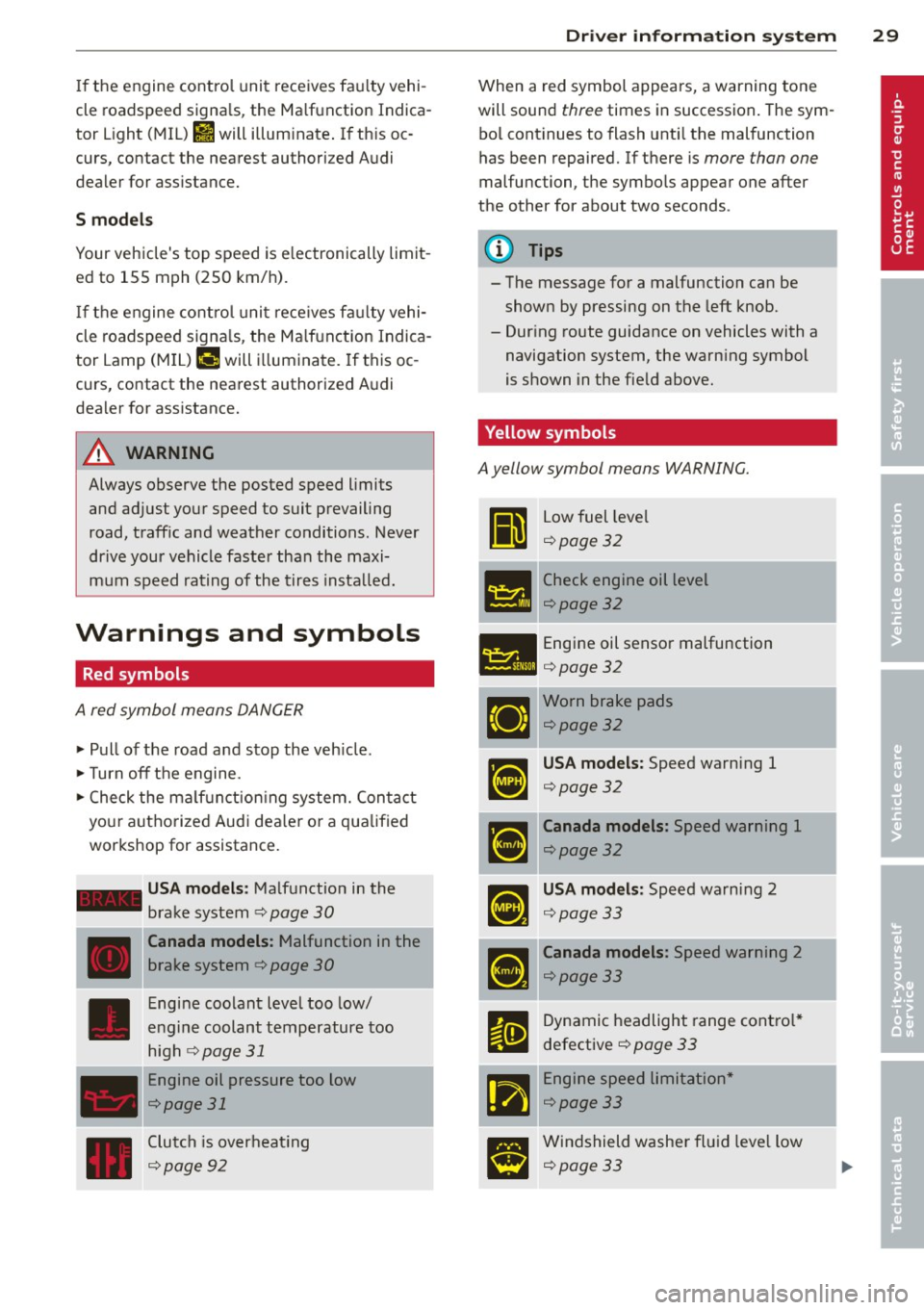
Red symbols
A red symbol means DANGER
" Pull of the road and stop the veh icle .
"T urn off the engine.
" Check the ma lf u nction ing system. Contact
your autho rized Audi dea le r o r a qualified
workshop for assistance.
- USA models : Malfunction in the
brake system ¢
page 30
---·--
D
Canada models : Malfunction in the
brake system ¢
page 30
Engine coolant level too low/
engine coolant temperature too
high
r:1;> page 31
Engine oil pressure too low
¢page 31
Clutch is overheat ing
c:1;> page 92
Dr iver in formati on sys tem 29
When a red symbol appears, a warning tone
will sound
three times in succession . The sym
bo l cont inues to flash unti l the malfunction
has been repaired. If there is
more than one
malfunc tion, the symbo ls appear one after
the other for about two seconds .
(D Tips
- The message for a malfunction can be
shown by pressing on the left knob.
- Dur ing route guidance on vehicles with a
navigation system, the warn ing symbol
is shown in the field above.
Yellow symbols
A yellow symbol means WARNING.
Ii
Low fuel leve l
¢page32
- -- Check engine oil level
151!1 ¢page 32
- Engine oil sensor malfunction
l:ill ¢ page 32
Worn brake pads
¢page32
USA models : Speed warning 1
c:1;> page 3 2
Canada models : Speed warning 1
¢page32
USA models: Speed warning 2
c:1;> page 3 3
Canada models: Speed warning 2
c:1;> page 33
Dynamic headlight range contro l*
defective
¢ page 33
-Engine speed limitation *
c:1;> page 33
Windshield washer fl ui d leve l low
c:1;> page 33
Page 32 of 260

30 Driv e r in formation sy stem
Battery voltage too high or too low
¢page33
Defective light bu lb
Qpage 33
USA models: Defective brake light
Qpage33
Canada models: Defective brake
light
Q page 33
Light/rain sensor defective (automat
ic headlights) * defective
Q page 3 4
Adaptive Light* defective
¢page34
Tire pressure monitoring system
¢page212
When a yellow symbol appears, a warning
tone will sound
once. Check the d isp layed
f u nction as soon as possib le. If
more than one
malfunction is detected, a ll symbols will ap
pear one after the other for abou t two sec
onds.
Driver information
In addition to th e warning/indicator lights
a nd the symbols in the inst rument cluster dis
play, driver information is displayed.
F ig . 2 6 Section of instrument cluster: Set/Check b ut
ton
Driver information appea rs in the disp lay
when a defec tive l ight bu lb is reported by the
defect ive light bulb warning¢
page 33,
when the brake p ads are wo rn and before you
engage a gear. In add
ition, driver information may appear
whe n a red symbo l flashes in the driver dis
play .
To display Driver information
As an examp le, the . symbo l appears in the
display. If yo u now p ress the button¢
fig. 26,
the following driver message appears in the display:
Switch off engine and che ck oil level
The driver message in the display goes out af
te r about 5 seconds. Yo u can display t he drive r
message aga in by briefly pres sing the button.
BRAKE /(©) Brake system
The indicator light flashes if the brake fluid
level is too low, if there is a malfunction in
t he ABS sys tem o r when the parking brake is
engaged.
If the - (USA models),1111 (Canada
model s) symbo l flashes in the d isplay w it h t he
par king brake rele ase d, there is a mal func tion
in the brake system. In ad dition to the sym
bo l, one o f two messages appears in the dis
play :
STOP V ehicle and check brake fluid
ABS fault! See Owner's manual
.,. Pull off the road a nd stop the veh icle .
.,. Obtain profess iona l assistance.
USA models: if t here is a ma lf u nction in the
ABS system, the
mES warning/indicator light
illuminates along with the -system
malfu nction warning/ind icator light
Q .&. .
Canada models: if there is a mal function in
the ABS system, the
ti] warning/ indicator
light illum inates together with the . brake
system mal function warn ing/indicator light
Q .&_ .
Parking brake set
The parking brake war ning light -·
(Canada mode ls) illum inates when the park
i ng brake is set. In addition, a warn ing tone
will sound after yo u have driven for longer
Page 33 of 260

than 3 seconds and faster than 3 mph (5 km/
h).
A WARNING
-Always observe the warnings in
9 page 172, Engine compartment, be
fore opening the engine hood and check ing the brake flu id .
- Driv ing with low brake fluid is a safety
hazard! Stop the car and get professional
assistance.
- If the brake system warn ing/ indicator
light illuminates together with the ABS
warning/ind icator light, t hen the ABS
system is malfunct ion ing . The rear
wheels co uld qu ickly lock up when yo u
apply the brakes. This could lead to loss
o f control and your vehi cle could slide!
Drive carefu lly to the nearest a uthorized
Audi dealer and have the ma lfunction
corrected.
_ L Engine cooling system
A malfunction in the engine cooling system
must be repaired as soon as possible .
When the . symbol in the d isp lay flashes,
then either the eng ine coolan t
temperature is
too high, or the coo lant
level is too low. In ad
dition to the symbol, the fo llowing message
also appears in the display:
Swit ch off engine and check coolant level
"'Pull off the road and stop the vehicle.
"'T urn off t he engine.
"' Check coolant leve l
9page 185.
"'Add coolant if ne cessary¢ page 186.
"' Contin ue driving only after the eng ine cool -
ant warn ing/indicato r light goes o ut.
"' Contact your authorized Audi dea ler for as-
s istance if necessary.
If the engine coolant level is correct, then the radiator fan may be the cause of the malf unc
tion .
If the generator wa rning/ind icator light
should also illuminate ¢
page 16, then the
fan belt may be damaged.
Dr iver in formati on sys tem 3 1
A WARNING
-If your vehicle should break down for
mechanical or other reasons, park at a
safe distance from moving traffic, tu rn
off the eng in e and tu rn on the haza rd
warn ing ligh ts ¢
page 56, Emergen cy
flasher ~-
-
-Never ope n the hood if you see o r hear
s team or coola nt es caping from the en
gi ne compartmen t -you ris k being sc ald
ed . Wait unt il yo u can no longer see o r
hea r steam o r coolant escap ing.
- T he engine compa rtment o f any vehicle
is a dangerous area. Be fore you perform
a ny work i n the engine compartment,
turn off the eng ine and allow it to cool.
Follow t he warn ing stickers
9 page 172,
Engine compartment .
(D Note
Do not continue driv ing if the . sym bol
ill uminates. There is a malfunction in the
engine cooling system -you could damage
your engine.
~ Engine oil pr essure
The red engine oil pressure warning symbol
requires immediate service or repair.
If the . symbo l appears in the disp lay and
flashes, the o il pressure is too low . In add ition
to the symbol, the following message a lso ap
pears in the display:
Switch off engine and check oil le vel
"' Pull off the road an d stop the ve hicle.
"' Shu t the eng ine down.
"' Check the engine oil level¢
page 183 .
"'Contact your authorized Audi dealer for as-
sistance if necessary.
Engine oil level too low
I f the engine oil leve l is too low , top off oil to
the p roper level
¢ page 183. .,.
Page 34 of 260

32 Driver information system
Engine oil level OK
If th e . symbol st arts flashin g ag ain eve n
though the engine oil leve l checks O K on the
dip stick,
do not start driving again and do
not let the engine run at idle .
Instead, con
tact your author ized Audi dealer for assis
tance.
@ Tips
- The engine oil pressure symbol. is
not an indicator for a low engine oil lev
el. Do not rely on it. Instead , check the
oil level in your engine at regular inter
vals, preferably each time you refuel,
and always before going on a long trip.
- The yellow oil level warning indication
II requires oil refill or workshop serv
ice without delay. Do not wait until the
red oil pressure warning symbol.
starts to flash before you respond to
the low oil level warning
II . By then,
your engine may already have suffered
serious damage.
fl) Fuel supply too low
When the (i1 symbo l ill uminates, this means
there are about 2.6 gallons (10 liters) of fue l
left i n the fuel tank . Time to ref uel!
r::;, page 17 5 .
If the symbol lights up, even when t he re is
ample fuel in the tank, and the text
Tank sys
tem malfunction! Please contact workshop
a ppears in the d isplay, there is a fault in the
sys tem. Contact a qualified wor ksh op to have
the fau lt rectified.
'l=:11 , Checking the engine oil level
II! Please add max . 1 qt of engine oil!
If th e II sy mbo l comes o n, add 1 quart( ! li
ter) of o il at t he nex t oppor tunity
<::;,page 183.
1) - : USA mod els onl y
~ Checking the engine oil level
W hen the Ill symbol illum ina tes, check t he
engi ne oil leve l as soon as po ssibl e
r::;, page 183 . Top off t he oil at your ear liest
oppo rtunity
<::;, page 183 .
~.,., Engine oil sensor defective
If the II symbol illum inates, contact yo ur
autho rized Aud i dea le r and have the oil senso r
i nspected .
{0) Worn brake pads
&J Brake pads!
If the warning light i lluminates, immed iate ly
contact your a uthori zed Audi d ealer or quali
fied works hop to have all b rake pads i nspect
ed. On USA mode ls t he war ning ligh t
&J
comes on together w ith the warning light
1111 . Bot h set s of bra ke pads o n an ax le
mu st al ways be re place d at th e same time.
A WARNING
Driving w ith bad bra kes ca n ca use a colli
sion and ser io us perso nal in jury.
- If th e warni ng light
&J an d th e warn ing
lig ht
11111> with t he mess age Brake
pads!
comes o n in the ins trum en t cluste r
d isp lay, immediate ly co ntact you r au
th orized A udi dealer or qualif ied work
shop to have all b rake pads checked or
re placed if nec essary.
0 /8 Speed warning 1
If the [i (USA models)l [i) (Canada mode ls)
symbol illum ina tes, this m ea ns you a re d riv
i ng fas ter than t he set vehicle speed . S low
down!
r::;, page 26.
-