2011 AUDI S8 light
[x] Cancel search: lightPage 259 of 302

remain continuously illuminated. This se
quence will continue upon subsequent vehicle
start-ups as long as the malfunction exists.
When the malfunction indicator is illuminat
ed, the system may not be able to detect or
signal low tire pressure as intended . TPMS
malfunct ions may occur for a variety of rea
sons, including the installation of replace ment or alternate tires or wheels on the vehi
cle that prevent the TPMS from functioning
properly . Always check the TPMS malfunct ion
tellta le after replacing one or more t ires or
wheels on your vehicle to ensure that the re
placement or alternate tires and wheels allow
the TPMS to continue to function properly.
Tire pressure indicator appears
Applies to vehicles: with tire pressure monitoring system
The tire pressure indicator in the instrument
cluster informs you if the tire pressure is too
low or if there is a system malfunction.
Fig. 189 Display : underinflatio n warning
Fig. 190 Display: System malfu nctio n
Using the ABS sensors, the tire pressure moni
toring system compares the tire tread circum
ference and vibration characteristics of the in
dividual tires . If the pressure decreases in one
or more tires, this is indicated in the instru-
Tires and wheels 257
ment cluster with a warning symbol [I) and a
message
r::!) fig. 189.
The tire pressure monitoring system must be
reset via MMI each t ime the pressures are ad
justed (e.g. when switching between partial
and full load pressure) or after changing or re
placing a tire on your vehicle
r::!) page 258. You
can find the recommended tire pressures for
your vehicle on the label on driver's side 8-pil
lar
r::!) page 242 .
Tire tread circumference and vibration charac
teristics can change and cause a tire pressure
warning if:
- the tire pressure in one or more tires is too
low,
- the tire has structural damage,
- the tir e pressure was changed, wheels rotat-
ed or replaced but the TPMS was not reset
r::!) page 258 .
Warning symbols
[I) Loss of pressure in at least one tire co& .
Check the tire or tires and replace or repa ir if
necessary. The indicator light
[I) in the instru
ment cluster also illuminates
r::!) page 11.
Check/correct the pressures of all four tires
and resetTPMS via MMI.
lli§ffl (Tire Pressure Monitoring System) Tire
pressure! System malfunction.
If llilffl appears after switching the ignition
on or while driving co
fig. 190 and the indica
tor light
[I) in the instrument cluster blinks
for approximately one minute and then stays
on, there is a system malfunction . See your
authorized Audi dea ler as soon as possible .
A WARNING
-If the tire pressure indicator appears in
the instrument cluster display , one or
more of your tires is significant ly under
inflated . Reduce your speed immediately
and avoid any hard steering or braking
maneuvers. Stop as soon as possible and
check the tires and their pressures . In
flate the tire pressure to the proper pres-
sure as indicated on the vehicle's tire .,.
Page 265 of 302

other warning devices to alert other mo
torists.
- Make sure that passengers wait in a safe
place away from the vehicle and well
away from the road and traffic.
- To help prevent the vehicle from moving
suddenly and possibly slipping off the
jack, always fully set the parking brake
and block the wheel diagonally opposite
the wheel being changed. When one
front wheel is lifted off the ground, plac
ing the Automatic Transmission in "P"
(Park) will
not prevent the vehicle from
moving.
- Before you change a wheel, be sure the
ground is level and firm. If necessary,
use a sturdy board under the jack.
- After installing the spare wheel, make
sure that you replace the flat tire/wheel
in its storage area properly and tighten
the knurled retaining screw securely.
@ Tips
Before changing the wheel, you must acti·
vate the jacking mode, so that the auto
matic controls for the Adaptive Air Sus
pension do not make it more difficult to
lift the vehicle with the jack ¢
page 265.
Changing a wheel
When you change a wheel, follow these
quence described below step-by-step and in
exactly that order.
1. Activate the vehicle jack mode
¢ page 265.
2. Remove the decorative wheel cover*. For
more details see also¢
page 264, Deco
rative wheel covers
or ¢ page 264,
Wheels with wheel bolt caps.
3 . Loosen the wheel bolts¢ page 264 .
4. Locate the proper mounting point for the
jack and align the jack below that point
¢page 265.
5. Raise the car with the jack¢ page 265.
6. Remove the wheel with the flat tire and
then install
the spare ¢ page 266.
What do I do now? 263
7. Tighten all wheel bolts lightly.
8.
Lower the vehicle with the jack.
9. Use the wheel bolt wrench and
firmly
tighten all wheel bolts¢ page 264.
10. Replace the decorative wheel cover*.
11. Deactivate the vehicle jack mode in the
MMI:
ICARI function button > Car systems
control button > Servicing & checks> Air
susp.: jack mode> Off .
The vehicle jack mode switches off automati
cally at speeds above 10 km/h .
A WARNING
Always read and follow all WARNINGS and
information¢ .&
in Raising the vehicle on
page 265
and ¢ page 267.
After changing a wheel
A wheel change is not complete without the
doing the following.
.. Store and secure the wheel you replaced in
the spare wheel well.
.. Replace the tools and the jack in their prop
er location.
.. Check the
tire pressure on the spare wheel
immediately after mounting it.
.. As soon as possible, have the
tightening
torques
on all wheel bolts checked with a
torque wrench. The correct tightening tor
que is 90
ft lb (120 Nm).
.. Have the flat tire
replaced as soon as possi
ble .
(D Tips
-If you notice that the wheel bolts a re
corroded and difficult to turn while
changing a tire, they should be replaced
before you check the tightening torque.
- Drive at reduced speed until you have the
tightening torques checked.
•
•
Page 268 of 302

266 What do I do now ?
-Make sure that passengers wait in a
safe p lace away from the vehicle and
well away from the road and traffic.
- Make sure jack position is correct, ad
just as necessary and then continue to ra ise the jack.
- Changes in temperature or load can af
fect the height of the vehicle.
@ Tips
The vehicle jack mode switches off auto
matica lly at speeds above 10 km/h.
Taking the wheel off/installing the spare
Follo w thes e instruct ions st ep-by -step for
changing th e wh eel .
Fig. 2 02 Chan gin g a w hee l: u sing t he sc rewdr ive r ha n
dl e (w it h th e bla de r emoved ) to tu rn th e bolts
Fi g. 20 3 Changin g a w heel : a lignm en t pin inside th e
t o p hole
After you have loosened a ll wheel bolts and
ra ised the vehicle off the ground, remove and
replace the wheel as follows:
R emoving the wheel
• Use the hexagonal socket in the screwd riv
e r handle
to comp lete ly remove the top
most wheel bolt and set it aside on a
clean
surface ¢fig. 202.
• Sc rew the th readed end of the alignment
pin
from t he tool k it hand-tight into t he
empty bolt hole
r::;, fig . 203 .
• Then remove the other whee l bolts as de
scribed above.
• Takeoff the whee l leaving the a lignment pin
in the bo lt hole
r::;, (D .
Putting on the spare wheel
• Lift the spare whee l and carefu lly s lide it
over the alignment p in to g uide it in place
¢ (D .
.,. Use the hexagonal socket in the screwdriver
ha ndle to screw in and tighten a ll whee l
bolts
slightly .
.,. Remove the alignment pin and inse rt and
tighten the rem aining wheel bol t slightly
like the res t.
• Turn the jack hand le co unter-clockwise to
lower the veh icle until the jack is fully re
leased .
.,. Use the wheel bo lt wrench to tighten all
wheel bolt s firm ly
r::;, page 264 . Tigh ten
them
crosswise, from one bolt to the (ap
proximately) opposite one, to keep the
wheel cente red .
(D Note
When remov ing or installing the whe el,
the rim cou ld hit the b rake roto r and dam
age t he ro to r. Wor k caref ully and have a
s eco nd pers on h elp you.
{i) Tips
Neve r use the hexagonal socket in the han
dle of t he s crewdr iver to lo ose n or t igh ten
t he wheel bo lts .
- P ull the revers ible blade from the screw
dr iver be fore y ou use the hexagon al
so cket in the han dle to tur n the w heel
bolts.
- W he n m oun tin g ti res w ith
unidirectional
tread design
make sure t he trea d pat
t ern is poin ted t he righ t way
r::;, page267.
- T he wheel bolts shou ld be clean and easy
to t urn. Check for dirt an d corrosion on
the mating surfaces of both the w heel .,,.
Page 271 of 302
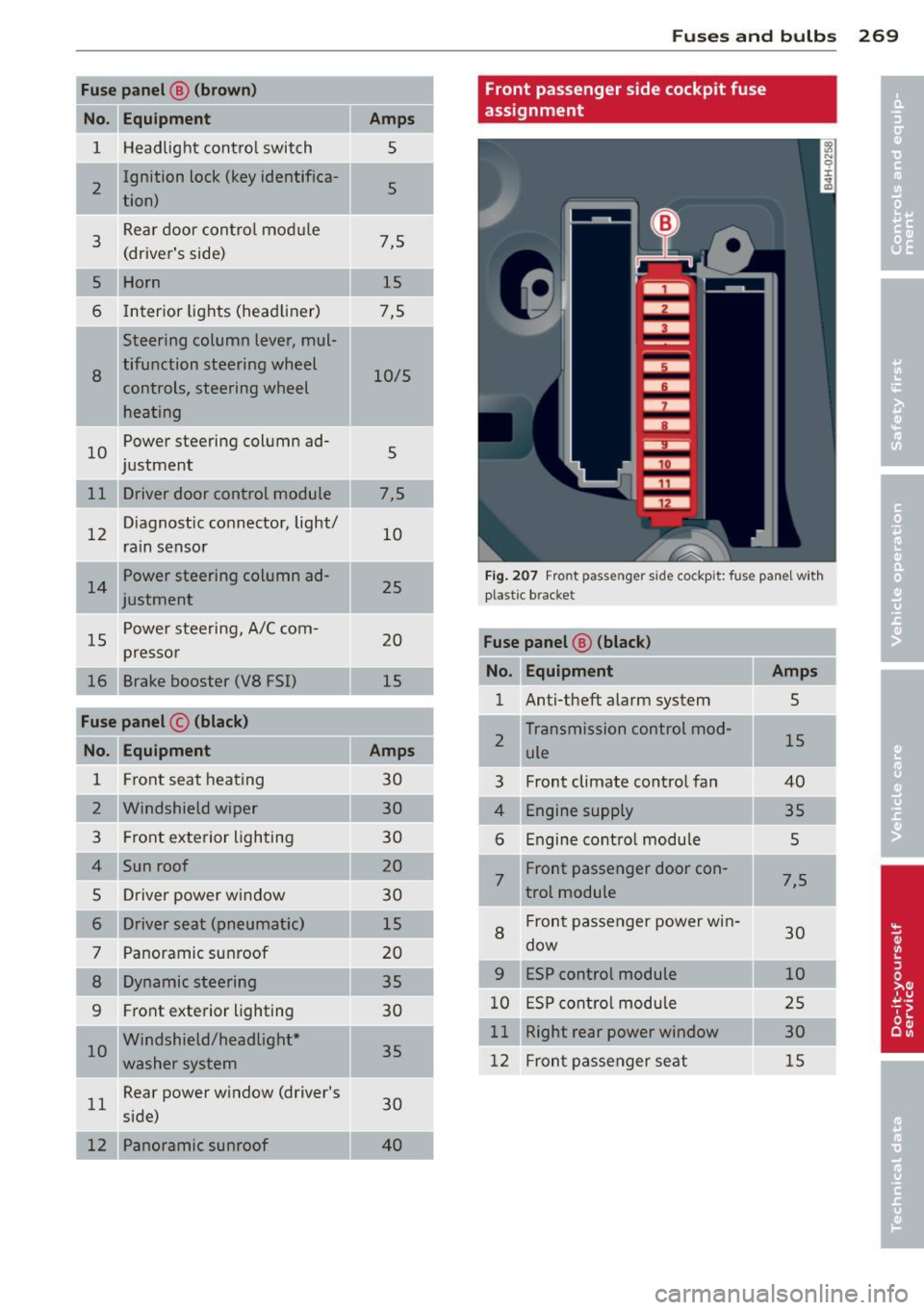
Fuse panel@ (brown)
No. Equ ipment
1 H eadlight contro l switch
I 2
Ignition lock (key identifica-
tion)
3
Rear door control mod ule
(driver's side)
5 Horn
6 Interior lights (head liner)
Steering column lever, mul-
8
tifunction steering wheel
controls, steering wheel
heating
10
Power steering column ad-
j ustment
11 Driver door control module
12
D iagnostic co nnector, light/
rain sensor
Power steering column ad-
justment
15
P ower stee ring, A/C com-
pr esso r
16 Brake booster (VS FSI)
Fuse panel © (black )
No. Equipment
1 F ront seat heating
2 Windshield wiper
3 Fr ont exterior lighting
4 Sun roof
5 Dr iver power window
6 Driver seat (pneumatic)
7 Panoramic sunroof
8 Dynamic steering
9 Fr
ont exterior lighting
I 10
Windshield/headlight *
washe r system
11
Rear power w indow (driver's
side)
12 Panoramic sunroof
Amp s
5
5
7,5 15
7,5
10/5
5
7,5 10
25
20
15
Amps
30 30
30
20
30
15
20 35
30
35
30
4 0
Fu se s and bulb s 269
Front passenger side cockpit fuse
assignment
Fi g. 2 07 Fro nt passe nger s id e co ckpit: f use pa nel w it h
plast ic brac ket
Fuse panel ® (black)
No . Equipment Amps
1 Anti-theft alarm system 5
2
Transmission control mod-
15 ule
3 Front climate control fan 40
4
Engine supply 35
6
Engine cont ro l module 5
7
Front passenger door con-7,5
t rot module
8
Fron t passe nger power w in-
30 dow
9 ESP control module 10
1 0
E S P cont ro l modu le 2 5
11
Right rear power window 30
12
Fron t passe nger seat 15
Page 272 of 302

2 70 Fu ses and bulb s
Luggage compartment fuse assignment
Fig. 208 Luggage co mpar tment: fuse panel with plastic b racket
Fu se pan el A (black ) Fuse panel
@ (b lac k)
I
No.
Equ ipment Amps No
. Equipment
Amps .
l!l button, data logger, diag-
1 nostic con
nector, adaptive
5 10
Rear seat heating, refrigera-
5 j tor, interior rearview mirror
lighting system 11 Dynam
ic steer ing 5
2 Networking gateway
5 12
Selector lever, BCM-2
5
3 adaptive air suspension
5 13 Audi side ass
ist 5
4 Parking system 5 14 Engine control module
5
5 Steering column
lever
5 1
5 Starter 40
I 6 Suspension control system
5
sensor left headlight/Headlight
'
16
10/5
range control system
.
7 Belt tensioners, airbag con-
5
trol module Fuse pan el@ (red)
No. Equipment Amps
Heated washer fluid nozzles,
Homelink (garage door
8 opener), night vision system
5
control module, sport differ- 1
left reversib
le be lt tens ioner
25
2 II
R_ight reversible belt ten-
25
s1oner
ential, ioniser 3
Starter diagnos
is
5
9
Electromechan ica l park ing
5
brake con tro l module 4 DC/DC converter
7,5
5 Adaptive cruise control 7,5
Page 273 of 302

Fuse panel@ (red)
No. Equipment
= '
I 6 Right headlight (headlight
with adaptive light)
I
7 ESP control module
8
9 Adaptive cruise control
Transmission control mod-
10 ule
11 Climate control system sen
sors
Fuse panel @ (brown)
No
. II Equipment
Electromechan ical parking
1 brake
2 Suspension control system
sensor
Right rear door control mod-
3 ule
4 Smart-Modul Tank
5 Front climate control system
controls
6 Rear climate control system
controls
7 Networking gateway
8 Refrigerator
Interface for spec ial func-
9 tions
12 Selector lever
13 Ambient lighting
14 Rear exterior lighting
15 Fuel pump
16 Electromechanical parking
brake
Fuse panel @ (black)
Equipment
3 Rear sockets*
5 adaptive air suspension
6 115-V socket
7 Electromechanical parking
brake
II
Amps
10
s
5
10
5
5
Amps
5
5
7,5 5
15
10 5
15
5
10
10
20
25
30
Amps
20
15
25
30
=
Fuses and bulbs 271
Fuse panel @ (black)
No. Equipment
8 Rear seat heating
9 Rear exterior lighting
10 Rear
climate control system
blower
Rear sun shade, closing aid,
11 luggage compartment lock,
keyless
go/entry, fuel filler
door
12 luggage compartment lid
control module
Fuse panel E (red)
No. Equipment
1 Rear
seat adjustment but-
tons
3 Left rear seat
(pneumatics)
5 Trailer hitch control modu le*
6 Left rear seat
7 Right rear seat
8 Trailer hitch control module*
9 Trailer hitch control module*
10 Right rear seat (pneumatics)
Fuse panel ® (brown)
No. Equipment
1 Radio receiver/sound ampli-
fier
Sound amplifier, Bang&
2 Olufsen Advanced Sound
System
Rear Seat Enterta inment, ra-
3 dio receiver/sound amplifier
Automatic dimming interior
5 rearview mirror, rearview
camera (parking aid)
6 DVD changer
7 TV tuner
8 MMI unit/drives
9
Instrument cluster, analog
clock
10 MMI Display
Amps
25
20
20
20
30
Amps
s
7,5
20
30
30
20
15
7,5
30
30 10
5
5
5
7,5
5
5
•
•
....
Page 274 of 302

272 Fuses and bulbs
Fuse panel ® (brown)
No. Equipment
= 11 Radio receiver Cell phone adapter, cell
12 phone/telephone charging
cradle, chip card reader (not
i n all countries)
Bulbs
Replacing light bulbs Amps
= 7,5
5
For
your safety, we recommend that you have
your authorized Audi dealer replace burned
out bulbs for you.
It is becoming increasingly more and more
difficult to replace vehicle light bulbs since in
many cases, other parts of the car must first
be removed before you are able to get to the
bulb . This applies especially to the light bulbs
in the front of your car which you can only
reach through the engine compartment .
Sheet metal and bulb ho lders can have sharp
edges that can cause serious cuts, and parts must be correctly taken apart and then prop
erly put back together to help prevent break
age of parts and long term damage from wa
ter that can enter hous ings that have not been
properly resealed.
For your safety, we recommend that you have
your author ized Audi dealer replace any bulbs
for you, since your dealer has the proper tools,
the correct bulbs and the expertise.
Gas discharge lamps (Xenon lights):
Due to the high electrical vo ltage, have the
bulbs replaced by a qualified technician.
H eadlights with Xenon light can be identified
by the high voltage sticker.
LED headlights* require no maintenance .
Please contact your authori zed Audi dealer if a
bulb needs to be replaced.
A WARNING
Contact with high-voltage components of
the electrical system and improper re- placement
of gas discharge (Xenon) head
light bulbs can cause serious personal in
jury and death.
- Xenon bulbs are pressurized and can ex
plode when being changed.
- Changing Xenon lamps requires the spe
cial training, instructions and equip ment.
- Only an authorized A udi dealer or other
qualified workshop should change the bulbs in gas discharge lamps.
A WARNING
There are parts with sharp edges on the
openings and on the bulb holders that can
cause ser ious cuts.
- If you are uncertain about what to do,
have the work performed by an author
ized Audi dealer or other qualified work
shop. Serious personal injury may result
from imprope rly performed wo rk.
(D Tips
- If you must replace the light bulbs your
self, a lways remember that the eng ine
compartment of any vehicle is a hazard
ous area to work in. A lways read and
heed all WARNINGS¢
page 216, Engine
compartment¢ &..
-It is best to ask your authorized Audi
dealer whenever you need to change a
bulb.
Page 275 of 302

Emergency situations
General
This chapter i s intended for trained emer
gency crews and working personnel who have the necessary tools and equipment to
perform these operations.
Starting by pushing or
towing
CD Note
Ve hicles w ith an automatic tra nsmission
cannot be started by pus hing o rtowi ng.
Starting with jumper
cables
If necessary, the engine can be started by
connecting it to the battery of another vehi
cle.
If the engine shou ld fail to start because of a
discha rged o r wea k battery, the battery can be
connected to the battery o f
another vehicle,
using a
pair of jumper cables to start the en
g ine.
Jumper c ables
Use only jumper cables of sufficiently la rge
c ross section to carry the starter c urrent safe
l y . Refer to the man ufacturer's specifications.
Use only jumper cables with
insulated te rm i
na l clamps wh ic h are d istinctly mar ked:
plus(+) cable in mos t cases co lore d red
minus (-) cable
in most cases colored black .
A WARNING
Batterie s contain e lec tricity, ac id, an d gas.
Any of these can cause ve ry ser io us or fatal
inju ry. Follow the ins tructions below f or
safe han dling of your veh icle's b attery .
- Alway s sh ield you r eye s and avoid lean
i n g over the bat te ry w henever possib le.
- A dis ch arged battery c an free ze at tem
pera tures ju st below 3 2 °F ( 0 °C ). Befo re
Emergency situations 273
connecting a jumpe r cab le, you must
thaw the fr ozen battery c omp lete ly, ot h
erwise it could explode.
- Do not allow battery acid to contact eyes
or skin. Fl ush any contacted area with
wate r immediately .
- Improper use of a booster battery to start a vehicle may cause an explosion.
- Vehicle batter ies genera te exp losive gas
es. Keep spar ks, flame and lighted c iga
rettes away from batte ries.
- Do not try to jump start any ve hicle w ith
a low ac id leve l in the battery.
- The vo ltage of the booste r batte ry m ust
a lso have a 12-Vol t rating. T he capacity
(Ah) of the booster battery sho uld not be
lowe r tha n that of the discharged bat
tery . U se of batte rie s of d iffe ren t voltage
or substantially d iffe rent "Ah" rat ing
may c au se an exp losion and persona l in
Ju ry.
- N ever cha rge a fro zen battery. Gas tr ap
pe d in the i ce m ay cause a n ex plosion.
- Never cha rge or use a batte ry tha t h as
been fr ozen . T he battery case may have
be weakened.
- Us e of batter ies of differe nt voltage or
sub stant ia lly diffe ren t ca pa city (Ah) rat
i ng may c ause an exp losion an d injury .
Th e capac ity (Ah) of the booster bat tery
should not be lower than that of the dis
charged batte ry .
- Before you chec k any thing in the engine
compa rtment, always read and hee d all
WARNINGS
¢page 216, Engine com
partment.
CD Note
- App lying a higher voltage booster ba t
tery will cause expens ive damage to se n
sit ive e lectronic components, such as
cont rol units, relays, rad io , etc.
- There must be no electrical contact be
tween the vehicles as otherwise current
cou ld already start to f low as soon as the
posit ive(+) term inals a re connected. ..,. •
•