2011 AUDI Q7 wiper
[x] Cancel search: wiperPage 11 of 392
Instruments and controls
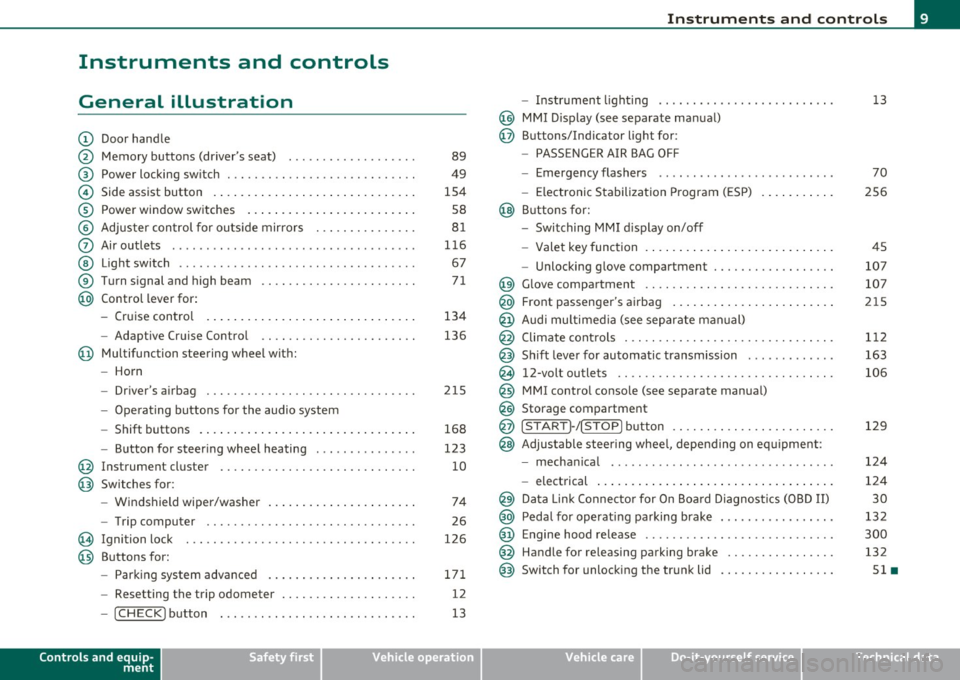
General illustration
(D Door handle
@ Memory buttons (driver's seat) .................. .
@ Power locking sw itch ........................... .
© Side assist button ... .. ... ... ... .. .. .. ... . .. ... .
® Power window sw itches ... .... .. .. .. .. .. ... ... . .
© Adjuster con trol for outs ide mir rors .............. .
0 Air outlets .......... .... .. .... ............... .
@ Light switch ...... .. .... ... .. .. .. ... ... .. .. ... .
® Turn s ignal and high beam ...................... .
@ Control lever for:
- Cru ise control . .... ... ... .. .. .. .. .. .. .. .. ... .
-Adaptive Cruise Control .. .. ................ .. .
@ Mu ltifunction steering wheel with:
- Horn
- Driver's airbag .............................. .
- O pera ti ng butto ns for the audio system
- Shift buttons . ... .. .. .. .... .. .. .. .. .. ...... . .
- Button for steer ing whee l heating ..... ... ...... .
@ Instrument cluster ............................ .
@ Switches for:
- Windshield wiper/washer ... ...... .. ..... .... . .
- Trip computer .............................. .
@ Ignition lock ................................. .
@ Buttons for:
- Par king sys tem advance d .... ..... .. .. ... .. .. . .
- Resetting the trip odometer ................... .
- ICHECK ]button ......................... ... .
Controls and equip
ment Safety first
89
49
1S4
S8
8 1
11 6
67
7 1
134
136
2 1S
168
123
10
74
26
126
171 12
13
Instruments and controls
- Instr ument lighting ......................... .
@ MMI Disp lay (see separate ma nual)
@ Buttons/Indicator light for:
- PASSENGER AIR BAG OFF
- Emergency flashers ...... .. ................. .
- Electroni c Stabilization Progr am ( ESP)
@ B uttons for:
- Switching MMI d isplay on/off
- Valet key function .. .. .. .. .. .. .. ...... ... .. .. .
- Unlocking g love compartment ................. .
@ Glove compartment ........................... .
@ Front passenger's airbag ...... ..... .. ..... .. .. . .
@ Audi mu ltime dia (see separate man ual)
@ Climate cont rols .............................. .
@ Shift leve r for automatic transmission ............ .
@ 12-volt outlets ............................... .
@ MMI contro l console (see separate manua l)
@ Storage compartment
@ ISTART]-/ISTOP] button ....................... .
@ Adjustable stee ring whee l, depending on eq uipme nt:
- mecha nical .... .. .... ... .. .. .. ... .... ..... . .
- electrical ..... . ... .. .. .. .... .... .. .. .. ... .. .
@ Da ta Lin k Connecto r for On Boa rd Diagnos tics (OBD II)
@ Peda l for operating pa rking brake ................ .
@ Engine hood release ............. ... .. ......... .
@ Handle for releasing parking brake ............... .
@ Switch for unlocking the trunk lid ................ .
Vehicle care
13
70
2S6
45
107
107
215
1 12
163
106
129
12 4
124
30
13 2
300
132
Sl •
Technical data
Page 29 of 392

Memories
The trip computer is equipped with two fully automatic
memories as well as an efficiency program*.
Fig. 16 Trip computer
display: memory level
1
You can switch between the trip computer 1 and 2 and the efficiency
program* by pressing the [
RESET] button®=> fig. 17.
You can tell which memory level is currently active by the number or
the sign in the display=> fig. 16. The data from the single-trip
memory (memory level 1) is being displayed if a 1 appears in the
display . If a
2 is shown, then the data from the total-trip memory is
being displayed (memory level 2). The fuel pump nozzle
ii indicates
the efficiency program*=>
page 28.
Single-trip memory (Trip computer 1)
The single-trip memory stores the trip information from the time the
ignition is turned on until it is turned off. If the trip is continued
within 2 hours from the time the ignition was turned off, the new
data will be included in the calculation of the current trip informa
tion. If the trip is interrupted for
more than 2 hours the memory is
reset automatically.
Total-trip memory (Trip computer 2)
Unlike the single-trip memory, the total-trip memory is not reset
automatically. This permits you to evaluate your driving data for the
entire period between manual resets.
Con tro ls a nd e quip
m en t Vehicle
OP-eration
Driver information display
Efficiency program*
The efficiency program can help you to use less fuel => page 28. •
Operation
The trip computer is controlled by two switches on the
windshield wiper lever .
Fig. 17 Windshield
wiper lever: controls
for the trip computer
- To display the trip computer memory levels, press the
[ RESET) button ®=> fig. 17 repeatedly until the desired
memory level is shown in the display.
- To display trip information within a memory level, press
the top or bottom part of the function selection switch @.
The trip computer will not operate unless the ignition is on. When you
turn on the ignition, the function that was in use when you last turned
the ignition off will be displayed.
In addition to information on the trip computer (trip computer 1, 2
and efficiency program*, the digital speedometer and information
regarding the navigation system* can also be displayed. To sw itch the
display between the different information, tap the
I RESET] button
@ briefly. ...,
Vehicle care Do-it-yourselt service iTechnical data
Page 40 of 392

Driver information display
Defective light bulb ::::>page24
._ -
Light/rain sensor defective :::>page 38
-Windshield washer fluid =>page39
level low
Low fuel level
::::>page39
Refill Ad Blue* ::::>page296
AdBlue malfunction* =>page 296
-Battery voltage ::::>page39
Worn brake pads ::::>page39
Dynamic headlight range ::::>page39
control defective
-
Check engine oil level ::::>page40
Engine oil sensor malfunction =>page40
Engine speed limitation* ::::>page40
Diesel particulate filter* ::::>page40
clogged
Adaptive Light* defective
=>page40
Ignition lock malfunction ::::>page41
--
Windshield wiper defective => page 41
-
-
-
-
-
-
Tire pressure monitoring sys-::::>page338
tern Loss of air pressure
Tire pressure monitoring sys-=> page338
tern
System not available
- -
11
sattery in remote control key ::::>page44
Automatic transmission mal-=> page 168
function
Applies to veh icles: with Conven ience key
Key not in vehicle ..Z..
Key not in vehicle
This reminder appears along with the -i. symbol if the master key is
removed from the vehicle with the engine running. It is intended to
remind you (e.g. when changing drivers) not to continue the journey
without the master key.
If the master key is no longer in the vehicle, you cannot switch off the
ignition after stopping the engine and you also cannot start the
engine again. What is more, you cannot lock the vehicle from the
outside. •
Light/rain sensor defective ~'j.
Automatic headlights/ automatic wipers defective
If the symbol illuminates, the light sensor has failed. For safety
reasons the low beams are turned on permanently with the switch in
AUTO. However, you can continue to turn the lights on and off using
the light switch. In the case of a defect in the rain sensor, the wind
shield wiper lever functions are still available. Have the light/rain
sensor checked as soon as possible by an authorized Audi dealer. •
•
Page 43 of 392

Ignition Lock malfunction
If the ~ symbol in the display comes on, there is a malfunc
tion in the electronic ignition lock. An addi tional driver
message can be displayed by pressing the
[CHECK] button :
Ignition lock defecti ve
- Drive to an authorized Audi dealer or qualified workshop
at your earliest convenience to have the malfunction
corrected .•
Windshield wipers faulty ~
0 W ind shi eld wi per d efe cti ve
When this symbol illum inates, it means that the electronics for
the windshield wipers are defective . Please go to an authorized Audi
deale r o r qualified workshop to have the w indshield w ipe r system
repaired. •
Controls and equip
ment Safety first
Dri
ver information display
Vehicle care Technical data
Page 70 of 392

Clear vision
In the AUTO positio n the low beams are switched off automatically
w hen the ign it ion is turned o ff.
Light Sensor Malfunction
In the event of a light senso r m alfun ction, the driver is not ified in the
instrument cluster display:
~ Automatic headlight s/ automatic wipers defective
For safety reasons the low beams a re turned on permane ntly with the
switch in
AUTO . However, you can contin ue to turn the lights on and
off using the light sw itch. Have the light sensor checked as soon as
possible at an autho rized Audi dealer or q ua lified workshop.
& WARNING
• Never u se daytime running lights to see where you are going .
They are not bright enough and w ill not let you see far enough
ahead for safety, especially at dusk o r when it i s dark . Always
s witch on the low beams at du sk or when it i s dark.
• Automati c headlights are only intended to as sist the dri ver.
They do n ot relieve the driver of h is re spon sibility to check the
headlights and to turn them on manually according to the current
light and visibility condition s. For example, fog and rain cannot be
detected by the light sensors. So alw ays sw it c h on the headl ights
under the se weather condition s and when driving in th e dark
io.
• Crashes can happen when you cannot see the road ahead and
when you cannot be seen by other motori sts.
- Always tu rn on the headlights so that you can see ahead and
so that others can se e your car from the back.
(I) Tips
• With the swit ch in AUTO front fog lig hts a nd rea r fog l ights ca nnot
be t urned on in addition. •
The light sensor for headlight control is located in the rear view
mi rror moun t. D o no t apply any stickers to the w indshield in this area
to prevent malfunctions or failures .
• If you remove the ign ition from t he ignit ion lock wh ile the head
lights are still on, a buzzer wi ll sound as long as the driver's door is
open to remind you to t urn off the lights.
• Always observe the spec ific local regulations for your area as to
when to use your lig hts .•
Adjusting exterior lighting
T he functions are set in the f\1f\1J.
- Select: Function button [CAR ]> Systems *> Exterior
lighting .
Coming home
The Corning hom e function ensures tha t a fter turning off the igni
tion and open ing the driver 's door
the veh icle per iphery is illum i
nated in the dark. I n addition, the front fog lights, the ta il lights and
the license plate l ight are turned on . On-time can be set for a period
from O (o ff) to 60 seconds .
Leaving home
The Leaving home function ens ures tha t when unlocking the vehicle
periphery is illuminated in the dark. In add ition, the front fog lights,
the tai l lights and the license p late light are turned on . This funct ion
can be turned on and off .
Daytime running ligh ts
U SA models : The daytime running lights can be turned on or off using
this funct ion .
Canada model s: The function cannot be t urned off. It is activated
automatically each time the ignition is t urned on. This men u item is
shown "greyed out". •
Page 76 of 392

Clear vision
Applies to veh icles : w ith sun shade
Sun shade
The windows in the rear doors and the rear window ore
each equipped with a sun shade .
Sun shade (rear doors )
Fig. 66 Sun shade
pulled up on a rear
wi ndow
F ig. 67 Su n shade
pulled up on the r ear
lid w indo w
-Pull the shade out and hang it in the bracket on the upper
door frame ~ fig. 66 .
Sun shade (r e ar window )
-Pull the shade out and hang it in the bracket on the rear lid
frame ~ fig. 67. •
Wiper and washer system
Switching the windshield wipers on '¢>
The windshield wiper lever controls both the windshield
wipers and the washer system .
Fig . 68 Wi ndshie ld
wiper lever
The windshield w iper lever ~ fig. 68 has the following posi
tions :
Activating rain senso r
-Move the lever up to posi tion (D .
- Move switch @ up or down to adjust the sensitivity of the
rain sensor .
Low wiper sp eed
- Move the lever up to position @.
High wiper speed
- Move the lever up to position @.
Page 77 of 392

One-touch wiping
- Move the lever to position@, when you want to wipe the
windshield
briefly.
Automatic wiper /washer
- Pull the lever to position © (toward the steeri ng w heel)
and hold .
- Re lease the lever. The washer stop s and t he wip ers keep
going for about four seconds . Depending on how long the
lever is held, d ifferent numbers of was h cyc les are
performed.
Turning off the wipers
- Move the lever back to positio n@ .
Gen eral information
The windshield wipers and the windshield washer system operate
only with the ign it ion on .
Dur ing a temporary stop, e.g. at a traff ic signa l, the set wipe speed is
automatica lly red uced by one stage.
Th e windshie ld washer noz zles a re heated at low tempe ratures when
the ignition is on .
Removing water droplets
About 5 seconds afte r the was h cycle is complete, the wipe r system
performs a single automat ic wipe cycle to remove any water droplets
that remain on the windshie ld w hile driving.
If you would like to deact ivate this delayed wipe cy cle w hile d riving,
you have to pull the lever to position ® aga in w it hi n 10 seconds after
this wipe cycle.
Water droplet removal is react ivated after the ign ition is sw itched off
and then on again.
Controls and equip
ment Safety first
Clear v
ision
W int er pos ition
T o speed up de -icing of the windshield wipers, they move to the
w inter position when the ig nitio n is switched off and at an outs ide
temperature below 39 °F (4 °C). In this position, the windshield
wipers a re in an a rea on the g lass which is reached by the air vents
below the g lass. It is also easier to remove snow and ice from the
windshield wipers in this position.
The w ipers leave the w inter pos it ion, when the ign it ion is switched
on, if the windshield wiper lever is oper ated or the active ra in sensor
reacts to moisture .
Rain sensor
The rain sensor operates on ly in the interval wiper position. When it
sta rts to rai n, the in terv al wiper mode is a ctivated a utomat ic al ly.
If the w indshield wipe r leve r is in the inte rval wipe position with the
ignition switched off, the rain sensor is not act ivated until vehicle
speed is above 4 mph (6 km/h) .
To reduce the sens itivity of the rain sensor, the switch © must be
moved down. To i ncrease t he se nsitivi ty of the ra in se nso r, the sw itch
must be moved up.
Th e higher the sensitivity setting, the sooner the windshie ld wipers
react to mo isture on the windshie ld . Increased sensit ivity is signa led
by the windshie ld wipers making a s ingle pass over the windshie ld.
Th e rain se nsor wiper inte rvals de pend on the se nsi tivity se tt ing as
well as veh icle speed . During br ief stops, w iper motion will ad just in
re lation to the amoun t of rain on the w indshield.
& WARNING
• Wiper blade s are crucial for safe dr iving! Only wh en they are in
good condition are the y able to clear the windows properly to
provide uncompromi sed vi sibility. Worn or damaged wiper blades
are a safety hazard~
page 78, "Replacing windshield wiper
blade s"! _..
Vehicle care Technical data
Page 78 of 392

Clear vision
& WARNING (conti nued)
• The ra in se nsor i s on ly d esigned to assist and suppo rt the
driv er. It remain s entire ly the dri ver's res ponsibilit y to monitor
out side wea ther cond itions and to m anua lly ac tivate the wipe rs as
s oon as rain or dr izzle reduces visibil ity throu gh the wind sh ie ld.
0 Note
In freezing or nea r freezing condi tions:
• Always check that the wiper blades are not frozen to the glass
before you turn the wipers on. Loosen a w iper blade wh ich is frozen in
place before operating the wipers to prevent damage to the w iper
blade or the wiper motor.
• Do not use the wipers to clear a frosted window. Using the wipers
as a convenient ice scraper will destroy the w iper blades .
• Prior to using a car wash, the windshield wiper system mus t be
switched off (lever in position 0) , This helps to prevent unintentional
switching on and damage to the windshield wiper system .
(I) Tips
• The windshield wipers are switched off when the ignition is turned
off. Activate the winds hield wipers after the ignition is sw itched back
on by moving the windshield wiper lever to any position.
• Worn or d irty windshie ld w iper blades cause smear ing which can
affect the operation of the rain sensor . Check the condition of your
w indshield wiper b lades regularly .
• T he rain sensor is part of the interval wiping system. Turning off
the ignition will also deact ivate the ra in sensor. To reactivate the
sensor, switch off the interval wiping function, then switch it back on
again.
• Make sure the washer fluid reservoir in the engine compartment is
topped off before going on a long trip . Look up=> page
316 for
checking and filling the washer container. •
,,._. ..
Rear window wiper~
The wiper lever is also used to operate the rear window
wiper and the automatic wiper/washer function .
Fig. 69 Wipe r leve r:
ac tiva tin g th e rear
w indow w ip er an d
wa sh er
The rear window wipe r and the automatic wipe r/washe r func
tions are activate d as follows:
Intermittent wiping
- Push the wiper lever forward to the first position ©
=> fig. 69. The rear window wiper will wipe the window
approx. every four seconds.
Automatic wiper /washer function
- Push the wiper lever forward to the second stop, position
0 , and hold it there for as long as you want the rear
wiper/was her to operate .
- Re lease the lever aga in. the w iper wi ll keep running for
approx . four seconds .
Switching intermittent wiper action off
- Pull the lever all the way back to the original position.