2011 AUDI A5 COUPE steering
[x] Cancel search: steeringPage 138 of 362

IIII.___A_ d_ a,.:.p _ t_ i _v _ e_ c_ r _u _ is_ e_ c_o _n_ t_r _o _l _____________________________________________ _
The Audi braking guard is active from a speed of approx. 20 mph
(30 km/h) and works within the system limits=>
page 133 even when
the adaptive cruise control is deactivated.
A radar sensor is built into the front of the vehicle=>
page 122,
fig. 112. The system is intended to measure the distance to reflective
surfaces. If a measurement is not possible, the system does not
respond.
When the measurement has taken place, the system can assess a
hazardous situation, when a vehicle ahead suddenly brakes or when
your own vehicle is dr iving at high speed towards a much slower
vehicle ahead. As soon as the system assumes that a possible colli
sion w ith the vehicle ahead can only be avoided by immediate all-out
braking or by an avoiding maneuver, a warning appears .
Th e system has a pre-set response time to be able to warn in good
time. This system response time is automatically reduced if you accel
erate actively, for example to join a highway. Braking, transverse
acceleration and the steering angle can lead to a reduced system
response time. The warning is deactivated if you begin to overtake
with full accelerat ion.
The system draws your attention to two different hazardous situa
tions:
Distance
Th e distance wa rning is issued in the event of inadequate distance to
the vehicle ahead a period of more than S seconds. If the distance is
less than 30 feet (9 meters) at SO mph (80 km/h), for example, an
optical display is faded in on the instrument cluster=>
page 135,
fig. 131.
If the vehicle ahead brakes sharply, a collision cannot be avoided,
even in the case of an immediate response. In this case, increase the
distance to the vehicle ahead.
Speed
If there is a much slower vehicle ahead in your lane, or if the vehicle
ahead brakes sha rply, the Audi braking guard calculates the point from which a collision can only be avoided by all-out brak
ing or by an
avoiding maneuver. If a warning does sound, a possible collision with
the vehicle in front can be avoided through an evasive maneuver or by
braking.
Th e warn ing is given in two stages:
• Pre-warning: An optical display appears in the instrument cluster
and a warning tone sounds.
• Acute warning: If you do not respond to the pre-warning, the
second stage, the acute warning, is issued. A brake jolt reminds you
to concentrate on the road again.
Under heavy breaking, brake assist =>
page 241 also helps you obtain
maximum braking effic ien cy.
& WARNING
Always pay attention to traffic, even when the Audi braking guard
is switched on. You are always resp onsible for
your speed and the
distance between your vehicle and other vehicles.
• Always keep the legally stipulated safety distance between
your vehicle and the vehicle ahead -danger of accident!
• The Audi braking guard does not respond outside the system
limits, for example if you approach a stationary obstacle (end of a
traffic jam or breakdown vehicle).
• Please observe that the Audi braking guard is subject to restric
tions in narrow bends due to the field of vision of the radar sensor.
This may possibly lead to obstacles not being detected.
• The radar sensor's
vision can be reduced by rain, snow and
heavy spray . This can result in vehicles driving ahead being inade
quately detected or, in some circumstances, not detected at all.
Always watch where you are driving.
• Reflecting objects such as e.g. crash barriers or the entrance to
a tunnel may impair the function of the radar sensor.•
Page 149 of 362

_____________________________________________ _:_A..:. u =.= d:.:i...: d=.:.. r.:..:iv :..:e=-..: s:.: e=. l:.: e:.: c=. t:..__1!'11
Audi drive select
Driving settings
Applies to veh icles: with dr ive select
Introduction
Audi drive se lect provides the possib ility to experience different types
o f vehicle se ttings in one ve hicle. For ins tan ce, using the t hree
COMFORT, AUTO and DYNA MIC modes, the driver can switch from a
sporty to a com fortab le dr iv ing mode with the p ress of a bu tton .
Add itionally, in ve hicles with MMI*, the veh icle se tup for I NDI
VIDUAL * mo de can be c ustomized by you. This makes it poss ib le to
combi ne sett ings such as a sporty engi ne tuning w it h light st eering.
& WARNING
• Improper use of the Audi drive select can cause collisions,
other accidents and serious personal injury.
• Never drive at speeds that are too high for traffic , road and
weather conditions. •
Applies to vehicles: with drive select
Description
The ve hicle setup in eac h mode depends on the vehicle's features.
However, the engine and servo tron ic are always affe cted . The auto
matic transm issio n*, dy namic steering* and adapt ive dampers * are
also ad justab le.
Depe nd ing o n the mode, t he
engine and automatic transmission*
respond more quickly or in a more balanced manner to accelerator
ped al m oveme nts.
Controls and equip
ment Safety first
Th
e Servotronic (st ee ring s ervo assistance) ~ page 242 can a lso be
adapted to d riving situations.
Dynamic steering c hanges the s teer ing ra tio as a func tion of the
dr iv ing speed in order to optimize the driver's required steering
effor t. T his se ts the s teer ing to be less sensi tive at hig he r speeds in
orde r to provide greate r co ntro l over the ve hicle. At reduced speeds,
however, steering is more direct in o rder to keep the stee rin g effort
as min imal as possible whe n the dr ive r is maneuvering the vehicle. At
low and average speeds, dynam ic steer ing add it iona lly p rovides more
respo nsive steer ing pe rfo rmance. The dr iver can set the basic
steering ratio characteristics.
Th e
adaptive dampers use senso rs to recor d info rmat io n regar ding
steering movements, braking and acce lera tion operations by the
dr ive r, road sur face, driving speed, and lo ad . T his makes i t possib le to
adapt damp ing to the driving si tuat ion v irt ua lly in r eal t ime . Audi
dr ive select a lso makes it poss ible to satisfy the desire fo r sporty
s u spension (DY NAMIC) and comfortab le sus pension (COMFOR T)
without giving up balanced tun ing (A UTO) .
Th e follow ing ch art prov ides a n overv iew o f th e ch ara cterist ics o f
each driving mode.
Systems AUTO DYNAMIC
Engine/gearbox b ala nce d balan ced sp orty
Servotronic comfortable balanced sporty
Dynamic steering comfort- bal- spo rty/d irect
a b le/indire ct anc ed/ direct
Adaptive dampers comfortable balanced sporty
Th e Servotr onic sett in gs are ad juste d und er the
Dyn. steering menu
item. .,_
Vehicle care Technical data
Page 150 of 362

ffl..__A_ u_d_ i _d _r_ i_v _e _ s_e _ l_ e _ c_ t _______________________________________________ _
(I) Tips
• Sporty sh ifting characteristics can be set by selecting the
DYNAMIC mode. The S selector lev er position is not available.
• The dynamic steering may make noise when starting or stopp ing
the engine. This does not indicate a problem .•
Ap plies to ve hicles : with drive se lect
Selecting the driving mode
You can choose between COMFORT, AUTO, DYNAMIC and
INDIVIDUAL* modes.
__, __ . -
.,,
~
--========== "' "" l8
Fig. 142 Shift gate:
Control for Audi drive
select
Fig. 143 Center
console: Co ntrol for
Audi drive select
The control is located on the shift gate:::::, fig. 142 in vehic les
with a radio, and in vehicles with
MMI*, it is located in the
center console :::::, fig . 143 .
- Turn on the ignition.
- Press the left or right arrow button until the desired mode
appears in red.
You can change the driv ing mode when the vehicle is stationary or
w hil e driving. If traffic permits, after chan ging modes, briefly take
your foot off the accelerator pedal so that the recently selected mode
is also activated for the eng ine and transmission .
COMFORT
The COMFORT mode prov ides a comfo rtable vehi cle se tting . The
engine and automatic t ransm ission * respond in a balanced manner
when the accelerator pedal is pressed or released. Steering is light
and ind irect*, and adaptive dampers* provide a soft suspension . The
setting is ideal for driving on long stretches , such as on freeways.
AUTO
Full use of AUTO provides a comfortable, yet dynamic feel. The
sett ing is perfect for daily use .
DYNAMIC
DYNAMIC gives the vehicle a sporty feeling. The eng ine responds
quickly to accelerator pedal movements, and steer ing is sporty and
more direct. The adap tive dampers* are adjus ted to provide a stiffer
suspension and the automatic t ransmission* sh ifts at higher RPMs.
The setting is ideal for sporty driving .
INDIVIDUAL*
You can adap t this mode to your personal needs in the
MMI* =>
page 149.
Page 158 of 362

1111..__T_ r_a _ n_ s_m_ i _s_ s_ io_ n _____________________________________________________ _
Applie s to veh icles : wi th tiptro nic steer ing whe el
Steering wheel with tiptronic
The shift buttons on the steering wheel allow the driver to
shift gears manually.
F ig. 15 0 Steering
wh eel: Sh ift butt ons
- To downshift, touch the button on the left Q.
- To upshift , touch the button on the right G) .
The shift but tons are a ct ivated when the selec to r l ever is in D, Sor in
the manual shift program (t iptronic).
Of course, you can continue to use the manual shift program with the
selector lever on the cente r console. •
Applies to veh icles: w ith automat ic transm ission
Automatic transmission malfunction l
In the event of a system malfunction, the automatic transmission
switches to emergency operation mode.
Gearbox malfunction : you can continue driving
You can continue to dr ive the vehicle . See an authorized Audi dealer
or other qualifie d workshop at the next opportu nity.
Gearbo x malfunction : you can continue driving (limited
functionality)
T he re is a ser ious system malfunc tion:
• The program sh if ts only into certa in gea rs .
• T he engine may stall.
• It is not possible to restart the engine if it has been switched off.
• Continuing to d rive cou ld res ult in subseq uent damage .
0 Note
If the transmission switches to fail-safe mode, you sho uld take the
vehicle to an authorized Audi dea lership as soon as poss ible to have
t he con ditio n corre cted. •
Applies t o vehi cles: with au to m ati c transm iss ion
Emergency release of the selector lever
I f the vehi cle's power supply fails, the selector lever can
be released in an emergency.
Fig. 1 51 Removi ng
as htr ay in sert ..
Page 165 of 362
___________________________________________________ P_ a _ r_k :...:.; a..::s ...:s...: i..::s ...:t _ ___,J_
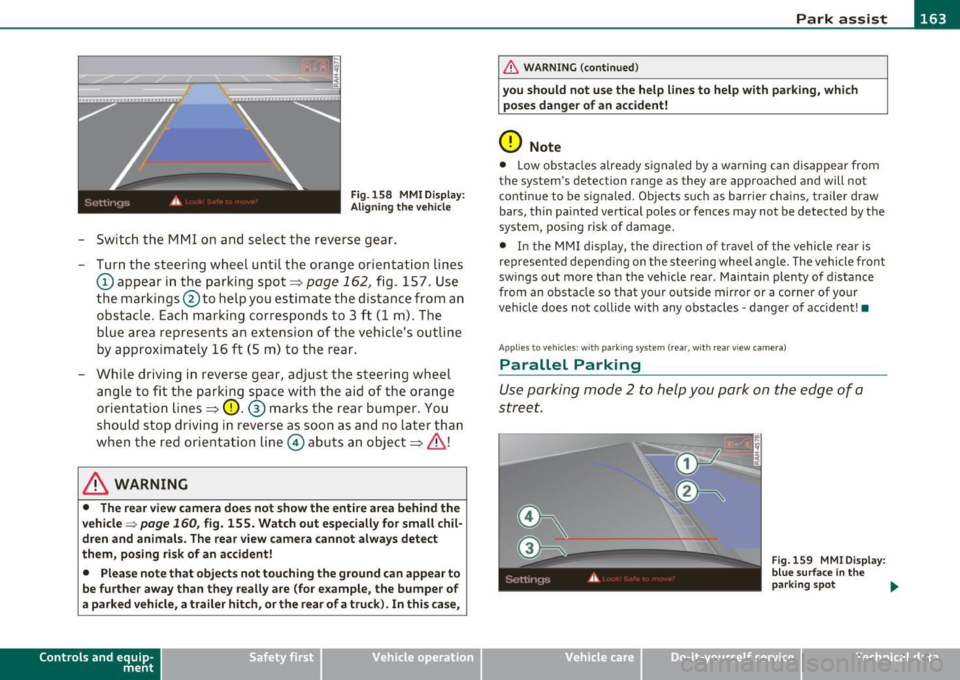
Fig. 158 MMI D isplay:
Ali gning the vehicl e
-Switch the MMI on and se lect the reverse gear .
- Turn the steering wheel until the orange orientation lines
(D appear in the parking spot=> page 162 , fig. 157. Use
the markings @to help you estimate the distance from an
obstac le. Each marking corresponds to 3 ft (1 m) . The
b lue ar ea represents an extension of the vehicle's outline
by approximately 16
ft (5 m) to the rear .
- While driving in reverse gear, adjust the steering wheel ang le to fit the parking space with the aid of the orange
orientation lines =>
0. ® marks the rear bumper . You
should stop driving in reverse as soon as and no la ter than
when the red orientation line© abuts an object=>& !
& WARNING
• The rear view came ra does not show the enti re area beh ind the
v ehicle =>
page 160, fig. 155. Watch out e spe cially fo r s mall chil ·
dren and animal s. The rear v iew cam era cannot alwa ys dete ct
them , posing ri sk of an accident!
• Plea se note that obje ct s not tou ching the groun d can appear to
be further awa y than th ey reall y are (for example , th e bum per of
a parked vehi cle, a trailer hit ch , or the r ear of a truck) . In thi s case ,
Con tro ls a nd e quip ·
m en t Vehicle
OP-eration
& WARNING (con tin ued)
you sh o uld not use the help lin es to help with p arking , whic h
po se s dang er of an accident!
0 Note
• Low obstacles a lready signaled by a wa rning c an disappear from
the sys tem's de te ct ion range as they are app roached and will no t
conti nue to be signaled . Objects such as barrier cha ins, trailer draw
bars, thin painted ve rtical poles or fences may not be detected by the
system , posing risk of damage.
• In the MMI display , the direc tion o f travel o f the vehicle rear is
represen ted depend ing on the steering whee l angle. The vehicle front
swings out more than the veh icle rear . Maintain plenty of distance
from an obstacle so that your outside mirror or a corner of your
vehicle does not collide with any obstacles -danger of accident !•
Ap plie s to veh icle s: with pa rk ing syst e m (r ea r, wi th rear vie w cam era)
Parallel P arking
Use parking mode 2 to help you park on the edge of a
street.
Vehicle care
Fig. 159 MMI Di spl ay :
blue surface In the
p arking s pot
~
Do-it-yourselt service iTechnical data
Page 166 of 362
1111....__P_ a_r_ k_ a_s_ s_ i_ s _t __________________________________________________ _
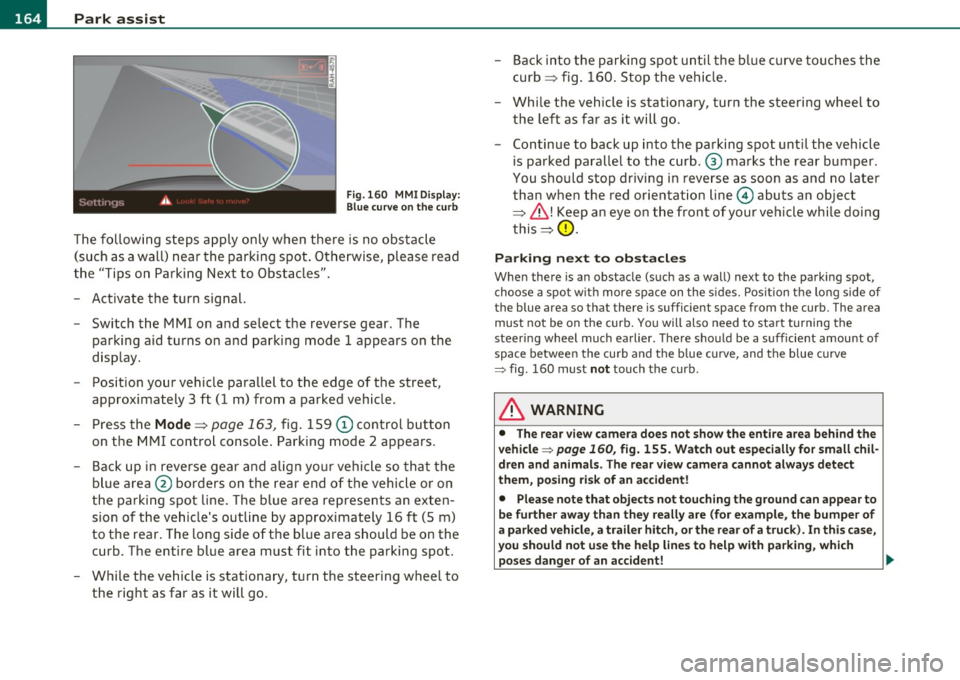
Fig.160 MMI Display:
Blue curve on the curb
The following steps apply only when there is no obstacle
(such as a wall) near the parking spot. Otherwise, please read
the "Tips on Parking Next to Obstacles".
- Activate the turn signal.
- Switch the MMI on and select the reverse gear. The
parking aid turns on and parking mode 1 appea rs on the
display.
- Position your vehicle parallel to the edge of the street,
approximately 3 ft (1 m) from a parked vehicle.
- Press the
Mode => page 163, fig. 159 (D control button
on the MMI control console. Parking mode 2 appears.
- Back up in reverse gear and align your vehicle so that the
blue area ® borders on the rear end of the vehicle or on
the parking spot line. The blue area represents an exten
sion of the vehicle's outline by approximately 16 ft (5 m)
to the rear. The long side of the blue area should be on the
curb. The entire blue area must fit into the parking spot.
- While the vehicle is stationary, turn the steering wheel to
the right as far as it will go. -
Back into the parking spot until the blue curve touches the
curb ::::> fig. 160. Stop the vehicle.
- While the vehicle is stationary , turn the steering wheel to
the left as far as it will go .
- Continue to back up into the parking spot until the vehicle
is parked parallel to the curb .® marks the rear bumper .
You should stop driving in reverse as soon as and no later
than when the red orientation line© abuts an object
=> & !Keep an eye on the front of your vehicle while doing
this =>
0.
Parking next to obstacles
When there is an obstacle (such as a wall) next to the parking spot,
choose a spot with more space on the sides. Position the long side of
the blue a rea so that the re is sufficient space from the curb. The area
must not be on the curb. You will also need to start turning the
steering wheel much earlier. There should be a sufficient amount of
space between the curb and the blue curve, and the blue curve
=> fig . 160 must not touch the curb .
& WARNING
• The rear view camera does not show the entire area behind the
vehicle => page
160, fig. 155. Watch out especially for small chil
dren and animals. The rear view camera cannot always detect
them, posing risk of an accident!
• Please note that objects not touching the ground can appear to
be further away than they really are (for example, the bumper of
a parked vehicle, a trailer hitch, or the rear of a truck). In this case,
you should not use the help lines to help with parking, which
poses danger of an accident! _,,,
Page 167 of 362

Park assist IIJII _________________________________ _____;.....:;_;_.:..:,____;;_ ____ _
0 Note
In the MMI display, the d irect ion of t ravel of the vehicle rear is rep re
sented depend ing on the steering wheel angle. The vehicle front
swi ngs ou t mo re t han t he ve hicle re ar. M ain tain ple nty of dist ance
from an obstacle so t hat your outs ide mirror or a corner of your
vehicle d oes no t collide with any o bstacles - dange r of accide nt!
[ i ) Tips
Th e left or right or ientat ion lines and s urfaces will be displ aye d,
depending on the tu rn signal being used. •
App lies to veh icles : with park ing syst em (rear, wit h rea r view cam era)
Adjusting the display and warning tones
The display and warning tones are adjusted in the radio
or fv1fv1 I*.
-Select : [CAR]> Parking system.
Display
• Off -
when the parking system is switched off, only aud ible sig nals
are given.
• On -when the pa rking system is switc hed on, the pic ture from the
rea r view camera is displayed.
Warning tones
• Rear volume -rear sensor vo lume
• Rear frequency -rear sensor frequency
• In-car entertainment fader -when the par kin g sys tem i s sw itched
on, the volume of the active audio source is lowered.
T he newly a djusted value is br iefly hear d from the signal generator .
T he settings are automatica lly stored and assigned to the remote
cont rol key.
Controls and equip
ment Safety first
& WARNING
•
Always make sure that the volume and frequency of the
warning tones i s adju sted so that you can easily hear the acou stic
distance signal even if the radio is playing , the air-conditioner
blower is on High or there is a high level of outside noise.
• Check the settings whenever someone else has driven the
vehicle before you.
[I] Tips
• Th e warning tones can also be ad justed directly from the rea r view
camera image . Simply p ress the
[Settings I* cont rol b utton .
• C han ged settings are a ctivat ed w hen parking assist is switched on
again .•
A pplies to v ehicl es: w ith park ing syst em (r e a r, wi th re ar view cam era)
Error messages
If a warni ng tone is aud ible fo r about five se conds when yo u turn on
the ignition, the re is a ma lfunction in t he system. Have the prob lem
co rrected by yo ur a utho rized Audi dea ler .
K eep the se nsors in the rear b umper clean and free from i ce s o th at
the acoustic pa rk assist system can function p roper ly .•
Vehicle care Technical data
Page 174 of 362

-Driving
Safely ----------=-----------------
Proper occupant seating positions
Proper seating position for the driver
The proper driver seating position is important for safe,
relaxed driving.
Fig. 164 Correct
seating position
For your own safety and to reduce the risk of injury in the
event of an accident, we recommend that you adjust the
driver's seat to the following position:
- Adjust the driver's seat so that you can easily push the
pedals all the way to the floor while keeping your knee(s)
slightly bent~& .
- Adjust the angle of the seatback so that it is in an upright
pos ition so that your back comes in full contact with it
when you drive.
- Adjust the steering wheel so that there is a distance of at least 10 inches (25 cm) between the steering wheel and
your breast bone~ fig . 164. If not possible, see your
authorized Audi dealer about adaptive equipment.
- Adjust the steering wheel so that the steering wheel and airbag cover points at your chest and not at your face. -
Grasp the top of the steering wheel with your elbow(s)
slightly bent.
- Applies to vehicles w ith adjustable head restraints: Adjust
the head restraint so the upper edge is as even as poss ible
with the top of your head. If that is not possible, try to
adjust the head restraint so that it is as close to this posi
tion as possible.
Fasten and wear safety belts correctly~
page 185.
-Always keep both feet in the footwell so that you are in
control of the vehicle at all t imes.
For de tailed inform ation on h ow to adju st the d river 's seat , see
~ page 76 .
& WARNING
Drivers who are unbelted, out of position or too close to the airbag
can be seriously injured by an airbag as it unfolds. To help reduce
the risk of serious personal injury:
• Always adjust the driver's seat and the steering wheel so that
there are at least 10 inches (25 cm) between your breastbone and
the steering wheel.
• Always hold the steering wheel on the outside of the steering
wheel rim with your hands at the 9 o'clock and 3 o'clock positions
to help reduce the risk of personal injury if the driver's airbag
inflates.
• Never hold the steering wheel at the 12 o'clock position or with
your hands at other positions inside the steering wheel rim or on
the steering wheel hub. Holding the steering wheel the wrong way
can cause serious injuries to the hands, arms and head if the
driver's airbag deploys.
• Pointing the steering wheel toward your face decreases the
ability of the supplemental driver's airbag to protect you in a colli·
sion. .,