2011 AUDI A5 COUPE warning
[x] Cancel search: warningPage 119 of 362

_________________________________________________ O_ n_t_ h ___: e:....:.. ro.::...:. a:..:d:....:.._ffl'II
& WARNING
If a gear or a drive range (automatic transmission) is engaged
with the vehicle stationar y and the engine running , you mu st
in no
instance ac celerate or release the clutch carelessly . Otherwise the
vehicle will start to move immediately -risk of an accident.
0 Note
If the symbo l (CD) in the display or t he indicator lig ht BRAKE (USA
mode ls)/ {(l)) (Canada mode ls) in t he inst rume nt cl uster flashes , th ere
is a malfunct io n in the brake system. By pressing the
I SET ] button,
yo u ca n br ing up a dr ive r message w hich explains the ma lf u nct io n in
more detail. If the driver message
Parking brake! appears, there is an
operat ing malfunc tion in the par king b rake which yo u should have
repaired immediately by an authorized Audi dea ler or other qualified
wo rksh op ~
page 33.
[ i ] Tips
• You can app ly the pa rking brake at any time -even wi th t he ig ni
t ion turned off . T he ign ition must be turned on i n order to release the
park ing b rake .
• Occas ional noises when the parking brake is applied and released
are normal and a re not a ca use fo r concern.
• When the ve hicle is parked, the parking brake goes through a self
t e st cy cl e a t regu lar inte rvals . Any a ssoci ate d noises are normal. •
Parking
Various rules apply to prevent t he parked v ehicle from
rolling away accidentally.
Parking
- Sto p the v ehicle wi th t he foot brak e.
Controls and equip
ment Safety first
-
Pull t he sw itc h to ap ply t he parking brake .
- Automat ic trans mission* : M ove the selector lever to
P .
- T urn t he eng ine off ~& .
- Manual t ransmissi on: Sh ift in to 1 st gear .
In addition on inclines and grades
- Turn t he steeri ng w heel so t hat your vehicle w ill roll
agai nst t he cu rb in case it shou ld sta rt to m ove.
& WARNING
• When you leave your vehicle -even if only briefly -always
remove the ignition key . Thi s applies particularly when children
remain in the vehicle. Otherwise the children could start the
engine , release the parking brake or operate electrical equipment
( e .g. power window s) . There is the risk of an accident.
• When the vehicle is lo cked, no one -particularly not children
should remain in the vehicle . Locked doors make it more difficult
for emergency workers to get into the vehicle -putting lives at
risk. •
Starting from rest
The st artin g assis t func tion ensures th at the p arking
br ake is rele ased a utomatically upo n sta rting .
Stopping and applying parking brake
- Pu ll th e sw itc h t o ap ply t he pa rking brake.
Starting and automatically releasing the
parking brake
- Wh en you start to d rive as usual , the park ing brake is auto-
matically released and your ve hicle begins to move . .,..
Vehicle care Technical data
Page 120 of 362

_____ o_ n_ t_h _e_ r_o _a _ d ________________________________________________ _
When stopping at a traffic signal or stopping in city traffic on vehicles
with an automatic transmission, the parking brake can be applied.
The vehicle does not have to be held with the footbrake . The parking
brake eliminates the tendency to creep with a drive range engaged.
As soon as you drive
off as usual, the parking brake is released auto
matically and the vehicle starts to move.
Starting on slopes
When starting on inclines, the starting assist prevents the vehicle
from unintentionally rolling back. The braking force of the parking
brake is not released until sufficient driving force has been built up at
the wheels .
[I) Tips
For safety reasons, the parking brake is released automatically only
when the driver 's safety belt is engaged in the buckle. •
Starting off with a trailer
To prevent rolling back unintentionally on an incline, do
the following:
- Keep the switch pulled and depress the accelerator. The
parking brake stays applied and prevents the vehicle from
rolling backward.
- You can release the switch once you are sure that you are
developing enough driving force at the wheels by
depressing the accelerator.
Depending on the weight of the rig (vehicle and trailer) and the
severity of the incline, you may roll backwards as you start. You can
prevent rolling backwards by holding the parking brake switch pulled
out and accelerating -just as you would when starting on a hill with a
conventional hand brake. •
Emergency braking
In the event that the conventional brake system fails or
locks.
- In an emergency, pull the switch and continue to pull it to
slow your vehicle down with the parking brake .
- As soon as you release the switch or accelerate, the
braking process stops.
If you pull the switch and hold it above a speed of about 5 mph (8
km/h), the emergency braking function is initiated. The vehicle is
braked at all four wheels by activating the hydraulic brake system.
The brake performance is similar to making an emergency stop:::>& .
In order not to activate the emergency braking by mistake, an audible
warning tone (buzzer) sounds when the switch is pulled. As soon as
the switch is released, or the accelerator pedal is depressed, emer
gency braking stops.
& WARNING
Emergency braking should only be used in an emergency, when
the normal foot brake has failed or the brake pedal is obstructed.
Using the parking brake to perform emergency braking will slow
your vehicle down as if you had made a full brake application. The laws of physics cannot be suspended even with ESP and its associ
ated components (ABS, ASR, EDS). In corners and when road or
weather conditions are bad, a full brake application can cause the
vehicle to skid or the rear end to break away· risking an accident. •
Driver messages in the instrument cluster
Warning Vehicle incline is excessive
This message appears when the parking brake is applied on an incline
that exceeds about 30%. ._
Page 122 of 362

lffl!I.___O_ n_ t_h_ e_ r_ o_ a _ d _________________________________________________ _
may vary, depending on the type of display in your vehicle. The indi
cator ligh t
CRUISE (US model)/ 0" (C anadia n mo del) w ill also light up
in the instrume nt cluster .
The speed is kept constant by modifying engine power or through an
active brake intervention.
& WARNING
• Always pay attention to the traffic around you when the cruise
control is in operation . You are always responsible for your speed
and the distance between your vehicle and other vehicles.
• For reasons of safety, cruise control should not be used in the
city, in stop-and-go traffic, on twisting roads and when road
conditions are poor (such as ice, fog , gravel, heavy rain and hydro
planing) -you could have an accident.
• Switch the cruise control off temporarily when driving in
turning lanes, highway exits or in construction zones.
• Please note that unconsciously "resting" your foot on the
accelerator pedal causes cruise control not to brake. This is due to
the control system being overridden by the driver's acceleration.
(I) Tips
• Vehicles with manual transmission: You can attain the set speed
only if the gear that is currently engaged will allow it, or if it does not
tax the engine and allows it to run smoothly. Therefore shift into a
hig her o r lower gear in a t imely manne r.
• The brake lights illuminate as soon as the brakes apply
automatically .•
Changing speed
- Press the lever in the direction of the 0 => page 119,
fig. 110 or in the dire ction of the Oto increase or
decrease your speed . -
Let go of the lever to save that speed.
Change speed in increments of 1 mph (1 km/h) by lightly pressing the
lever. If you keep the lever pressed down, you will alter your speed in
S mph
(10 km/h) increments.
You can also press the accelerator pedal down to increase your speed,
e.g. if you want to pass someone. The speed you saved earlier will
resume as soon as you let off of the accelerator pedal.
If, however, you exceed your saved speed by 5 mph
(10 km/h) for
longer than 5 minutes, the cruise control will be turned off tempo
rarily. The green symbol in the d isp lay turns white, the saved speed is
reta ined. •
Pre-selecting speed
You can pre -select your desired speed while the vehicle is
not moving.
- Turn on the ign ition .
- Pull lever into position 1
:::> page 119, fig. 110.
- Press the lever in the
0 or O direction to increase or
decrease your speed.
- Let go of the lever to save that speed.
This function makes it possible, for example, to save the speed you
want before dr iv ing on the highway. Once on the highway, activate
the cruise control by pulling the lever toward
(D . •
Switching off
Temporary deactivation
- Step on the brake pedal, or
Page 123 of 362

On the road -
----------------
-Manual transmission: Keep the clutch pedal pressed down
longer, or
- Press the lever into position @ (not clicked into place)
=> page 119, fig. 110, or
- Drive for longer than 5 minutes at more than 5 mph
(10 km/h) above the stored speed.
Switching off completely
- Press lever in to position @ (clicked into place), or
- Switch the ignition off.
Th e speed you saved will be retained if the cru ise control has bee n
switched off temporari ly . T o resume the saved speed, let up on the
brake or cl utch pedal and pull the leve r to position
(D .
The saved speed w ill be erased after turning the ignition off.
& WARNING
You should only resume the saved spe ed if it is not too high for
ex is ting traffi c co nd itions . Otherwi se you ri sk an a ccident .•
Controls and equip
ment Safety first
Vehicle care Technical data
Page 124 of 362

ffl..__A_ d_a_ p :...... t_iv _ e_ c_r _u _i_s _e _ c..;.,o _n_ t..;., r _o.;.__ l ___________________________________________ _
Adaptive cruise control
Speed and distance control system
Applies to veh icl es : w it h adaptive c ruise contro l
Description
The adaptive cruise control driver assistan ce program is a
combined speed and distance control system .
Fig. 112 Front
bum per : Po sitio n of
r a d ar sen sor
Any speed betwee n about 20 mph (30 km/h) and about 95 mph
( 1 50 km/ h) can be set and held with the adaptive cruise control. The
system also regu lates a pre-set distance from the vehicle ahead
w ith in the limits of the system described.
Driv ing c an be more relaxed, particularly o n long tr ips on inter states
or on other highways that a re generally straig ht.
How does it work?
Yo u ca n operate the adaptive c ruise contro l using the leve r o n the
steer ing wheel column:::,
page 125, "H ow is the speed sto red? " and
=:> pag e 12 7, "How is the distance (time interval) set?".
Driver information
Important info rmation is brought up in the speedometer and in the
instrumen t clust er dis play as the ve hicl e is be ing driven :::,
page 128,
"Driver in format ion ".
What is important for you to know
The adaptive cru ise cont rol is set with system-specified lim its, that is,
a s a driver, yo u will h ave to adju st the speed and dist an ce to the
vehicle ahead in some instances :::,
page 132, "Driver inte rvention
promp t" and =>
page 133, "Sy stem limi ta tions ".
& WARNING
Improper u se of the adaptive cruise control can cause colli sion s,
othe r accidents and serious personal injury.
• Never drive at speeds that are too high for traffic, road and
weather condition s.
• Never follow the vehicle in front so closely that you cannot stop
your vehicle safel y. The adaptive cruise control cannot brake the
vehicle safely when you follow another vehicle too closely . Alway s
remember that the adapti ve cruise control has a braking power
that i s only about 25% of the vehicle 's maximum br aking ability,
the automatic b rak ing function cannot bring the vehicle to a stop.
• Never use adaptive cruise control on roads where you cannot
drive safely at a steady speed , including city , stop-and-go or heavy
traffi c, on winding roads or when road condition s are poor (for
example , on ice, gravel, in fog, heavy rain or on wet roads that
in crea se the risk of hydroplaning).
• The rada r sensor's
vis io n can be reduced by rain, snow and
heavy spray . This can re sult in vehicle s driving ahead being inade
qu ately detected or, in some circumstances , not detected at all. If
necessary, take action yourself! ..,
Page 125 of 362

Adaptive cruise control -____________ __._ __ _
& WARNING (co ntinued )
• Always turn off adaptive crui se control when entering turn
lanes, highway ex it lanes and con struction zones or similar situa
tions because the vehicle will automatically accele rate to the
stored speed .
• Never rest your foot on the accelerator pedal, especially when
the adaptive cruise control is being u sed because doing so will
override the braking function and prevent the brakes from being
applied by the system when it detect s a situation when the brake s
must be applied.
• Alway s remember that the adaptive cruise control has limits -
it does not react when you drive towards an obstacle or something
else on or near the road that is not moving, such as vehicles
stopped in a traffic jam , a stalled or disabled vehicle .
• Always remember that the adaptive cruise control cannot
detect a veh icle th at i s driving towards you in your traffic lane and
that it cannot detect narrow vehicles such as motorcycles and bicy
cles .
[ i] Tips
• For safety reasons, the stored speed is deleted when the ignition
is turned off.
• The Electronic Stabilization Program (ESP) and the Ant i-Slip Regu
la tio n (A SR) c anno t be de activated when the adaptive cruise cont rol
is sw itched on .
If the ESP and the Anti -S lip Regulation (ASR) has been
de activ at ed an d yo u the n switch on the ad apt ive cruise cont rol, the
ESP fu nction w ill also be activated automatically.
• Dam age cau sed by accide nts (e.g. if the vehicle is dam age d whe n
park ing) can affect the rada r sensor settings. This can cause t he
sys tem to malfunc tion or switch off comple tely.
• The radar sensor cover is heated. In w inter conditions, you should
st ill ch eck befor e dr iv in g to make s ure i t is free of ice and s now. If
necessary, clean the area nea r the rada r sensor carefully=>
page 122,
fig. 112 .
Controls and equip
ment Safety first
•
To ensure that the radar sensor is not blocked , fore ign objects
(e .g. st ickers, add -on par ts) m ust no t cover the are a ne ar th e radar
sensor=>
page 122, fig . 112 . The area near t he radar sensor must not
be painted, either .
• For Declaration of Compliance to United States FCC and Industry
C an ada regula tions =>
page 34 3. •
App lies to ve hicle s: with adap tiv e crui se contro l
How does adaptive cruise control work?
Vehicles traveling ahead are de tec ted w ith the aid of a
ra dar sens or.
I;= =;. =============== -.~
~
ll!
Fig. 113 Radar sen sor
mea sureme nt r an ge
A radar sensor is buil t into the front of the vehicle=> fig. 113, which
is subject to ce rtain system limits =>
page 133 . Stationary o bjects are
not taken into cons iderat ion. The system is intended to measure the
distance to reflective s urfaces. The system responds after the
dis tance measuremen t has taken place. If a meas urement is not
poss ible, the system does not respond.
Open road
When the road is clear, the adaptive c ruise contro l works like cr uise
cont rol. It ma inta ins a constant target speed specified by the drive r.
~
Vehicle care Technical data
Page 126 of 362
1111....__A_ d_ a..:.p _ t_ i _v _ e_ c_ r _u _ is_ e_ c_o _n_ t_r _o _l _____________________________________________ _
Driving in traffic
If a vehicle driving ahead is detected, the adaptive cruise control
decelerates (within the limits of the system)=>
page 132, "Driver
intervention prompt" and=>
page 133, "System limitations" to its
speed and after adjusting, tries to mainta in the set distance from the
vehicle ahead. The vehicle may temporarily drive slower than the set
speed wh ile adjusting::::>
& in "Description" on page 122 .
If the vehicle in front accelerates, adaptive cruise control also accel
erates up to the speed that you have set.
Situation requiring driver intervention
In some situations you will have to use the footbrake to slow the
vehicle down in order to keep a safe distance from vehicle in front of
you o r to avoid a rear-end co llision. In this situation, a symbo l
appears and a warning tone sounds=>
page 132.
Passing another vehicle
If you move into the passing lane and no vehicle is detected ahead,
the adaptive cruise control accelerates to the speed you have set and
maintains it .
Override
You can increase your speed at any time by stepping on the acceler
ator pedal. After you release the accelerator pedal, the system
adjusts back down to the speed you previously set .
[ i] Tips
Please note that the amount of acceleration the adaptive cruise
control uses depends on the Distance setting selected. DISTANCE 1
gives you accelerat ion that is dynamic and sporty. DISTANCE 4, on the
other hand, gives more moderate acceleration . For more information
about the time intervals=>
page 127, "H ow is the distance (time
interval) set?".
• Please note that if the adaptive cruise control has begun braking
the vehicle and the driver chooses to brake the vehicle additionally, the brakes may
feel "hard". This is simply due to the pressure build
up of the initial braking.
• Adaptive cruise contro l is switched off after pressing the foot
brake. The speed saved up this point can be resumed. To resume the
saved speed, release the brake pedal and pull the control lever
=>
page 126, "Tu rning adaptive cruise control off temporarily". •
Applies to veh icles : wit h ad aptive c ru is e cont rol
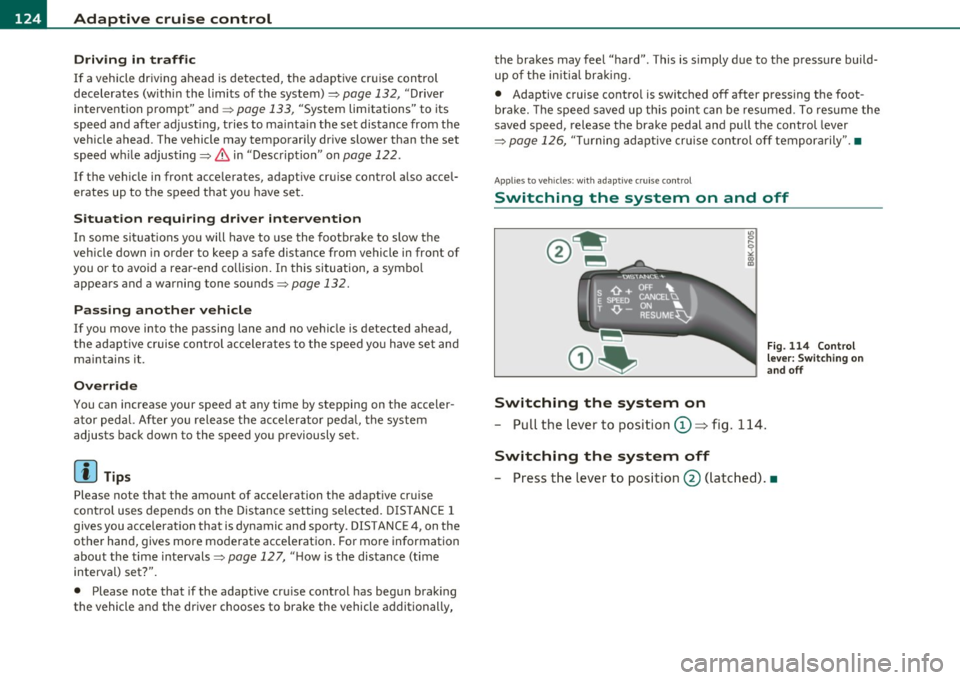
Switching the system on and off
Switching the system on
- Pull the lever to position 0 => fig. 114.
Switching the system off
Fig . 114 Control
lever: Switching on
and off
- Press the lever to position@ (latched) .•
Page 128 of 362

BI..__A_ d_a_ p,__ t_i v_ e_ c_r _ u _i _ s _e _ c_o _n _ t_ r_ o_ l ___________________________________________ _
-Press the lever downwards Q and hol d it. As long as you
hold the control switch down, the light diode display in the
speedometer LED display moves backward and the speed
is reduced.
After releasing the control switch, the system r egulates the speed to
the value just set.
Aft er each adjustment, the newly-set speed is shown for a short time
in the Information line~
page 131.
[ i ] Tips
You can increase your speed at any time by stepping on the acceler
ator pedal. After you release the accelerator pedal, the system
adjusts back down to the speed you previously set. A new desired
speed can be stored at any time by pressing the [SET ] button
~ page 125, fig. 115 . •
Applies to veh icles: with adaptive cruise control
Turning adaptive cruise control off
temporarily
In some situations it makes sense to turn adaptive cruise control off temporarily.
Fig. 117 Co ntrol
lever: Turning adaptive
cru ise control off
temporarily
Turning contro l off temporaril y
-To shut off the control with the save function, either
depress the brake pedal, or
- Press the lever in the direction of the arrow @~fi g. 117.
R eactivating control
- To resume the saved speed, release the brake pedal and
press the lever in the direction of the arrow
(D .
& WARNING
Impr oper u se o f the ad apti ve crui se co ntro l ca n ca use co llisions,
o th er acci dents a nd se rious perso na l inju ri es. Ne ver resu me th e
s t o red sp eed if the s pee d i s too high fo r pr eva ilin g road, t ra ffi c o r
weathe r co ndi tions.
lil Tips
When the system is turned off temporarily, the speed stored at the
time is retained. •