Page 214 of 517

FOLDER REPEAT-This feature
replays all the files in the selected
folder in the order they are stored.
To activate the folder repeat feature,
press the RPT button repeatedly. You
will see ‘‘F-RPT ’’in the center
display. To turn it off, press and hold
the RPT button.
Each time you press and release the
RPT button, the mode changes from
file repeat to folder repeat, then to
normal play. FOLDER RANDOM
-This feature
plays the files in the selected folder
in random order. To activate the
folder random feature, press the
A.SEL/RDM button. You will see ‘‘F-
RDM ’’in the center display. To turn
it off, press and hold the A.SEL/
RDM button.
RANDOM -This feature plays all
the files in random order. To activate
the track random feature, press the
A.SEL/RDM button repeatedly. You
will see ‘‘RDM ’’in the center display.
To turn it off, press and hold the
A.SEL/RDM button.
Each time you press and release the
A.SEL/RDM button, the mode
changes folder random to random
play, then to normal play. SCAN
-This feature samples all
files in the selected folder in the
order they are stored. To activate the
scan feature, press the SCAN button.
You will see ‘‘SCAN ’’in the center
display. You will get a 10 second
sampling of each file in the folder.
Press and hold the SCAN button to
get out of the scan mode and play the
last file sampled.
FOLDER SCAN -This feature
samples the first file in each folder in
the order they are stored. To activate
the folder scan feature, press the
SCAN button repeatedly. You will
see ‘‘F-SCAN ’’in the center display.
You will get a 10 second sampling of
the first file in each folder. Press and
hold the SCAN button to get out of
the folder scan mode and play the
last file sampled.
CONTINUED
Playing a USB Flash Memory Device (Models without navigation system)
209
Features
10/06/08 17:42:32 11 ACURA RDX MMC North America Owner's M 50 31STK640 enu
Page 215 of 517

Each time you press and release the
SCAN button, the mode changes
from file scan to folder scan, then to
normal play.To Stop Playing a USB Flash
Memory Device
To play the radio, press the FM, AM
or
button. Press the CD/AUX
button to switch between disc (if a
disc is loaded) and
Bluetooth
®Audio.
You can also press the MODE button
on the steering wheel to change
modes.
If you reconnect the same USB flash
memory device, the system will
begin playing where it left off.
Disconnecting a USB Flash Memory DeviceYou can disconnect the USB flash
memory device at any time even if
the USB mode is selected on the
audio system. Always follow the USB
flash memory device's instructions
when you remove it.
When you disconnect the USB flash
memory device while it is playing,
the center display shows ‘‘USB NO
DATA. ’’
If you reconnect the same USB flash
memory device, the system will
begin playing where it left off.
USB Flash Memory Device Error
Messages
For information, see page 211.
Playing a USB Flash Memory Device (Models without navigation system)21010/06/08 17:42:32 11 ACURA RDX MMC North America Owner's M 50 31STK640 enu
Page 223 of 517
U.S. model is shown.PRESET BUTTONS
TUNE/FOLDER BAR
AM/FM BUTTON
PWR/VOL KNOB
SCAN BUTTON
SEEK/SKIP BAR INTERFACE DIAL
AUDIO BUTTONPlaying the FM/AM Radio (Models with navigation system)21810/06/08 17:42:32 11 ACURA RDX MMC North America Owner's M 50 31STK640 enu
Page 224 of 517

To Play the Radio
The ignition switch must be in the
ACCESSORY (I) or the ON (II)
position. Press the AUDIO button to
view the audio control display. Turn
the system on by pressing the PWR/
VOL knob or the AM/FM button.
Adjust the volume by turning the
PWR/VOL knob.The band and frequency the radio
was last tuned to are shown on the
upper display. To change bands,
press the AM/FM button. You can
also change bands with the interface
dial. Press the AUDIO button to view
the audio control display and the
band changes to FM1, FM2, or AM
each time you push the selector up.
On the FM bands,
‘‘STEREO ’’will be
shown on the audio control display.
‘‘ ST’’ will also appear on the upper
display if the station is broadcasting
in stereo. Stereo reproduction on AM
is not available.
XM Radio information is available on
page 228. To Select a Station
You can use any of five methods to
find radio stations on the selected
band: TUNE, SEEK, SCAN, the
preset buttons or icons, and AUTO
SELECT.
TUNE
-Use the TUNE/FOLDER
bar to tune the radio to a desired
frequency. Press the
side of the
bar to tune to a higher frequency,
and the
side of the bar to tune to
a lower frequency.
If you press and hold the
or
side of the bar, the frequency will
begin to change rapidly. It will stop
when you release it.
CONTINUED
Playing the FM/AM Radio (Models with navigation system)
219
Features
10/06/08 17:42:32 11 ACURA RDX MMC North America Owner's M 50 31STK640 enu
Page 234 of 517
SEEK/SKIP
(CATEGORY) BARSCAN BUTTON AUDIO BUTTON
INTERFACE DIAL
XM BUTTONDISP/MODE BUTTON
TUNE/FOLDER BAR
PRESET BUTTONS
PWR/VOL KNOB
U.S. model is shown.
CONTINUED
Playing the XM
®Radio (Models with navigation system)
229
Features
10/06/08 17:42:32 11 ACURA RDX MMC North America Owner's M 50 31STK640 enu
Page 236 of 517
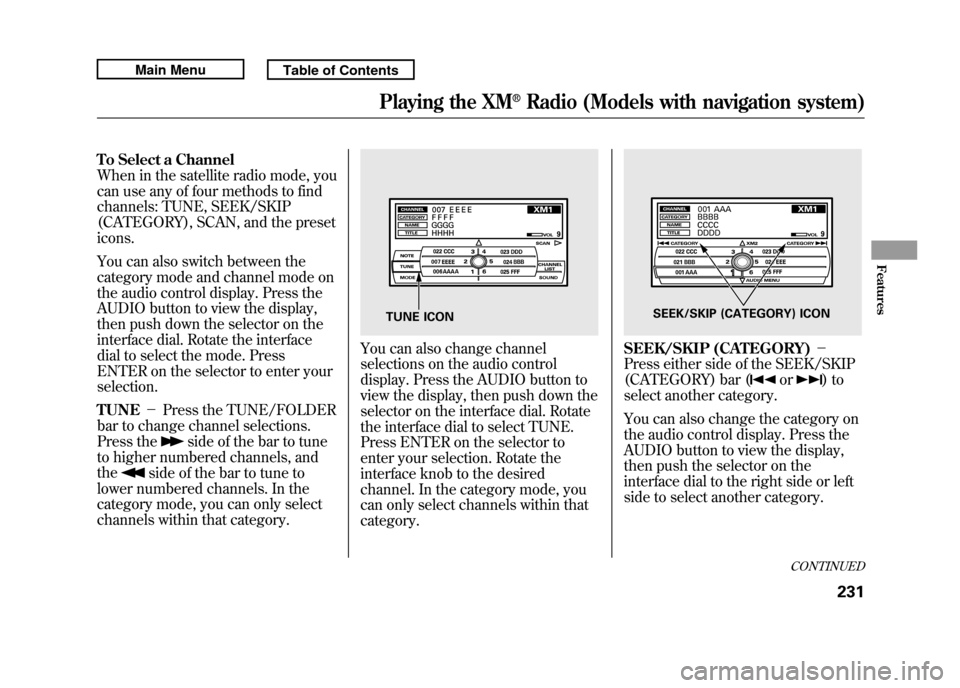
To Select a Channel
When in the satellite radio mode, you
can use any of four methods to find
channels: TUNE, SEEK/SKIP
(CATEGORY), SCAN, and the preset
icons.
You can also switch between the
category mode and channel mode on
the audio control display. Press the
AUDIO button to view the display,
then push down the selector on the
interface dial. Rotate the interface
dial to select the mode. Press
ENTER on the selector to enter your
selection.
TUNE-Press the TUNE/FOLDER
bar to change channel selections.
Press the
side of the bar to tune
to higher numbered channels, and
the
side of the bar to tune to
lower numbered channels. In the
category mode, you can only select
channels within that category.
You can also change channel
selections on the audio control
display. Press the AUDIO button to
view the display, then push down the
selector on the interface dial. Rotate
the interface dial to select TUNE.
Press ENTER on the selector to
enter your selection. Rotate the
interface knob to the desired
channel. In the category mode, you
can only select channels within that
category.
SEEK/SKIP (CATEGORY) -
Press either side of the SEEK/SKIP
(CATEGORY) bar (
or
)to
select another category.
You can also change the category on
the audio control display. Press the
AUDIO button to view the display,
then push the selector on the
interface dial to the right side or left
side to select another category.
TUNE ICON
SEEK/SKIP (CATEGORY) ICON
CONTINUED
Playing the XM
®Radio (Models with navigation system)
231
Features
10/06/08 17:42:32 11 ACURA RDX MMC North America Owner's M 50 31STK640 enu
Page 244 of 517
U.S. model is shown.
Normal mode
SCAN INDICATOR TRACK NUMBER SCAN INDICATORWMA MODE INDICATOR
DISC NUMBER
MP3 MODE INDICATOR FOLDER NUMBER
MP3/WMA mode
CONTINUED
Playing Discs (Models with navigation system)
239
Features
10/06/08 17:42:32 11 ACURA RDX MMC North America Owner's M 50 31STK640 enu
Page 245 of 517
U.S. model is shown.AUDIO BUTTON
DISC SLOT
DISC/AUX BUTTON
SCAN BUTTON
LOAD BUTTON
SEEK/SKIP BAR
PRESET BUTTONSTUNE/FOLDER BAR EJECT BUTTON
DISP/MODE BUTTON DISC LOAD INDICATOR
PWR/VOL KNOB
INTERFACE DIALPlaying Discs (Models with navigation system)24010/06/08 17:42:32 11 ACURA RDX MMC North America Owner's M 50 31STK640 enu


