Page 48 of 396

Warning lampis onCauseAction/Observations
Electric parkingbrake flashing. The application or release of theelectric parking brake was interrupted. You must stop as soon as it is safe to do so.
Park on level ground, switch off the ignition and contact
a CITROËN dealer or a qualified workshop.
+
Electric parking brakemalfunction
fix
ed. The electric parking brake has a fault. Automatic application/release is no longer possible.
Contact a CITROËN dealer or a qualified workshop
without dela
y.
The parking brake can be released manually using theemergency release procedure.
For more information on the electric parking brake,refer to the "Driving" section.
Door(s) open
fixed if the speed isbelow 6 mph (10 km/h).
A door or the boot is still open.
Close the door or boot.
fixed and accompanied by an audible signal
if the speed is above6 mph (10 km/h).
* Accordin
g to country.
Seat belt notfastened/unfastened * fixed, then flashing,
accompanied by anincreasing audible
signal. The driver or
front passenger has notbuckled or has unbuckled their seatbelt. Pull on the belt in question and inser t the tongue in
the buckle.
This warning repeats the seat belt information given by the roof console warning lamps. At least one rear passenger hasunbuckled their seat belt.
Page 49 of 396

47Monitoring
Servicetemporarily,accompanied by amessage. A min
or malfunction has occurredfor which there is no specific warninglamp. Identi
fy the malfunction by reading the message
displayed in the screen, such as, for example:
- the opening of the doors, boot or bonnet,
- the engine oil level,
- the remote control battery,
- the t
yre pressures,
- saturation of the par ticle emission filter on
Diesel vehicles
(see "Checks - § Checks/Particleemissions filter").
For any other malfunctions, contact a CITROËN dealer
or a qualified workshop.
fixed, accompanied
b
y a message and anaudible signal. A ma
jor malfunction has occurred
for which there is no specific warninglamp. Identif
y the malfunction by reading the message
displayed in the screen and contact a CITROËN dealer
or a qualified workshop.
Warning lampis onCauseAction/Observations
Particleemissions filter (Diesel)
fixed, accompanied by an audible signal message on the risk of
blockage of the particle emissions filter.
This indicates that the par ticleemissions filter is star ting to become saturated.
As soon as driving conditions allow, regenerate the filter by driving at a speed of at least 35 mph (60 km/h)until the warning lamp goes off.
fixed, accompanied by an audible signal andand a message that the
par ticle emissions filter additive level is too low. Thi
s indicates the low level of the additive reservoir.Have the reser voir topped up as soon as possible by a
CITROËN dealer or a qualified workshop.
Page 60 of 396
The total and trip distances are displayed for
thirty seconds when the ignition is switchedoff, when the driver's door is opened and when
the vehicle is locked or unlocked.
Distance recorders
Total distance recorder
Trip distance recorder
Measures a distance travelled since it wasreset to zero by the driver.
)
With the ignition on, press and hold this
button until zeros appear.
Measures the total distance travelled bythe vehicle since its first registration.
Page 66 of 396
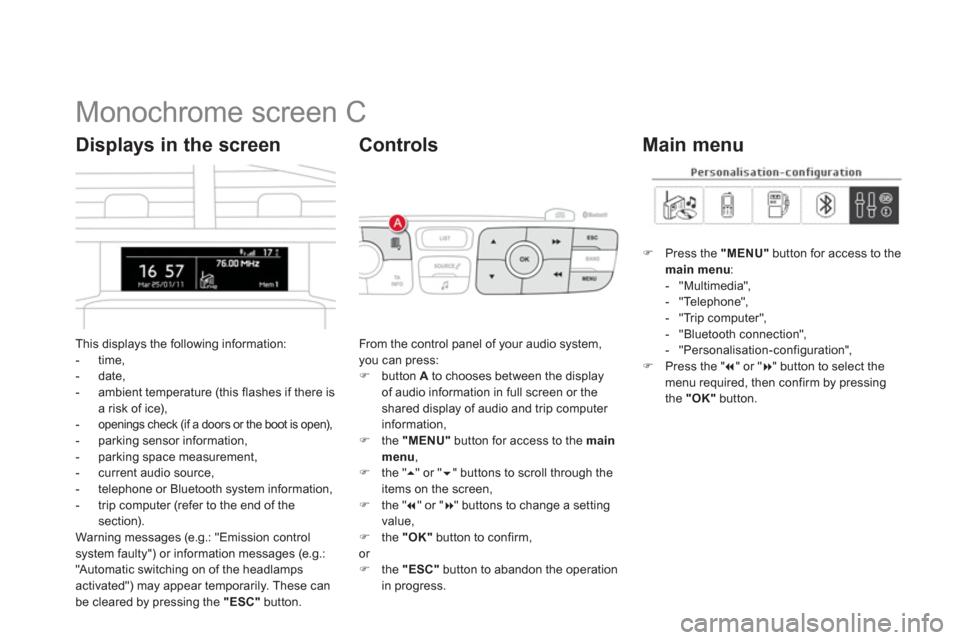
Monochrome screen C
This displays the following information:
- time,- date,
- ambient temperature (this flashes if there isa risk of ice),-openings check (if a doors or the boot is open),- parking sensor information,
- parking space measurement,
- current audio source,
- telephone or Bluetooth s
ystem information,
- trip computer (refer to the end of the
section).
Warning messages (e.g.: "Emission controlsystem faulty") or information messages (e.g.:
"Automatic switching on of the headlamps activated") may appear temporarily. These can
be cleared by pressing the "ESC"
button.
Displays in the screen
From the control panel of your audio system, you can press: )
button Ato chooses between the displayof audio information in full screen or theshared display of audio and trip computer
information,) the "MENU"
button for access to the main menu,)
the " �
" or " �" buttons to scroll through the
items on the screen,
) the " �
" or "�
" buttons to change a settingvalue, )
the "OK"button to confirm,
or ) the "ESC"button to abandon the operation
in progress.
Controls
)Press the "MENU"
button for access to themain menu:- "Multimedia",
- "Telephone",
- "Trip computer",
- "Bluetooth connection",
- "Personalisation-confi
guration",)Press the " �
" or "�
" button to select themenu required, then confirm by pressing
the "OK"
button.
Main menu
Page 92 of 396

Heated seats control
With the engine running, the front seats can be heated separately.)Use the adjustment dial, placed on the side
of each front seat, to switch on and select
the level of heating required: 0:
Off.1:Low.2:Medium. 3:
High.
Additional adjustments
Head restraint height and angle adjustment
)To raise a head restraint, pull it upwards.)To remove the head restraint, press thelug A
and pull the head restraint upwards.)To put the head restraint back in place, engage
the head restraint stems in the openings
keeping them in line with the seat back.)To lower the head restraint, press the lug A
and the head restraint at the same time.)To a djust the angle of the head restraint, tilt its lower part forwards or rearwards.
The head restraint is fitted with a framewith notches which prevents it fromlowering; this is a safety device in caseof impact. The adjustment is correct when theupper edge of the head restraint is level with the top of the head.Never drive with the head restraintsremoved; they must be in place andadjusted correctly.
Page 102 of 396
Remote control key System which permits central unlocking or locking of the vehicle using the door lock or from a distance. It is also used to locate and star t the vehicle, as well as providing protection against theft.
Unlocking the vehicle
Unfolding the key
)Press this button to unfold the key.
Complete unlocking using the
remote control
Selective unlocking using theremote control
)Press the open padlock to unlockthe vehicle completely.
)Press the open padlock once
to unlock the driver's door only.
) Press the open padlock again to unlock the other doors and the boot.
Opening the windows using the
remote contro
l
) Maintain the press on the open
padlock until the desired position
is obtained. The windows stop as soon as you release the button.
Programming the unlocking
The complete or selective door
un
locking parameter is set via the
vehicle configuration menu.
Page 104 of 396
Locking the vehicle
Normal locking using the remote
control
Normal locking using the key
)Turn the key towards the rear in the driver's door lock to lock the vehicle.
) Press the closed padlock to lockthe vehicle.If one of the doors or the boot is still open, the central locking does nottake place; the vehicle locks itself then unlocks straight away, identifiable by the sound of the locks rebounding. When the vehicle is locked, if it isunlocked inadvertently, it will lock itself again automatically after thir ty secondsunless a door or the boot is opened.
The folding and unfolding of the door mirrors using the remote control can bedeactivated by a CITROËN dealer or a qualified workshop.
Lockin
g is confirmed by fixed lighting of
the direction indicators for approximately
two seconds.
According to version, the door mirrors fold at
the same time.
In low light, locking also brings on of
the guide-me-home lighting (see "Visibility").
Page 105 of 396

103Access
Closing the windows using the
remote contro
l
)Press and hold down the closed padlock until the desired position
is obtained. The windows stop when you release the button.
When closing the windows using the remote control you must ensure that nothing prevents them from closingcorrectly.
If you want to leave the windowspartly open, you must deactivate thevolumetric alarm monitoring.
Deadlocking using the remote
control
Deadlockin
g using the key
)Turn the key to the rear in the driver’s door
lock to lock the vehicle completely. )Turn the key to the rear again within fiveseconds to deadlock the vehicle.In low light, deadlocking also brings on the
guide-me-home lighting (see "Visibility").) Press the closed padlock to lockthe vehicle completely.)
Press the closed padlock again
within five seconds to deadlock
the vehicle.
Deadlockin
g is confirmed by fixed lighting
of the direction indicators for approximatelytwo seconds.
According to version, the door mirrors fold at
the same time.
Deadlocking renders the exterior and interior door controls inoperative. It also deactivates the central lockingcontrol button. Therefore, never leave anyone inside the vehicle when it is deadlocked.


