Page 249 of 660
249
2-5. Driving information
2
When driving
Trailer towing
Your vehicle is designed primarily as a passenger carrying vehicle.
Towing a trailer will have an adverse effect on handling, perfor-
mance, braking, durability, and fuel consumption. For your safety
and the safety of others , do not overload the vehicle or trailer.
To tow a trailer safely, use extreme care and drive the vehicle in
accordance with the trailer’s char acteristics and operating condi-
tions.
The vehicle stability and braking performance are affected by trailer
stability, brake setting and performance, and the hitch.
Toyota warranties do not apply to damage or malfunction caused by
towing a trailer for commercial purposes.
Contact your Toyota dealer for fu rther information about additional
requirements such as a towing kits, etc.
Page 252 of 660

252 2-5. Driving information
Towing related term
Towing related termMeaning
GVWR (Gross Vehicle
Weight Rating)
The maximum allowable gross vehicle weight. The
gross vehicle weight is the total weight of the
vehicle. When towing a trailer, it is the sum of the
vehicle weight (including the occupants, cargo and
any optional equipment installed on the vehicle) and
the tongue load.
GAWR (Gross Axle
Weight Rating)The maximum allowable gross axle weight. The
gross axle weight is the load placed on each axle
(front and rear).
GCWR (Gross
Combination Weight
Rating)
The maximum allowable gross combination weight.
The gross combination weight is the sum of the total
vehicle weight (including the occupants, cargo and
any optional equipment installed on the vehicle) and
the weight of the trailer being towed (including the
cargo in the trailer).
Gross trailer weightThe sum of the trailer weight and the weight of the
cargo in the trailer.
Towing capacity
The maximum allowable gross trailer weight. Towing
capacity is calculated considering base vehicle with
necessary vehicle equipment and 150 pound driver.
Additional optional equipment, passengers and
cargo in the vehicle will reduce the towing capacity,
gross trailer weight includes the trailer, cargo and
necessary equipment for towing.
Tongue loadThe load placed on the trailer hitch ball.
Page 268 of 660
268
3-1. Using the air conditioning system and defogger
Front air conditioning system
Airflow and outlets are automatically adjusted according to the tem-
perature setting.
Control panel
Fan speed
control dial
Outside air or
recirculated air mode Front passenger’s
side temperature
control dial
Air conditioning ON/OFF switch
Simultaneous
mode
Rear air conditioning ON/OFF switch
Temperature control for rear
passengers Air outlet
selection dial
Driver's side temperature
control dial
Automatic mode Windshield defogger
Fan OFF switch
Page 269 of 660
269
3-1. Using the air conditioning system
and defogger
3
Interior features
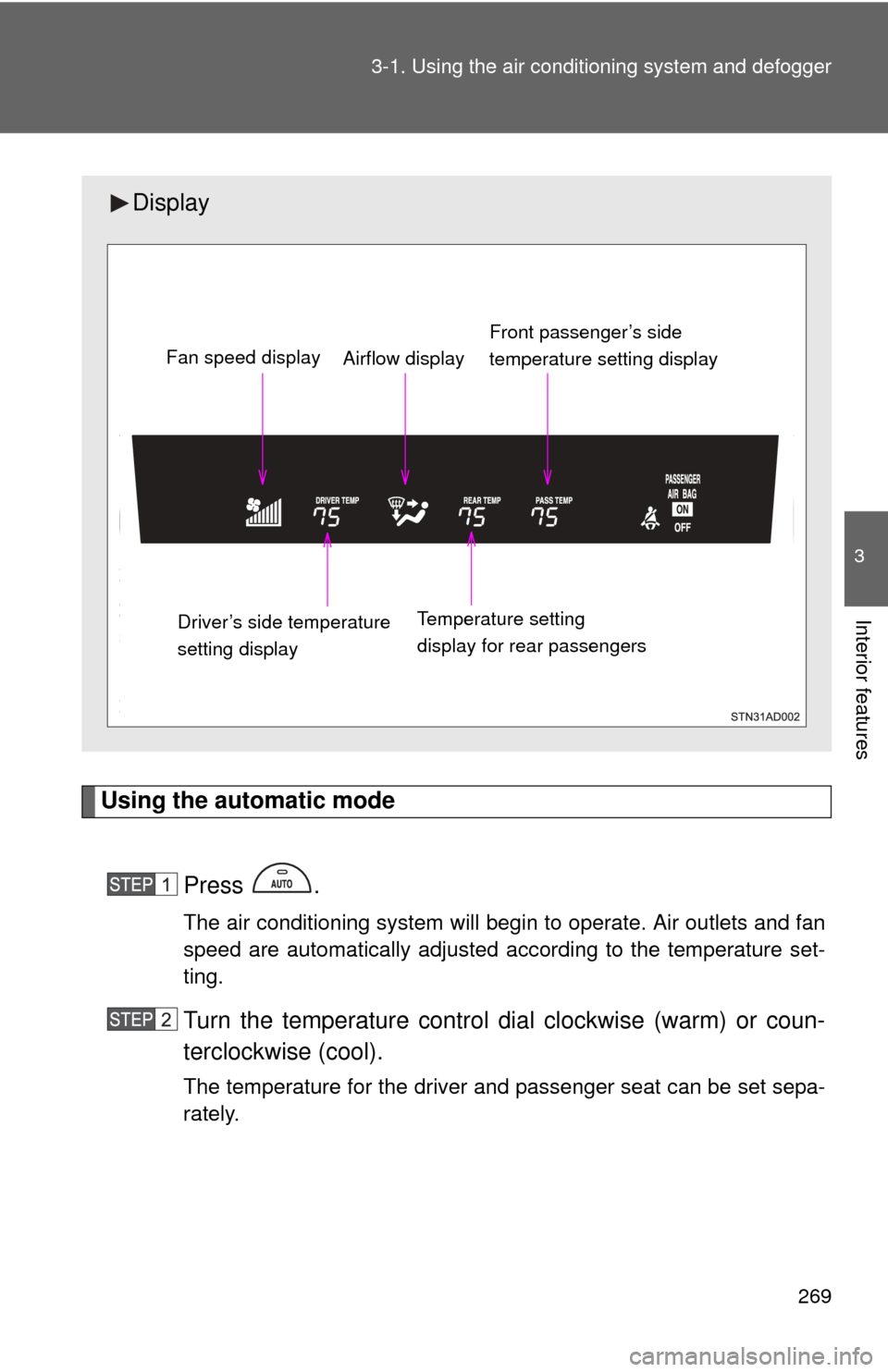
Using the automatic mode
Press .
The air conditioning system will begin to operate. Air outlets and fan
speed are automatically adjusted according to the temperature set-
ting.
Turn the temperature control dial clockwise (warm) or coun-
terclockwise (cool).
The temperature for the driver and passenger seat can be set sepa-
rately.
Display
Front passenger’s side
temperature setting display
Fan speed display
Airflow display
Driver’s side temperature
setting display Temperature setting
display for rear passengers
Page 270 of 660
270 3-1. Using the air conditioning system and defogger
Adjusting the settings
■ Adjusting the temperature setting
Turn the temperature control dial clockwise (warm) or counter-
clockwise (cool).
The air conditioning system sw itches between individual and
simultaneous modes each time is pressed.
● Simultaneous mode (the indicator on is on)
The driver’s side temperature control dial can be used to adjust
the temperature for all seats.
● Individual mode (the indicator on is off)
The temperature for the driver’s, front passenger’s and rear
seats ( P. 276) can be adjusted separately. Operate the pas-
senger’s side or rear temperature controls to enter individual
mode.
■ Adjusting the fan speed
Turn the fan speed control dial clockwise (increase) or counter-
clockwise (decrease).
The fan speed is shown on the display. (7 levels)
Press to turn the fan off.
Page 274 of 660

274 3-1. Using the air conditioning system and defogger
Passenger side outlets
Direct air flow to the left or
right, up or down.
Turn the knob to open or close
the vent.
■Using the automatic mode
Fan speed is adjusted automatically in accordance with the temperature set-
ting and ambient conditions. As a result, the following may occur.
●Immediately after the switch is pressed, the fan may stop for a while until
warm or cool air is ready to flow.
● Cool air may flow to the area around the upper body when the heater is
on.
■ Using the system in recirculated air mode
The windows will fog up more easily if the recirculated air mode is used for
an extended period.
■ Switching between outside air and recirculated air modes
Recirculated air mode or outside air mode may be automatically switched to
in accordance with the temperature setting and the inside temperature.
■ Window defogger feature
Recirculated air mode may automatically switch to
(outside air) mode
in situations where the windows need to be defogged.
Page 276 of 660
276
3-1. Using the air conditioning system and defogger
Rear air conditioning system
■Button lock function
During Simultaneous mode (the indicator on is on), the rear
air conditioning system button s will be automatically locked.
( P. 270)
appears on the display when the buttons are locked.
To unlock the buttons, c hoose the Individual mode (the indicator on
is off). ( P. 270)
Airflow and outlets are automatica lly adjusted according to the tem-
perature setting.
Airflow control
Temperature setting
display
Fan speed control
Off
Automatic mode
Temperature control
for rear passengers
Page 465 of 660
465
3-8. Other interior features
3
Interior features
Seatback table
: If equipped
CAUTION
■Caution while driving
Observe the following precautions to avoid death or serious injury.
●Do not set up the seatback table.
● Do not sit on or place anything on the seatback table.
NOTICE
■To prevent damage to the seatback table
Do not put heavy loads on the table.
Front passenger’s seatback can be used as a temporary table only
when the vehicle is stopped.
Fold down the front passen-
ger’s seat to use the seatback
table. ( P. 49)