Page 52 of 448
52
1-3. Adjustable components (seats, mirrors, steering wheel)
Anti-glare inside rear view mirror
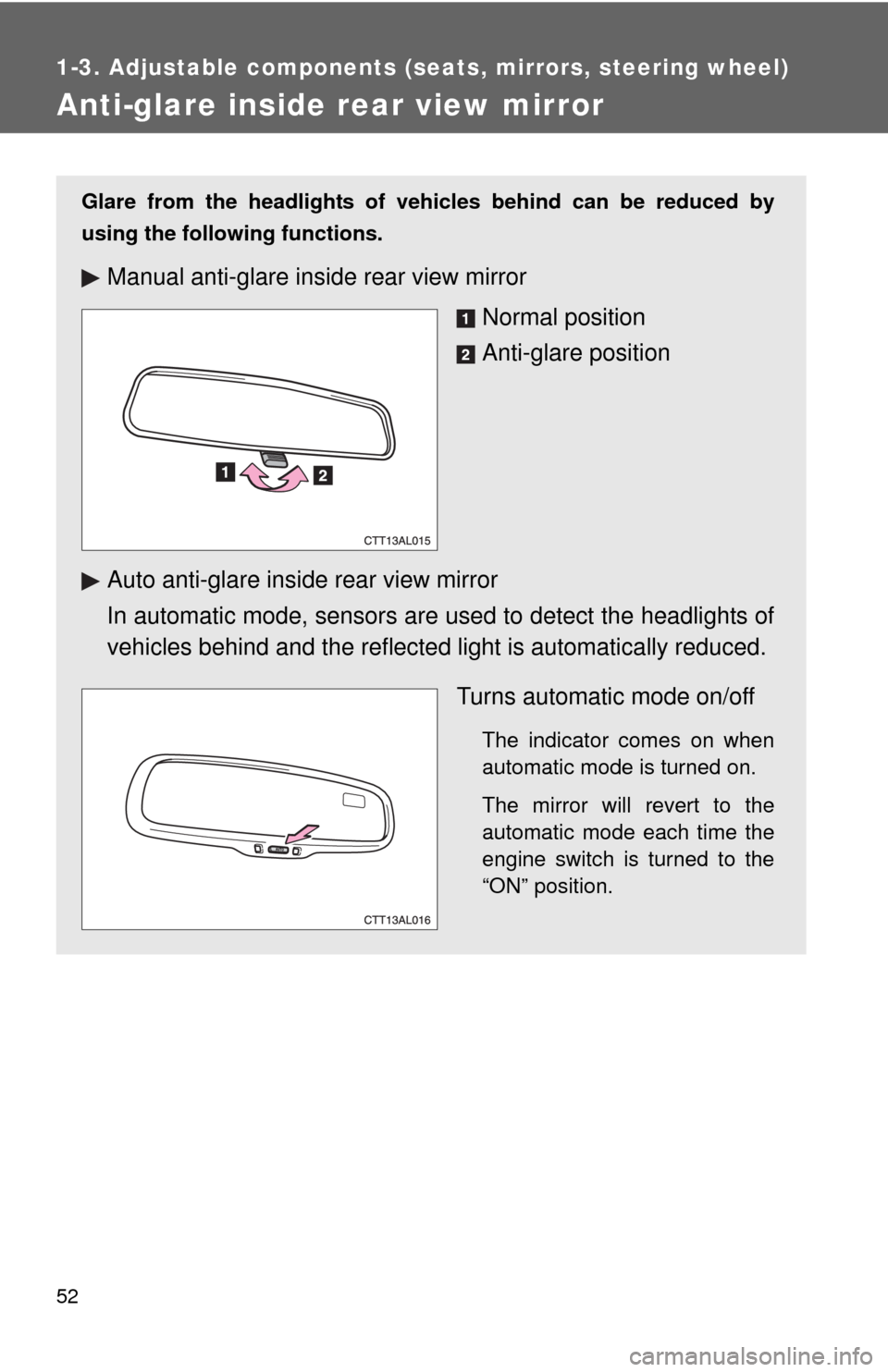
Glare from the headlights of vehicles behind can be reduced by
using the following functions.
Manual anti-glare inside rear view mirror
Normal position
Anti-glare position
Auto anti-glare inside rear view mirror
In automatic mode, sensors are used to detect the headlights of
vehicles behind and the reflected light is automatically reduced.
Turns automatic mode on/off
The indicator comes on when
automatic mode is turned on.
The mirror will revert to the
automatic mode each time the
engine switch is turned to the
“ON” position.
Page 53 of 448
53 1-3. Adjustable components (seats, mirrors, steering wheel)
1
Before driving
■To prevent sensor error
CAUTION
■Caution while driving
Do not adjust the position of the mirror while driving.
Doing so may lead to mishandling of the vehicle and an accident, resulting in
death or serious injury.
To ensure that the sensors operate prop-
erly, do not touch or cover them.
Page 54 of 448
54
1-3. Adjustable components (seats, mirrors, steering wheel)
Outside rear view mirrors
Folding back the mirrors
Push backward to fold the mir-
rors.
Mirror angle can be adjusted using the switch.
Select a mirror to adjust.
Left
Right
Adjust the mirror.
Up
Right
Down
LeftSTEP1
STEP2
Page 55 of 448
55 1-3. Adjustable components (seats, mirrors, steering wheel)
1
Before driving
■Mirror angle can be adjusted when
The engine switch is in the “ACC” or “ON” position.
■When the mirrors are fogged up (vehicles with outside rear view mirror
defoggers)
Turn on the mirror defoggers to defog the mirrors. (P. 174)
CAUTION
■When driving the vehicle
Observe the following precautions while driving.
Failing to do so may result in loss of control of the vehicle and cause an acci-
dent, resulting in death or serious injury.
●Do not adjust the mirrors while driving.
●Do not drive with the mirrors folded back.
●Both the driver and passenger side mirrors must be extended and properly
adjusted before driving.
■When the mirror defoggers are operating (vehicles with outside rear
view mirror defoggers)
Do not touch the rear view mirror surfaces, as they can become very hot and
burn you.
Page 107 of 448

107 2-1. Driving procedures
2
When driving
CAUTION
●Do not adjust the position of the steering wheel, the seat, or the inside or
outside rear view mirrors while driving. Doing so may result in a loss of
vehicle control that can cause accidents that may result in death or serious
injury.
●Always check that all passengers' arms, heads or other parts of their bod-
ies are not outside the vehicle, as this may result in death or serious injury.
●Do not drive the vehicle off-road.
This is not a AWD vehicle designed for real off-road driving. Proceed with
all due caution if it becomes unavoidable to drive off-road.
●Do not drive across river crossings or through other bodies of water.
This may cause electric/electronic components to short circuit, damage
the engine or cause other serious damage to the vehicle.
●Do not drive in excess of the speed limit. Even if the legal speed limit per-
mits it, do not drive over 85 mph (140 km/h) unless your vehicle has high-
speed capability tires. Driving over 85 mph (140 km/h) may result in tire
failure, loss of control and possible injury. Be sure to consult a tire dealer
to determine whether the tires on your vehicle are high-speed capability
tires or not before driving at such speeds.
■When driving on slippery road surfaces
●Sudden braking, acceleration and steering may cause tire slippage and
reduce your ability to control the vehicle, resulting in an accident.
●Sudden changes in engine speed, such as engine braking caused by up-
shifting or down-shifting, may cause the vehicle to skid, resulting in an
accident.
●After driving through a puddle, lightly depress the brake pedal to make
sure that the brakes are functioning properly. Wet brake pads may prevent
the brakes from functioning properly. If the brakes on only one side are wet
and not functioning properly, steering control may be affected, resulting in
an accident.
■When shifting the shift lever (vehicles with an automatic transmission)
Be careful not to shift the shift lever with the accelerator pedal depressed.
This may lead to unexpected rapid acceleration of the vehicle that may
cause an accident and result in death or serious injury.
Page 157 of 448

157 2-5. Driving information
2
When driving
■Before towing
●Ensure that your vehicle’s tires are properly inflated. (P. 317)
●Trailer tires should be inflated according to the trailer manufacturer's rec-
ommendation.
●All trailer lights must work in order to be legal.
●Confirm all lights work each time you connect them.
●Check that your vehicle remains level when a loaded or unloaded trailer
is hitched. Do not drive if the vehicle is not level, and check for improper
tongue load, overloading, worn suspension, or other possible causes.
●Make sure the trailer cargo is securely loaded.
●Check that your rear view mirrors conform to any federal, state/provincial
or local regulations. If they do not, install rear view mirrors appropriate for
towing purposes.
■Break-in schedule
Toyota recommends that you do not use a new vehicle or a vehicle with any
new power train components (engine, transmission, differential, wheel bear-
ings, etc.) to tow a trailer for the first 500 miles (800 km) of driving.
■Maintenance
●If you tow a trailer, your vehicle will require more frequent maintenance
due to the additional load. (See “Scheduled Maintenance Guide” or
“Owner's Manual Supplement”.)
●Retighten the fixing bolts of the towing ball and bracket after approxi-
mately 600 miles (1000 km) of trailer towing.
Page 166 of 448
166
3-1. Using the air conditioning system and defogger
Air conditioning system .... 168
Rear window and outside rear view
mirror defoggers ............ 174
3-2. Using the audio system Audio system types .......... 175
Using the radio ................. 178
Using the CD player ......... 184
Playing MP3 and WMA discs............................... 191
Optimal use of the audio system ........................... 199
Using the AUX adapter .... 202
Using the steering wheel audio switches ............... 203
Interior features3
Page 167 of 448

Interior features3
167
3-3. Using the hands-free phone
system (for cellular phone)
Hands-free phone system
(for cellular phone)
features .......................... 206
Using the hands-free
phone system
(for cellular phone) ......... 209
Making a phone call ......... 218
Setting a cellular phone ... 222
Security and system
setup .............................. 227
Using the phone book ...... 231
3-4. Using the interior lights
Interior lights list ............... 238
• Interior light ..................... 239
• Personal/interior lights .... 240
• Personal lights ................ 2413-5. Using the storage features
List of storage features .... 242
• Glove box........................ 243
• Console box .................... 243
• Cup holders .................... 245
• Bottle holders .................. 247
• Auxiliary boxes................ 248
3-6. Other interior features
Sun visors ........................ 250
Vanity mirrors ................... 251
Clock ................................ 252
Ashtrays ........................... 253
Cigarette lighter................ 254
Power outlet ..................... 255
Grocery bag hook ............ 257
Seatback table ................. 259
Floor mat .......................... 260
Luggage compartment
feature............................ 261
Compass .......................... 268