Page 24 of 476
24
AVALON_U (OM41437U)
1-2. Opening, closing and locking the doors and trunk
Smart key system
: If equipped
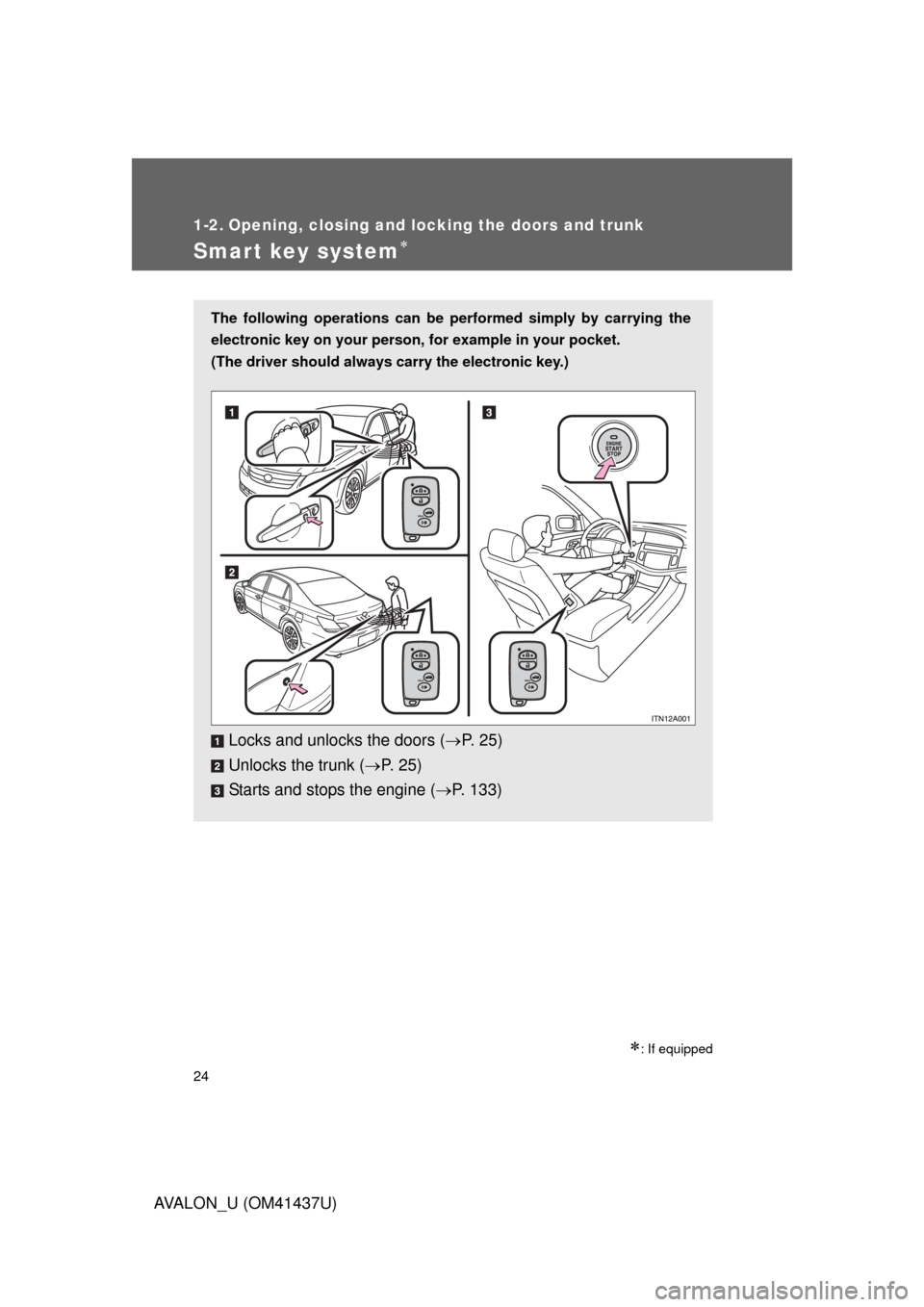
The following operations can be performed simply by carrying the
electronic key on your person, for example in your pocket.
(The driver should always carry the electronic key.)
Locks and unlocks the doors ( P. 2 5 )
Unlocks the trunk ( P. 2 5 )
Starts and stops the engine ( P. 133)
Page 27 of 476
27
1-2. Opening, closing and locking the doors and trunk
1
Before driving
AVALON_U (OM41437U)
■
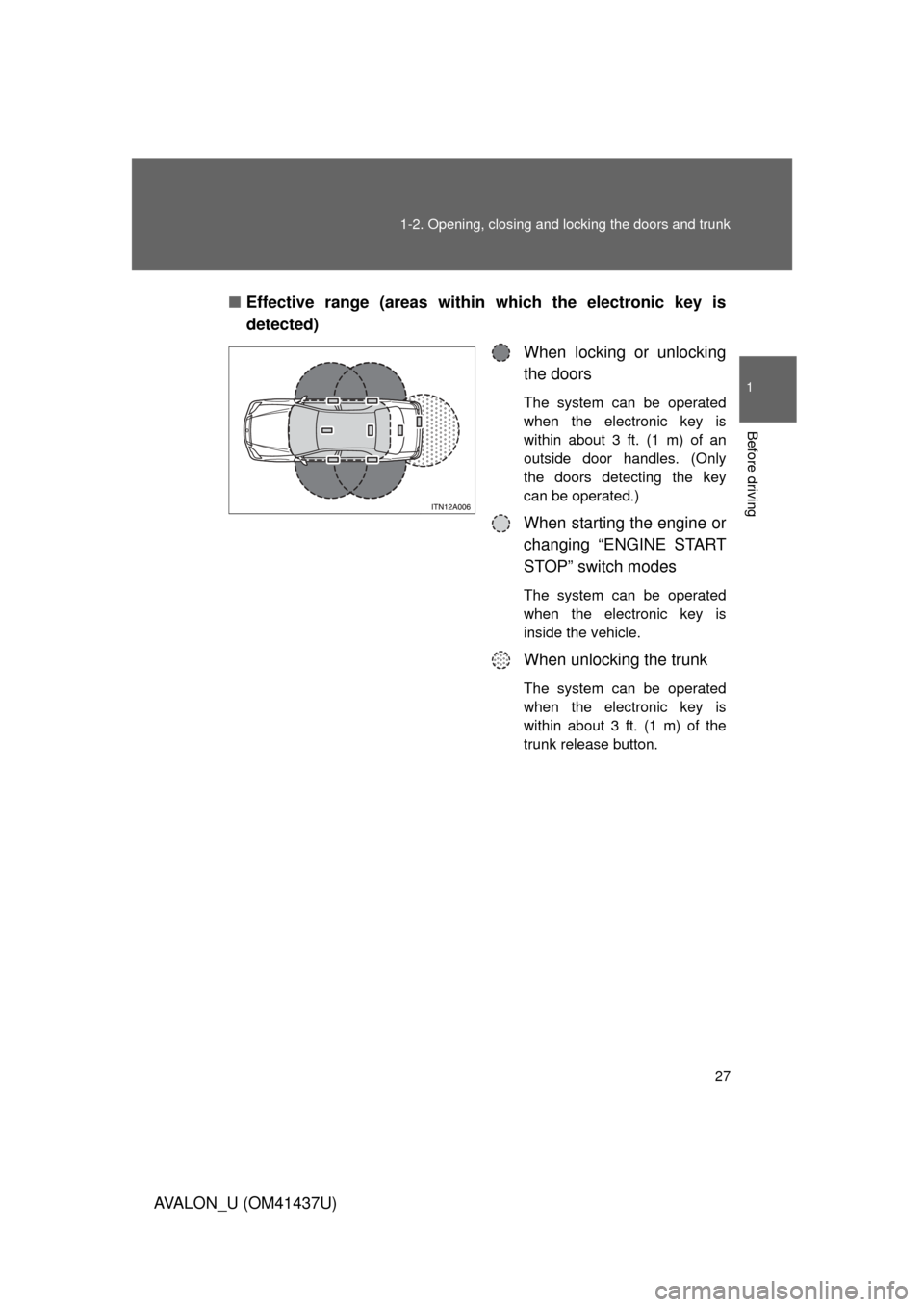
Effective range (areas within which the electronic key is
detected)
When locking or unlocking
the doors
The system can be operated
when the electronic key is
within about 3 ft. (1 m) of an
outside door handles. (Only
the doors detecting the key
can be operated.)
When starting the engine or
changing “ENGINE START
STOP” switch modes
The system can be operated
when the electronic key is
inside the vehicle.
When unlocking the trunk
The system can be operated
when the electronic key is
within about 3 ft. (1 m) of the
trunk release button.
Page 29 of 476
29
1-2. Opening, closing and locking the doors and trunk
1
Before driving
AVALON_U (OM41437U)
■
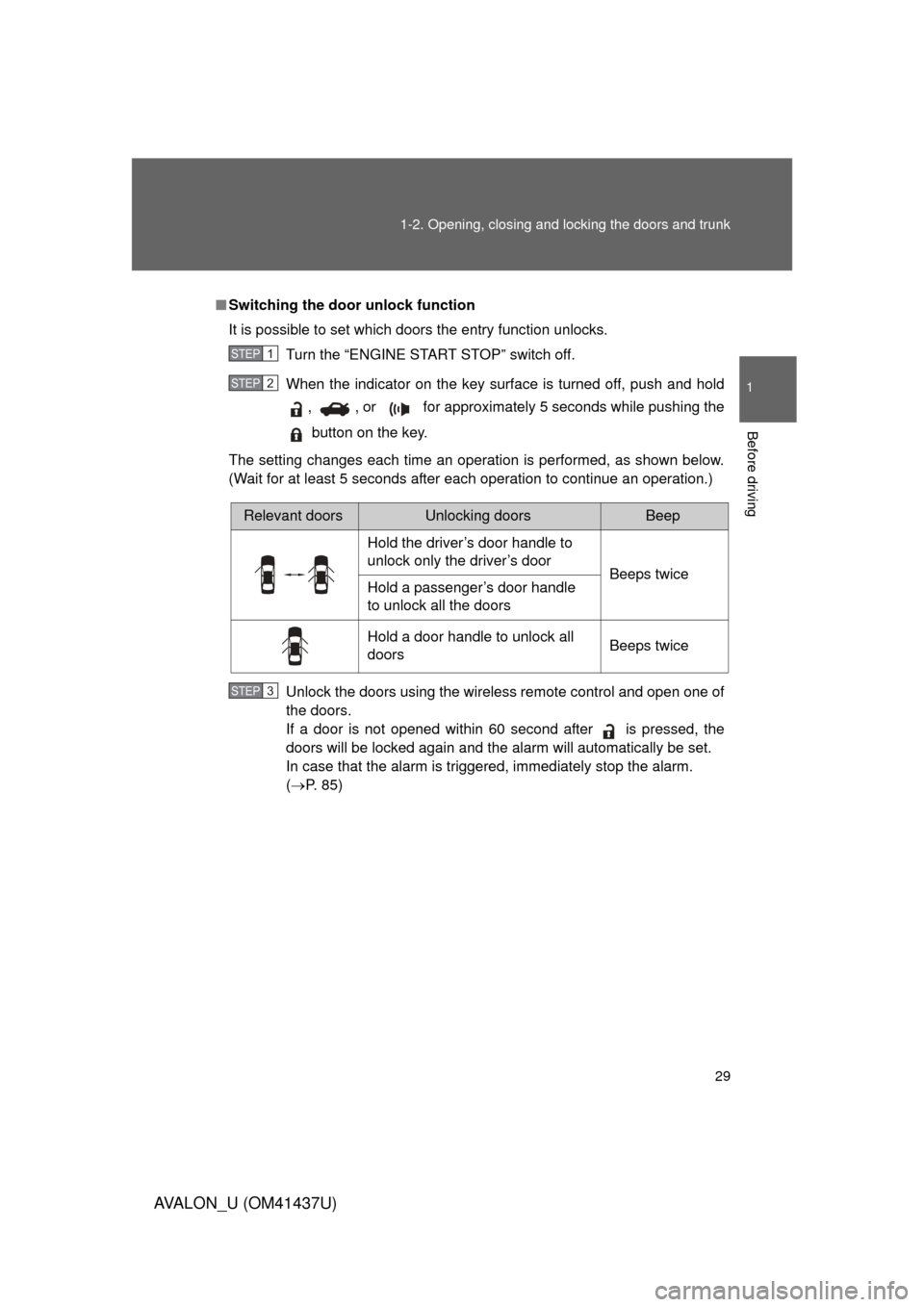
Switching the door unlock function
It is possible to set which doors the entry function unlocks.
Turn the “ENGINE START STOP” switch off.
When the indicator on the key surface is turned off, push and hold, , or for approximately 5 seconds while pushing the
button on the key.
The setting changes each time an operation is performed, as shown below.
(Wait for at least 5 seconds after each operation to continue an operation.)
Unlock the doors using the wireless remote control and open one of
the doors.
If a door is not opened within 60 second after is pressed, the
doors will be locked again and the alarm will automatically be set.
In case that the alarm is triggered, immediately stop the alarm.
(P. 85)
STEP1
STEP2
Relevant doorsUnlocking doorsBeep
Hold the driver’s door handle to
unlock only the driver’s door Beeps twice
Hold a passenger’s door handle
to unlock all the doors
Hold a door handle to unlock all
doors Beeps twice
STEP3
Page 31 of 476

31
1-2. Opening, closing and locking the doors and trunk
1
Before driving
AVALON_U (OM41437U)
■
Note for the smart key system
● Even when the electronic key is within the effective range (detection
areas), the system may not operate properly in the following cases.
• The electronic key is too close to the window or outside door handle,
near the ground, or in a high place when the doors are locked or
unlocked.
• The electronic key is near the ground or in a high place, or too close to the rear bumper center when the trunk is unlocked.
• The electronic key is on the instrument panel, rear package tray or floor, or in the glove box when the engine is started or “ENGINE
START STOP” switch modes are changed.
● As long as the electronic key is within the effective range, the doors may
be locked or unlocked by anyone.
● Even if the electronic key is not inside the vehicle, it may be possible to
start the engine if the electronic key is near the window.
● The doors may unlock if a large amount of water splashes on the door
handle, such as in the rain or in a car wash when the electronic key is
within the effective range. (The doors will automatically be locked after
approximately 60 seconds if the doors are not opened and closed.)
● Gripping the door handle when wearing a glove may not unlock the door.
● If the wireless remote control is used to lock the doors when the elec-
tronic key is near the vehicle, there is a possibility that the door may not
be unlocked by the entry function. (Use the wireless remote control to
unlock the doors.)
● A sudden approach to the effective range or door handle operation may
prevent the doors from being unlocked. In this case, return the door han-
dle to the original position and check that the doors unlock before pulling
the door handle again.
■ When the vehicle is not dr iven for extended periods
To prevent theft of the vehicle, do not leave the electronic key within 6 ft. (2
m) of the vehicle.
■ Security feature
If a door is not opened within approximately 60 seconds after the vehicle is
unlocked, the theft deterrent system automatically locks the vehicle again.
Page 32 of 476

32 1-2. Opening, closing and locking the doors and trunk
AVALON_U (OM41437U)
■Alarms and warning indicators
A combination of exterior and interior alarms are used to prevent theft of the
vehicle and unforeseeable accidents resulting from erroneous operation.
Take appropriate measures according to which warning light comes on.
(P. 393)
The following table describes circumstances and correction procedures
when only alarms are sounded.
AlarmSituationCorrection procedure
Exterior alarm
sounds once for
2 seconds Tried to lock the doors
using the entry function
while the electronic key is
still inside the passenger
compartment
Retrieve the elec-
tronic key from the
passenger compart-
ment and lock the
doors again.
Tried to exit the vehicle
with the electronic key and
lock the doors without first
turning the “ENGINE
START STOP” switch OFF Turn the “ENGINE
START STOP” switch
OFF and lock the
doors again.
Closed the trunk while the
electronic key is still inside
and all doors are locked Retrieve the elec-
tronic key from the
trunk and close the
trunk lid.
Exterior alarm
sounds once for
10 seconds Tried to lock the vehicle
using the entry function
while a door is open Close all of the doors
and lock the doors
again.
Interior alarm
sounds once The electronic key battery
is low. Replace the battery.
(
P. 363)
Interior alarm
sounds continu-
ously Tried to open the door and
exit the vehicle without
shifting the shift lever to
“P”
Shift the shift lever to
“P”.
Page 33 of 476
33
1-2. Opening, closing and locking the doors and trunk
1
Before driving
AVALON_U (OM41437U)
■
If the smart key system does not operate properly
● Locking and unlocking the doors: Use the mechanical key. ( P. 418)
● Starting the engine: P. 418
■ When the electronic key battery is fully depleted
P. 363
■ Customization that can be co nfigured at Toyota dealer
Settings (e.g. smart key system) can be changed.
(Customizable features P. 454)
AlarmSituationCorrection procedure
Interior alarm
rings continu-
ously Turned the “ENGINE
START STOP” switch to
ACCESSORY mode while
the driver’s door is open
(Opened the driver’s door
when the “ENGINE START
STOP” switch is in
ACCESSORY mode.)
Turn the “ENGINE
START STOP” switch
OFF and close the
driver’s door.
Turned the “ENGINE
START STOP” switch OFF
while the driver’s door is
open Close the driver’s
door.
Page 41 of 476
41
1-2. Opening, closing and locking the doors and trunk
1
Before driving
AVALON_U (OM41437U)
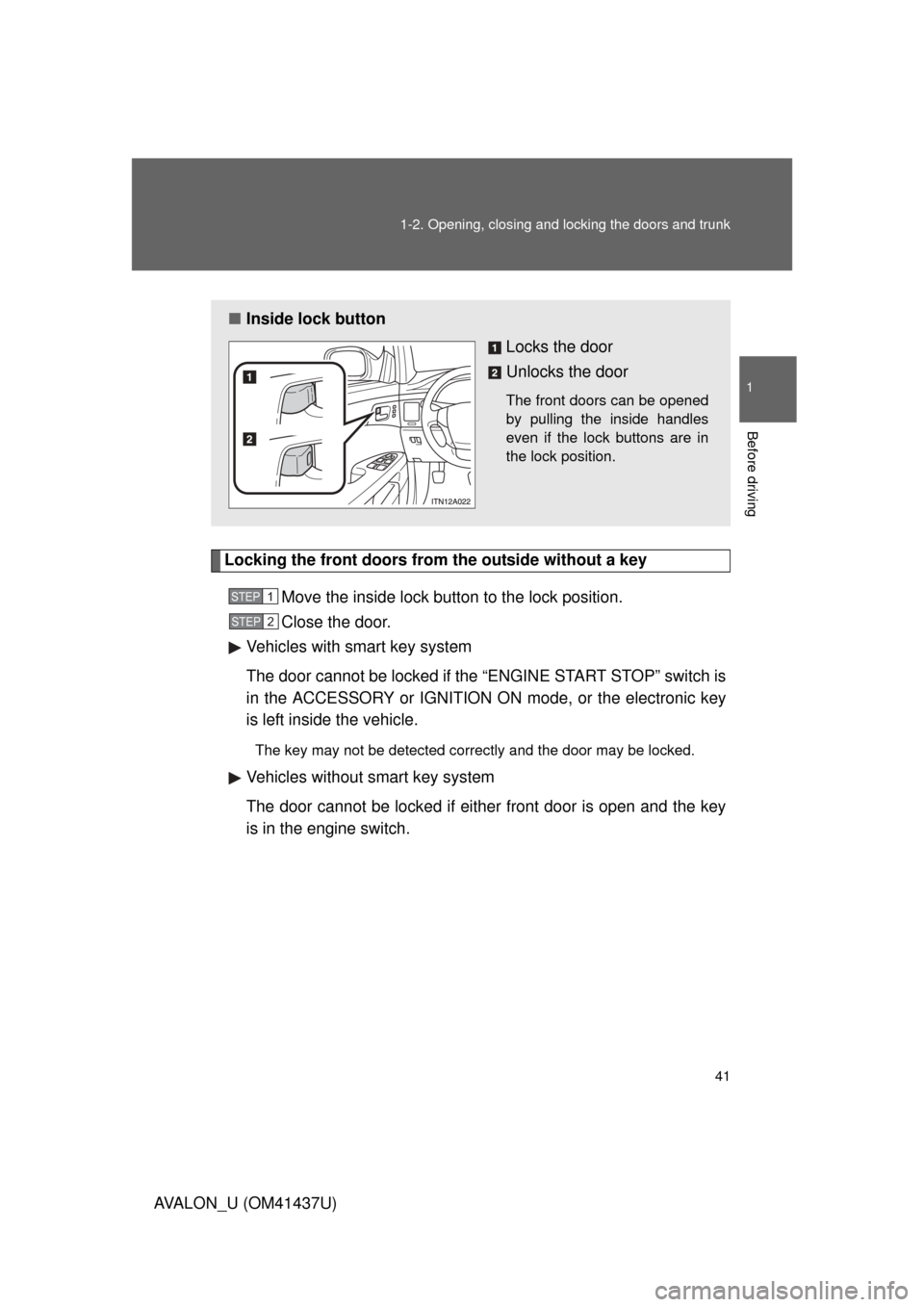
Locking the front doors from the outside without a key
Move the inside lock button to the lock position.
Close the door.
Vehicles with smart key system
The door cannot be locked if the “ENGINE START STOP” switch is
in the ACCESSORY or IGNITION ON mode, or the electronic key
is left inside the vehicle.
The key may not be detected correctly and the door may be locked.
Vehicles without smart key system
The door cannot be locked if either front door is open and the key
is in the engine switch.
■ Inside lock button
Locks the door
Unlocks the door
The front doors can be opened
by pulling the inside handles
even if the lock buttons are in
the lock position.
STEP1
STEP2
Page 43 of 476
43
1-2. Opening, closing and locking the doors and trunk
1
Before driving
AVALON_U (OM41437U)
■
Setting and canceling the functions
To switch between setting and canceling, follow the procedure
below:
Vehicles with smart key system: Close all the doors and turn
the “ENGINE START STOP” swit ch to IGNITION ON mode.
(Perform within 10 seconds.)
Vehicles without smart key system: Close all the doors and
turn the engine switch to the “ON” position. (Perform
within 10 seconds.)
FunctionOperation
Driver’s door linked door
unlocking function
Vehicles with smart key system
All doors are unlocked when the driver’s door
is opened within 10 seconds after turning the
“ENGINE START STOP” switch OFF.
Vehicles without smart key system
All doors are unlocked when the driver’s door
is opened within 10 seconds after turning the
engine switch to the “LOCK” position.
STEP1
STEP2
STEP2