Page 206 of 665
206 2-3. Operating the lights and wipers
4RUNNER_U
■The windshield wipers and washer can be operated when
Vehicles without a smart key system: The engine switch is in the “ON” posi-
tion.
Vehicles with a smart key system: The “ENGINE START STOP” switch is in
IGNITION ON mode.
■ If no windshield washer fluid sprays
Check that the washer nozzles are not blocked if there is washer fluid in the
windshield washer fluid reservoir.
NOTICE
■When the windshield is dry
Do not use the wipers, as they may damage the windshield.
■ When the washer fluid tank is empty
Do not operate the switch continually as the washer fluid pump may over-
heat.
■ When a nozzle becomes blocked
Do not try to clear it with a pin or other object. The nozzle will be damaged.
Washer/wiper dual opera-
tion
The wipers will automatically
operate a couple of times after
the washer squirts.
CTH23AS029
Page 208 of 665

208 2-3. Operating the lights and wipers
4RUNNER_U
■When the rear window wiper and washer switch is turned off
The rear wiper will stop operation, and return to the retracted position after
approximately 3 seconds.
However, if the engine switch is turned to the “ACC” or “LOCK” position
(vehicles without a smart key system) or the “ENGINE START STOP” switch
is turned to ACCESSORY mode or tur ned off (vehicles with a smart key sys-
tem) while the rear wiper is operating, the rear wiper will stop at that position
and will not return to the retracted position.
■ If no washer fluid sprays
Check that the washer nozzle is not blocked if there is washer fluid in the
washer fluid reservoir.
■ Customization that can be co nfigured at Toyota dealer
Settings (e.g. drip prevention function) can be changed.
(Customizable features P. 638)
NOTICE
■When the rear window is dry
Do not use the wiper, as it may damage the rear window.
■ When the washer fluid tank is empty
Do not operate the switch continually as the washer fluid pump may over-
heat.
■ When a nozzle becomes blocked
Do not try to clear it with a pin or other object. The nozzle will be damaged.
Page 239 of 665
239
2-4. Using other
driving systems
2
When driving
4RUNNER_U
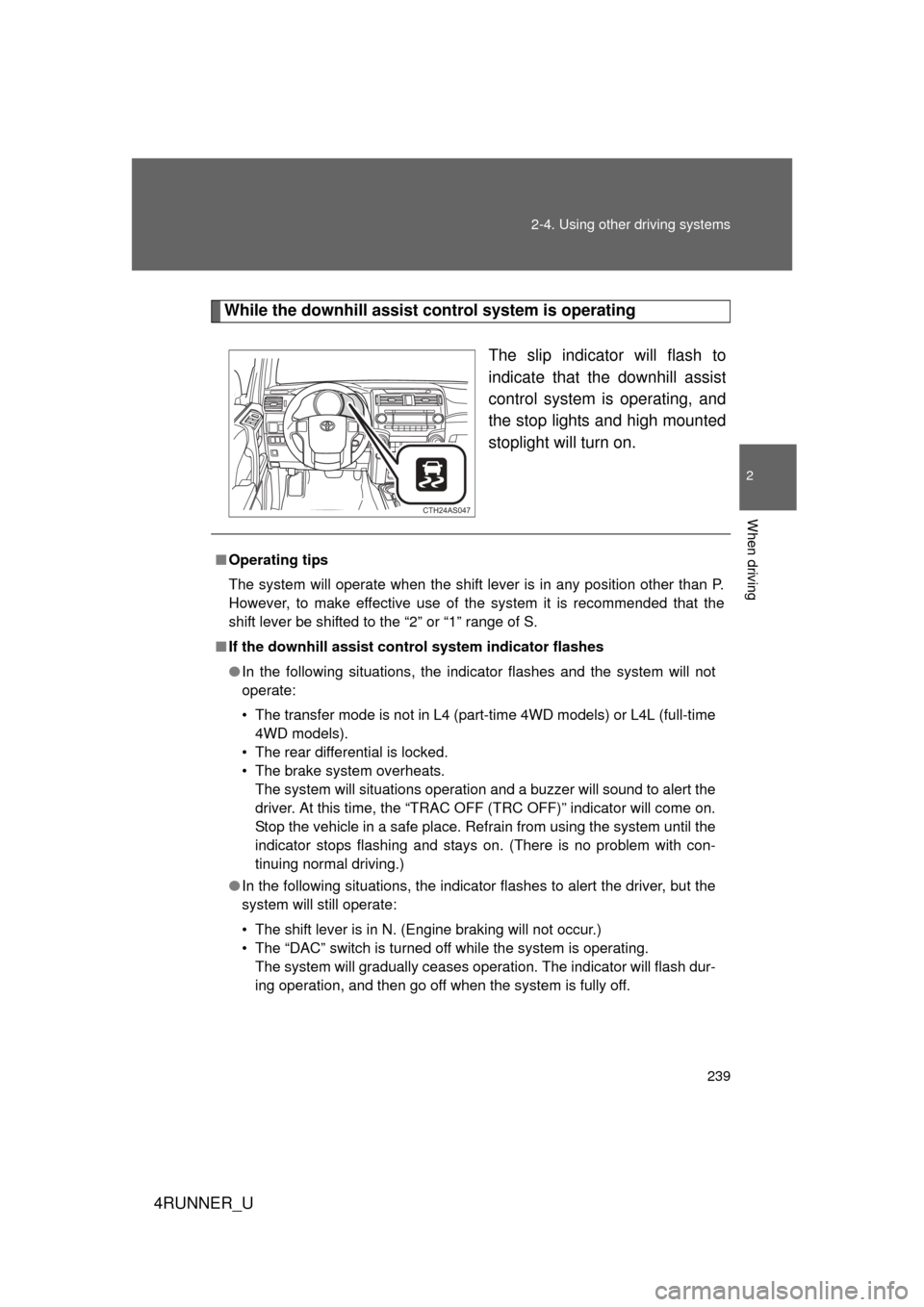
While the downhill assist control system is operating
The slip indicator will flash to
indicate that the downhill assist
control system is operating, and
the stop lights and high mounted
stoplight will turn on.
CTH24AS047
■Operating tips
The system will operate when the shift lever is in any position other than P.
However, to make effective use of the system it is recommended that the
shift lever be shifted to the “2” or “1” range of S.
■ If the downhill assist control system indicator flashes
● In the following situations, the indicator flashes and the system will not
operate:
• The transfer mode is not in L4 (part-time 4WD models) or L4L (full-time
4WD models).
• The rear differential is locked.
• The brake system overheats. The system will situations operation and a buzzer will sound to alert the
driver. At this time, the “TRAC OFF (TRC OFF)” indicator will come on.
Stop the vehicle in a safe place. Refrain from using the system until the
indicator stops flashing and stays on. (There is no problem with con-
tinuing normal driving.)
● In the following situations, the indicato r flashes to alert the driver, but the
system will still operate:
• The shift lever is in N. (Engine braking will not occur.)
• The “DAC” switch is turned off while the system is operating. The system will gradually ceases operation. The indicator will flash dur-
ing operation, and then go off when the system is fully off.
Page 242 of 665
242 2-4. Using other driving systems
4RUNNER_U
■Crawl Control can be operated when
● The engine is running.
● The shift lever is in any position other than P or N.
● The front-wheel drive control lever is in L4.
● The driver’s door is closed.
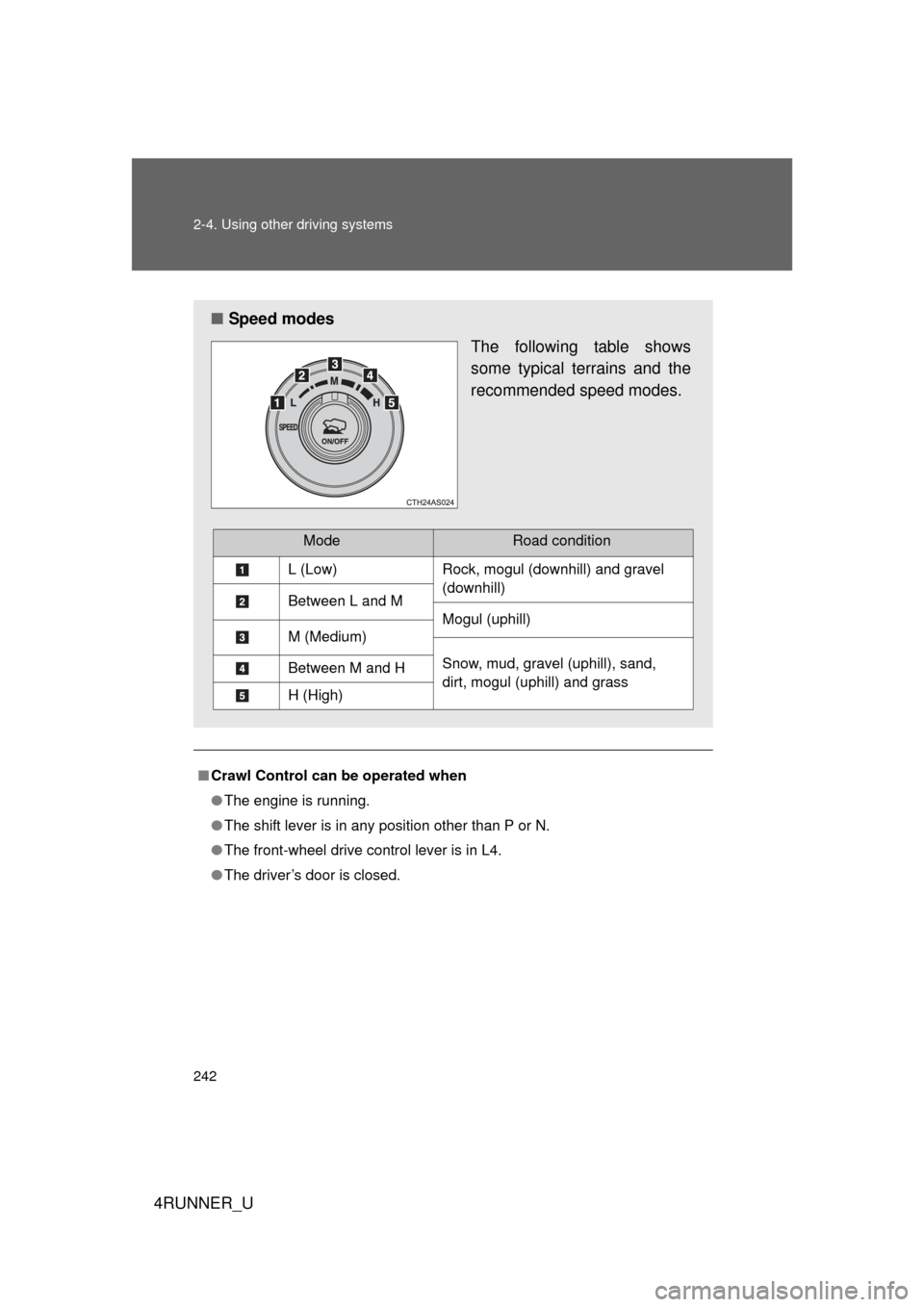
■ Speed modes
The following table shows
some typical terrains and the
recommended speed modes.
ModeRoad condition
L (Low)Rock, mogul (downhill) and gravel
(downhill)
Between L and M
Mogul (uphill)
M (Medium)
Snow, mud, gravel (uphill), sand,
dirt, mogul (uphill) and grassBetween M and H
H (High)
Page 244 of 665

244 2-4. Using other driving systems
4RUNNER_U
CAUTION
■When using Crawl Control
● Do not overly rely on Crawl Control. This function does not extend the
vehicle’s performance limitations. Always check the terrain thoroughly and
drive safely.
● The recommended speed modes for the listed terrains ( P. 242) are only
a reference. The selected mode may not be suitable to actual off-road con-
ditions due to factors such as the type or unevenness of the terrain or the
degree of incline. Check the actual terrain thoroughly and drive safely.
● After activating Crawl Control, make sure that the Crawl Control indicator
comes on. If the indicator flashes, the vehicle is not under system control.
■ Conditions under which the syst em may not operate correctly
When driving on the following surfaces, the system may not be able to main-
tain a fixed low speed, which may result in an accident:
● Extremely steep inclines
● Extremely uneven surfaces
● Snow-covered roads, or other slippery surfaces
Page 247 of 665
247
2-4. Using other
driving systems
2
When driving
4RUNNER_U
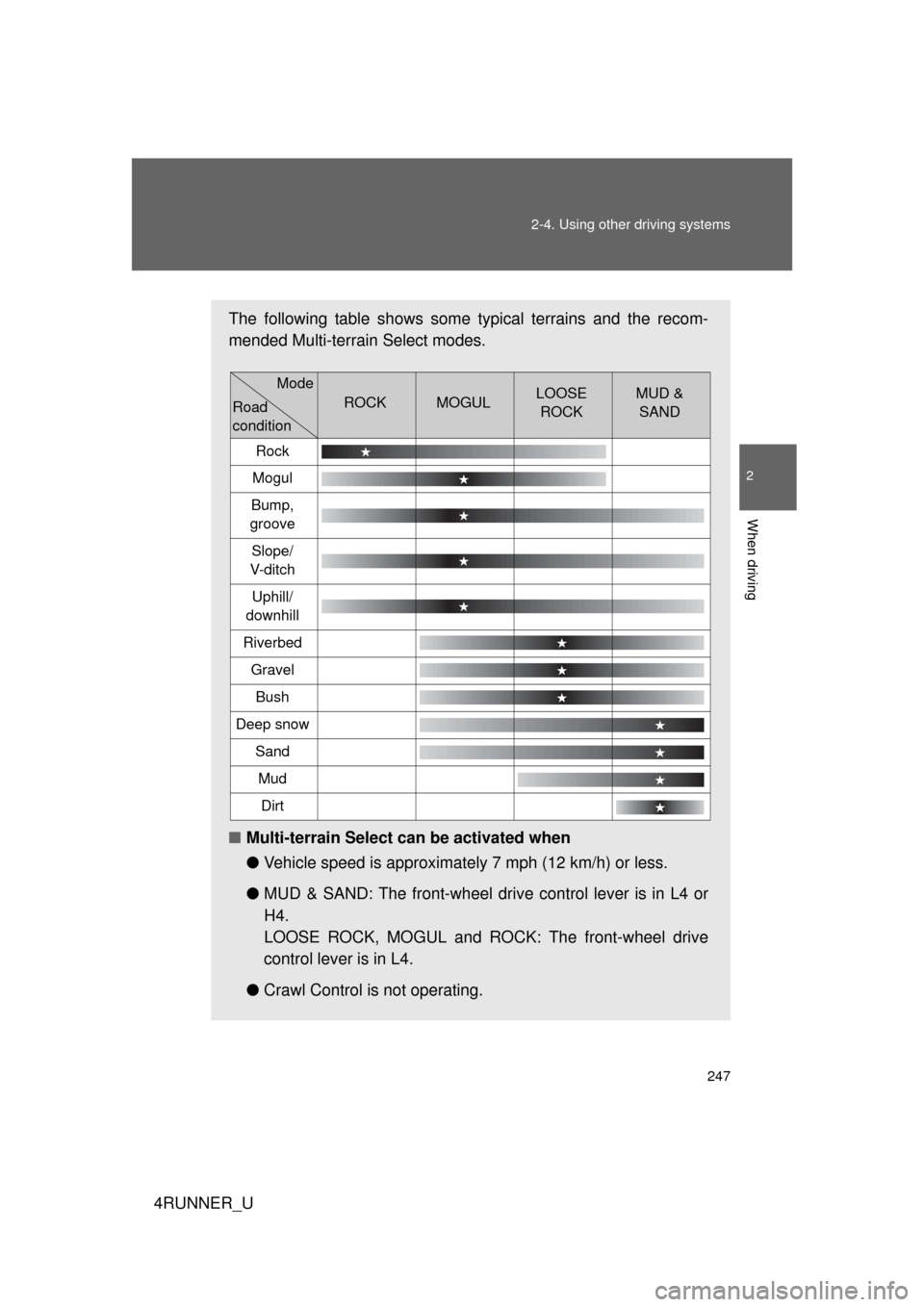
The following table shows some typical terrains and the recom-
mended Multi-terrain Select modes.
■Multi-terrain Select can be activated when
●Vehicle speed is approximately 7 mph (12 km/h) or less.
● MUD & SAND: The front-wheel driv e control lever is in L4 or
H4.
LOOSE ROCK, MOGUL and ROCK: The front-wheel drive
control lever is in L4.
● Crawl Control is not operating.
ROCKMOGULLOOSE
ROCKMUD & SAND
Rock
Mogul
Bump,
groove
Slope/
V-d i t c h
Uphill/
downhill
Riverbed
Gravel
Bush
Deep snow
Sand
Mud
Dirt
Mode
Road
condition
Page 252 of 665

252 2-4. Using other driving systems
4RUNNER_U
CAUTION
■Before driving
To avoid an accident, observe the precautions relating to off-road driving.
(P. 262)
■ When using Multi-terrain Select
● Do not use the Multi-terrain Select system for normal (on-road) driving.
The Multi-terrain Select system is designed for off-road use only.
● Do not overly rely on Multi-terrain Select. This function does not exten\
d
the vehicle’s performance limitations. Always check the terrain thoroughly
and drive safely.
● The recommended modes for the listed terrains ( P. 246) are only a refer-
ence. The selected mode may not be suitable to actual off-road conditions
due to factors such as the type or unevenness of the terrain or the degree
of incline. Check the actual terrain thoroughly and drive safely.
● After selecting a mode, make sure that the Multi-terrain Select indicator
and the selected mode indicator come on. If any related indicator flashes,
the vehicle is not under Multi-terrain Select control.
Page 301 of 665
301
3-1. Using the air conditioning system
and defogger
3
Interior features
4RUNNER_U
■Air conditioning odors
● During use, various odors from inside and outside the vehicle may enter
into and accumulate in the air conditioning system. This may then cause
odor to be emitted from the vents.
● To reduce potential odors from occurring:
It is recommended that the air conditioning system be set to outside air
mode prior to turning the vehicle off.
CAUTION
■To prevent the windshield from fogging up
Do not use during cool air operation in extremely humid weather. The
difference between the temperature of the outside air and that of the wind-
shield can cause the outer surface of the windshield to fog up, blocking your
vision.
NOTICE
■To prevent battery discharge
Do not leave the air conditioning system on longer than necessary when the
engine is stopped.