2010 SUZUKI KIZASHI ECU
[x] Cancel search: ECUPage 255 of 388
5-76
OTHER CONTROLS AND EQUIPMENT
57L20-03E
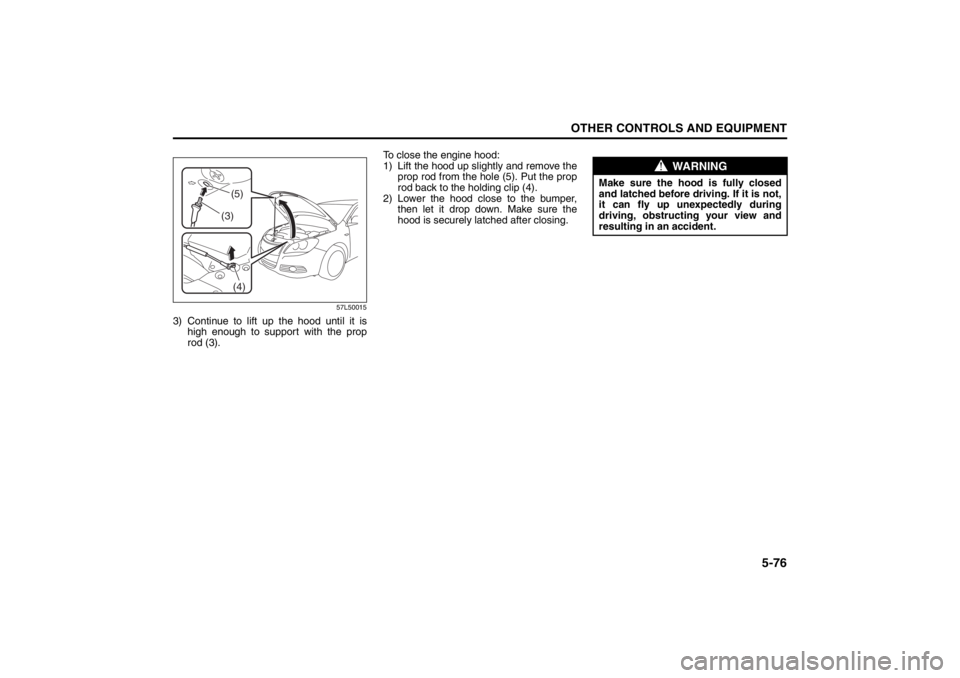
57L50015
3) Continue to lift up the hood until it ishigh enough to support with the prop
rod (3). To close the engine hood:
1) Lift the hood up slightly and remove the
prop rod from the hole (5). Put the prop
rod back to the holding clip (4).
2) Lower the hood close to the bumper, then let it drop down. Make sure the
hood is securely latched after closing.
(4)
(3)(5)
WARNING
Make sure the hood is fully closed
and latched before driving. If it is not,
it can fly up unexpectedly during
driving, obstructing your view and
resulting in an accident.
Page 264 of 388

5-85OTHER CONTROLS AND EQUIPMENT
57L20-03E
65D612
Be sure to close the sunroof when you
leave the vehicle unattended.
Periodically inspect the guide rail for dirt
and clean it if any dirt has accumulated.
Glove Box
57L51029
(2) Unlock
(3) Lock
To open the glove box, pull the latch lever
(1). To close it, push the lid until it latches
securely.
To lock the glove box, insert the key
attached to your keyless start system
remote controller into the lock, turn the key
fully clockwise, and pull it out of the lock in
this position.
WARNING
Never allow any part of your body
such as hands or head to get out of
the sunroof opening while the vehi-
cle is moving.
Be sure there are no hands or other
obstructions in the path of the sun-
roof when you close the sunroof.
Always take the keyless start sys-
tem remote controller with you
when leaving the vehicle even if
only for a short time. Also do not
leave children alone in a parked
vehicle. Unattended children could
use the sunroof switches and get
trapped by the sunroof.
CAUTION
Do not put your body weight on the
roof around the sunroof such as by
sitting on it.
WARNING
Never drive with the glove box lid
open. It could cause injury if an acci-
dent occurs.
(1)
(3) (2)
Page 269 of 388

5-90
OTHER CONTROLS AND EQUIPMENT
57L20-03E
Lower compartmentOpen the lower compartment by raising
the top lid and tray (4) together while keep-
ing the lever (3) up.
57L51035
NOTE:
Always close the lid after you put some-
thing into or take something out of the
box.
The upper compartment (tray) and lower
compartment have slots on their edges
so that the cable of an appliance con-
nected to the accessory socket can be
led through them. When the top lid or the
top lid and tray combination is raised or
lowered to open or close the upper or
lower compartment, be careful not to
trap a cable under it.
ArmrestFront
57L50069
The lid of the center console box serves as
the front armrest when it is closed.
Rear
57L51047
The armrest (1) is stowed in the center of
the seatback. Tilt it down forward to use.
57L50070
(4)
(3)
(1)
(1)
WARNING
The seat belt must always be
passed under the armrest. It cannot
provide the intended protection if it
runs over the armrest.
In an accident or sudden stop, the
rear armrest could fall forward. If
there is a child in a rearfacing child
restraint in the center seating posi-
tion, the falling armrest could injure
the child. Make sure the armrest is
secured in the stowed position
when not in use.
(1)
(2)
Page 270 of 388
5-91OTHER CONTROLS AND EQUIPMENT
57L20-03E
NOTE:
There is a lid (1) behind the armrest stow-
age in the seatback.
When carrying a long cargo, the lid (1)
can be opened by folding it forward while
keeping the lever (2) pressed down.
When closing the lid (1), raise and push
it into position.
Floor Mats (if equipped)
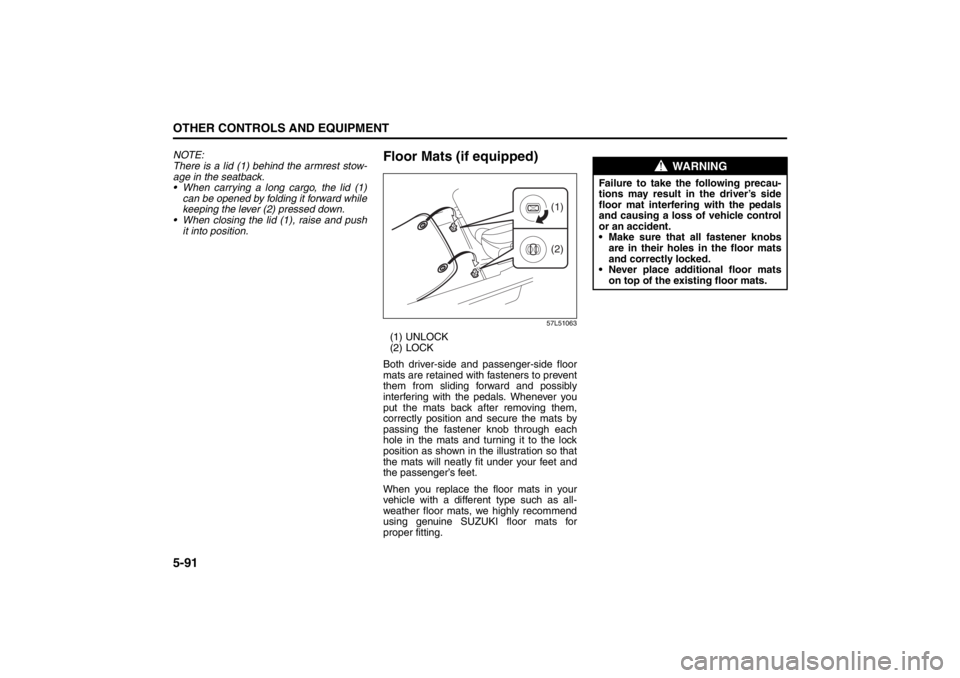
57L51063
(1) UNLOCK
(2) LOCK
Both driver-side and passenger-side floor
mats are retained with fasteners to prevent
them from sliding forward and possibly
interfering with the pedals. Whenever you
put the mats back after removing them,
correctly position and secure the mats by
passing the fastener knob through each
hole in the mats and turning it to the lock
position as shown in the illustration so that
the mats will neatly fit under your feet and
the passenger’s feet.
When you replace the floor mats in your
vehicle with a different type such as all-
weather floor mats, we highly recommend
using genuine SUZUKI floor mats for
proper fitting.
(1)
(2)
WARNING
Failure to take the following precau-
tions may result in the driver’s side
floor mat interfering with the pedals
and causing a loss of vehicle control
or an accident.
Make sure that all fastener knobs
are in their holes in the floor mats
and correctly locked.
Never place additional floor mats
on top of the existing floor mats.
Page 271 of 388
5-92
OTHER CONTROLS AND EQUIPMENT
57L20-03E
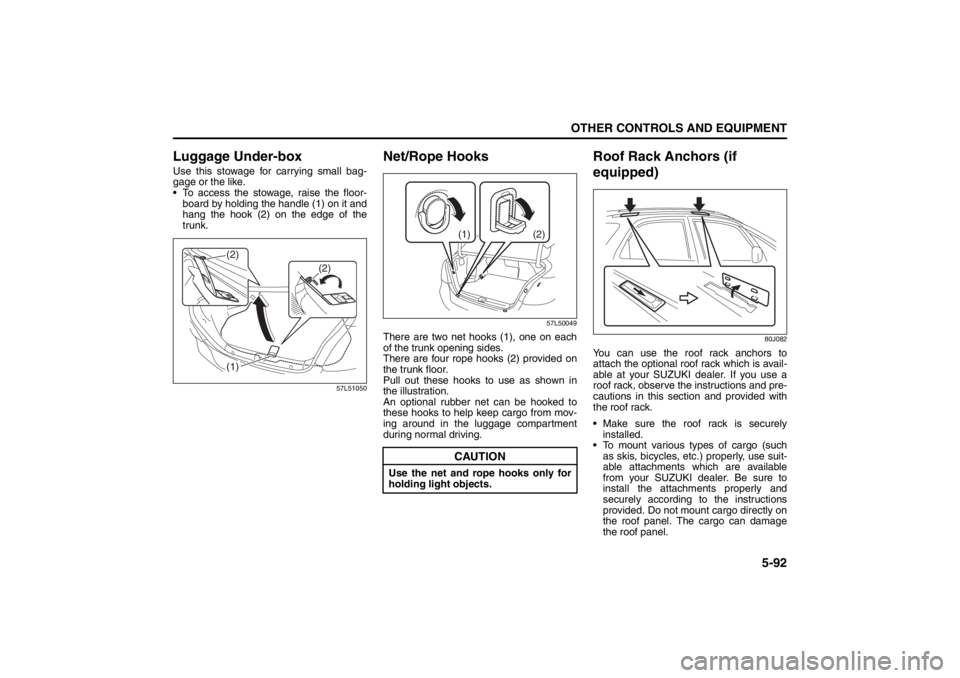
Luggage Under-boxUse this stowage for carrying small bag-
gage or the like.
To access the stowage, raise the floor-
board by holding the handle (1) on it and
hang the hook (2) on the edge of the
trunk.
57L51050
Net/Rope Hooks
57L50049
There are two net hooks (1), one on each
of the trunk opening sides.
There are four rope hooks (2) provided on
the trunk floor.
Pull out these hooks to use as shown in
the illustration.
An optional rubber net can be hooked to
these hooks to help keep cargo from mov-
ing around in the luggage compartment
during normal driving.
Roof Rack Anchors (if
equipped)
80J082
You can use the roof rack anchors to
attach the optional roof rack which is avail-
able at your SUZUKI dealer. If you use a
roof rack, observe the instructions and pre-
cautions in this section and provided with
the roof rack.
Make sure the roof rack is securely
installed.
To mount various types of cargo (such
as skis, bicycles, etc.) properly, use suit-
able attachments which are available
from your SUZUKI dealer. Be sure to
install the attachments properly and
securely according to the instructions
provided. Do not mount cargo directly on
the roof panel. The cargo can damage
the roof panel.
(1) (2)
(2)
CAUTION
Use the net and rope hooks only for
holding light objects.
(2) (1)
Page 272 of 388

5-93OTHER CONTROLS AND EQUIPMENT
57L20-03E
The gross weight of the roof rack plus
cargo must not exceed the loading
capacity (50 kg (110 lbs)). Also, do not
let the gross vehicle weight (fully loaded
vehicle including driver, passengers,
cargo, roof load and trailer tongue
weight) exceed the Gross Vehicle
Weight Rating (GVWR) listed in the
driver’s door lock pillar.
Mount and secure the cargo onto the
roof rack properly according to the
instructions provided. Be sure to stow
the heaviest items at the bottom and dis-
tribute the cargo as evenly as possible.
Do not carry items so large that they
hang over the bumpers or the sides of
the vehicle, or block your view.
Secure the front and rear ends of long
items – such as wood panels, surfboards
and so forth – to both the front and rear
of the vehicle. You should protect the
painted surfaces of the vehicle from
scuffing caused by tie-down ropes.
Check periodically to make sure the roof
rack is securely installed and free from
damage.
For vehicles with roof rack anchors,
make sure the anchors are covered with
the caps when not in use.
HomeLink
® (if equipped)
66J092
HomeLink
®: HomeLink
® is a registered
trademark of Johnson Controls Technology
Company.
The HomeLink
® Wireless Control System
provides a convenient way to replace up to
three hand-held radio-frequency (RF)
transmitters used to activate devices such
as gate operators, garage door openers,
entry door locks, security systems, even
home lighting. Additional HomeLink
® infor-
mation can be found on the Internet at
www.homelink.com
or by calling 1-800-
355-3515.
Before programming HomeLink
® to a
garage door opener or gate operator, make
sure that people and objects are out of the
way of the device to prevent potential harm
or damage. When programming a garage
door opener, it is advised to park outside of
the garage. Do not use HomeLink® with
any garage door opener that lacks safety
stop and reverse features as required by
U.S. federal safety standards (this includes
WARNING
Abrupt maneuvers or failure to
properly secure cargo can allow the
cargo to fly off the vehicle and hit
others, causing personal injury or
property damage.
Mount cargo securely and avoid
abrupt maneuvers such as “jack-
rabbit” starts, sharp turns, fast cor-
nering and sudden braking. Check
periodically to make sure that
cargo is securely fastened.
Large, bulky, long, or flat items can
affect vehicle aerodynamics or be
caught by the wind, and can reduce
vehicle control resulting in an acci-
dent and personal injury. Drive cau-
tiously at a safely reduced speed
when carrying this type of cargo.
Page 273 of 388

5-94
OTHER CONTROLS AND EQUIPMENT
57L20-03E
any garage door opener position manufac-
tured before April 1, 1982). A garage door
that cannot detect an object – signaling the
door to stop and reverse – does not meet
current U.S. federal safety standards. For
more information, contact HomeLink
® at
www.homelink.com
or by calling 1-800-
355-3515.
Retain the original transmitter of the RF
device you are programming for use in
other vehicles as well as for future
HomeLink
® programming. It is also sug-
gested that upon the sale of the vehicle,
the programmed HomeLink
® buttons be
erased for security purposes. Refer to
“Programming HomeLink
®” (step 1) only)
or, for assistance, contact HomeLink
® at
www.homelink.com
or by calling 1-800-
355-3515.
Programming HomeLink
®
NOTE:
Some vehicles may require the ignition
switch to be turned to the second (or
“accessories”) position or the “on” position
for programming and/or operation of
HomeLink
®. It is also recommended that a
new battery be placed in the hand-held
transmitter of the device being pro-
grammed to HomeLink
® for quicker train-
ing and accurate transmission of the
radiofrequency signal. Do not repeat “Pro-
gramming HomeLink
®” – step 1) to train
additional devices to a second or thirdHomeLink
® button. Begin with “Program-
ming HomeLink
®” – step 2).
57L51036
1) Press and hold the two outer
HomeLink
® buttons (buttons one and
three) – releasing only when the indica-
tor light begins to flash (after 20 sec-
onds). Do not hold the buttons for
longer than 30 seconds and do not
repeat step 1) to program a second
and/or third hand-held transmitter to the
remaining two HomeLink
® buttons.
2) Position the end of your hand-held
transmitter 5–14 cm (1–3 inches) away
from the HomeLink
® button you wish to
program while keeping the indicator
light in view.
3) Simultaneously press and hold both the
chosen HomeLink® and hand-held
transmitter buttons. Do not release the
buttons until step 4) has been com-
pleted.NOTE:
Some gate operators and garage door
openers may require you to replace this
Programming step 3) with procedures
noted in the “Gate Operator / Canadian
Programming” section.
4) After the HomeLink
® indicator light
changes from a slow to a rapidly blink-
ing light, release both the HomeLink
®
and hand-held transmitter buttons.
NOTE:
If the HomeLink
® indicator light does not
change to a rapidly blinking light, contact
HomeLink
® at www.homelink.com
or call
1-800-355-3515 for assistance.
5) Press and hold the just-trained
HomeLink
® button and observe the
indicator light.
– If the indicator light stays on con-
stantly, programming is complete and
your device should activate when the
HomeLink® button is pressed and
released.
NOTE:
To program the remaining two HomeLink
®
buttons, begin with “Programming
HomeLink
®” – step 2). Do not repeat step
1).
– If the indicator light blinks rapidly for
two seconds and then turns to a con-
stant light continue with “Programming
Page 275 of 388

5-96
OTHER CONTROLS AND EQUIPMENT
57L20-03E
Using HomeLink
®
To operate, simply press and release the
programmed HomeLink
® button. Activation
will now occur for the trained device (i.e.
garage door opener, gate operator, secu-
rity system, entry door lock, home/office
lighting, etc.). For convenience, the hand-
held transmitter of the device may also be
used at any time. In the event that there
are still programming difficulties or ques-
tions, contact HomeLink
® at
www.homelink.com
or 1-800-355-3515.
Erasing HomeLink
® Buttons
To erase programming from the three but-
tons (individual buttons cannot be erased
but can be “reprogrammed” as outlined
below), follow the step noted:
Press and hold the two outer HomeLink
®
buttons until the indicator light begins to
flash-after 20 seconds. Release both but-
tons. Do not hold for longer that 30 sec-
onds. HomeLink
® is now in the train (or
learning) mode and can be programmed at
any time beginning with “Programming
HomeLink
®” – step 2).
Reprogramming a Single
HomeLink
® Button
To program a device to HomeLink
® using a
HomeLink
® button previously trained, fol-
low these steps:
1) Press and hold the desired HomeLink
®
button. DO NOT release the button.
2) The indicator light will begin to flash
after 20 seconds. Without releasing the
HomeLink
® button, proceed with “Pro-
gramming HomeLink
®” – step 2).
For questions or comments, contact
HomeLink
® at www.homelink.com
or 1-
800-355-3515.
Frame HooksFront hook (1)
1) Take out the necessary tools (jack bar,
wheel nut wrench and tow hook) from
the onboard tool set.
2) Use the end of the jack bar (a) wrapped
with a cloth (b) to open the front tow
hook cover (c).
57L51037
3) Insert the tow hook (e) into the tow
hook receptacle (d) and screw the hook
in as far as it can be turned by hand.
(c)
(a)
(b)