Page 244 of 388

5-65OTHER CONTROLS AND EQUIPMENT
57L20-03E
Selecting the radio station (FM1, FM2,
AM mode)
To select the next preset station, lean
the SEEK switch (4) to the upper side
briefly.
To select the previous preset station,
lean the SEEK switch (4) to the lower
side briefly.
To scan to a higher frequency radio sta-
tion, lean the SEEK switch (4) to the
upper side for 1 sec. or longer.
To scan to a lower frequency radio sta-
tion, lean the SEEK switch (4) to the
lower side for 1 sec. or longer.Selecting the channel (XM1, XM2, XM3
mode)
To select the next preset channel, lean
the SEEK switch (4) to the upper side
briefly.
To select the previous preset channel,
lean the SEEK switch (4) to the lower
side briefly.
To select the next channel in the same
category, lean the SEEK switch (4) to
the upper side for 1 sec. or longer.
To select the previous channel in the
same category, lean the SEEK switch
(4) to the lower side for 1 sec. or longer.Selecting the track (CD, USB (iPod
®),
Bluetooth
® audio mode)
To advance to the next track, lean the
SEEK switch (4) to the upper side
briefly.
To select the previous track, lean the
SEEK switch (4) to the lower side briefly.
Fast forwarding/Rewinding a track
To advance a track rapidly, lean the
SEEK switch (4) to the upper side for 1
sec. or longer
To rewind a track, lean the SEEK switch
(4) to the lower side for 1 sec. or longer.
Page 245 of 388
5-66
OTHER CONTROLS AND EQUIPMENT
57L20-03E
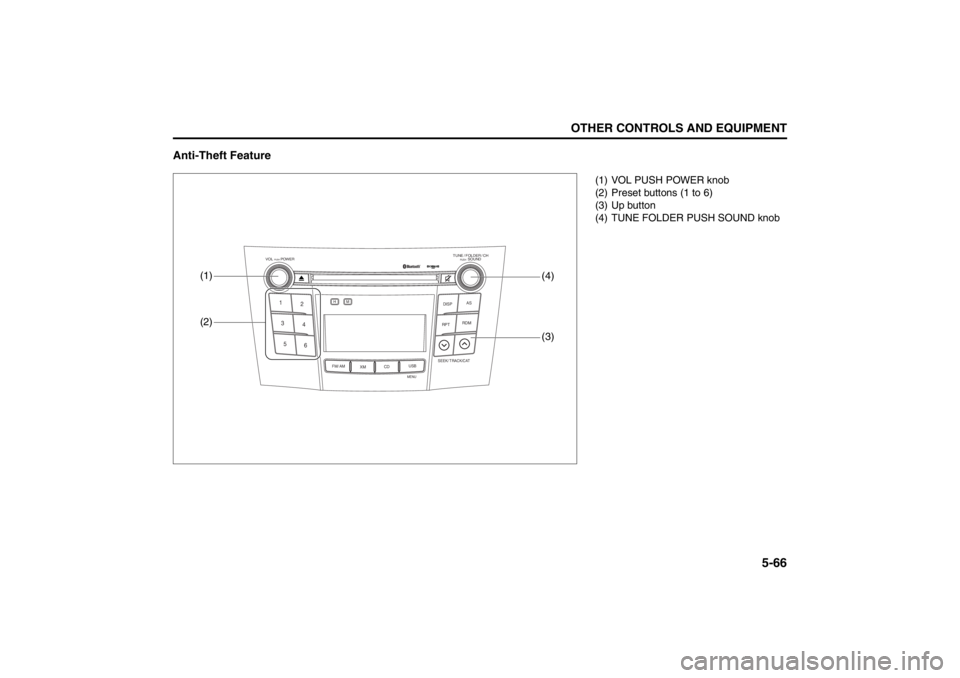
Anti-Theft Feature
TUNE / FOLDER / CHDISPAS
RPT
XM
USBMENU
RDM
SEEK/ TRACK/CAT
SOUNDPUSH
1
2
3
4
5
6
VOL PUSH POWER
CD
FM/ AMH
M
(2)
(3)
(1)
(4)
(1) VOL PUSH POWER knob
(2) Preset buttons (1 to 6)
(3) Up button
(4) TUNE FOLDER PUSH SOUND knob
Page 248 of 388

5-69OTHER CONTROLS AND EQUIPMENT
57L20-03E
MP3/WMA
No playback The disc has unplayable formatted data. Check the file format.
Sound skipping or noisePlaying VBR (Variable Bit Rate) files may
cause sound skipping.Play Non-VBR files.
USB
Music is not played back even if the USB
device is connectedThere is no music stored in a format that
is supported on this unit.Check the file format.
The current consumption of the USB
device exceeds 500 mA.Use a USB device with a current con-
sumption lower than 500 mA.
Bluetooth
®
Pairing failedThe distance between this unit and the
Bluetooth
®-ready device is too long, or
the Bluetooth
®-ready device is hidden
behind a metallic object from this unit.Change the location of the Bluetooth
®-
ready device.
The Bluetooth
® function of the Bluetooth
®-
ready device is deactivated.Refer to the Operating Instructions of the
Bluetooth
®-ready device. (With regard to
some devices, the power saving mode is
activated after a certain time.)
Cannot receive a call. Your mobile phone is out of service area.Drive your car to the service area of your
mobile phone.
The voice quality of hands-free is low
(Distortion, noise etc.).There is another wireless device near the
unit.Switch off the wireless device or keep it
away from the unit.
Problem
Possible cause
Possible solution
Page 250 of 388
5-71OTHER CONTROLS AND EQUIPMENT
57L20-03E
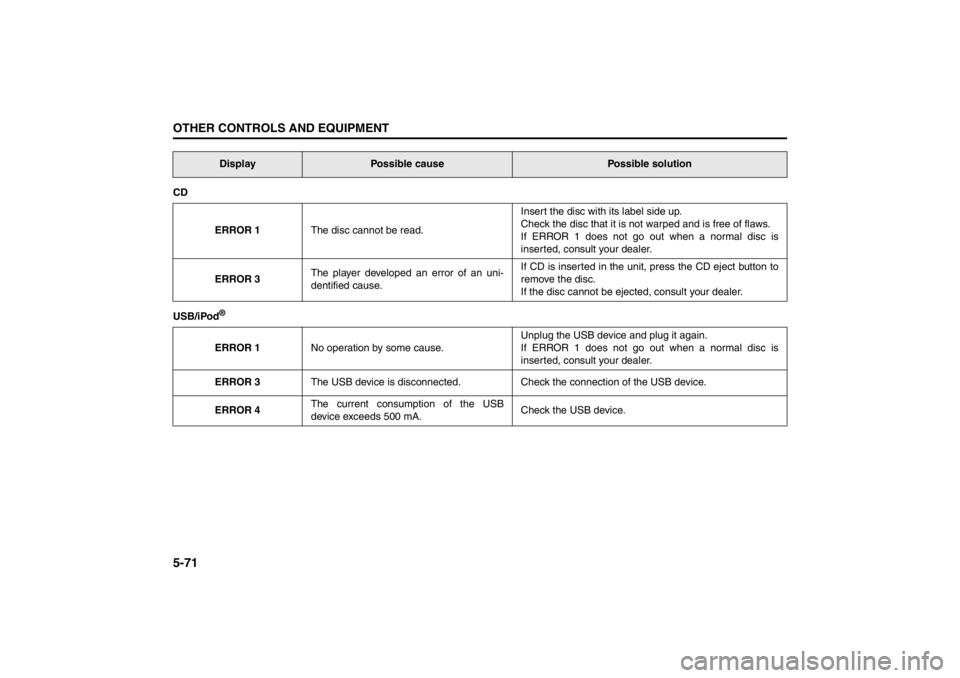
CD
ERROR 1The disc cannot be read.Insert the disc with its label side up.
Check the disc that it is not warped and is free of flaws.
If ERROR 1 does not go out when a normal disc is
inserted, consult your dealer.
ERROR 3The player developed an error of an uni-
dentified cause.If CD is inserted in the unit, press the CD eject button to
remove the disc.
If the disc cannot be ejected, consult your dealer.
USB/iPod
®ERROR 1No operation by some cause.Unplug the USB device and plug it again.
If ERROR 1 does not go out when a normal disc is
inserted, consult your dealer.
ERROR 3The USB device is disconnected. Check the connection of the USB device.
ERROR 4The current consumption of the USB
device exceeds 500 mA.Check the USB device.Display
Possible cause
Possible solution
Page 260 of 388

5-81OTHER CONTROLS AND EQUIPMENT
57L20-03E
Universal Serial Bus (USB) Socket
57L51061
Connect your portable digital music player,
etc. to this socket to enjoy music through
the vehicle’s audio system using it as a
source. Refer to “Audio Systems” in the
“OTHER CONTROL AND EQUIPMENT”
section.
Cigarette Lighter (if equipped)
57L51068
The cigarette lighter will work when you
press the engine switch to change the igni-
tion mode to “ACC” or “ON”.
To use the cigarette lighter, push it all the
way into the receptacle and release it. It
will automatically heat up and will pop out
to its normal position when it is ready for
use.
CAUTION
If you close the lid of the lidded
instrument panel box with a device
still connected to the USB socket, the
equipment and the socket may be
damaged.
CAUTION
Holding the cigarette lighter in can
overheat and damage the lighter.
Release the lighter after you push it
in.
CAUTION
To avoid damage to the cigarette
lighter socket, do not use it as an
accessory power source. Some
accessories’ power plug can damage
the inner mechanism of the cigarette
lighter socket.
Page 385 of 388

13-5
INDEX57L20-03E
Temperature Gauge ............................................................. 2-79
Theft Deterrent Alarm System ............................................ 2-14
Thermometer ........................................................................ 2-84
Tilt/Telescoping/Steering Lock Lever .............................. 2-110
Tire Chains ............................................................................. 4-5
Tire Changing Tool ................................................................ 8-1
Tire Inflation Pressure ......................................................... 7-30
Tire Inspection ..................................................................... 7-31
Tire Pressure Monitoring System (TPMS) ......................... 3-34
Tire Rotation......................................................................... 7-34
Tire Sidewall Labeling ......................................................... 7-28
Tire Size ................................................................................ 7-29
Tires ...................................................................................... 7-28
Towing a Disabled Vehicle.................................................... 8-7
Towing Your Vehicle (recreational towing) ......................... 6-2
Traction Control System ..................................................... 3-31
Trailer Towing ........................................................................ 6-2
Transaxle Warning Light ..................................................... 2-76
Trip meter ............................................................................. 2-84
Trunk Lid ................................................................................ 2-5
Trunk Lid Lock Switch .......................................................... 2-6
Trunk Light ........................................................................... 5-79
Turn Signal Control Lever................................................. 2-105
Turn Signal Indicators ......................................................... 2-75
Turn Signal Operation ....................................................... 2-106UUniform Tire Quality Grading ............................................. 7-33
Universal Serial Bus (USB) Socket .................................... 5-81
Using the 2WD/i-AWD (intel ligent All Wheel Drive)
Switch ................................................................................... 3-19
Using the Transaxle............................................................. 3-13
VVehicle Cleaning .................................................................... 9-3
Vehicle Identification Number............................................. 10-1
Vehicle Loading............................................................. 6-1 , 7-37WWarning and Indicator Lights ............................................. 2-69
Warning and Indicator Messages ....................................... 2-86
Warranties............................................................................. 10-2
Washing .................................................................................. 9-5
Waxing .................................................................................... 9-6
Windows ............................................................................... 2-17
Windshield Washer ............................................................ 2-109
Windshield Washer Fluid .................................................... 7-56
Windshield Wipers ............................................................. 2-107
Wiper Blades ........................................................................ 7-54
Page:
< prev 1-8 9-16 17-24