Page 94 of 388

2-75BEFORE DRIVING
57L20-03E
Open Door Warning Light
54G391
This light remains on until all doors and the
engine hood are completely closed.
If any of the doors or the engine hood
becomes open while the vehicle is moving,
a warning sound will remind you to close
all the doors and the engine hood com-
pletely.“CRUISE” Indicator Light
(if equipped)
52D113
When the cruise control system is on, this
light will be on.
“SET” Indicator Light (if equipped)
65D474
When the vehicle’s speed is controlled by
the cruise control system, this light will be
on.Illumination Indicator Light
64J045
This indicator light comes on while the
position lights, tail light and/or the head-
lights are on.
Turn Signal Indicators
50G055
When you turn on the left or right turn sig-
nals, the corresponding green arrow on the
instrument panel will flash along with the
respective turn signal lights.
When you turn on the hazard warning
switch, both arrows will flash along with all
of the turn signal lights.High Beam Indicator Light
50G056
This indicator comes on when headlight
high beams are turned on.
Page 95 of 388

2-76
BEFORE DRIVING
57L20-03E
Intelligent All Wheel Drive (i-AWD)
Indicator Light (if equipped)
57L30044
When the 2WD/i-AWD switch is in the “i-
AWD” mode with the engine switch in the
“ON” mode, the light comes on and stays
on.
For details, refer to “Using the 2WD/i-AWD
Switch” in the “OPERATING YOUR VEHI-
CLE” section.Daytime Running Light (D.R.L.) Indi-
cator Light (if equipped)
60B245
With the D.R.L. system, the headlights
light, but are dimmer than the low beam,
when the following three conditions are all
met. Whenever the D.R.L. system is oper-
ating, the D.R.L. indicator light remains on.Conditions for D.R.L. system operation
1) The engine is running.
2) The parking brake is released.
3) The headlights are off.
Transaxle Warning Light (if
equipped)
80J219
This light comes on when you press the
engine switch to change the ignition mode
to “ON” if there is any problem with the
continuously variable transaxle (CVT).
The light should normally come on when
the ignition mode is changed to “ON” by
pressing the engine switch and stay on
for about 2 seconds before going out.
NOTE:
The following conditions may indicate
some problem with the CVT system. If any
of these conditions occurs, have your vehi-
cle inspected by an authorized SUZUKI
dealer.
The light comes on while driving.
The light does not come on even when
the ignition mode is changed to “ON” by
pressing the engine switch. The light does not go out in about 2 sec-
onds after changing the ignition mode to
“ON” by pressing the engine switch.
Immobilizer/Keyless Start System
Warning Light
80JM122
When you press the engine switch to
change the ignition mode to “ON”, the light
comes on briefly so you can check that the
light is working. If this light stays on, there
is a problem with the system. This light
flashes if you press the engine switch while
the system is not sensing the remote con-
troller. For details, refer to “Immobilizer
System” in this section.i-AWD Warning Light (if equipped)
57L30042
When you press the engine switch to
change the ignition mode to “ON”, the light
Page 98 of 388

2-79BEFORE DRIVING
57L20-03E
If the low fuel warning light (1) comes on,
fill the fuel tank immediately.
When the low fuel warning light (1) comes
on, a ding sounds once to remind you to fill
the fuel.
If you do not fill the fuel, a ding sounds
every time you press the engine switch to
change the ignition mode to “ON”.
NOTE:
The activation point of the low fuel warning
light (1) varies depending on road condi-
tions (for example, slope or curve) and
driving conditions because of fuel moving
in the tank.
The mark (2) indicates that the fuel filler
door is located on the left side of the vehi-
cle.
Temperature Gauge
57L21060
When the ignition mode has been changed
to “ON” by pressing the engine switch, this
gauge indicates the engine coolant tem-
perature. Under normal driving conditions,
the indicator should stay within the normal,
acceptable temperature range between “H”
and “C”. If the indicator approaches “H”,
overheating is indicated. Follow the
instructions for engine overheating in the
“EMERGENCY SERVICE” section.
Brightness Control
57L21080
When the engine switch is pressed to
change the ignition mode to “ON”, the
instrument panel lights come on.
Your vehicle has a system to automatically
dim the brightness of the instrument panel
lights when the parking lights or headlights
are on.
You can change the brightness of the
instrument panel lights regardless of
whether the parking lights or headlights
are off or on.
To increase the brightness of the instru-
ment panel lights, turn the brightness con-
trol knob (1) clockwise.
To reduce the brightness of the instrument
panel lights, turn the brightness control
knob (1) counterclockwise.
CAUTION
Avoid driving with an extremely low
fuel level. Running out of fuel could
cause the engine to misfire, damag-
ing the catalytic converter.
CAUTION
Continuing to drive the vehicle when
engine overheating is indicated can
result in severe engine damage.
(1)
Page 99 of 388
2-80
BEFORE DRIVING
57L20-03E
57L21081
NOTE:
• If you do not turn the brightness controlknob within about 5 seconds of activat-
ing the brightness control display, the
brightness control display will be can-
celed automatically.
When you reconnect the battery, the brightness of the instrument panel lights
will be reinitialized. Readjust the bright-
ness according to your preference.
NOTE:
If you select the lowest brightness level
when the parking lights or headlights are
on, the instrument panel lights other than
meter lights are turned off.
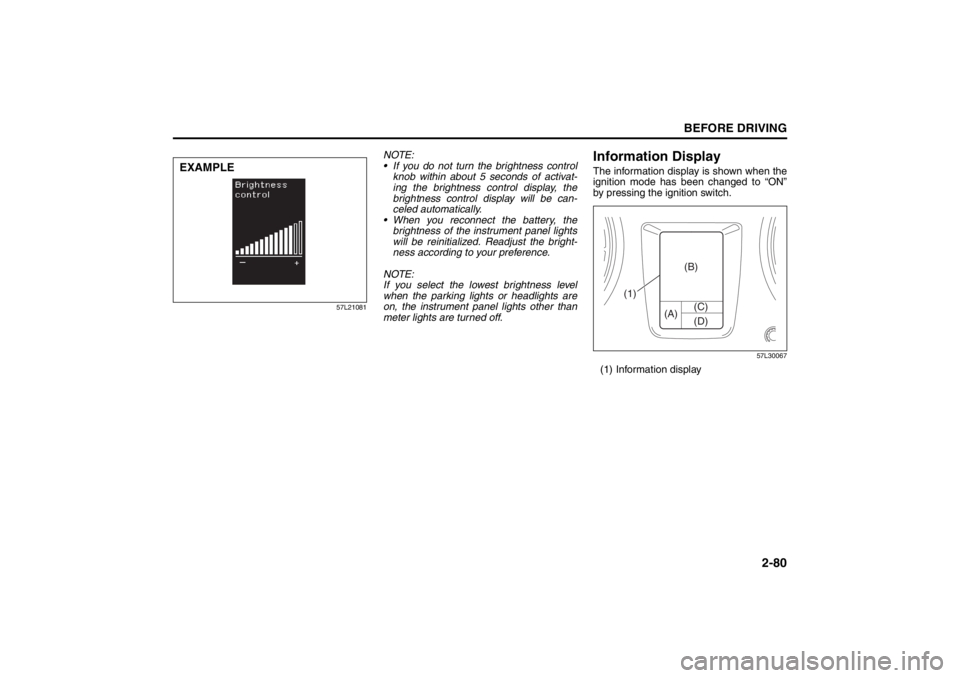
Information DisplayThe information display is shown when the
ignition mode has been changed to “ON”
by pressing the ignition switch.
57L30067
(1) Information display
EXAMPLE
(A) (C)
(B)
(D)
(1)
Page 104 of 388

2-85BEFORE DRIVING
57L20-03E
Setting ModeWhen the ignition mode is changed to
“ON” by pressing the engine switch and
the vehicle is stationary, you can enter the
setting mode of the information display by
pulling and holding the DISP switch (2) for
more than 3 seconds.
To select the setting that you want to
change, pull the TRIP switch (3).
To change the setting, pull the DISP
switch (2).
To exit the setting mode, select “Back”
and pull the DISP switch (2).
57L21085
NOTE:
Current settings appear with reversed text
and background colors.NOTE:
If you pull and hold the DISP switch (2)
to enter the setting mode when the dis-
play (B) shows average fuel consump-
tion or average speed, the value will be
reset simultaneously. If you do not want
to reset the value, pull the DISP switch
quickly to switch the indication of the dis-
play.
If you press the engine switch or start to
move the vehicle when the display is in
the setting mode, the setting mode will
be canceled automatically.
Distance units
You can change the units odo/trip meter
distance is displayed in.
NOTE:
When you change the units odo/trip meter
distance is displayed in, the trip meter will
be reset automatically.
Fuel economy units
You can change the units that fuel con-
sumption is displayed in.
Language
You can change the language of the infor-
mation display.
Avg. fuel economy reset
You can change when the value of average
fuel consumption is reset.Temperature units
You can change the units that temperature
is displayed in.
NOTE:
When you change the units that tempera-
ture is displayed in, the air conditioning
system temperature display units will be
changed automatically.
Foot lights
The foot lights can be programmed for
interlocked operation with either lighting
control or door operation and for no light-
ing.
Default setting
If you select “YES” and pull the DISP
switch (2), all settings will be reinitialized.
Page 111 of 388
2-92
BEFORE DRIVING
57L20-03E
(#1) This message will disappear for a while even if the problem that caused the message to appear is not corrected.Warning and Indicator
MessageMaster Warning
IndicatorSound Cause and Remedy
57L21095
Blinks Continuous beep (from inte-
rior buzzer)The headlights and position lights are left
on. Turn them off.
57L21096
Off Off This message is displayed when the “ON”
position is selected as the power supply
position. (#1)
Page 119 of 388
2-100
BEFORE DRIVING
57L20-03E
Lighting Control Lever
57L21128
Lighting Operation (if equipped)
57L21062
To turn the lights on or off, twist the knob
on the end of the lever. There are three
positions:
OFF (1)
All lights are off.
(2)
Front position lights, tail lights, license
plate light and instrument lights are on, but
headlights are off.
(3)
Front position lights, tail lights, license
plate light, instrument lights and headlights
are on.
57L21063
With the headlights on, push the lever for-
ward to switch to the high beams (main
beams) or pull the lever toward you to
switch to the low beams. When the high
beams (main beams) are on, a light on the
instrument panel will come on. To momen-
tarily activate the high beams (main
beams) as a passing signal, pull the lever
slightly toward you and release it when you
have completed the signal.
WARNING
To avoid possible injury, do not oper-
ate controls by reaching through the
steering wheel.
(1)(2)(3)
Page 120 of 388

2-101BEFORE DRIVING
57L20-03E
Automatic Lights Operation (if
equipped)
57L21064
57L21118
(1)
(2)
(3) (4)
EXAMPLE
(5)
Your vehicle’s lighting system is controlled by three main systems: the Lighting switch, the
Auto-On Headlight System (when the lighting switch is in the “AUTO” position) and the
Daytime Running Light (D.R.L.)system. Of these systems, the D.R.L. system does not
work while the parking brake is applied.
The three systems work together to operate your lights as shown in the following chart:
E/G: Engine
ON: Lights ON
LIGHT: When it is light around the light sensor (5).
DARK: When it is dark around the light sensor (5).
Lighting
switch
positionMain lights to
be operatedIgnition mode
“LOCK” (OFF)
or “ACC”Ignition mode “ON”
E/G OFF E/G OFF E/G RUNNING
LIGHT DARK LIGHT DARK LIGHT DARK
(1) OFFD.R.L ––––ONON
Position lights,
Tail lights––––––
Head lights ––––––
(2) AUTOD.R.L ––––ON–
Position lights,
Tail lights–––ON–ON
Head lights – – – ON – ON
(3) D.R.L ––––ONON
Position lights,
Tail lightsON ON ON ON ON ON
Head lights ––––––
(4) D.R.L ––––––
Position lights,
Tail lightsON ON ON ON ON ON
Head lights ON ON ON ON ON ON